
Introduction
Thank you for purchasing the Acctim Infinity 71952 Radio Controlled LCD Alarm Clock. This manual provides detailed instructions for setting up, operating, and maintaining your new alarm clock. Please read these instructions carefully before use and retain them for future reference.
This clock features a radio-controlled time signal for automatic and precise timekeeping (UK and Ireland only), a clear LCD display, dual alarms with snooze, calendar display, weekday display, and indoor temperature monitoring.
Package Contents
- Acctim Infinity 71952 Radio Controlled LCD Alarm Clock
- User Manual
Product Overview
Familiarize yourself with the clock's display and control buttons.
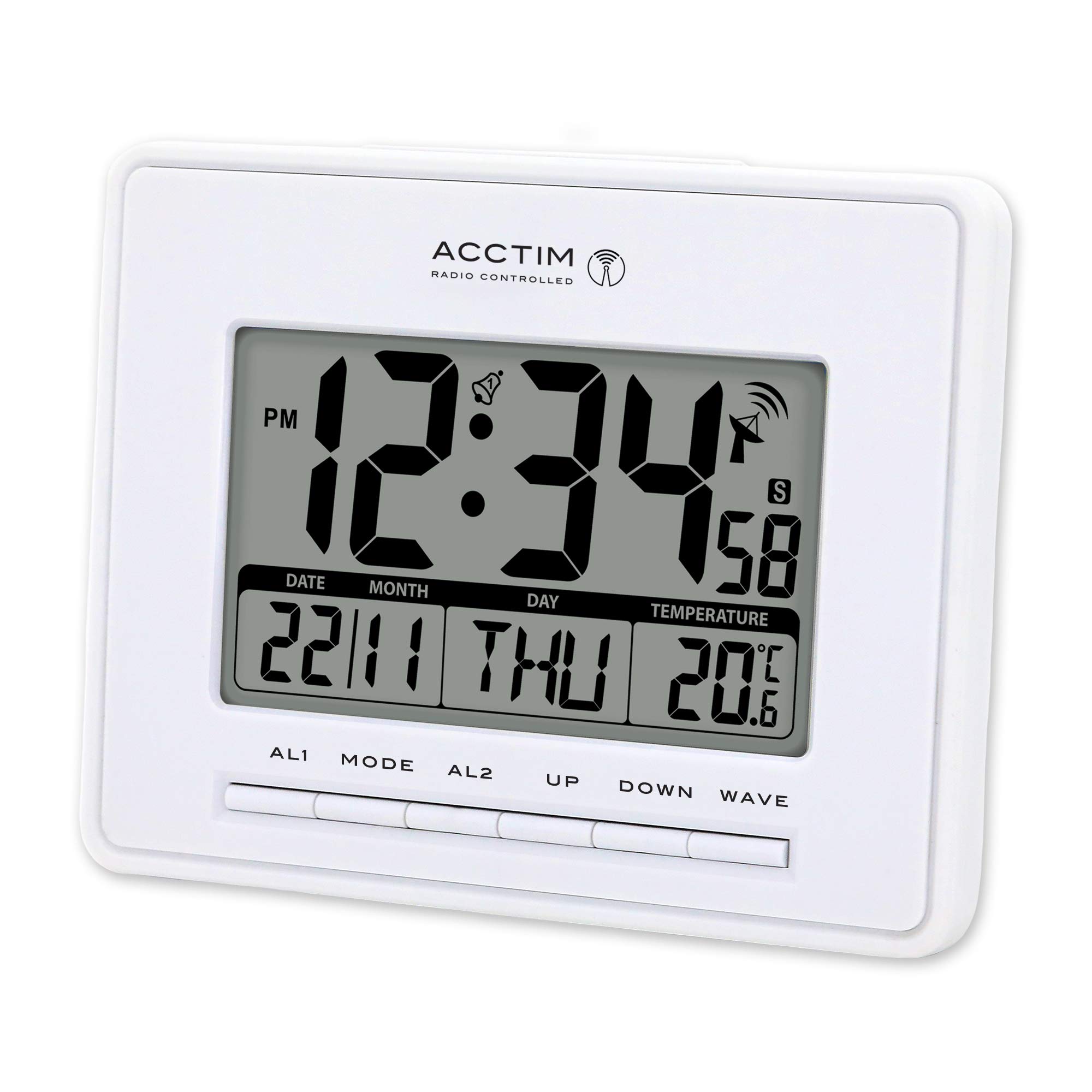
This image displays the front of the Acctim Infinity 71952 alarm clock. The large blue LCD screen shows the time (12:34 PM), date (22/11), day (THU), and indoor temperature (20.6°C). Below the screen are control buttons labeled AL1, MODE, AL2, UP, DOWN, and WAVE.
Display Elements:
- Time Display: Shows current time (12 or 24-hour format).
- PM Indicator: Appears for PM hours in 12-hour format.
- Alarm Indicators: Bell icons for AL1 and AL2 when active.
- Radio Control Signal: Antenna icon indicates signal reception strength.
- Date Display: Shows day and month.
- Day of Week: Displays the current day (e.g., THU).
- Temperature Display: Shows indoor temperature in Celsius or Fahrenheit.
Control Buttons:
- AL1: Accesses and sets Alarm 1.
- MODE: Toggles between display modes and enters setting modes.
- AL2: Accesses and sets Alarm 2.
- UP: Increases values during setting, activates/deactivates functions.
- DOWN: Decreases values during setting, activates/deactivates functions.
- WAVE: Initiates manual radio control signal search.
Battery Installation
The clock requires 3 x AAA batteries (not included) for operation.
- Locate the battery compartment cover on the back of the clock.
- Remove the cover by sliding it down or lifting it off.
- Insert 3 new AAA batteries, ensuring the correct polarity (+ and -) as indicated inside the compartment.
- Replace the battery compartment cover securely.
Upon battery insertion, the clock will power on and attempt to receive the radio control signal.
Initial Setup (Radio Control)
The Acctim Infinity 71952 is a radio-controlled clock, designed to automatically synchronize its time with the atomic clock signal (available in the UK and Ireland). This ensures accurate timekeeping and automatic adjustment for Daylight Saving Time (summer/winter time changes).
- After installing batteries, place the clock near a window for optimal signal reception.
- The clock will automatically begin searching for the radio signal. A flashing antenna icon on the display indicates it is searching.
- Once the signal is received and synchronized, the antenna icon will become solid, and the correct time and date will be displayed. This process may take several minutes or up to 24 hours depending on location and signal strength.
- To manually initiate a signal search, press the WAVE button.
Note: If the signal is weak or unavailable, the clock will operate as a standard quartz clock, and you may need to set the time manually.
Manual Time and Date Setting
If radio control is not desired or unavailable, you can set the time and date manually.
- Press and hold the MODE button for approximately 3 seconds until the time display starts flashing.
- Use the UP or DOWN buttons to adjust the flashing value (e.g., hour).
- Press MODE again to confirm the setting and move to the next adjustable item (e.g., minute, year, month, day, 12/24-hour format, temperature unit).
- Repeat steps 2 and 3 until all desired settings are adjusted.
- Press MODE one last time or wait for 15 seconds for the clock to exit the setting mode automatically.
Alarm Settings
The clock features two independent alarms (AL1 and AL2).
Setting an Alarm:
- Press the AL1 or AL2 button once to display the current alarm time.
- Press and hold the AL1 or AL2 button for approximately 3 seconds until the alarm hour starts flashing.
- Use the UP or DOWN buttons to adjust the alarm hour.
- Press AL1 or AL2 again to move to the alarm minute setting.
- Use the UP or DOWN buttons to adjust the alarm minute.
- Press AL1 or AL2 one last time or wait for 15 seconds to exit the alarm setting mode.
Activating/Deactivating an Alarm:
- In normal time display mode, press the UP button repeatedly to cycle through alarm activation options: AL1 ON, AL2 ON, AL1 & AL2 ON, ALARMS OFF.
- A bell icon will appear on the display next to AL1 or AL2 when the respective alarm is active.
Snooze Function:
- When an alarm sounds, press any button (except AL1 or AL2) to activate the snooze function. The alarm will temporarily stop and sound again after a few minutes.
- To stop the alarm completely, press the AL1 or AL2 button corresponding to the sounding alarm.
Temperature Display
The clock displays the indoor temperature. During manual time setting, you can switch between Celsius (°C) and Fahrenheit (°F) using the UP or DOWN buttons when the temperature unit is flashing.
Care and Maintenance
- Clean the clock with a soft, dry cloth. Do not use abrasive cleaners or solvents.
- Avoid exposing the clock to extreme temperatures, direct sunlight, or high humidity.
- If the display becomes dim or the clock malfunctions, replace the batteries.
- Remove batteries if the clock will not be used for an extended period to prevent leakage.
Troubleshooting
| Problem | Possible Cause | Solution |
|---|---|---|
| No display or dim display | Batteries are low or incorrectly inserted. | Replace with new AAA batteries, ensuring correct polarity. |
| Incorrect time displayed | No radio signal received or manual time not set. | Place clock near a window and press WAVE to initiate signal search. If signal is consistently poor, set time manually. |
| Radio control signal icon is flashing or absent | Weak signal, interference, or out of reception range. | Move the clock to a different location, preferably near a window, away from electronic devices that may cause interference. Try a manual signal search with the WAVE button. |
| Alarm does not sound | Alarm is not activated or set incorrectly. | Ensure the alarm time is set correctly and the alarm is activated (bell icon visible). |
Specifications
- Model: Acctim Infinity 71952
- Display Type: Digital LCD
- Timekeeping: Radio Controlled (UK & Ireland only) / Quartz
- Functions: Time, Date, Day of Week, Indoor Temperature, Dual Alarm, Snooze
- Automatic Adjustments: Daylight Saving Time (Summer/Winter)
- Power Source: 3 x AAA Batteries (not included)
- Dimensions (H x W x L): 12.5 cm x 16.4 cm x 2.3 cm
- Weight: 0.242 kg
- Color: White
Warranty and Support
For warranty information and customer support, please refer to the documentation provided at the point of purchase or contact your retailer. Keep your proof of purchase for any warranty claims.


