
WirelessFinest 93837-OO1
WirelessFinest Replacement Battery (Part 93837-OO1) for Wahl Cordless Clippers
Instruction Manual
Introduction
This manual provides detailed instructions for the installation and use of the WirelessFinest replacement battery, Part 93837-OO1, designed for various Wahl cordless hair clippers. Please read this manual thoroughly before proceeding with the battery replacement to ensure safe and correct installation.
Safety Information
Always prioritize safety when handling electronic components and batteries. The following guidelines are crucial:
- Always unplug or turn off the device before replacing the battery.
- Do not use the device if the cord is damaged or if it has been dropped in water.
- Avoid contact with eyes and skin.
- Keep the device away from heat sources and do not store it in direct sunlight.
- Follow the manufacturer's instructions for cleaning and maintenance.
- Dispose of old batteries properly according to local regulations. Do not incinerate or expose to high temperatures.
Compatibility
The WirelessFinest replacement battery (Part 93837-OO1) is compatible with the following Wahl cordless clipper models:
- Wahl Magic Clip Cordless
- Wahl Designer Cordless
- Wahl Senior Cordless
- Wahl Sterling-4 Cordless
- Wahl Beretto Cordless
- Wahl Super Taper Cordless

A graphic illustrating the compatibility of the WirelessFinest battery (Part 93837-OO1) with Wahl Magic Clip Cordless, Wahl Sterling Cordless, Wahl Designer Senior Cordless, and Wahl Taper Cordless clippers. It also highlights CE, FCC, PSE, RoHS safety certifications and various protection features like over-charge, over-discharge, over-voltage, over-current, and over-heating protections.
Package Contents
Your package should contain the following items:
- 1 x WirelessFinest Replacement Battery (Part 93837-OO1)
- 1 x Screwdriver Tool

This image shows the orange cylindrical replacement battery with its red and black wires and white connector, alongside a small screwdriver with a clear handle and red tip.
Installation Guide
Follow these steps carefully to replace the battery in your Wahl cordless clipper. No soldering is required for this installation.

This image demonstrates the plug-and-play installation of the replacement battery into a Wahl Magic Clip clipper. It highlights that no soldering or wiring modification is needed, and the battery has a built-in connector for easy and safe installation. Text indicates the battery fixes dead power or low charge issues.
Step-by-Step Instructions:
- Remove Top Cover: Slide the chrome top cover off your clipper. Push it towards the blades to detach.
- Remove First Screw: Use the included screwdriver to remove the screw located under where the top cover was.
- Remove Bottom Screws: Locate the two screws at the lower bottom end of the clipper. Remove these two screws.
- Access Battery: Carefully remove the top panel cover. You will now see the internal battery. Gently lift the battery using the screwdriver tool if needed.
- Unplug Old Battery: Locate the battery connector and carefully unplug the old battery from the circuit board.
- Install New Battery: Connect the new WirelessFinest replacement battery to the circuit board. Ensure the connector is securely seated.
- Reassemble Clipper: Place the new battery into its compartment. Reattach the top panel cover, secure the screws, and slide the chrome top cover back into place.

A four-step visual guide for battery replacement. Step 1 shows sliding off the chrome top cover. Step 2 shows removing a screw with the included screwdriver. Step 3 shows locating and removing two screws at the lower bottom end. Step 4 shows removing the top panel cover, lifting the battery, and unplugging its connector.
Installation Video Guide:
This video provides a visual guide on how to replace the battery in a Wahl Magic Clip Senior clipper. It shows the steps of disassembling the clipper, unplugging the old battery, connecting the new battery, and reassembling the device.
Troubleshooting
Clipper Does Not Charge After Battery Replacement
If your clipper does not charge after installing the new battery, it might be a compatibility issue with the connector. The WirelessFinest replacement battery includes an extra adapter connector to resolve this.
- Use Adapter Connector: If the clipper does not charge with the direct connection, unplug the battery.
- Connect Adapter: Plug the extra adapter connector into the existing battery connector on the circuit board.
- Connect Battery to Adapter: Then, plug the new battery's connector into the other end of the adapter.
- Test Charging: Reassemble the clipper and attempt to charge it again. This should resolve the charging issue.
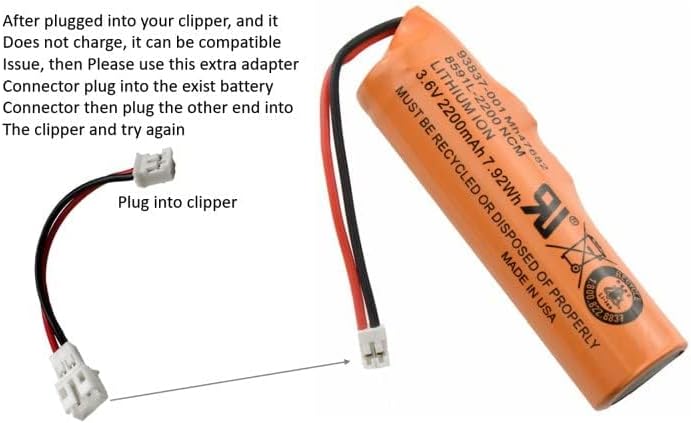
This image displays the replacement battery alongside an additional adapter connector. It explains that if the clipper does not charge after initial installation, this adapter can be used by plugging it into the existing battery connector and then into the clipper.
Specifications
| Feature | Detail |
|---|---|
| Battery Type | Lithium Ion |
| Voltage | 3.6V |
| Capacity | 2200mAh |
| Energy | 7.92Wh |
| Part Number | 93837-OO1 |
| Manufacturer | WirelessFinest |
| Item Weight | 0.03 Kilograms (1.06 ounces) |
| Package Dimensions | 3.7 x 3.07 x 0.63 inches |
Warranty and Support
For warranty information or technical support, please contact WirelessFinest customer service through the retailer where the product was purchased. Keep your proof of purchase for warranty claims.
Ask a question about this manual
Ask about setup, troubleshooting, compatibility, parts, safety, or missing instructions. Manuals+ will review the question and use this page’s manual context to help answer it.