
1. Important Safety Information
Please read and understand all safety instructions before operating this appliance. Failure to follow these instructions may result in electric shock, fire, or serious injury.
- Always plug the dehumidifier into a grounded 3-prong outlet.
- Do not operate the unit with a damaged power cord or plug.
- Ensure proper clearance around the unit for adequate airflow.
- Do not block air inlets or outlets.
- Do not use the dehumidifier near flammable gases or combustible materials.
- This appliance uses R-32 refrigerant. Servicing should only be performed by qualified personnel.
- Keep children and pets away from the unit during operation.
- Always unplug the unit before cleaning or performing any maintenance.
2. Product Overview
The BLACK+DECKER BD50MWSA is a high-efficiency portable dehumidifier designed to reduce humidity in large spaces up to 4500 sq. ft. (2012 DOE standard) or 650 sq. ft. (2019 DOE standard). It features a removable water bucket and includes a drain hose for continuous operation.
Key Features:
- High Efficiency: Extracts up to 50 pints of water per 24 hours.
- Portable Design: Equipped with casters and recessed handles for easy movement.
- Convenient Water Removal: Features a detachable 12.68-pint bucket and a 1.64 ft. drain hose for continuous drainage.
- Energy Efficient: UL Certified and uses environmentally friendly R-32 refrigerant.
- Safety Features: Automatic overflow shutoff protection with built-in indicator light and audible alert.
- Easy-to-Use Controls: Top-mounted electronic control panel with adjustable humidistat and LED digital display.

3. Setup
3.1 Unpacking and Initial Placement
- Carefully remove the dehumidifier from its packaging.
- Place the unit upright on a level, stable surface.
- Allow the unit to stand upright for at least 24 hours before plugging it in. This allows the refrigerant to settle, ensuring optimal performance and preventing damage.
3.2 Positioning
- Ensure there is at least 8 inches (20 cm) of space around the unit for proper air circulation.
- Avoid placing the unit near heat sources, windows, or doors that are frequently opened.
- The unit is portable with built-in casters and recessed handles for easy relocation.

4. Operating Instructions
4.1 Control Panel Overview
The dehumidifier features a top-mounted electronic control panel with an LED digital display for easy operation.
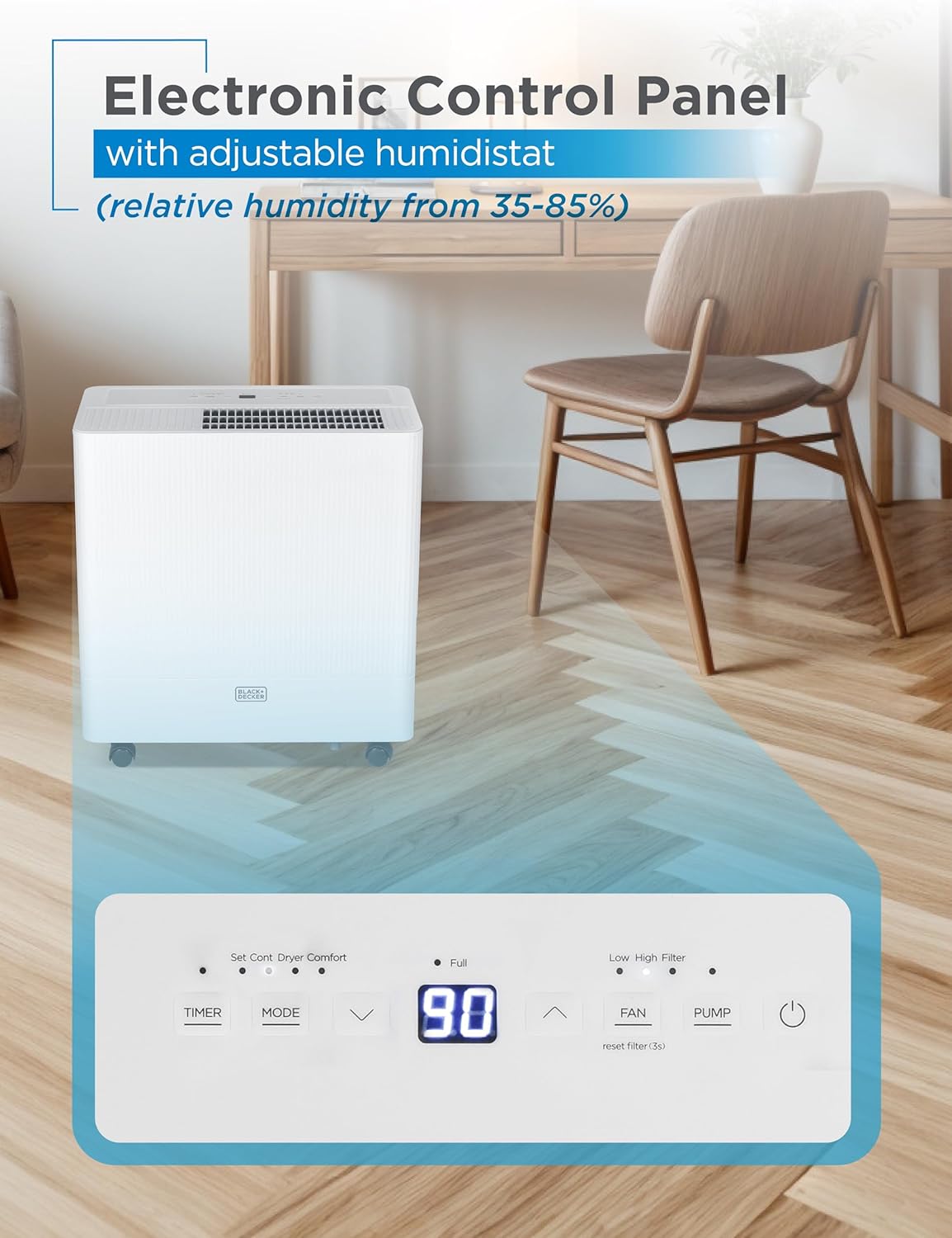
4.2 Basic Operation
- Power On/Off: Press the Power button to turn the unit on or off.
- Mode Selection: Use the Mode button to cycle through available operating modes (e.g., Dehumidify, Continuous, Comfort).
- Humidity Setting: Use the Up/Down arrows to adjust the desired humidity level (35-85% relative humidity). The unit will operate until this level is reached, then cycle off.
- Fan Speed: Press the Fan Speed button to select between low and high fan speeds.
- Timer: Set a timer for automatic shut-off (0-24 hours).
5. Water Removal & Drainage
The dehumidifier offers two methods for water removal: manual emptying of the bucket or continuous drainage via a hose.
5.1 Manual Bucket Emptying
- When the 12.68-pint water bucket is full, the unit will automatically shut off, an indicator light will illuminate, and an audible alert will sound.
- Carefully pull out the bucket from the front of the unit using the recessed handle.
- Empty the collected water into a sink or drain.
- Slide the empty bucket back into the unit until it clicks into place. The unit will resume operation.

5.2 Continuous Drainage
- For continuous operation without emptying the bucket, attach the included 1.64 ft. drain hose to the drainage outlet at the back of the unit.
- Ensure the hose is positioned correctly and without any kinks to allow for unobstructed water flow.
- Direct the other end of the hose to a suitable drain (e.g., floor drain, utility sink).

Video 5.1: Overview of the BD50MWSA 50 Pint Portable Dehumidifier, demonstrating its features and operation.
6. Maintenance
6.1 Filter Cleaning
Regular cleaning of the air filter is essential for maintaining the dehumidifier's efficiency and lifespan.
- Turn off and unplug the dehumidifier before cleaning.
- Locate the washable filter at the back of the unit.
- Gently pull out the filter.
- Wash the filter with warm, soapy water. Rinse thoroughly and allow it to air dry completely before reinserting.
- Reinsert the dry filter back into the unit.

6.2 Storage
If storing the unit for an extended period, ensure the water bucket is empty and the unit is clean and dry. Store in an upright position in a cool, dry place.
7. Troubleshooting
If you encounter issues with your dehumidifier, refer to the following common problems and solutions:
- Unit Not Turning On: Check if the unit is properly plugged into a grounded outlet. Ensure the water bucket is correctly inserted and not full.
- No Water Collection: Verify that the humidity setting is lower than the current room humidity. Check if the air filter is clean and not blocked. Ensure the room temperature is within the operating range (above 41°F / 5°C).
- "Full" Indicator On, But Bucket Not Full: Ensure the water bucket is fully and correctly seated in the unit. Check the float switch for any obstructions.
- Fluctuating Humidity Readings: It is normal for the display to show fluctuating numbers as the unit adjusts to the current room humidity.
- Unit Not Defrosting Automatically: This may indicate an issue with the condenser. Contact customer support for assistance.
- Drainage Problems: If using continuous drainage, ensure the hose is positioned correctly without kinks and that the drain is not clogged.
For persistent issues, please refer to the Warranty and Support section for contact information.
8. Specifications
| Brand | BLACK+DECKER |
| Model Name | BD50MWSA |
| Coverage Area | Up to 4500 Sq. Ft. (2012 DOE) / 650 Sq. Ft. (2019 DOE) |
| Dehumidification Capacity | 50 Pints per Day |
| Water Tank Volume | 12.68 Pints |
| Product Dimensions | 9.92"D x 18.8"W x 20"H |
| Item Weight | 42.1 Pounds |
| Color | White |
| Material | Plastic |
| Voltage | 115 Volts |
| Wattage | 515 watts |
| Operation Mode | Continuous |
| Special Feature | Portable |
| UPC | 810064691461 |
9. Warranty and Support
9.1 Product Warranty
This BLACK+DECKER dehumidifier comes with a 1-year warranty covering labor and parts for manufacturing defects only.
9.2 Customer Support
For any questions, technical assistance, or warranty claims, please contact BLACK+DECKER customer support. Refer to your product packaging or the official BLACK+DECKER website for the most current contact information.


