
1. Introduction
The Einhell FREELEXO 1200 LCD BT robotic lawnmower is designed for automated lawn care, suitable for areas up to 1200 m². It is part of the Power X-Change family, allowing for flexible use of its lithium-ion batteries with other compatible system devices. This manual provides essential information for the setup, operation, and maintenance of your robotic lawnmower.

Figure 1.1: The Einhell FREELEXO 1200 LCD BT robotic lawnmower in a typical garden setting.
Key Features:
- Designed for a grass area of up to 1200 m²
- High Quality construction
- Very durable components
- Ergonomic design
2. Package Contents
Before beginning installation, ensure all components are present in the package:

Figure 2.1: Robotic lawnmower and included accessories.
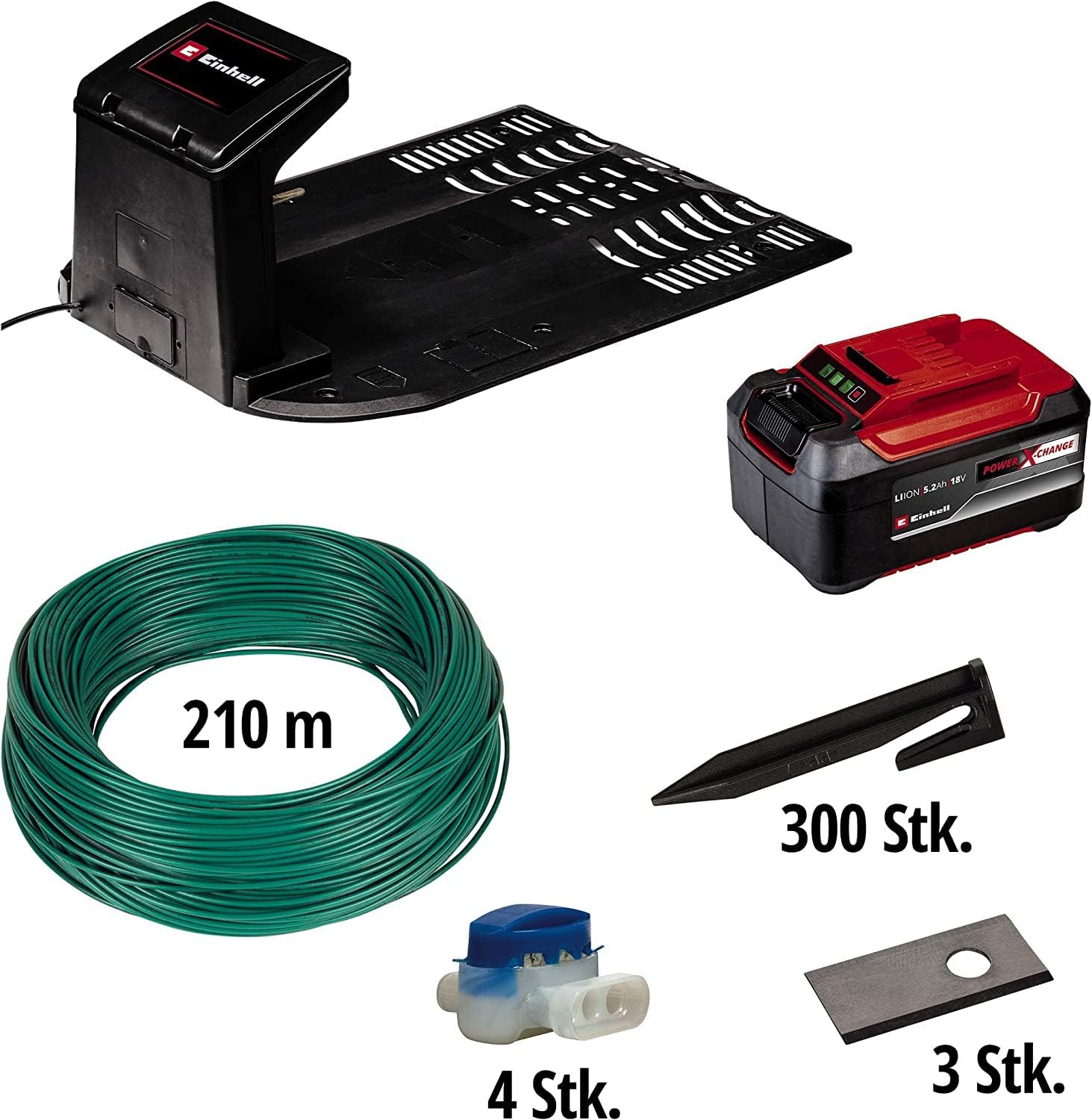
Figure 2.2: Detailed view of the installation kit components, including 210 meters of boundary wire, 300 fixing stakes, 4 wire connectors, and 3 spare blades.
- Einhell FREELEXO 1200 LCD BT Robotic Lawnmower
- Charging Station
- Power X-Change Battery (1 included)
- Boundary Wire (approx. 210 meters for 1200m² model)
- Fixing Stakes (approx. 300 pieces for 1200m² model)
- Wire Connectors (approx. 4 pieces)
- Spare Blades (approx. 3 pieces)
- User Manual (this document)
3. Setup
3.1 Preparing the Lawn Area
Before installing the boundary wire, clear the lawn of any obstacles such as large stones, toys, or branches. Ensure the lawn is relatively level, though the mower can handle slopes up to 35%.

Figure 3.1: The robotic lawnmower is capable of mastering slopes of up to 35%.

Figure 3.2: The mower is designed for lawn areas up to 1200 m².
3.2 Installing the Boundary Wire
The boundary wire defines the mowing area. Lay the wire around the perimeter of your lawn, ensuring it is at least 30 cm from edges, flowerbeds, and obstacles. Secure the wire to the ground using the provided fixing stakes. For best results, bury the wire slightly or ensure it is flush with the ground to prevent tripping hazards and damage.
For complex garden layouts with multiple distinct areas, the mower supports multi-area mowing with different start points. This allows the mower to navigate and maintain twisting gardens effectively.

Figure 3.3: Multi-area mowing setup, allowing the mower to manage complex garden layouts with multiple start points.
3.3 Installing the Charging Station
Place the charging station on a flat, level surface near an outdoor power outlet. Ensure there is sufficient clear space around the station for the mower to dock easily. Connect the boundary wire to the charging station terminals as per the diagram in the quick start guide (not included in this manual). Plug in the power supply.
4. Operating the Robotic Lawnmower
4.1 Initial Start-up and Programming
Once the boundary wire and charging station are set up, place the mower in the charging station to ensure it is fully charged. Follow the on-screen instructions on the mower's LCD display to set up the initial programming, including mowing schedule and PIN code.
4.2 Adjusting Cutting Height
The cutting height can be adjusted to suit your lawn's needs. The Einhell FREELEXO 1200 LCD BT allows for individual adjustment between 20 mm and 60 mm. Locate the cutting height adjustment dial on the top of the mower and rotate it to your desired setting.

Figure 4.1: Adjusting the cutting height between 20 mm and 60 mm.
4.3 Safety Features
The robotic lawnmower is equipped with multiple sensors to ensure safe operation. These include bump sensors, tilt sensors, lift sensors, and rain sensors. These sensors help the mower navigate obstacles, prevent operation if lifted or tilted, and return to the charging station during rain.

Figure 4.2: The mower features maximum protection thanks to integrated bump, tilt, lift, and rain sensors.
5. Maintenance
5.1 Battery Care
The robotic lawnmower uses a Power X-Change lithium-ion battery. This battery is replaceable and can be used with other compatible Einhell Power X-Change devices. Ensure the battery is charged regularly and stored in a cool, dry place when not in use for extended periods.
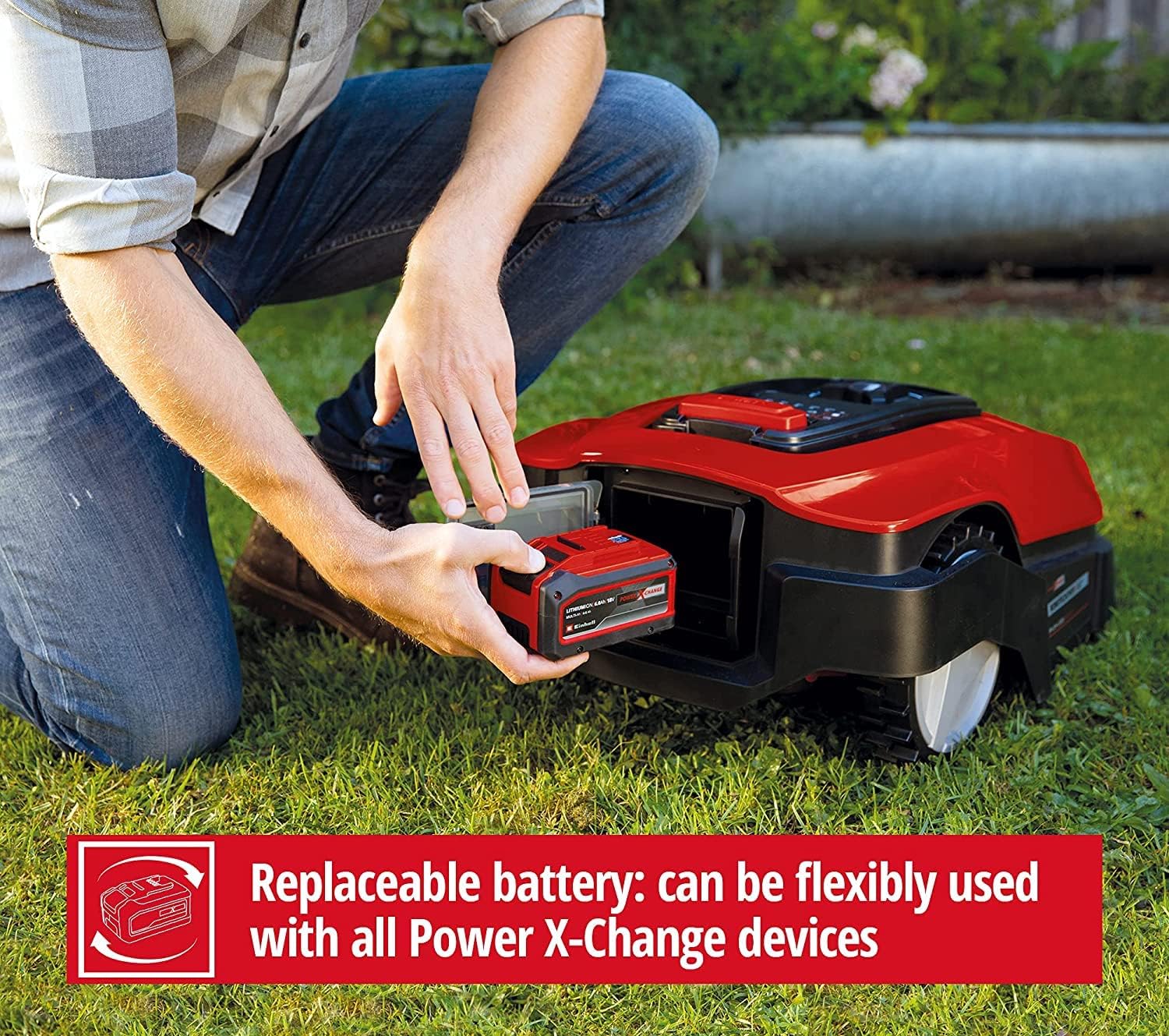
Figure 5.1: The replaceable battery can be flexibly used with all Power X-Change devices.
5.2 Blade Replacement
For optimal cutting performance, inspect the blades regularly and replace them when they become dull or damaged. Always wear protective gloves when handling blades. Refer to the quick start guide for detailed instructions on blade replacement. Spare blades are included in the installation kit.
5.3 Cleaning
Regularly clean the mower's chassis, wheels, and cutting deck to prevent grass clippings and dirt buildup. Use a soft brush or damp cloth. Do not use high-pressure washers or immerse the mower in water.
6. Troubleshooting
This section addresses common issues you might encounter with your Einhell FREELEXO 1200 LCD BT robotic lawnmower.
| Problem | Possible Cause | Solution |
|---|---|---|
| Mower not starting or stopping unexpectedly. | Low battery, boundary wire issue, safety sensor triggered. | Check battery charge. Inspect boundary wire for breaks or disconnections. Ensure no objects are obstructing sensors. |
| Poor cutting performance. | Dull or damaged blades, grass too long, cutting height set too high. | Replace blades. Mow frequently. Adjust cutting height lower. |
| Mower gets stuck frequently. | Obstacles in mowing area, uneven terrain, boundary wire too close to obstacles. | Remove obstacles. Adjust boundary wire placement. Level uneven areas if possible. |
| Mower not returning to charging station. | Charging station not powered, boundary wire issue near station, station obstructed. | Verify power to charging station. Check boundary wire connection to station. Clear path to station. |
For more detailed troubleshooting or issues not listed here, please refer to the comprehensive manual available on the Einhell website or contact customer support.
7. Specifications
| Attribute | Detail |
|---|---|
| Brand | Einhell |
| Model Number | 4326368 |
| Power Source | Battery Powered (Power X-Change) |
| Material | Plastic |
| Color | Plain Red |
| Recommended Lawn Area | Up to 1200 m² |
| Item Weight | 14.3 Kilograms (31.5 pounds) |
| Cutting Width | 18 Centimeters |
| Cutting Height Adjustment | 5 positions, 20 - 60 mm |
| Operation Mode | Automatic |
| Product Dimensions (L x W x H) | 28.43"D x 20.79"W x 12.8"H (approx. 72 x 52.8 x 32.5 cm) |
| Batteries Required | 1 Lithium Ion (included) |
8. Warranty and Support
Einhell products are designed for durability and performance. For warranty information, please refer to the documentation included with your purchase or visit the official Einhell website. The EU Spare Part Availability Duration is 2 Years.
For technical support, spare parts, or service inquiries, please contact Einhell customer service. Contact details can typically be found on the Einhell website or in your product registration materials.


