
1. Introduction
The winees Wireless Doorbell is a smart home security device designed to provide enhanced monitoring and communication at your doorstep. Featuring 1080P Full HD video, infrared night vision, two-way audio, and intelligent motion detection, this doorbell offers comprehensive surveillance and convenience. Its wireless design and IP65 waterproof rating ensure easy installation and reliable performance in various weather conditions.

Figure 1: The winees Wireless Doorbell, showcasing its sleek design.
2. Package Contents
Please verify that all items are present in your package:
- winees Wireless Video Doorbell
- Mounting Bracket
- Mounting Screws and Wall Plugs
- Double-sided Adhesive Tape
- USB Charging Cable
- User Manual (this document)
- (Optional, depending on purchase) Chime Unit
3. Key Features
3.1. 1080P Full HD & Night Vision
Experience crystal-clear video with 1080P Full HD resolution. The doorbell automatically switches to infrared night vision mode, ensuring clear visibility even in low-light conditions or complete darkness. The 140° wide-angle lens provides a broad view of your doorstep.

Figure 2: Day and night vision comparison.
3.2. Intelligent PIR Motion Detection
The built-in Passive Infrared (PIR) motion sensor detects movement in front of your door. You will receive instant notifications on your mobile device when motion is detected, allowing you to monitor suspicious activity. The detection range is approximately 1-3 meters.

Figure 3: Motion detection in action.
3.3. Two-Way Audio Communication
Communicate directly with visitors from anywhere using the integrated microphone and speaker. This feature enables real-time conversations through your smartphone, whether you are at home or away.

Figure 4: Remote video call functionality.
3.4. High-Capacity Rechargeable Battery
The doorbell is equipped with a 5000mAh rechargeable battery, providing extended operation time. Its wireless nature eliminates the need for constant wiring, offering flexible placement options.
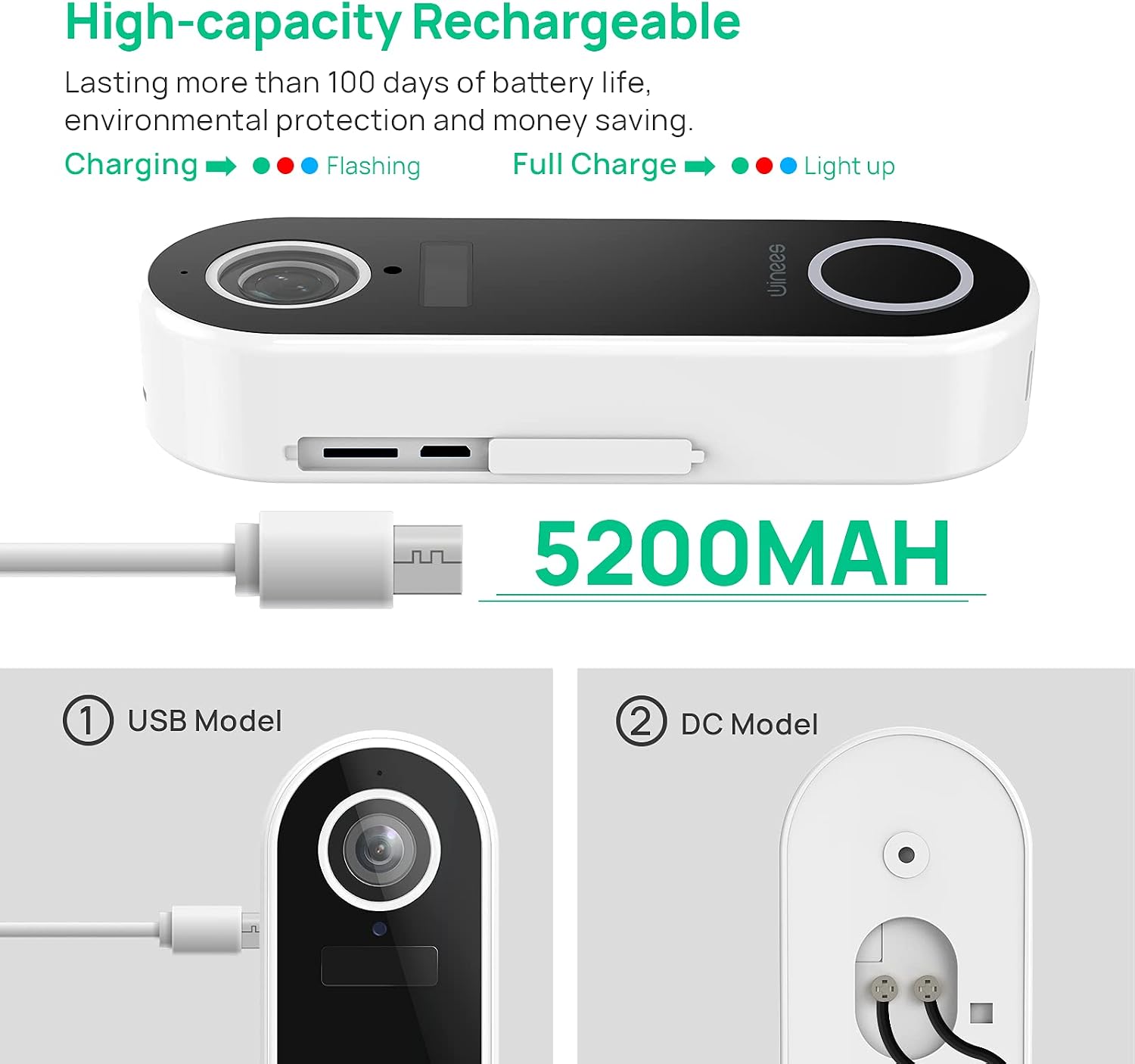
Figure 5: High-capacity rechargeable battery and charging options.
3.5. IP65 Weatherproof Design
Designed for outdoor use, the doorbell boasts an IP65 waterproof rating, making it resistant to dust and water splashes. This ensures reliable operation in various weather conditions, from rain to sunshine.

Figure 6: IP65 Weatherproof design.
3.6. Tamper Warning
If the doorbell is forcibly removed or tampered with, an alarm will sound, and an immediate notification will be sent to your mobile application, enhancing security against theft or vandalism.

Figure 7: Tamper warning system.
4. Setup Guide
4.1. Charging the Doorbell
Before initial use, fully charge the doorbell using the provided USB cable. Connect the USB cable to the doorbell's charging port and a standard USB power adapter (not included). The indicator light will show charging status and turn off when fully charged. A full charge typically takes 6-8 hours.
4.2. App Installation and Account Creation
Download the official winees app from your smartphone's app store (iOS or Android). Follow the on-screen instructions to create an account and log in.
4.3. Connecting to Wi-Fi
Ensure your Wi-Fi network is 2.4GHz, as the doorbell does not support 5GHz Wi-Fi. Open the winees app, select "Add Device," and follow the in-app prompts to connect your doorbell to your home Wi-Fi network. This typically involves scanning a QR code displayed on your phone with the doorbell's camera.
4.4. Micro SD Card Installation (Optional)
For local video storage, insert a Micro SD card (up to 32GB, not included) into the designated slot on the doorbell. Ensure the doorbell is powered off before inserting or removing the card. The app will allow you to format the card if necessary.
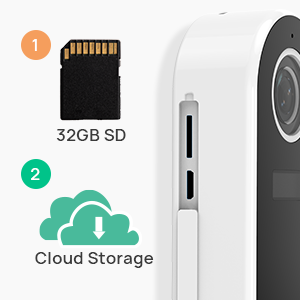
Figure 8: Micro SD card and cloud storage options.
4.5. Mounting the Doorbell
The doorbell supports two installation methods:
- Screw Installation: Use the provided mounting bracket as a template to mark and drill holes on your wall. Insert wall plugs, then secure the bracket with screws. Attach the doorbell to the bracket.
- Adhesive Installation: For smooth, clean surfaces, use the provided strong double-sided adhesive tape to affix the mounting bracket directly to the wall, then attach the doorbell.

Figure 9: Easy installation methods.
Ensure the doorbell is mounted at an appropriate height for optimal viewing angle (approximately 1.2-1.5 meters from the ground).
5. Operating Instructions
5.1. Live View and Two-Way Talk
Open the winees app and select your doorbell from the device list to access the live video feed. Tap the microphone icon to initiate two-way audio communication with visitors at your door.
5.2. Motion Detection Alerts
When motion is detected, you will receive a push notification on your smartphone. Tap the notification to view the live feed or recorded event. You can adjust motion sensitivity settings within the app to minimize false alerts.
5.3. Video Recording and Playback
The doorbell automatically records video clips when motion is detected or the doorbell button is pressed. These recordings are stored on the Micro SD card (if installed) or in the cloud (if subscribed to a cloud service). Access recorded events through the "Playback" section in the app.
5.4. Night Vision
The doorbell automatically activates its infrared night vision in low-light conditions, providing clear black-and-white video footage.
6. Maintenance
6.1. Battery Charging
Monitor the battery level through the winees app. When the battery is low, remove the doorbell from its mount and recharge it using the USB cable. Frequent live view access or numerous motion events can deplete the battery faster.
6.2. Cleaning
Wipe the doorbell's lens and body with a soft, damp cloth to remove dust and smudges. Avoid using harsh chemicals or abrasive materials that could damage the device.
6.3. Firmware Updates
Periodically check the winees app for available firmware updates. Keeping your doorbell's firmware up-to-date ensures optimal performance and access to new features.
7. Troubleshooting
| Problem | Possible Cause | Solution |
|---|---|---|
| Doorbell not connecting to Wi-Fi | Incorrect Wi-Fi password; 5GHz Wi-Fi network; weak signal; temporary network issue. | Ensure correct 2.4GHz Wi-Fi password. Move doorbell closer to router. Restart router and doorbell. Try pairing again after a short delay. |
| Frequent false motion alerts | High motion sensitivity; objects like trees or passing cars in detection zone. | Adjust motion detection sensitivity settings in the app to a lower level. Consider adjusting the doorbell's angle if possible. |
| Delayed notifications or live view loading | Poor Wi-Fi signal strength; slow internet connection; app issues. | Check Wi-Fi signal strength at the doorbell's location. Ensure stable internet connection. Restart the app or your phone. |
| Battery drains quickly | Frequent live view access; high number of motion events; extreme temperatures. | Reduce frequency of live view. Adjust motion sensitivity. Ensure doorbell is not exposed to extreme heat or cold. Consider hardwiring the doorbell if frequent charging is inconvenient (requires AC 24V power source). |
| Doorbell not responding / blue ring blinking | Battery depleted; internal error. | Charge the doorbell fully. If issue persists, attempt a factory reset (refer to app for specific instructions) or contact customer support. |
8. Specifications
| Brand | winees |
| Model | B08W56WMWR |
| Video Resolution | 1080P Full HD |
| Viewing Angle | 140 Degrees |
| Night Vision Range | 3 Metres |
| Frame Rate | 15 fps |
| Power Source | Battery Powered (5000mAh rechargeable battery) |
| Connectivity | 2.4GHz Wi-Fi |
| Waterproof Rating | IP65 |
| Storage Options | Micro SD Card (up to 32GB), Cloud Storage (subscription may be required) |
| Compatible Devices | Tablet, Smartphone |
| Mounting Type | Mounting Glue / Screws |
| Colour | Bianco (White) |
| Package Weight | 0.37 Kilograms |
| Package Dimensions (L x W x H) | 17.7 x 14 x 3.4 centimetres |
9. Warranty and Support
winees is committed to providing high-quality products and customer satisfaction. If you encounter any problems when using the product, please do not hesitate to contact our after-sales service team. We are dedicated to resolving any issues you may experience.
For support, please refer to the contact information provided in the product packaging or on the official winees website.


