
ECOXGEAR GDI-EXJRNY02
ECOXGEAR EcoJourney User Manual
Model: GDI-EXJRNY02 | Brand: ECOXGEAR
1. Introduction and Overview
The ECOXGEAR EcoJourney is a rugged, waterproof, and portable Bluetooth wireless speaker designed for outdoor adventures. It features a powerful 65-watt speaker system, an integrated dry storage compartment, and an impressive battery life of up to 50 hours. The EcoJourney also includes ECOCAST technology, allowing wireless connection with up to 50 compatible ECOXGEAR speakers for an expanded audio experience.

Image: Front view of the ECOXGEAR EcoJourney speaker, showcasing its rugged black casing and blue speaker accents.
2. What's in the Box
Upon unboxing your ECOXGEAR EcoJourney, please ensure all the following items are present:
- ECOXGEAR EcoJourney Speaker (Model: GDI-EXJRNY02)
- User Guide
- USB-C Cable
- AC Adapter
- Internal Material Mesh Liner
- Shoulder Carry Strap
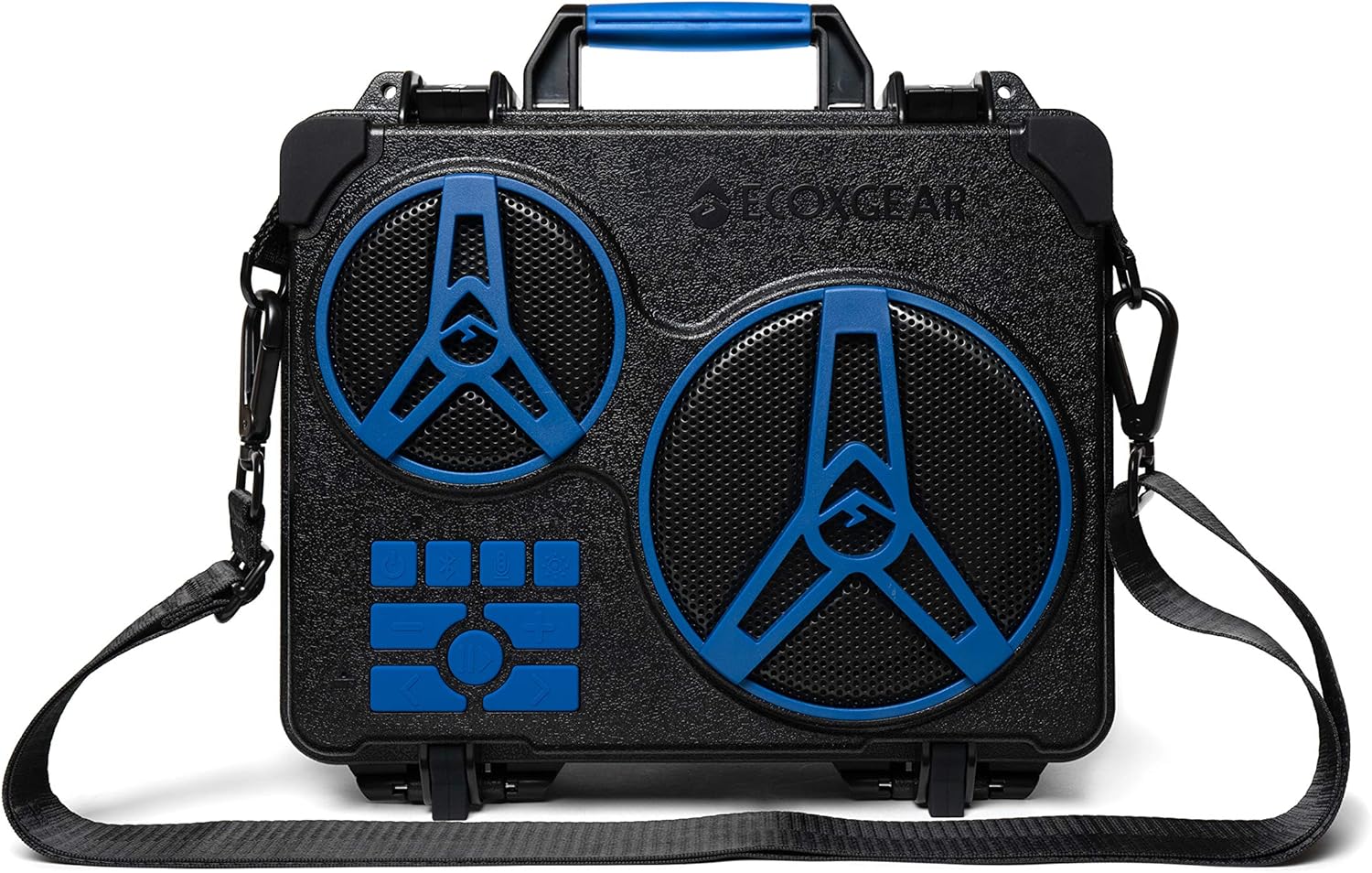
Image: The ECOXGEAR EcoJourney speaker shown with its detachable shoulder carry strap.
3. Safety Information
Please read all safety warnings and instructions before using this product to avoid injury or damage. Keep these instructions for future reference.
- Waterproof Integrity: Ensure the dry storage compartment lid is securely latched and the USB/AUX port cover is fully sealed before exposing the speaker to water. While the device floats, prolonged submersion is not recommended.
- Charging: Only use the provided USB-C cable and AC adapter for charging. Do not attempt to charge the device if it is wet.
- Temperature: Avoid exposing the speaker to extreme temperatures (hot or cold) as this may affect battery life and performance.
- Cleaning: Clean the speaker with a soft, damp cloth. Do not use harsh chemicals or abrasive materials.
- Disassembly: Do not attempt to disassemble or modify the speaker. This will void the warranty and may cause damage.
- Hearing Protection: Prolonged exposure to high volume levels may cause hearing damage. Adjust volume to a comfortable level.
- Proposition 65 Warning: This product may contain chemicals known to the State of California to cause cancer and birth defects or other reproductive harm.
4. Setup
4.1 Charging the EcoJourney
Before first use, fully charge your EcoJourney speaker. The built-in 20,000mAh battery provides up to 50 hours of playtime at average listening levels.
- Locate the USB-C input port on the side of the speaker, typically under a protective cover.
- Connect the provided USB-C cable to the speaker's USB-C input port.
- Connect the other end of the USB-C cable to the AC adapter, then plug the AC adapter into a wall outlet.
- The charging indicator lights will illuminate, showing the charging status. The lights will turn solid when fully charged.

Image: The EcoJourney speaker demonstrating its power bank capability by charging a smartphone via its USB output port.
4.2 Power On/Off
- To power on, press and hold the Power button located on the control panel until you hear an audible confirmation.
- To power off, press and hold the Power button again until the speaker shuts down.
4.3 Bluetooth Pairing
The EcoJourney uses Bluetooth V5.0 for wireless audio streaming up to 100 feet away.
- Ensure the EcoJourney is powered on and in Bluetooth pairing mode (indicated by a flashing Bluetooth LED). If not, press the Bluetooth button on the control panel.
- On your mobile device (smartphone, tablet, laptop), enable Bluetooth and search for available devices.
- Select "ECOXGEAR EcoJourney" from the list of found devices.
- Once paired, the Bluetooth LED on the speaker will become solid, and you will hear a confirmation tone.
5. Operating Instructions
5.1 Basic Audio Playback
Control your music directly from the EcoJourney's full pad control panel or your paired Bluetooth device.
- Play/Pause: Press the Play/Pause button.
- Volume Up/Down: Press the Volume + or Volume - buttons.
- Next/Previous Track: Use the Skip Forward or Skip Backward buttons.
- Hands-Free Calling: The speaker supports hands-free calling. Use the phone button on the control panel to answer or end calls.
5.2 ECOCAST Feature
The built-in ECOCAST feature allows you to wirelessly connect up to 50 ECOXGEAR speakers with ECOCAST capability for a synchronized audio experience.
- Ensure all EcoJourney speakers are powered on and not currently paired to a Bluetooth device.
- On the primary speaker (the one you want to connect to your device), press the ECOCAST button. It will enter ECOCAST pairing mode.
- On the secondary speakers, press their ECOCAST buttons. They will search for the primary speaker.
- Once connected, the ECOCAST indicator lights will confirm the connection. You can then pair your mobile device to the primary speaker.
Video: Demonstrates the ECOCAST feature, showing how multiple EcoJourney speakers can be wirelessly linked for a larger sound field.
5.3 Dry Storage Compartment
The EcoJourney features a large, watertight dry storage compartment to protect your valuables from water, dust, and sand.
- To open, unlatch the two side clips and lift the speaker lid.
- Place your tablet, phone, keys, wallet, or other small items inside. An internal mesh liner is provided for organization.
- To close, ensure the lid is properly aligned and firmly press down until both side clips securely latch.

Image: The EcoJourney speaker with its top lid open, revealing the spacious dry storage compartment designed to protect personal items.

Image: A diagram illustrating the internal dimensions of the EcoJourney's dry storage compartment, providing measurements for capacity planning.
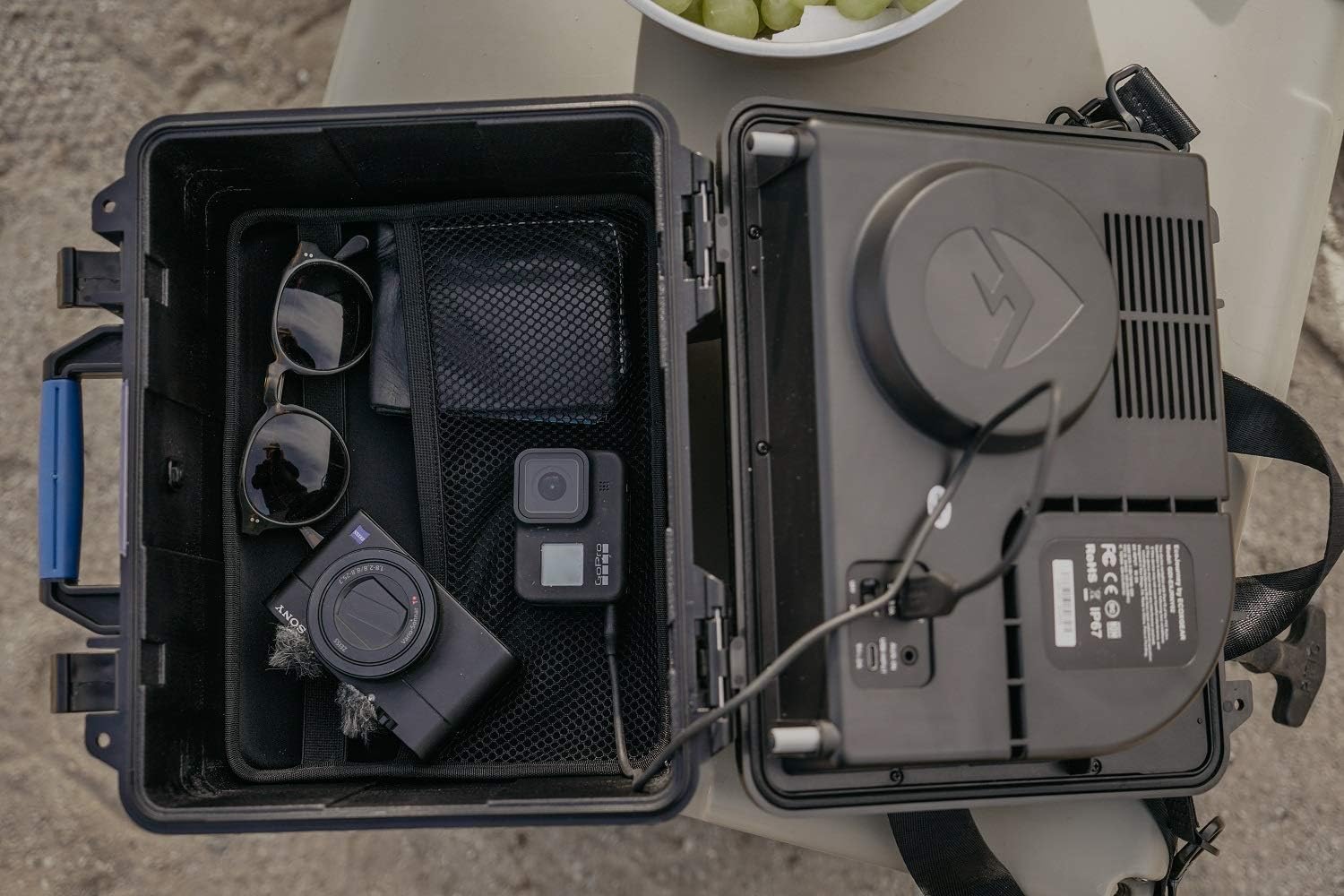
Image: The dry storage compartment of the EcoJourney, shown with various items like sunglasses, a wallet, and a camera, demonstrating its practical use.
5.4 Charging External Devices
The EcoJourney's large internal battery can also serve as a power bank to charge your mobile devices.
- Locate the USB output port on the side of the speaker.
- Connect your device's charging cable to the USB output port.
- Your device will begin charging.
6. Maintenance
Proper maintenance will ensure the longevity and performance of your EcoJourney speaker.
- Cleaning: After use, especially in sandy or salty environments, rinse the speaker with fresh water. Use a soft cloth to wipe down the exterior. Do not use abrasive cleaners or solvents.
- Drying: Ensure the speaker is completely dry before opening the dry storage compartment or the charging port cover.
- Storage: Store the speaker in a cool, dry place when not in use. Avoid prolonged exposure to direct sunlight or extreme temperatures.
- Battery Care: For optimal battery life, avoid fully discharging the battery frequently. Charge the speaker regularly, even if not in constant use.
7. Troubleshooting
| Problem | Possible Cause | Solution |
|---|---|---|
| Speaker does not power on. | Battery is depleted. | Charge the speaker using the provided AC adapter. |
| No sound from speaker. | Volume is too low or muted; Device not paired; AUX cable not fully inserted. | Increase volume; Re-pair Bluetooth device; Ensure AUX cable is fully inserted. |
| Bluetooth pairing fails. | Speaker not in pairing mode; Device too far; Interference. | Ensure speaker is in pairing mode; Move device closer; Turn off other Bluetooth devices. |
| Dry storage compartment leaks. | Lid not properly sealed or latched; Debris on seal. | Ensure lid is aligned and latches are fully closed; Clean the rubber seal around the lid. |
8. Specifications
- Model Name: ECOJOURNEY
- Model Number: GDI-EXJRNY02
- Brand: ECOXGEAR
- Speaker Type: Outdoor
- Special Feature: Waterproof (IP67 rated)
- Speaker Maximum Output Power: 65 Watts
- Battery Life: Up to 50 Hours (at average listening levels)
- Battery Capacity: 20,000 mAh (8 Lithium Ion batteries included)
- Wireless Communication Technology: Bluetooth V5.0
- Bluetooth Range: 100 Feet
- Connectivity Protocol: Bluetooth, USB, Auxiliary
- Product Dimensions: 6.5"D x 11"W x 9.5"H
- Item Weight: 7.19 pounds (3.27 Kilograms)
- Material: Plastic
- Included Components: User Guide, USB-C cable, AC adapter, internal material mesh liner, shoulder carry strap
9. Warranty and Support
The ECOXGEAR EcoJourney speaker comes with a Limited Warranty. For specific details regarding warranty coverage, please refer to the warranty card included with your product or visit the official ECOXGEAR website.
For technical support, troubleshooting assistance, or to inquire about replacement parts, please contact ECOXGEAR customer service. Contact information can typically be found on the manufacturer's website or in the included user guide.
Online Resources:
- Visit the official ECOXGEAR Store on Amazon for product information and updates.
Ask a question about this manual
Ask about setup, troubleshooting, compatibility, parts, safety, or missing instructions. Manuals+ will review the question and use this page’s manual context to help answer it.