
1. Introduction
This manual provides detailed instructions for the assembly, operation, and maintenance of your Tribesigns HL0155 Height Adjustable C Table. Please read these instructions carefully before assembly and use to ensure proper function and longevity of the product.
2. Safety Information
- Ensure all components are present and undamaged before assembly.
- Do not exceed the maximum weight recommendation of 35 pounds (15.8 kg) on the tabletop.
- Keep small parts away from children during assembly.
- Tighten all screws and bolts securely, but do not overtighten.
- Use the locking casters to stabilize the table when in a desired position.
- Avoid placing hot items directly on the tabletop without protective coasters.
3. Package Contents
Verify that all parts listed below are included in your package. If any parts are missing or damaged, please contact customer service.
- Tabletop sections (main and tiltable)
- Metal frame components
- Two-tier storage shelves
- 4 rolling wheels (casters)
- Assembly hardware (screws, bolts, knobs)
- Installation tool (screwdriver)
- Assembly Guide
4. Assembly Instructions
Assembly typically takes 30 minutes or less. It is recommended that two people assemble the table for ease and safety. Tools and hardware are included.
- Unpack all components and lay them out on a clean, soft surface to prevent scratches.
- Attach the rolling wheels to the base frame. Ensure they are securely fastened.
- Assemble the main metal frame structure according to the included diagram in the separate assembly guide. Do not fully tighten all screws until the entire frame is aligned.
- Install the two-tier storage shelves onto the frame.
- Attach the tabletop sections to the frame. Ensure the tiltable section is correctly oriented.
- Once all parts are in place, gradually tighten all screws and bolts.

5. Operating Instructions
5.1 Height Adjustment
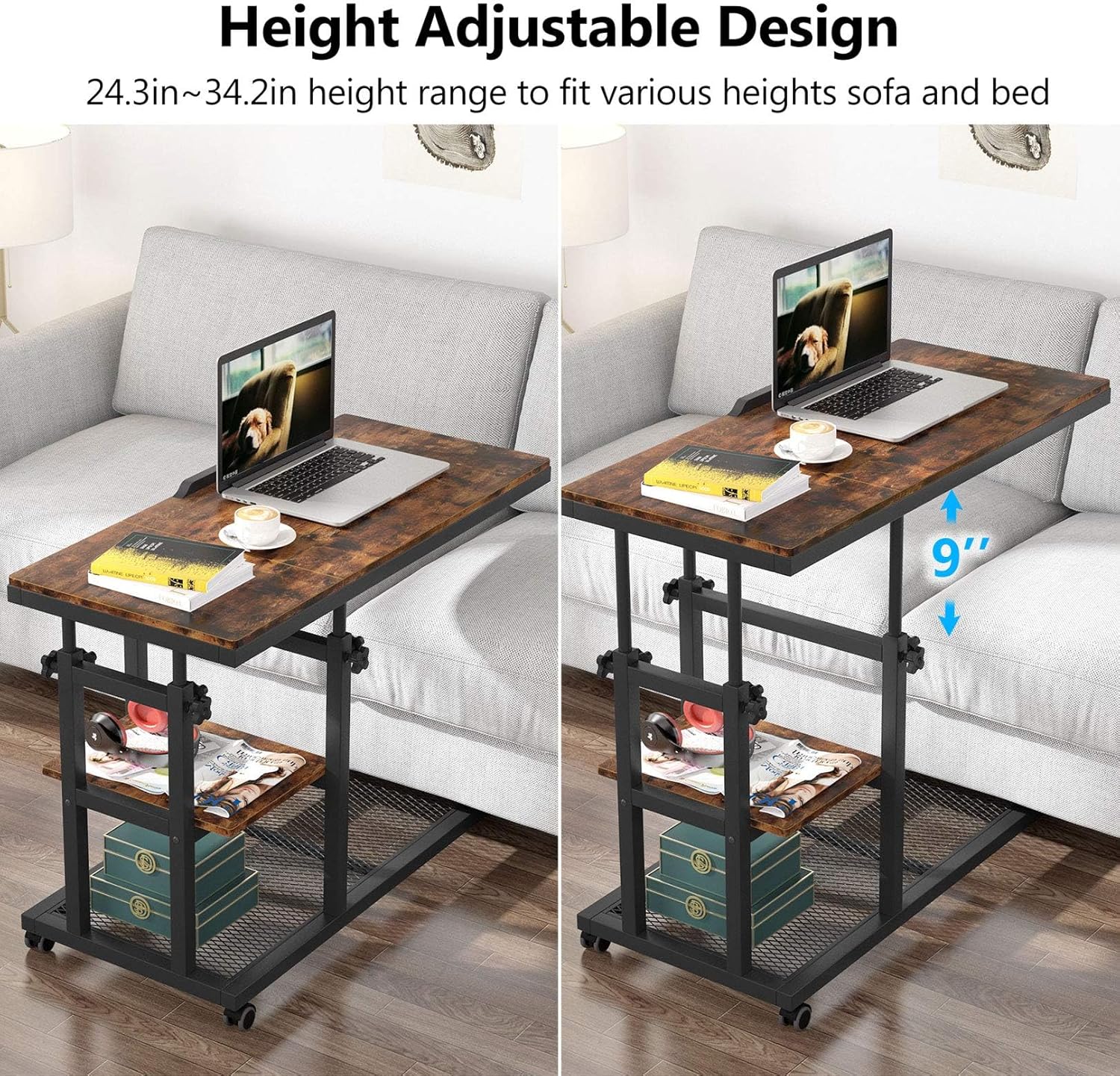
The table's height can be adjusted from 26 inches to 34.5 inches to suit various sofas, beds, or user preferences. To adjust the height:
- Loosen the adjustment knobs located on the vertical support poles.
- Carefully raise or lower the tabletop to the desired height.
- Once at the desired height, securely tighten all adjustment knobs to lock the table in place.
5.2 Tiltable Drawing Board
One section of the tabletop can be tilted from 0 to 80 degrees, offering 12 adjustable angles for activities like drawing, reading, or using a tablet.
- Lift the tiltable section of the tabletop.
- Adjust it to one of the 12 available angles.
- Ensure it clicks securely into position before placing items on it.

5.3 Mobility and Stability
The table is equipped with four rolling wheels for easy movement. Each wheel includes a brake mechanism to secure the table in place.
- To move the table, ensure all wheel brakes are disengaged.
- To stabilize the table, push down the lever on each wheel to engage the brake.
- The C-shaped design allows the table to slide underneath most sofas, couches, or beds, optimizing space utilization.

5.4 Storage
The table features two-tier shelves located beneath the main tabletop, providing additional space for books, magazines, headphones, or other small items.

5.5 Product Video
Video 5.1: This video demonstrates the height adjustment and tiltable drawing board features of the Tribesigns C Table.
6. Maintenance
To maintain the appearance and functionality of your C Table:
- Cleaning: Wipe the surfaces with a dry cloth. Avoid abrasive cleaners or harsh chemicals that may damage the finish.
- Hardware: Periodically check all screws and bolts to ensure they remain tight. Retighten as necessary.
- Casters: Keep the wheels free of debris to ensure smooth rolling.
7. Troubleshooting
| Problem | Possible Cause | Solution |
|---|---|---|
| Table is wobbly or unstable. | Loose screws or uneven floor. | Ensure all assembly screws are tightened. Adjust the height slightly to find a stable position on uneven floors. Engage wheel brakes. |
| Difficulty adjusting height. | Knobs not fully loosened or mechanism is stiff. | Ensure all four height adjustment knobs are completely loosened before attempting to adjust. Apply gentle, even pressure when raising or lowering. |
| Wheels do not roll smoothly or lock inadvertently. | Debris in casters or brake engaged. | Check wheels for any trapped debris and remove. Ensure wheel brakes are disengaged when moving the table. |
| Tiltable top does not stay in position. | Not clicked into a locking angle. | Ensure the tiltable section is fully engaged in one of the 12 locking angles. |
8. Specifications
| Feature | Detail |
|---|---|
| Brand | Tribesigns |
| Model Number | HL0155 |
| Product Dimensions (D x W x H) | 15.7" x 31.5" x 26" |
| Adjustable Height Range | 26" to 34.5" |
| Item Weight | 12 kg (approx. 26.4 lbs) |
| Maximum Weight Recommendation | 35 pounds |
| Frame Material | Metal |
| Top Material Type | Engineered Wood |
| Color | Rustic Brown |
| Special Features | Adjustable Height, Wheels, Tiltable Top, Storage Shelves, Easy Assembly |
| Recommended Uses | Dining, Reading, Working, Writing |
| Included Components | Assembly Guide, Installation Tool |
| UPC | 078756528833 |
9. Warranty and Support
This Tribesigns product comes with an 18-month quality assurance. For any questions, concerns, or assistance with your product, please contact Tribesigns customer service. Please have your model number (HL0155) and proof of purchase ready when contacting support.
Contact information can typically be found on the Tribesigns official website or through your purchase platform.


