
Introduction
Thank you for choosing the JZBRAIN WG500B 1080P Night Vision Binoculars. This device is designed to provide clear viewing and recording capabilities in various light conditions, including total darkness. Please read this manual thoroughly to ensure proper use and maintenance of your binoculars.
Key Features:
- 1080P Infrared Night Vision: High-resolution imaging for low-light and nighttime observation.
- Extended Viewing Range: Up to 1640ft (500m) in complete darkness.
- Adjustable Magnification: 3-10x optical and digital zoom for detailed viewing.
- High Sensitivity COMS Sensor: Ensures clear image capture.
- Integrated Storage: Includes a 64GB SD card for recording photos and videos.
- Durable Construction: Robust design suitable for outdoor use.
- Large Viewing Screen: 4-inch screen with 15-level brightness adjustment for comfortable viewing.
Setup
1. Unboxing and Initial Inspection
Carefully unpack all components and inspect for any damage. The package should include the night vision binoculars, a carrying case, a cleaning cloth, a USB cable, a neck strap, and this user manual.
2. Battery Installation
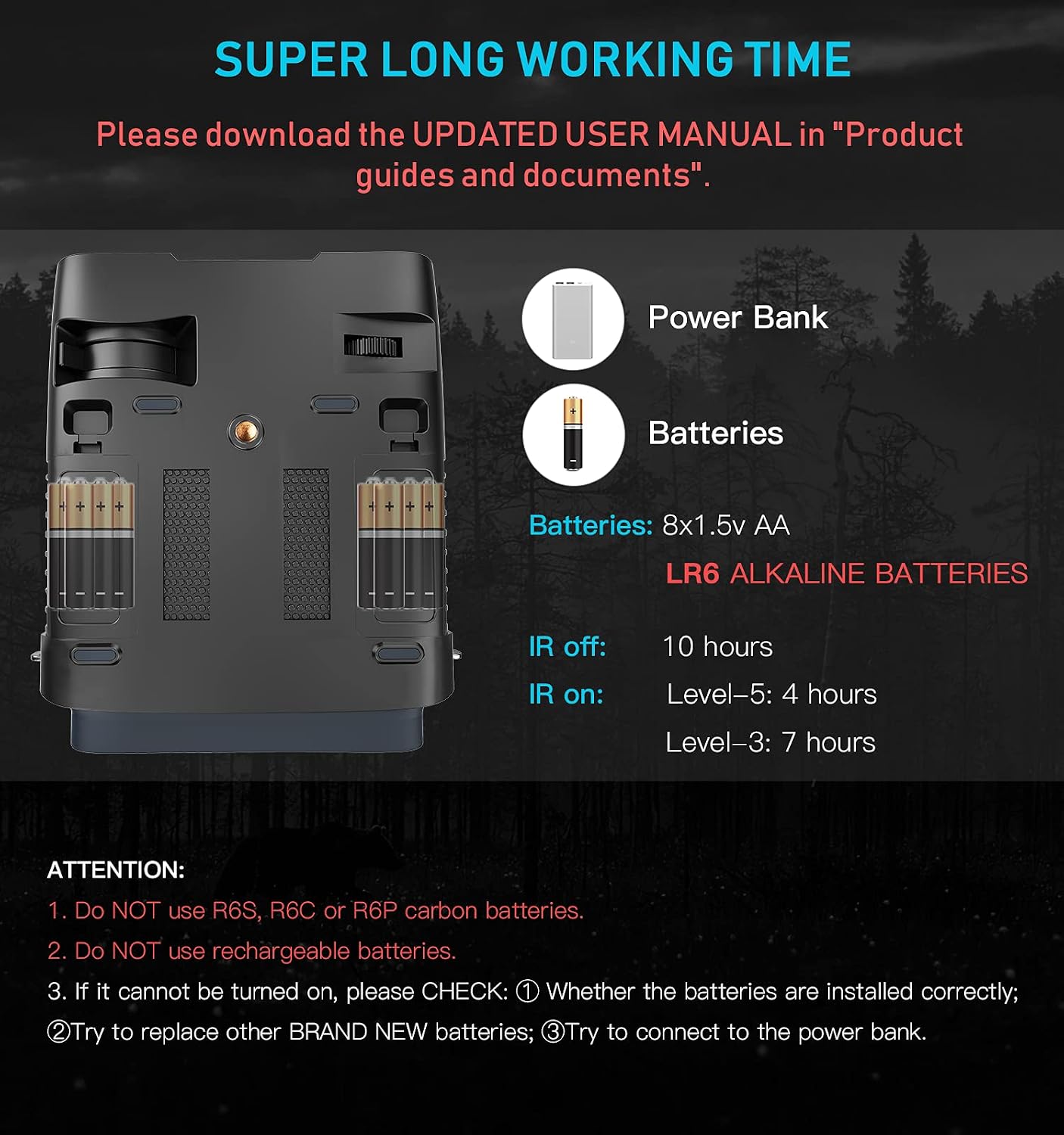
The device requires 8 AA 1.5V LR6 Alkaline batteries (not included). Locate the battery compartments on the underside of the binoculars. Open the covers and insert 4 batteries into each compartment, ensuring correct polarity (+/-). Close the covers securely.

Important: Do not use R6S, R6C, or R6P carbon batteries. Do not use rechargeable batteries. If the device does not power on, check battery installation and try new batteries.
3. Power Bank Connection (Optional)
For extended use, the binoculars can be powered via a power bank. Attach the power bank to the device using the provided band and connect it with the USB cable.
4. SD Card Installation
The device supports TF (Micro SD) cards from 8GB to 128GB. Insert the provided 64GB SD card into the TF card slot located on the side of the binoculars. Ensure it clicks into place.
5. Neck Strap Attachment
Attach the neck strap to the metal eyelets on the binoculars for secure carrying.
Operating Instructions
1. Power On/Off
- To power on, press and hold the power button (usually located in the center top).
- To power off, press and hold the power button again.
2. Mode Selection
Use the 'MODE' button to switch between different functions:
- Photo Mode: For taking still images.
- Video Mode: For recording video footage.
- Playback Mode: To review captured photos and videos.
3. Zoom Adjustment
Use the 'ZOOM' buttons (up/down arrows) to adjust the magnification from 3x to 10.8x. The objective lens focus wheel can also be used for fine-tuning.

4. IR Brightness Settings
The device features a 5W 850NM Infrared Illuminator with multiple brightness levels. Use the 'IR' buttons to cycle through the 7 available IR brightness settings to optimize visibility in varying degrees of darkness.
5. Day/Night Mode Filter
For daytime use, ensure the IR filter is closed over the lens to prevent overexposure and maintain color accuracy. For nighttime use, open the IR filter to allow the infrared illuminator to function effectively.
6. Recording and Capturing
In Photo Mode, press the 'SNAP' button to take a picture. In Video Mode, press 'SNAP' to start recording and press it again to stop recording.
7. LCD Backlight Adjustment
The 4-inch viewing screen has 15 levels of backlight brightness. Adjust this setting for comfortable viewing in different ambient light conditions.
8. Date and Time Settings
Access the menu to set the correct date and time for accurate timestamps on your recordings.
Maintenance
- Cleaning: Use the provided cleaning cloth to gently wipe the lenses and exterior of the binoculars. Avoid abrasive materials or harsh chemicals.
- Storage: When not in use, store the binoculars in their protective carrying case in a cool, dry place. Remove batteries if storing for extended periods.
- Battery Care: Always use fresh, non-rechargeable alkaline batteries. Do not mix old and new batteries or different battery types.
Troubleshooting
- Device does not power on:
- Check if batteries are installed correctly with proper polarity.
- Replace with new, brand-name alkaline batteries.
- Try connecting to a power bank to rule out battery issues.
- Poor image quality in daylight: Ensure the IR filter is closed over the lens.
- Poor image quality in darkness: Ensure the IR filter is open and adjust IR brightness settings.
- Image blurry: Adjust the objective lens focus wheel until the image is clear.
Specifications
| Feature | Specification |
|---|---|
| Product Dimensions | 6.69 x 5.91 x 2.36 inches |
| Item Weight | 1.55 pounds |
| Item Model Number | WG500B |
| Batteries Required | 8 AA batteries (Alkaline recommended) |
| Maximum Focal Length | 31 Millimeters |
| Viewing Range | Up to 1640ft (500m) |
| Magnification | 3-10x (Optical & Digital) |
| Infrared Illuminator | 5W 850NM |
| Video Resolution | 1080P FHD 30FPS |
| Image Resolution | 1920x1080p |
| Storage | Supports 8-128GB TF Card (64GB included) |
Warranty & Support
For warranty information, technical support, or service inquiries, please refer to the contact details provided with your product packaging or visit the official JZBRAIN website. Keep your purchase receipt as proof of purchase.