
1. Important Safety Information
Please read this entire manual before assembling or operating your ANCHEER Elliptical Trainer. Keep this manual for future reference. Failure to follow these instructions can result in serious injury or damage to the equipment.
- Consult your physician before starting any exercise program.
- Keep children and pets away from the equipment during operation.
- Place the elliptical on a flat, stable surface with adequate clearance around it.
- Inspect the equipment for loose or worn parts before each use. Do not use if damaged.
- Wear appropriate exercise clothing and athletic shoes.
- The maximum user weight capacity for this machine is 390 lbs (177 kg).
- Do not attempt to adjust resistance while standing on the pedals.
- Stop exercising immediately if you feel faint, dizzy, or experience pain.
2. Product Overview
The ANCHEER Magnetic Elliptical Trainer is designed for home use, offering a smooth and quiet workout experience. It features a magnetic resistance system, an LCD monitor, and APP connectivity for enhanced training.

Image: The ANCHEER Magnetic Elliptical Trainer Machine, showcasing its overall design and structure.
Key Features:
- APP Connection: Connect to a free application for interactive workouts and progress tracking.
- Adjustable Magnetic Resistance: 10 levels of resistance for varied workout intensity.
- Dual Power Motion: Engages both upper and lower body simultaneously.
- Quiet Operation: Precision balanced flywheel and V-belt drive ensure smooth and silent use.
- Multi-function Digital Monitor: Tracks Time, Speed, Distance, Calories Burned, and Pulse Rate.
- Heart Rate Monitoring: Pulse pads on stationary handlebars for real-time heart rate data.
- Sturdy Construction: Made from alloy steel with a wide base for stability.
3. Assembly Instructions
Assembly typically requires two people. Ensure all parts are present before beginning. Refer to the included hardware pack for specific fasteners.
General Assembly Steps:
- Unpack Components: Carefully remove all parts from the packaging and lay them out on a clean, flat surface. Verify all parts are present against the parts list (not provided in this manual).
- Attach Stabilizers: Secure the front and rear stabilizers to the main frame using the provided bolts and washers.
- Install Pedals: Attach the left and right pedals to their respective crank arms. Note that the left pedal often tightens counter-clockwise.
- Assemble Handlebars: Connect the moving handlebars and stationary handlebars to the main frame. Ensure all cables for the monitor are properly routed and connected.
- Mount Console/Monitor: Secure the LCD monitor to its bracket, connecting any necessary sensor wires.
- Final Checks: Tighten all bolts and nuts. Ensure all moving parts operate smoothly.

Image: Detailed view of the elliptical's construction, highlighting the sturdy chassis, transport wheels, and comfortable handlebars.
4. Operating Instructions
4.1 Console Functions (LCD Monitor)
The advanced LCD digital monitor tracks your workout data. It typically powers on automatically when you begin exercising or press a button.

Image: The elliptical's LCD monitor, showing tracked metrics like Time, Step, Distance, Pulse, and Calories. Also visible is the resistance knob and an iPad/Phone bracket.
- TIME: Displays the duration of your workout.
- SPEED: Shows your current workout speed.
- DISTANCE: Indicates the total distance covered during your session.
- CALORIES: Estimates the calories burned during your workout.
- PULSE: Displays your heart rate when holding the pulse grip sensors.
- SCAN: Cycles through all metrics automatically, displaying each for a few seconds.
- MODE: Press to select or confirm display modes.
- RESET: Press and hold to clear all workout data.
4.2 Adjusting Resistance
The elliptical features 10 levels of magnetic resistance. Turn the tension control knob located on the upright post to adjust the intensity of your workout.

Image: Close-up of the adjustable magnetic tension control knob, showing levels from 1 (low) to 10 (high) for varying workout intensities.
- Turn the knob clockwise to increase resistance (higher numbers for more intensity).
- Turn the knob counter-clockwise to decrease resistance (lower numbers for less intensity).
- Resistance Levels:
- 1-4 Level: Casual Mode
- 5-8 Level: Strength Training Mode
- 9-10 Level: Body Built Mode
4.3 APP Connectivity
Enhance your workout experience by connecting your elliptical to the dedicated ANCHEER fitness application. The app allows you to explore virtual scenes, track your progress, and engage in guided workouts.

Image: A user exercising on the elliptical while viewing the ANCHEER fitness app on a tablet, demonstrating the 'Explore the World App' feature with virtual routes and workout tracking.
- Download the ANCHEER fitness app from your device's app store.
- Ensure Bluetooth is enabled on your smartphone or tablet.
- Open the ANCHEER app and follow the on-screen instructions to pair with your elliptical trainer.
- Once connected, you can select various workout scenes, track your metrics, and set fitness goals.
4.4 Heart Rate Monitoring
To monitor your heart rate, firmly grasp the pulse pads located on the stationary handlebars. Your heart rate will be displayed on the LCD monitor after a few seconds.

Image: A close-up of the elliptical's console, showing a hand on the pulse grip and the digital display indicating heart rate. This illustrates the heart rate monitoring function.
5. Maintenance and Care
Regular maintenance ensures the longevity and optimal performance of your elliptical trainer.
- Cleaning: Wipe down the machine with a damp cloth after each use to remove sweat and dust. Avoid abrasive cleaners.
- Inspection: Periodically check all bolts, nuts, and moving parts for tightness and wear. Tighten any loose fasteners.
- Lubrication: The magnetic resistance system is generally maintenance-free. If any squeaking occurs from moving joints, apply a small amount of silicone-based lubricant.
- Storage: Store the elliptical in a dry, cool place away from direct sunlight and extreme temperatures. Use the front-mounted transport wheels to move the machine easily.
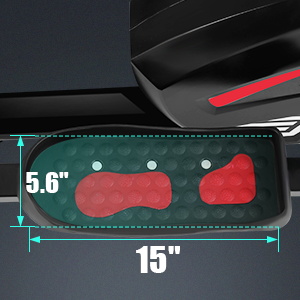
Image: Close-up view of the front-mounted transport wheels, indicating ease of movement for storage or repositioning.
6. Troubleshooting
If you encounter issues with your elliptical trainer, refer to the following common problems and solutions:
- Monitor Not Displaying Data:
- Check battery installation and replace if necessary.
- Ensure all sensor cables are securely connected to the monitor.
- Resistance Not Changing:
- Verify the tension control cable is properly connected and not kinked.
- Ensure the resistance knob is turning freely and engaging the mechanism.
- Squeaking or Grinding Noises:
- Check all bolts and nuts for tightness, especially around joints and the flywheel.
- Apply a small amount of silicone lubricant to any pivot points or moving parts that are causing noise.
- APP Not Connecting:
- Ensure Bluetooth is enabled on your device and the elliptical is powered on.
- Restart both your device and the elliptical.
- Check if the app requires an update.
7. Product Specifications
| Specification | Detail |
|---|---|
| Brand | ANCHEER |
| Model Number | B08VWRY9P2 |
| Material | Alloy Steel |
| Resistance Mechanism | Magnetic |
| Number of Resistance Levels | 10 |
| Maximum Weight Recommendation | 390 Pounds (177 kg) |
8. Warranty and Support
ANCHEER provides a 1-year quality assurance for this product. Within this period, free replacement parts will be provided for any manufacturing defects.
For technical support, warranty claims, or assistance with assembly and operation, please contact ANCHEER customer service. Refer to your purchase documentation or the ANCHEER official website for contact details.
Please have your model number (B08VWRY9P2) and proof of purchase ready when contacting support.
