
1. Product Overview
The Planet Audio P10AWK is a compact, powered 10-inch car subwoofer designed to deliver enhanced bass performance in vehicles with limited space. It features a built-in amplifier with 1000 Watts maximum output, a single 4 Ohm voice coil, and comes with an 8-gauge wire installation kit for convenient setup. This unit is ideal for under-seat mounting, providing powerful low-frequency sound without occupying significant trunk space.
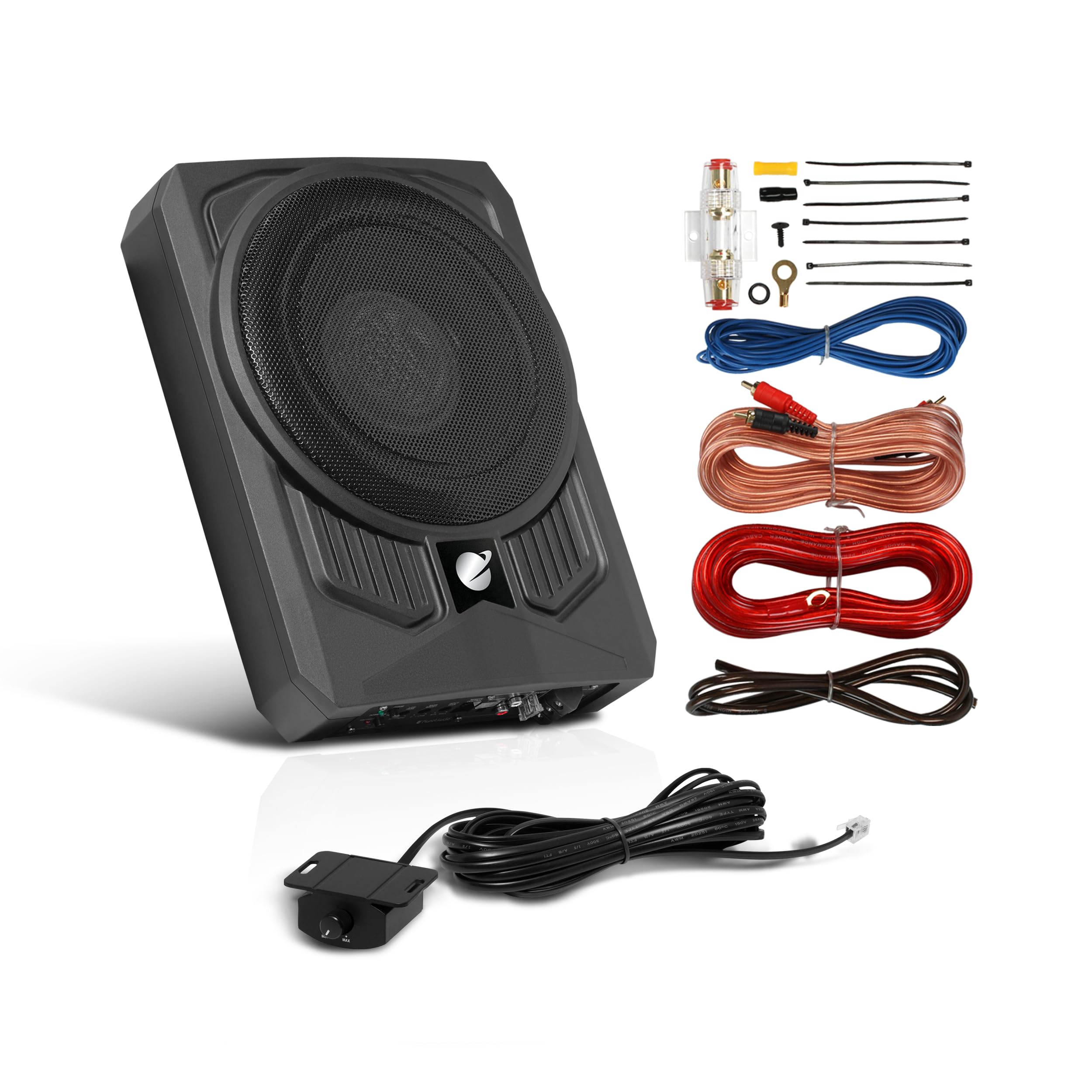
Image 1.1: Front view of the Planet Audio P10AWK powered subwoofer.
2. Setup and Installation
Proper installation is crucial for optimal performance and safety. It is strongly recommended to have this product professionally installed. The P10AWK includes an 8-gauge amplifier installation kit to facilitate the wiring process.
2.1 Included Components

Image 2.1: The P10AWK subwoofer shown with all included installation kit components.
The installation kit includes:
- 17’ 8 Gauge Power Cable
- 40 A Fuse Holder
- 3’ 8 G Ground Cable
- 16’ 18 G Remote Cable
- 16’ RCA Interconnect
- 4" Wire Ties
- Plastic Grommet
- #10 Gold-Plated Ring Terminal
- Butt Splice Wire Connectors
- Tap Screw
- Rubber Terminal Boot
2.2 Wiring Connections
The P10AWK supports both high-level and low-level inputs for connection to your vehicle's audio system.
- High-Level Inputs: These are speaker-level inputs, used when connecting to a factory radio or an aftermarket radio that lacks low-level (RCA) outputs.
- Low-Level Inputs: Also known as RCA inputs, these use RCA interconnect cables to link the P10AWK with a source unit that has RCA outputs.

Image 2.2: Illustration of High and Low Level Input connections.
The unit features a PWM MOSFET Power Supply, which is a Pulse Width Modulated design that simplifies power delivery, ensuring efficient and reliable operation by precisely controlling output voltage and current.

Image 2.3: Icon indicating MOSFET Power Supply technology.
3. Operation and Controls
The P10AWK offers several controls to fine-tune your audio experience.

Image 3.1: Control panel of the P10AWK, showing various adjustment knobs and ports.
3.1 Variable Low-Pass Filter (LPF)
This electronic circuit removes frequencies below its set point, ensuring that only low notes are sent to the subwoofer. Adjust the LPF to prevent higher frequencies from being reproduced by the subwoofer, optimizing bass clarity.

Image 3.2: Icon illustrating the Variable Low-Pass Filter function.
3.2 Variable Bass Boost
The Variable Bass Boost allows you to adjust the intensity of the low bass frequencies within a specified range, customizing the bass output to your preference.
3.3 Variable Gain Control
The gain control adjusts the input signal level from your receiver to the amplifier. It is not a volume control but rather a sensitivity adjustment to match the output of your source unit to the subwoofer's amplifier.
3.4 Remote Subwoofer Control
A remote subwoofer control is included, allowing convenient adjustment of the subwoofer's output level from the driver's seat.
4. Maintenance
To ensure the longevity and optimal performance of your P10AWK subwoofer, follow these general maintenance guidelines:
- Cleaning: Keep the subwoofer and its surrounding area clean and free from dust and debris. Use a soft, dry cloth for cleaning. Avoid liquid cleaners directly on the unit.
- Connections: Periodically check all wiring connections to ensure they are secure and free from corrosion. Loose connections can lead to poor performance or damage.
- Ventilation: Ensure the subwoofer has adequate ventilation. Do not block any vents or place objects directly on the unit that could impede airflow.
5. Troubleshooting
If you encounter issues with your P10AWK subwoofer, refer to the following common troubleshooting steps:
- No Power:
- Check the power cable connection to the vehicle battery and the subwoofer.
- Verify the 40A fuse in the fuse holder is intact.
- Ensure the ground cable is securely connected to a clean metal surface on the vehicle chassis.
- Check the remote turn-on wire connection.
- Observe the LED status indicator on the unit. A red LED typically indicates a protection mode or fault.
- No Sound or Low Output:
- Confirm the audio input cables (RCA or high-level) are correctly connected to both the source unit and the subwoofer.
- Adjust the Variable Gain Control. Ensure it is set appropriately to match your source unit's output.
- Check the settings on your car stereo to ensure subwoofer output is enabled and volume is not muted.
- Adjust the Remote Subwoofer Control.
- Distorted Sound:
- Reduce the gain setting.
- Adjust the Variable Low-Pass Filter to ensure only appropriate frequencies are sent to the subwoofer.
- Check for loose speaker wires or damaged cones.
- Protection Mode (Red LED): The P10AWK includes Thermal, Short, and Overload Protection Circuits. If the unit enters protection mode (indicated by a red LED), it may be due to:
- Overheating: Ensure adequate ventilation. Allow the unit to cool down.
- Short Circuit: Inspect speaker wiring for any shorts.
- Overload: Reduce the input signal or gain.
6. Specifications
Detailed technical specifications for the Planet Audio P10AWK subwoofer:
| Brand | Planet Audio |
| Model Number | P10AWK |
| Speaker Maximum Output Power | 1000 Watts |
| Subwoofer Diameter | 10 Inches |
| Impedance | 4 Ohms |
| Connectivity Technology | RCA, Wired |
| Mounting Type | Car Mount (Under Seat) |
| Enclosure Material | Aluminum, Rubber |
| Control Method | Remote, Voice (via compatible head unit) |
| Item Dimensions (D x W x H) | 10.43" x 13.58" x 3.15" (265mm x 345mm x 80mm) |
| Item Weight | 11 Pounds (approx. 5 kg) |
| Additional Features | Amplified, Low Profile, Phase Control, LED Status Indicator, Thermal/Short/Overload Protection Circuits, High Performance Voice Coil, Rubber Surround, Aluminum Cone |

Image 6.1: Detailed dimensions of the P10AWK subwoofer.
7. Warranty and Support
The Planet Audio P10AWK is covered by a 3 Year Platinum Online Dealer Warranty. This warranty is valid for purchases made through authorized online dealers. For warranty claims or technical support, please contact your dealer or the manufacturer, Planet Audio, directly. Retain your proof of purchase for warranty validation.
