
1. Introduction
Thank you for purchasing the QFX E-B3 Bluetooth Professional High-Power Speaker. This manual provides essential information for the safe and efficient operation of your speaker. Please read it thoroughly before use and retain it for future reference.
The QFX E-B3 is designed to deliver powerful audio with features including Bluetooth connectivity, FM radio, USB/SD card playback, LED party lights, and a 250W power amplifier. It also supports True Wireless System (TWS) for stereo pairing with another compatible speaker.
2. Safety Information
- Power Source: Connect the speaker only to the specified power supply as indicated on the unit.
- Ventilation: Ensure adequate ventilation around the speaker. Do not block any ventilation openings.
- Water and Moisture: This speaker is not waterproof. Do not expose it to rain, moisture, or any liquids to prevent electric shock or fire.
- Heat: Keep the speaker away from heat sources such as radiators, heat registers, stoves, or other apparatus that produce heat.
- Cleaning: Unplug the speaker from the power outlet before cleaning. Use a dry cloth for cleaning. Do not use liquid cleaners or aerosol cleaners.
- Servicing: Do not attempt to service this product yourself. Refer all servicing to qualified service personnel.
- Placement: Place the speaker on a stable, flat surface to prevent it from falling.
3. Package Contents
Verify that all items are present in the package:
- QFX E-B3 High-Power Speaker
- Microphone
- Remote Control
- AC Power Cable
- User Manual (this document)
4. Product Overview
The QFX E-B3 speaker features dual 15-inch woofers and a 1-inch tweeter, protected by a metal grill. It includes integrated handles and wheels for portability.

Figure 4.1: Front view of the QFX E-B3 Speaker.
Rear Panel Controls and Ports
The rear panel houses all input/output connections and control knobs.
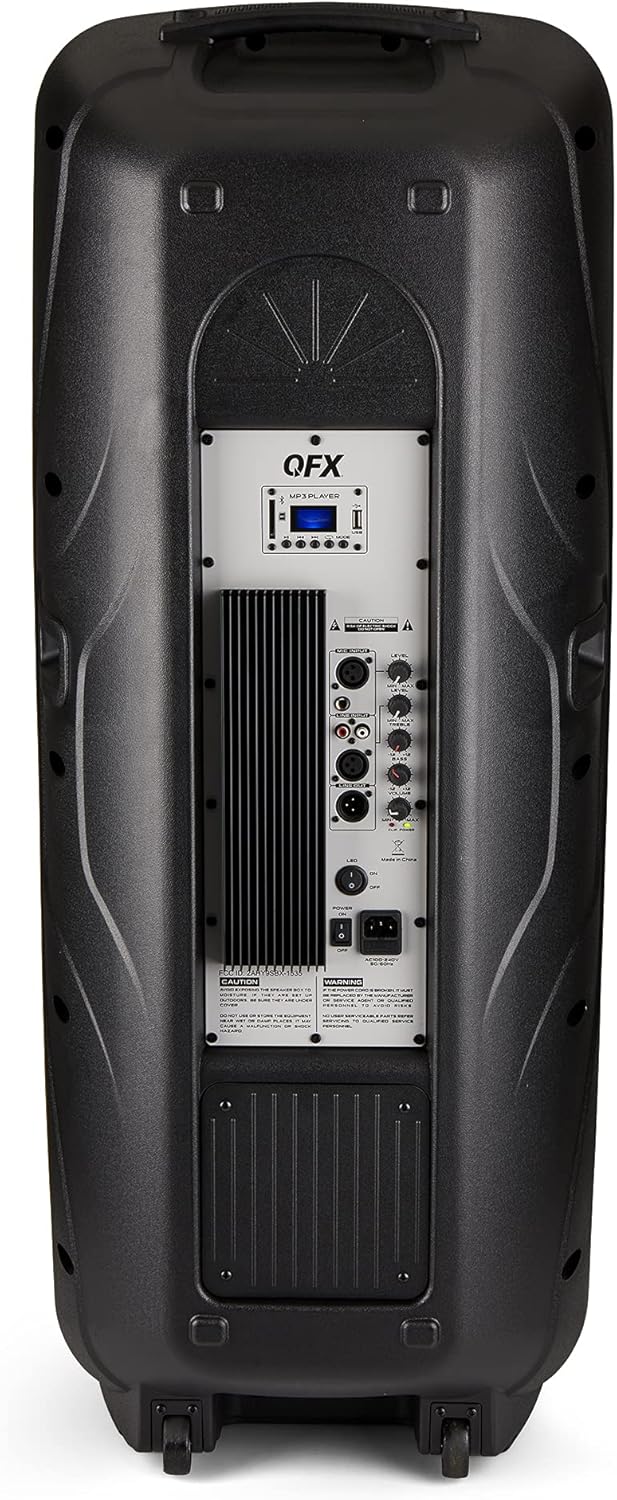
Figure 4.2: Rear panel with controls and ports.
- Power Switch: Turns the speaker ON/OFF.
- AC Input: Connects the AC power cable.
- USB/SD Card Ports: For playing audio files from USB drives or SD cards.
- Display Screen: Shows current mode and track information.
- Mode Button: Switches between input modes (Bluetooth, FM, USB, SD, RCA).
- Play/Pause Button: Controls playback for USB/SD/Bluetooth.
- Previous/Next Track Buttons: Navigates tracks or FM stations.
- Master Volume Knob: Adjusts the overall volume.
- Bass/Treble Control Knobs: Adjusts low and high frequencies.
- XLR Microphone Input: Connects a wired microphone.
- Microphone Volume/Echo Knobs: Adjusts microphone volume and echo effect.
- RCA Input (L/R): Connects external audio devices via RCA cables.
- XLR Line Input/Output: For connecting to other audio equipment.
5. Setup
Initial Placement
Place the speaker on a stable, flat surface. For optimal sound, position it in a central location within the listening area. The integrated wheels and handle allow for easy transport.

Figure 5.1: Speaker being moved with handle and wheels.
Power Connection
- Ensure the speaker's power switch is in the OFF position.
- Connect the AC power cable to the AC input on the rear panel of the speaker.
- Plug the other end of the AC power cable into a standard wall outlet.
- Flip the power switch to the ON position. The display screen will illuminate.
6. Operating Instructions
Bluetooth Pairing
- Turn on the QFX E-B3 speaker.
- Press the MODE button on the speaker or remote control until "BLUE" appears on the display screen, indicating Bluetooth mode.
- Enable Bluetooth on your mobile device (smartphone, tablet, etc.).
- Search for available Bluetooth devices and select "QFX E-B3" from the list.
- Once paired, the speaker will emit a confirmation sound. You can now play audio from your device through the speaker.
True Wireless System (TWS) Pairing
TWS allows two QFX E-B3 speakers to connect wirelessly for a stereo sound experience. This feature works only in Bluetooth mode.
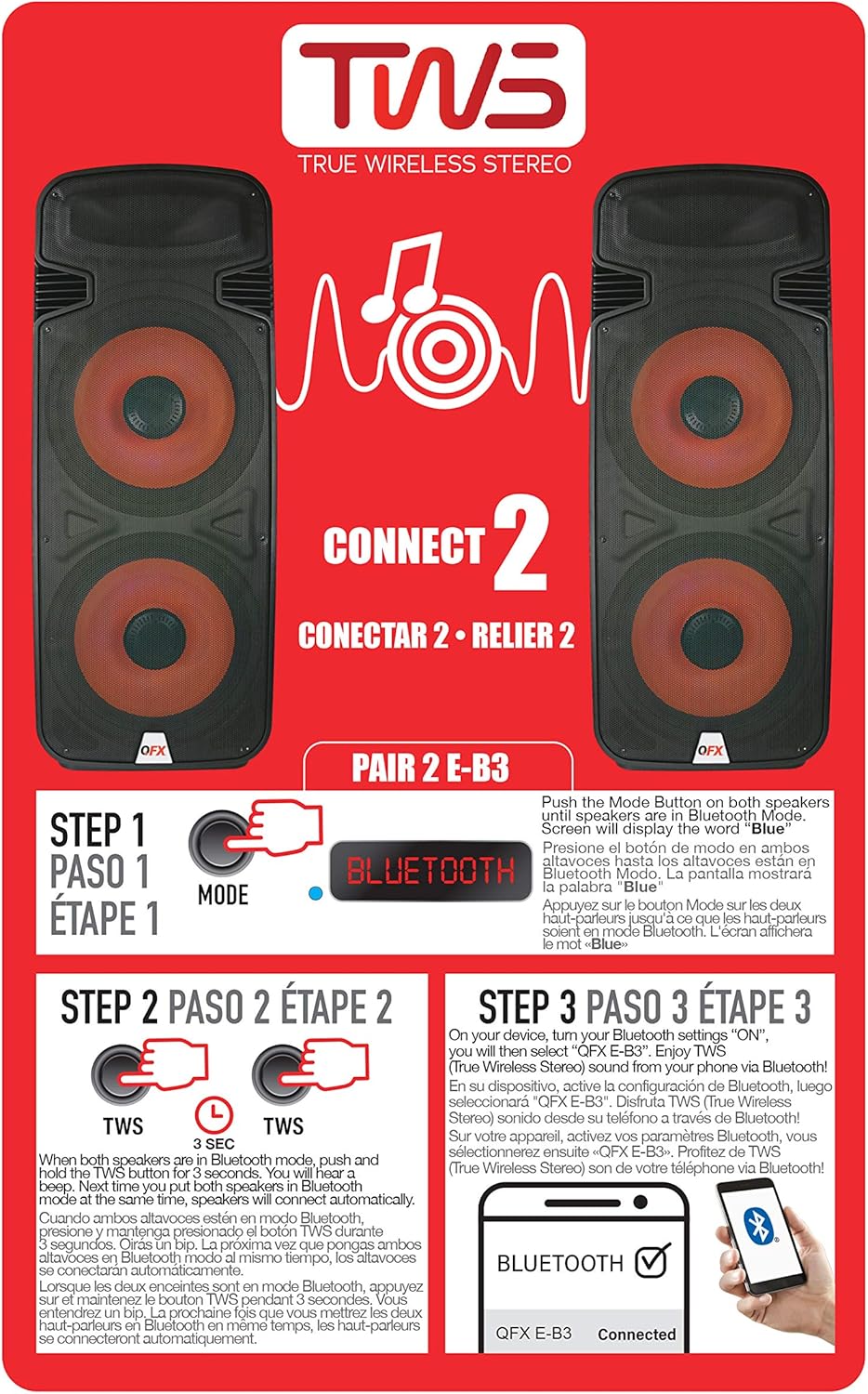
Figure 6.1: TWS Pairing Instructions.
- Ensure both QFX E-B3 speakers are powered on and in Bluetooth mode. The display on both speakers should show "BLUE".
- On one of the speakers (this will be your primary speaker), press and hold the TWS button for approximately 3 seconds. The speakers will attempt to connect to each other.
- Once successfully paired, you will hear a confirmation sound, and the display on the primary speaker will show "BLUE" while the secondary speaker will show "BLUE" as well.
- On your Bluetooth-enabled device, search for and select "QFX E-B3". The two speakers will now play audio in stereo.
FM Radio Operation
- Press the MODE button to switch to FM radio mode. The display will show the FM frequency.
- Press and hold the Play/Pause button to initiate an automatic scan for FM stations. The speaker will save all found stations.
- Use the Previous/Next Track buttons to navigate through the saved FM stations.
USB/SD Card Playback
- Insert a USB flash drive or SD card (with compatible audio files) into the respective port on the rear panel.
- The speaker will automatically switch to USB/SD mode and begin playing the audio files. If not, press the MODE button to select USB or SD mode.
- Use the Play/Pause and Previous/Next Track buttons to control playback.
Microphone Input
- Connect a microphone to the XLR Microphone Input on the rear panel.
- Adjust the Microphone Volume and Echo knobs to achieve the desired sound.
RCA Input
- Connect an external audio source (e.g., CD player, mixer) to the RCA Input (L/R) ports using appropriate RCA cables.
- Press the MODE button to select RCA input mode.
- Adjust the master volume on the speaker and the volume on your external audio source.
LED Party Lights
The speaker features integrated LED party lights that activate automatically when the speaker is powered on. There are no specific controls for the LED lights mentioned; they are designed to enhance the audio experience.
7. Maintenance
Cleaning
- Always unplug the speaker before cleaning.
- Use a soft, dry cloth to wipe the exterior surfaces of the speaker.
- Do not use abrasive cleaners, waxes, or solvents as they may damage the finish.
- Keep the ventilation openings clear of dust and debris.
Storage
When not in use for extended periods, store the speaker in a cool, dry place, away from direct sunlight and extreme temperatures. Cover the speaker to protect it from dust.
8. Troubleshooting
If you encounter issues with your QFX E-B3 speaker, refer to the following common problems and solutions:
| Problem | Possible Cause | Solution |
|---|---|---|
| No power | Power cable not connected; Power outlet not active; Speaker power switch off. | Ensure AC cable is securely connected to speaker and outlet. Check if outlet is working. Turn speaker power switch ON. |
| No sound | Volume too low; Incorrect input mode selected; Audio source not playing. | Increase master volume. Press MODE button to select correct input. Ensure audio source is playing and its volume is up. |
| Bluetooth not connecting | Speaker not in Bluetooth mode; Device Bluetooth off; Speaker already paired to another device; Device too far. | Ensure speaker is in Bluetooth mode ("BLUE" on display). Turn on device Bluetooth. Disconnect from other devices. Move device closer to speaker (within 30 feet). |
| TWS pairing failed | Speakers not in Bluetooth mode; TWS button not held long enough. | Ensure both speakers are in Bluetooth mode. Press and hold the TWS button on one speaker for 3 seconds. |
| USB/SD playback not working | Incorrect mode; Incompatible file format; Corrupted USB/SD card. | Press MODE to select USB/SD. Ensure audio files are in a compatible format (e.g., MP3). Try a different USB/SD card. |
9. Specifications
| Feature | Specification |
|---|---|
| Brand | QFX |
| Model Number | E-B3 |
| Speaker Maximum Output Power | 250 Watts |
| Connectivity Technology | USB, Bluetooth |
| Audio Output Mode | Stereo |
| Mounting Type | Plug Mount, Wheel Mount |
| Speaker Type | Woofer (Dual 15 Inches) |
| Controller Type | Remote Control |
| Color | Party LED |
| Is Waterproof | False |
| Control Method | Remote |
| Woofer Diameter | 15 Inches |
| Number of Audio Channels | 2.0 |
| Wireless Technology | Bluetooth |
| Connectivity Protocol | Bluetooth |
| Power Source | Corded Electric |
| Audio Driver Type | Dynamic Driver |
| Audio Driver Size | 15 Inches |
| Item Dimensions (D x W x H) | 16.77"D x 13.98"W x 23.74"H |
| Item Weight | 13.2 Pounds |
| Compatible Devices | Laptop, MP3 Player, Smartphone, Tablet, Television |
| UPC | 606540039618 |
10. Warranty Information
This product is covered by a limited warranty. For specific details regarding warranty coverage and terms, please refer to the warranty information provided at the point of purchase or contact QFX customer support directly. The warranty is typically per contract with the retailer.
11. Support
For technical assistance, troubleshooting beyond this manual, or inquiries about your QFX E-B3 speaker, please contact QFX customer support or your retailer. Contact information can usually be found on the manufacturer's website or on your purchase receipt.


