
1. Introduction
Thank you for choosing the KAIDI KD-952 Slim 5000 mAh Portable Power Bank. This device is designed to provide convenient and reliable power for your mobile devices on the go. Its compact size and integrated cable make it an ideal companion for daily use and travel.
Key Features:
- 5000 mAh Capacity: Provides ample power to extend the battery life of your smartphone or other USB-powered devices.
- Integrated Micro USB Cable: For convenient charging of compatible devices without needing an extra cable.
- Slim and Lightweight Design: Easy to carry in your pocket or bag.
- LED Indicator Lights: To display the remaining battery level.
2. Setup
Package Contents:
- KAIDI KD-952 Slim 5000 mAh Portable Power Bank
- Integrated Micro USB Charging Cable
Initial Charging:
Before first use, fully charge your power bank. This ensures optimal battery performance and longevity.
- Connect the integrated Micro USB cable to a compatible USB power adapter (not included) or a computer's USB port.
- Plug the USB power adapter into a wall outlet.
- The LED indicator lights on the power bank will illuminate to show the charging progress. All lights will be solid when fully charged.
- Disconnect the power bank once fully charged.

This image displays the KAIDI KD-952 portable power bank in white, featuring its slim design and the integrated yellow Micro USB charging cable. The power bank has LED indicator lights on its surface.
3. Operating Instructions
Charging External Devices:
The power bank can charge devices using its integrated Micro USB cable or a separate USB-A output port.
- Using Integrated Micro USB Cable: Pull out the integrated Micro USB cable and connect it directly to your Micro USB compatible device.
- Using USB-A Output Port: Connect your device's charging cable (USB-A to your device's connector) to the USB-A output port on the power bank.
- The power bank will automatically begin charging your device. The LED indicators will show the power bank's remaining battery level.
- Once your device is charged, disconnect it from the power bank.

A side view of the KAIDI KD-952 power bank, highlighting its various ports and the integrated Micro USB cable. This view shows the compact profile of the device.
Recharging the Power Bank:
When the power bank's battery is low, recharge it using its Micro USB input port.
- Connect a Micro USB cable (not the integrated one, unless it's for input) to the power bank's Micro USB input port.
- Connect the other end of the cable to a USB power source (e.g., wall adapter, computer USB port).
- The LED indicators will flash to show charging status and become solid when fully charged.
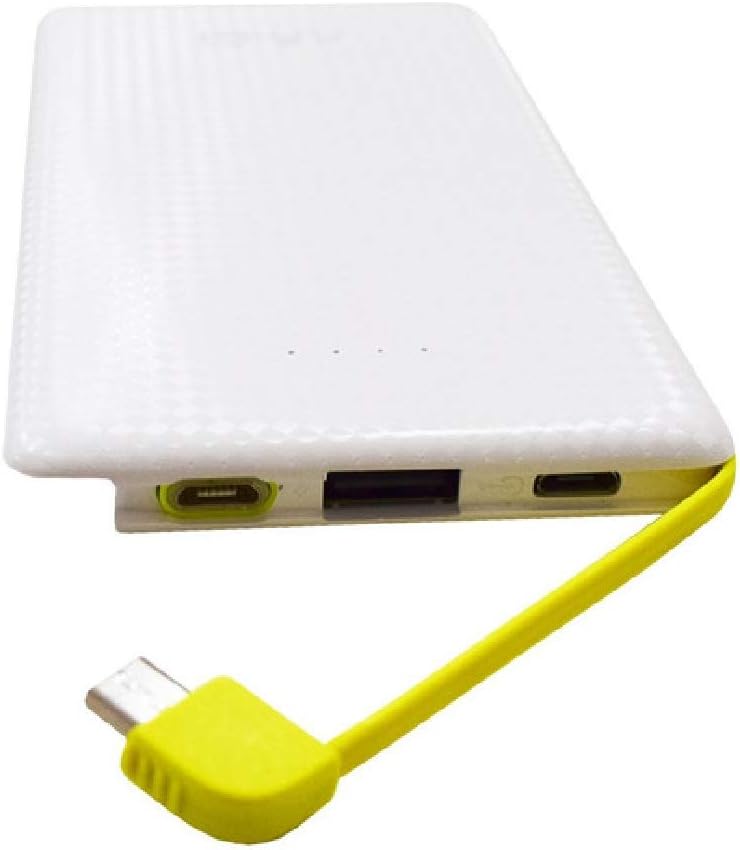
A close-up view of the KAIDI KD-952 power bank's charging ports, including the input port for recharging the power bank itself, the output USB port for charging other devices, and the integrated Micro USB cable.
Battery Level Indicator:
The power bank features LED lights that indicate the remaining battery charge:
- 4 LEDs: 75-100% charge
- 3 LEDs: 50-75% charge
- 2 LEDs: 25-50% charge
- 1 LED: 0-25% charge (recharge soon)
4. Maintenance and Care
Proper care ensures the longevity and optimal performance of your power bank.
- Cleaning: Use a soft, dry cloth to clean the power bank. Avoid liquid cleaners or abrasive materials.
- Storage: Store the power bank in a cool, dry place away from direct sunlight, extreme temperatures, and humidity.
- Battery Health: For best battery life, avoid fully discharging the power bank regularly. Recharge it when the battery level is low. If storing for extended periods, charge it to about 50-70% every few months.
- Avoid Drops: Do not drop or subject the power bank to strong impacts.
5. Troubleshooting
If you encounter issues with your power bank, refer to the following common problems and solutions:
| Problem | Solution |
|---|---|
| Power bank is not charging. | Ensure the charging cable is securely connected to both the power bank's input port and the power source. Try a different charging cable or power adapter. |
| Device is not charging from the power bank. | Check if the power bank has sufficient charge. Ensure the cable connecting your device to the power bank is secure and functional. Try a different cable or device. |
| Charging is slow. | Ensure you are using a compatible charging cable and adapter. Some devices may charge slower due to their input requirements or the power bank's output. |
| LED indicators are not working. | The power bank might be completely discharged. Try charging it for a few minutes to see if the indicators light up. If not, contact support. |
6. Specifications
| Feature | Detail |
|---|---|
| Brand | KAIDI |
| Model | KD-952 |
| Battery Capacity | 5000 Milliampere Hour (mAh) |
| Connector Type (Input/Output) | Micro USB |
| Output Current | 2.1 Amperes |
| Item Dimensions (L x W x Thickness) | 12.7 x 6.8 x 0.9 centimeters |
| Special Features | Integrated Cable, Lightweight |
7. Warranty and Support
For warranty information and customer support, please refer to the documentation provided at the time of purchase or contact your retailer. KAIDI is committed to providing quality products and assistance.
Please retain your proof of purchase for any warranty claims.