
1. Introduction
This manual provides comprehensive instructions for the Marea Smart Watch B57008/2. Please read this manual carefully before using the device to ensure proper operation and to maximize its features. Keep this manual for future reference.
2. Safety Information
- Do not attempt to disassemble or modify the device.
- Keep the device away from extreme temperatures and direct sunlight.
- Avoid exposing the device to strong impacts or drops.
- Consult a medical professional before starting any new exercise regimen, especially if you have pre-existing health conditions. The health data provided by this device is for reference only and should not be used for medical diagnosis or treatment.
- Ensure the charging contacts are clean and dry before charging.
3. Package Contents
Please check the package for the following items:
- Marea Smart Watch B57008/2
- Charging Cable
- User Manual
4. Product Overview
The Marea Smart Watch B57008/2 features a 1.14-inch display and a durable design. Below is an image illustrating the watch's appearance and key display elements.
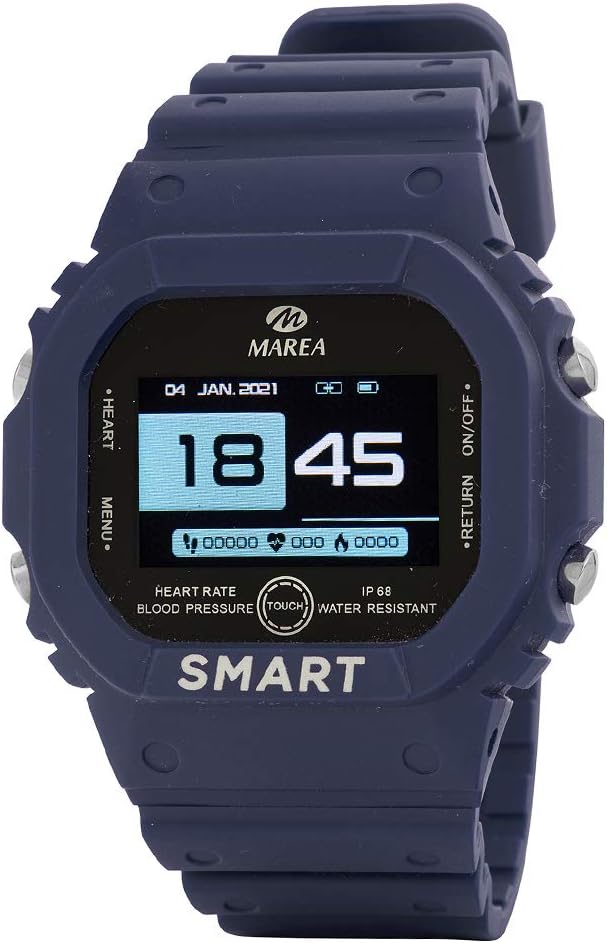
Figure 4.1: Marea Smart Watch B57008/2 Display
This image displays the Marea Smart Watch B57008/2. The watch face shows the date "04 JAN. 2021" and time "18:45". Icons for battery level and Bluetooth connectivity are visible at the top right. On the left side of the display, "HEART" and "MENU" are indicated, suggesting navigation options. On the right, "RETURN" and "ON/OFF" are indicated. Below the time, there are numerical indicators for steps, heart rate, and calories. At the bottom of the display, text indicates "HEART RATE", "BLOOD PRESSURE", "TOUCH", "IP 68", and "WATER RESISTANT", with "SMART" prominently displayed at the very bottom. The watch itself is dark blue with silver buttons on the sides.
Key Features:
- Display: 1.14-inch screen.
- Battery Capacity: 170 mAh (approximately 3 days of normal use, 7 days standby).
- Water Protection: IP68 rated.
- Health Monitoring: Heart rate, blood pressure, blood oxygen, sleep monitoring.
- Activity Tracking: Calories consumed, distance, steps.
- Training Mode: Dedicated mode for exercise tracking.
- Notifications: Displays recent messages and news.
- Additional Functions: Phone finder, alarm clock, smart watch finder, remote camera control, raise wrist to turn on screen, do not disturb mode, vibration alerts.
5. Setup
5.1 Charging the Device
- Connect the charging cable to the charging contacts on the back of the watch.
- Plug the USB end of the cable into a standard USB power adapter (5V/1A recommended) or a computer's USB port.
- The watch display will show a charging indicator. A full charge typically takes about 2 hours.
5.2 App Installation and Pairing
To unlock the full potential of your Marea Smart Watch, you need to install the companion application on your smartphone.
- Download the App: Search for the "Marea Smart" app (or similar name as indicated in the watch's quick start guide) on your smartphone's app store (Google Play Store for Android, Apple App Store for iOS).
- Enable Bluetooth: Ensure Bluetooth is enabled on your smartphone.
- Open the App: Launch the Marea Smart app and follow the on-screen instructions to create an account or log in.
- Add Device: Within the app, navigate to the "Device" or "My Device" section and select "Add Device" or "Bind Device".
- Select Your Watch: The app will scan for nearby Bluetooth devices. Select "Marea B57008/2" or a similar identifier from the list.
- Confirm Pairing: A pairing request may appear on both your watch and smartphone. Confirm the pairing on both devices.
- Once paired, the watch will synchronize data with your phone, and you can customize settings through the app.
6. Operating Instructions
6.1 Basic Navigation
- Power On/Off: Press and hold the side button (usually the "ON/OFF" button) to power the watch on or off.
- Wake Screen: Tap the screen or raise your wrist to automatically wake the screen.
- Swipe Gestures:
- Swipe up/down: Navigate through menus or notifications.
- Swipe left/right: Access different function screens (e.g., heart rate, steps, weather).
- Tap: Tap an icon or option to select it.
- Return: Use the designated return button or swipe gesture (if available) to go back to the previous screen.
6.2 Health Monitoring
The watch can monitor various health metrics. Ensure the watch is worn snugly on your wrist for accurate readings.
- Heart Rate: Navigate to the heart rate interface. The watch will automatically start measuring your heart rate.
- Blood Pressure: Access the blood pressure interface. Remain still during measurement.
- Blood Oxygen: Go to the SpO2 interface for blood oxygen level measurement.
- Sleep Monitoring: The watch automatically tracks your sleep patterns when worn during sleep. View detailed sleep data in the app.
6.3 Activity Tracking
- Steps, Distance, Calories: These metrics are tracked automatically throughout the day. View daily summaries on the watch or in the app.
- Training Mode: Select "Training" or "Sport Mode" from the menu to choose a specific activity (e.g., running, walking). The watch will record duration, distance, and calories burned during the activity.
- Sedentary Reminder: Enable this feature in the app to receive alerts when you have been inactive for a prolonged period.
6.4 Notifications
Once paired with your smartphone and notification permissions are granted in the app, the watch can display incoming calls, messages, and app notifications.
- Swipe down from the main watch face to view recent notifications. The watch can display up to the last 8 messages or news items.
6.5 Other Functions
- Find Phone: If your phone is connected via Bluetooth, select this option on the watch to make your phone ring.
- Alarm Clock: Set alarms through the app. The watch will vibrate at the set time.
- Find Smart Watch: Use the app to locate your watch if it's within Bluetooth range.
- Remote Camera: Open the camera function in the app, then use the watch as a remote shutter button.
- Do Not Disturb Mode: Enable this mode on the watch or through the app to silence notifications and vibrations during specific times.
7. Maintenance
- Cleaning: Wipe the watch and strap regularly with a soft, dry cloth. If necessary, use a slightly damp cloth and then dry thoroughly. Do not use harsh chemicals or abrasive cleaners.
- Water Resistance (IP68): The watch is IP68 rated, meaning it is resistant to dust and can withstand immersion in water up to 1.5 meters for up to 30 minutes. It is suitable for daily use, hand washing, and light rain. However, it is not recommended for hot showers, saunas, or diving, as steam and high pressure can compromise the seal.
- Battery Care: Avoid fully discharging the battery frequently. Charge the watch when the battery level is low. If storing the watch for an extended period, charge it to about 50% and recharge every few months to prevent deep discharge.
8. Troubleshooting
| Problem | Possible Cause / Solution |
|---|---|
| Watch does not turn on | Battery may be depleted. Charge the watch for at least 30 minutes. |
| Cannot pair with smartphone | Ensure Bluetooth is enabled on your phone. Make sure the watch is charged and within range. Restart both the watch and phone. Clear Bluetooth cache on phone if necessary. |
| Notifications not received | Check app notification permissions on your phone. Ensure the app is running in the background. Disable "Do Not Disturb" mode on the watch. |
| Inaccurate health data | Ensure the watch is worn snugly on your wrist, not too loose or too tight. Avoid excessive movement during measurement. Clean the sensor on the back of the watch. |
| Screen unresponsive | Restart the watch by pressing and holding the power button. If unresponsive, allow the battery to fully drain and then recharge. |
9. Specifications
| Feature | Detail |
|---|---|
| Brand | Marea |
| Model Number | B57008/2 |
| Screen Size | 1.14 Inches |
| Battery Capacity | 170 mAh |
| Water Resistance | IP68 |
| Wireless Communication Standard | Bluetooth |
| Compatible Devices | Smartphone |
| Special Features | Camera (Remote Control) |
| Target Audience | Men |
| Display Type | Analog (likely refers to the watch face style, not literal analog display) |
10. Warranty and Support
For warranty information and technical support, please refer to the warranty card included with your product or visit the official Marea website. Keep your purchase receipt as proof of purchase.
If you encounter any issues not covered in this manual, please contact Marea customer service for assistance.