
Introduction
The Northpoint Smart LED Plant Lamp is an innovative indoor gardening system designed for cultivating herbs and vegetables year-round. This hydroponic grow light provides optimal conditions for plant growth with its full-spectrum LED lighting, adjustable height, and integrated timer. Enjoy fresh produce directly from your kitchen.
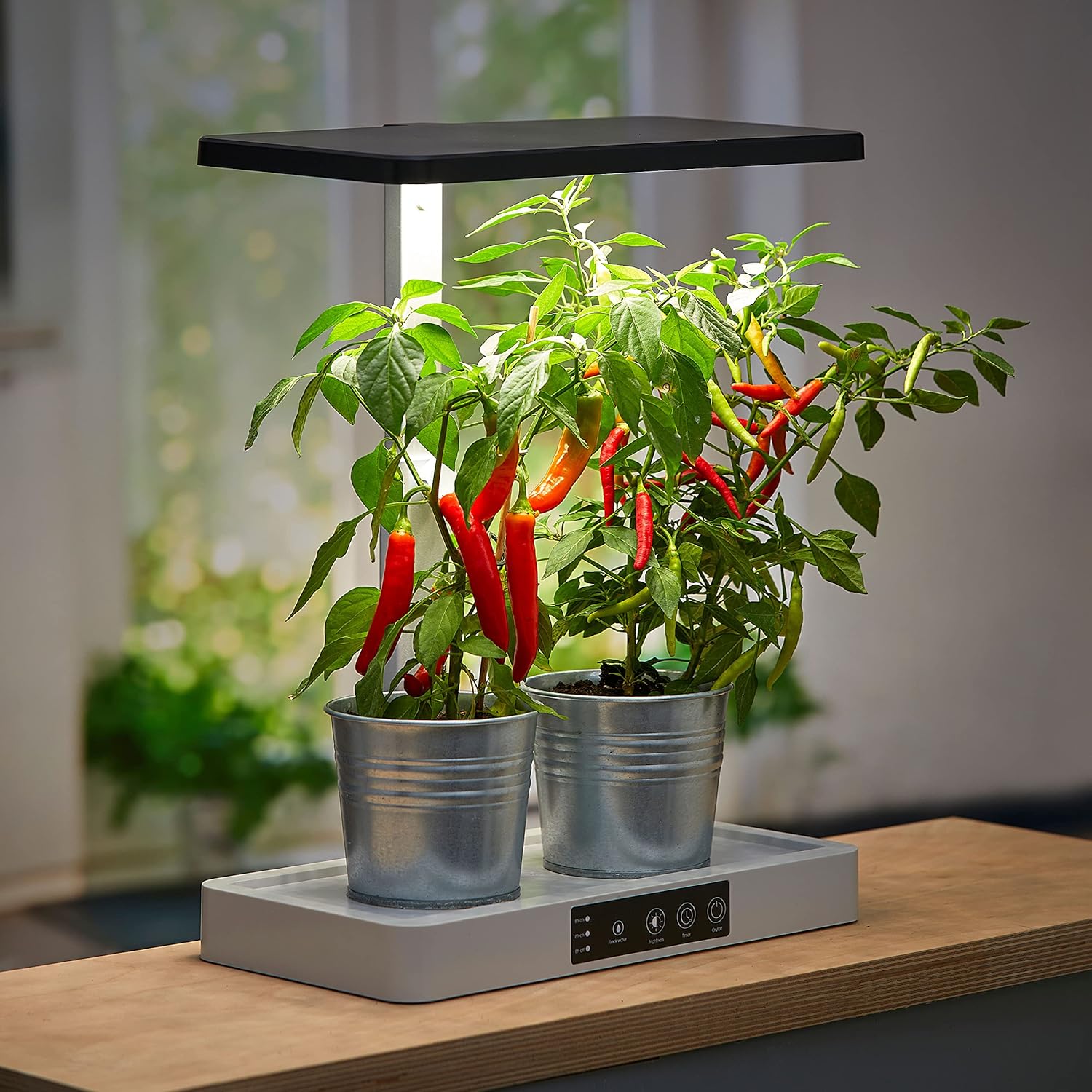
Image: The Northpoint Smart LED Plant Lamp in operation, supporting the growth of chili plants.
Safety Instructions
- Read all instructions thoroughly before operating the device.
- Keep the device away from water and high humidity to prevent electrical hazards.
- Do not attempt to disassemble or modify the unit. Refer all servicing to qualified personnel.
- Use only the power adapter supplied with the product.
- Ensure the power cord is not damaged or pinched.
- This product is intended for indoor use only.
Package Contents
Verify that all the following items are included in your package:
- 1 x Northpoint LED Plant Lamp (20 W)
- 6 x Smart-Soil growing substrate pods
- 6 x Plant pots with lids
- 1 x Funnel
- 1 x Water level indicator
- 2 x Mounting screws
- 1 x User Manual
Setup
- Unpack Components: Carefully remove all items from the packaging.
- Assemble Lamp Unit: Attach the LED lamp panel to the adjustable pole, then secure the pole into the base unit. Ensure all connections are firm.
- Place Growing Pots: Insert the six plant pots into the designated slots in the base unit.
- Add Water: Use the provided funnel to fill the water reservoir in the base unit. Monitor the water level indicator to ensure it does not exceed the maximum fill line.
- Prepare Substrate and Seeds: Place one Smart-Soil growing substrate pod into each plant pot. Plant your desired seeds into the substrate according to seed packet instructions. Cover the pots with the provided lids to create a humid environment for germination.
- Connect Power: Plug the power adapter into the lamp unit and then into a suitable electrical outlet.

Image: The base unit of the Northpoint Smart LED Plant Lamp with clear domes, ready for planting.

Image: Demonstrating the placement of a Smart-Soil substrate pod into a plant pot.
Operating Instructions
The Northpoint Smart LED Plant Lamp features intuitive touch controls on its base.
- Power On/Off: Touch the power button on the base to turn the LED light on or off.
- Timer Function: The lamp is equipped with an integrated timer that provides optimal light cycles for plant growth, typically 16 hours on and 8 hours off. This cycle is pre-set to mimic natural daylight patterns.
- Brightness Adjustment: Touch the brightness control button to cycle through different light intensity levels. Adjust as needed for your plants' specific growth stage.
- Water Management: Regularly check the water level indicator. Refill the reservoir when the water level is low to ensure continuous hydration for your plants. Use the funnel for easy refilling.
- Height Adjustment: As your plants grow, adjust the height of the LED lamp panel to maintain an optimal distance from the plant canopy. This ensures even light distribution and prevents burning.

Image: Mature herbs thriving under the Northpoint Smart LED Plant Lamp.

Image: Young seedlings beginning to sprout in the plant lamp.
Maintenance
- Cleaning: Wipe the lamp unit and base with a soft, damp cloth regularly to remove dust and water residue. Do not use abrasive cleaners.
- Water Changes: Periodically empty and refill the water reservoir with fresh water to prevent algae growth and ensure nutrient availability for your plants. The frequency depends on plant type and growth rate.
- Substrate Replacement: Replace the Smart-Soil growing substrate pods after each growth cycle or when they show signs of degradation to ensure optimal plant health.
Troubleshooting
| Problem | Possible Cause | Solution |
|---|---|---|
| Lamp does not turn on | Power cord not connected; Power outlet malfunction; Unit malfunction | Check power cord connection; Try a different outlet; Contact customer support |
| Plants are not growing well | Insufficient water; Incorrect light cycle/brightness; Poor seed quality; Nutrient deficiency | Refill water reservoir; Adjust light settings; Use fresh, viable seeds; Consider adding plant nutrients (not included) |
| Water level indicator is stuck or inaccurate | Obstruction in the float mechanism; Mineral buildup | Gently clean the indicator area; Use distilled water to minimize mineral buildup |
Specifications
| Feature | Detail |
|---|---|
| Brand | Northpoint |
| Model Number | NP-PL-SM21 |
| Product Dimensions | 21.4 x 36.5 x 49.2 cm |
| Wattage | 20 W |
| Luminous Flux | 1600 Lumen |
| Voltage | 24 V |
| Color Temperature | 4000 Kelvin |
| Color Rendering Index (CRI) | 90.00 |
| Lamp Type | LED |
| Switch Style | Touch |
| Power Source | Corded Electric |
| Special Features | Adjustable Timer, Adjustable Height, Water Level Indicator |
| Specific Use | Cultivation of herbs and vegetables in the kitchen |
Warranty and Support
For warranty information and customer support, please refer to the documentation included with your purchase or visit the official Northpoint website. If you encounter any issues not covered in this manual, please contact Northpoint customer service for assistance.