Prtukyt 6S Wireless Bluetooth Headphones User Manual
Model: V-PCEC2606
Brand: Prtukyt
Introduction
This manual provides detailed instructions for the proper use and maintenance of your Prtukyt 6S Wireless Bluetooth Headphones. Please read this manual thoroughly before using the product to ensure optimal performance and longevity.

Image: Banner displaying '6S Wireless Headphones Over Ear' with icons for Bluetooth V5.0, Built-in Mic, 40H Music Time, TF Card MP3, Foldable Design, and FM Radio.
Safety Information
- Do not expose the headphones to extreme temperatures, humidity, or corrosive substances.
- Avoid dropping or subjecting the headphones to strong impacts.
- Do not disassemble or modify the headphones. This may void the warranty and cause damage.
- Clean the headphones with a soft, dry cloth. Do not use harsh chemicals or abrasive materials.
- Listen at moderate volume levels to prevent hearing damage. Prolonged exposure to loud sounds can cause irreversible hearing loss.
Package Contents
Please check the package for the following items:
- Prtukyt 6S Wireless Bluetooth Headphones (1 unit)
- USB Charging Cable (1 unit)
- 3.5mm Audio Cable (1 unit)
- User Manual (This document)
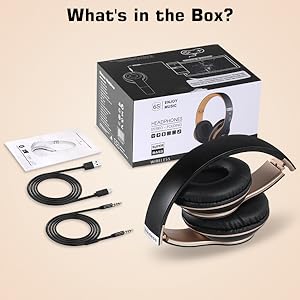
Image: The Prtukyt 6S headphones, USB charging cable, 3.5mm audio cable, and user manual laid out next to the product box, illustrating the package contents.
Product Overview
Familiarize yourself with the various parts and controls of your headphones:

Image: A detailed diagram highlighting the function of each button and port on the Prtukyt 6S headphones, including On/Off, Next/Volume+, Answer/Hang up, Previous/Volume-, Mode, Audio cable link hole, SD/TF card slot, and USB charging port.
- Power Button: On/Off, Play/Pause.
- Next/Volume+: Short press for next track, long press for volume up.
- Answer/Hang up Button: For call management.
- Previous/Volume-: Short press for previous track, long press for volume down.
- Mode Button: Switches between Bluetooth, FM Radio, and SD/TF card modes.
- Audio Cable Link Hole: For wired connection using the 3.5mm audio cable.
- SD/TF Card Slot: For playing music directly from a memory card (card not included).
- USB Charging Port: For charging the headphones.
Setup
1. Charging the Headphones
Before first use, fully charge the headphones. Connect the USB charging cable to the headphone's charging port and the other end to a USB power source (e.g., computer USB port, wall adapter). The indicator light will show charging status and turn off when fully charged.

Image: The Prtukyt 6S headphones with a large '40' indicating 40 hours of listening time, and text stating 'The 5-Minutes charge for 3 Hours of playtime'.
2. Bluetooth Pairing
- Ensure the headphones are charged and powered off.
- Press and hold the Power button until the indicator light flashes blue and red, indicating pairing mode.
- On your device (smartphone, tablet, PC), enable Bluetooth and search for available devices.
- Select "6S" from the list of devices. Once connected, the indicator light will turn solid blue.

Image: A split image showing the Prtukyt 6S headphones connected wirelessly to a phone via Bluetooth (10m range indicated) and also connected via a wired audio cable, demonstrating dual connectivity options.
3. Wired Connection
To use the headphones in wired mode, connect one end of the 3.5mm audio cable to the headphone's audio cable link hole and the other end to your audio device's 3.5mm jack. The headphones will automatically switch to wired mode, conserving battery life.
4. SD/TF Card Usage
Insert a micro SD/TF card (not included) with MP3 audio files into the designated slot. The headphones will automatically switch to SD card mode and begin playing music from the card. Use the 'Next/Volume+' and 'Previous/Volume-' buttons to navigate tracks.
Operating Instructions
Power On/Off
- Power On: Press and hold the Power button for 3 seconds.
- Power Off: Press and hold the Power button for 3 seconds.
Music Playback
- Play/Pause: Short press the Power button.
- Next Track: Short press the 'Next/Volume+' button.
- Previous Track: Short press the 'Previous/Volume-' button.
- Volume Up: Long press the 'Next/Volume+' button.
- Volume Down: Long press the 'Previous/Volume-' button.
Call Management
- Answer Call: Short press the Answer/Hang up button.
- End Call: Short press the Answer/Hang up button.
- Reject Call: Long press the Answer/Hang up button.
- Redial Last Number: Double-press the Answer/Hang up button.
Mode Switching
Press the 'Mode' button to cycle through available modes: Bluetooth, FM Radio, and SD/TF Card (if a card is inserted).
Video: An official product video demonstrating the features and usage of the 6S Wireless Headphones Over Ear. This video provides a visual guide to the product's functionality.
Maintenance
- Cleaning: Use a soft, lint-free cloth to wipe the headphones. For earcups, a slightly damp cloth can be used, but ensure no moisture enters the speaker grilles.
- Storage: When not in use, store the headphones in a cool, dry place, away from direct sunlight and extreme temperatures. The foldable design allows for compact storage.
- Battery Care: To prolong battery life, avoid fully discharging the headphones frequently. Charge them regularly, even if not in constant use.

Image: A close-up view highlighting the comfortable and soft earmuffs of the Prtukyt 6S headphones, designed to completely cover the ears and reduce pressure for extended comfort.
Troubleshooting
| Problem | Possible Cause | Solution |
|---|---|---|
| Headphones do not power on. | Low battery. | Charge the headphones fully. |
| Cannot pair via Bluetooth. | Headphones not in pairing mode; device Bluetooth off; too far from device. | Ensure headphones are in pairing mode (flashing blue/red); enable Bluetooth on your device; move closer to the device (within 10m). |
| No sound. | Volume too low; incorrect mode; wired cable not fully inserted. | Increase volume; press Mode button to select correct source; ensure 3.5mm cable is fully inserted. |
| Poor sound quality. | Weak Bluetooth signal; audio source issue. | Move closer to the Bluetooth device; try a different audio source. |
Specifications
| Feature | Detail |
|---|---|
| Model Name | Prtukyt 6S |
| Connectivity Technology | Wireless (Bluetooth), Wired (3.5mm) |
| Wireless Communication Technology | Bluetooth 5.0 |
| Battery Life | Up to 30 hours (music time) |
| Charging Time | Approx. 2.5 hours |
| Frequency Range | 20 Hz - 20,000 Hz |
| Item Weight | 0.27 Kilograms (9.6 ounces) |
| Product Dimensions | 6 x 5.9 x 3.1 inches |
| Material | Faux Leather |
| Earpiece Shape | Over Ear |
| Manufacturer | PRTUKYT |
| UPC | 790184222267 |
Warranty and Support
Prtukyt products are designed and manufactured to the highest quality standards. This product is covered by a limited warranty from the date of purchase. For detailed warranty terms and conditions, please refer to the warranty card included in your package or contact Prtukyt customer support.
If you encounter any issues or have questions regarding your Prtukyt 6S Wireless Bluetooth Headphones, please contact our customer support team for assistance. Our team is dedicated to providing prompt and helpful solutions.
For support, please visit the official Prtukyt website or refer to the contact information provided on the product packaging.


