
1. Introduction
Thank you for purchasing the ZOKOP 110V/150W 7.5 inch Semi-Automatic Deli Food Slicer. This manual provides important information regarding the safe operation, maintenance, and care of your new appliance. Please read these instructions thoroughly before first use and retain them for future reference.
2. Important Safety Instructions
When using electrical appliances, basic safety precautions should always be followed to reduce the risk of fire, electric shock, and/or injury to persons, including the following:
- Read all instructions carefully before operating the slicer.
- This appliance is for household use only. Do not use outdoors.
- Always unplug the slicer from the power outlet when not in use, before assembling or disassembling parts, and before cleaning.
- Do not immerse the motor unit, cord, or plug in water or other liquids.
- Keep hands, hair, clothing, and utensils away from the blade during operation to prevent injury.
- The blade is extremely sharp. Handle with extreme care during assembly, disassembly, and cleaning.
- Never operate the slicer without the food pusher/holder in place, especially when slicing smaller items.
- Ensure the slicer is placed on a stable, dry, and level surface before operation.
- Do not let the power cord hang over the edge of a table or counter, or touch hot surfaces.
- Close supervision is necessary when any appliance is used by or near children.
- Do not operate any appliance with a damaged cord or plug, or after the appliance malfunctions or has been damaged in any manner. Contact customer service for examination, repair, or adjustment.
- Use only attachments recommended or sold by the manufacturer.
- Do not attempt to repair the appliance yourself. All servicing should be performed by authorized personnel.
3. Product Overview and Components
Familiarize yourself with the parts of your ZOKOP Deli Food Slicer before operation.

Image 1: Labeled diagram of the ZOKOP Deli Food Slicer showing its main components.
- Thickness Guide: Controls the thickness of the slice.
- Blade Lock: Secures the blade in place.
- Stainless Steel Blade: The 7.5-inch cutting blade.
- Sliding Feed Table: Platform where food is placed for slicing.
- On/Off Switch: Power control for the slicer.
- Anti-slip Foot: Rubber feet for stability during operation.
- Food Pusher (Holder): Holds food securely against the thickness guide and protects fingers.
- Fixed Blade Box: Encases the blade for safety and stability.
- Thickness Adjusting Knob: Used to set the desired slice thickness from 0-15mm.
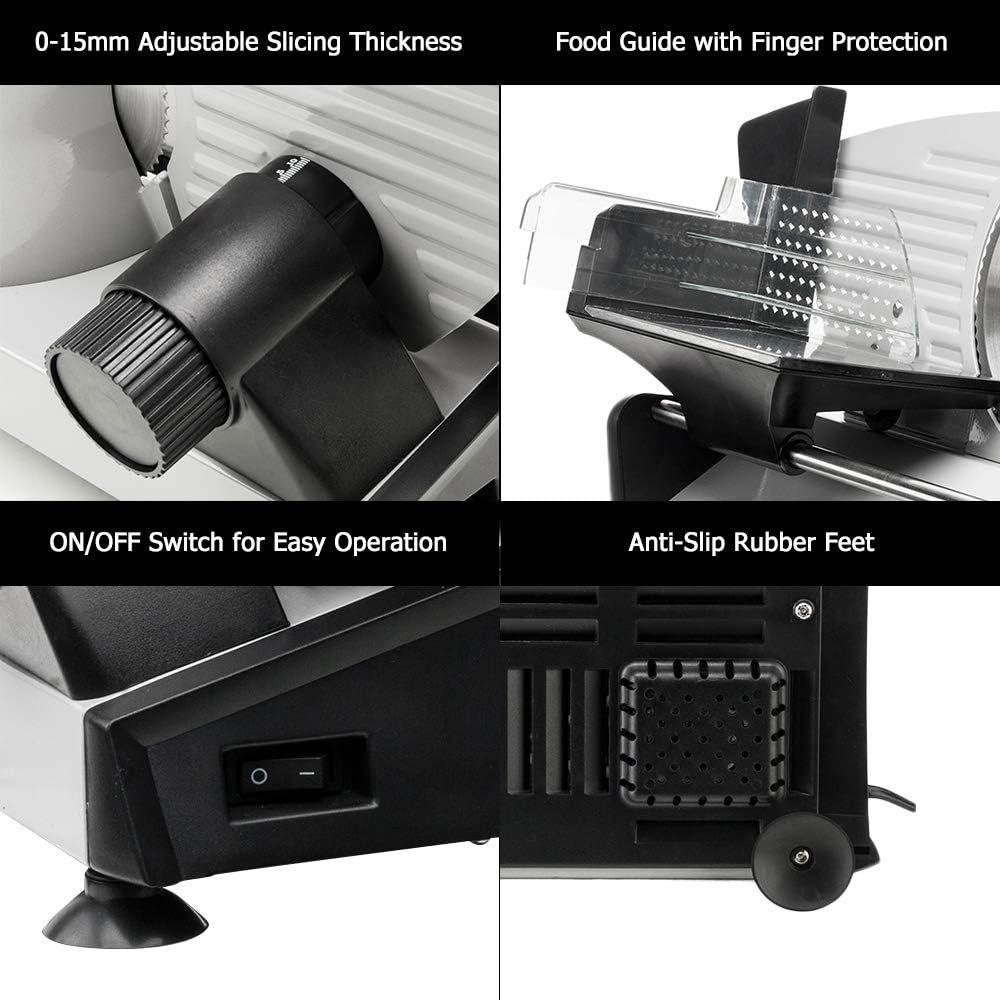
Image 2: Detailed view of key features: adjustable slicing thickness knob, food guide with finger protection, ON/OFF switch, and anti-slip rubber feet.
4. Setup
- Unpack: Carefully remove the slicer and all packaging materials from the box. Retain packaging for storage or return if necessary.
- Placement: Place the slicer on a clean, dry, stable, and level surface. Ensure the anti-slip feet are firmly gripping the surface to prevent movement during operation.
- Initial Cleaning: Before first use, clean all parts that will come into contact with food. Refer to the "Cleaning and Maintenance" section for detailed instructions.
- Power Connection: Ensure the ON/OFF switch is in the 'OFF' position before plugging the slicer into a standard 120V/60Hz electrical outlet.

Image 3: The ZOKOP Deli Food Slicer ready for setup, showing the power cord.
5. Operating Instructions
Follow these steps for safe and effective slicing:
- Prepare Food: Ensure food items are properly chilled for best slicing results. Trim any bones or hard rinds from meats.
- Adjust Thickness: Turn the Thickness Adjusting Knob to set your desired slice thickness. The slicer offers a range from 0mm (paper-thin) to 15mm.
- Position Food: Place the food item onto the Sliding Feed Table. Use the Food Pusher (Holder) to secure the food against the Thickness Guide. Ensure your fingers are protected by the food pusher.
- Start Slicing: Turn the On/Off Switch to the 'ON' position. The blade will begin to rotate.
- Slice: Gently push the Sliding Feed Table back and forth, guiding the food against the rotating blade. Apply even pressure with the food pusher.
- Collect Slices: Sliced food will fall onto the tray or surface beneath the blade.
- Finish Slicing: Once finished, turn the On/Off Switch to the 'OFF' position and unplug the appliance.

Image 4: Close-up of the thickness adjusting knob, allowing precise control over slice thickness.

Image 5: The slicer demonstrating its capability to slice various foods like bread, cheese, and meat, highlighting the 1-15mm adjustable slicing thickness.
6. Cleaning and Maintenance
Regular cleaning ensures optimal performance and extends the life of your slicer. Always unplug the appliance before cleaning.
- Unplug: Ensure the slicer is unplugged from the power outlet.
- Remove Food Pusher and Sliding Table: Carefully remove the food pusher and sliding feed table. These parts can be hand-washed with warm, soapy water or placed in a dishwasher (top rack recommended).
- Remove Blade: The 7.5-inch stainless steel blade is detachable for easy cleaning. Refer to the blade lock mechanism to safely remove the blade. Exercise extreme caution as the blade is very sharp. Hand wash the blade with warm, soapy water and a brush, then rinse thoroughly and dry immediately to prevent rust.
- Clean Main Unit: Wipe down the main body of the slicer with a damp cloth. Do not immerse the motor unit in water.
- Dry Thoroughly: Ensure all parts are completely dry before reassembling or storing the slicer.
- Reassemble: Carefully reattach the blade, sliding feed table, and food pusher.
- Storage: Store the slicer in a clean, dry place.
7. Troubleshooting
If you encounter issues with your slicer, refer to the following common problems and solutions:
| Problem | Possible Cause | Solution |
|---|---|---|
| Slicer does not turn on. | Not plugged in; power switch off; power outage. | Ensure plug is securely in outlet; check power switch; check household circuit breaker. |
| Blade not cutting effectively. | Blade is dull; food is too warm/soft; incorrect thickness setting. | Consider blade sharpening or replacement; ensure food is properly chilled; adjust thickness knob. |
| Slices are uneven. | Food not held firmly; thickness guide not set correctly. | Ensure food pusher holds food firmly against the guide; verify thickness setting. |
| Excessive vibration or noise. | Slicer not on a stable surface; loose parts. | Ensure slicer is on a stable, level surface; check if all removable parts are securely attached. |
If the problem persists after attempting these solutions, please contact customer support.
8. Specifications
Technical details for your ZOKOP Deli Food Slicer:
- Power: 150W
- Voltage: 120V/60Hz
- Blade Diameter: 7.5 inches (190mm)
- Adjustable Thickness: 0-15mm
- Blade Material: Stainless Steel / Alloy Steel
- Overall Dimensions (L x W x H): 16.5 x 10.4 x 9.7 inches (42 x 26.5 x 24.5 cm)
- Weight: 11.9 lbs (5.4 kg)
- Transmission Mode: Gear
- Main Unit Material: Stainless Steel / Alloy Steel
- Color: Gray
- Operation Mode: Semi-Automatic
- Special Feature: Multipurpose
- UPC: 679150230041
- ASIN: B08VN7C9FB

Image 6: Dimensional diagram of the slicer, indicating measurements in both centimeters and inches.
9. Warranty and Support
For warranty information, please refer to the documentation included with your purchase or visit the official ZOKOP website. If you require technical support or have questions not covered in this manual, please contact ZOKOP customer service through their official channels.