
1. Introduction
The IDEAL 61-747 TightSight clamp meter is a CAT III 600 V rated auto-ranging True Root Mean Square (TRMS) digital clamp meter. This instrument is designed for professional and accurate measurement of various electrical parameters in a wide range of applications. Its robust design and innovative features enhance safety and efficiency during electrical testing.

Figure 1.1: IDEAL 61-747 TightSight Clamp Meter with its unique secondary display.
2. Safety Information
Always adhere to local and national safety codes. Use personal protective equipment (PPE) such as safety glasses and insulated gloves when working with electrical circuits. Ensure the meter is in good working condition before use. Do not exceed the maximum input ratings for any function. Disconnect power to the circuit before making connections for resistance, continuity, capacitance, or diode tests.
- CAT III 600V Rating: This meter is rated for Category III installations up to 600 Volts.
- Inspect Before Use: Always inspect the meter, test leads, and accessories for any damage before each use. Do not use if damaged.
- Proper Function Selection: Ensure the correct function is selected for the measurement being performed.
- Non-Contact Voltage (NCV) Sensor: The NCV sensor detects voltage between 40V and 600V. An illuminated red LED and audible tones indicate voltage presence.
3. Package Contents
Upon opening the package, verify that all items listed below are present and undamaged:
- IDEAL 61-747 TightSight Clamp Meter
- Test Leads (Red and Black)
- K-Type Thermocouple
- 3 x 1.5V AAA Batteries (pre-installed or included separately)
- Soft Storage Pouch with Belt Loop
- User Manual (this document)
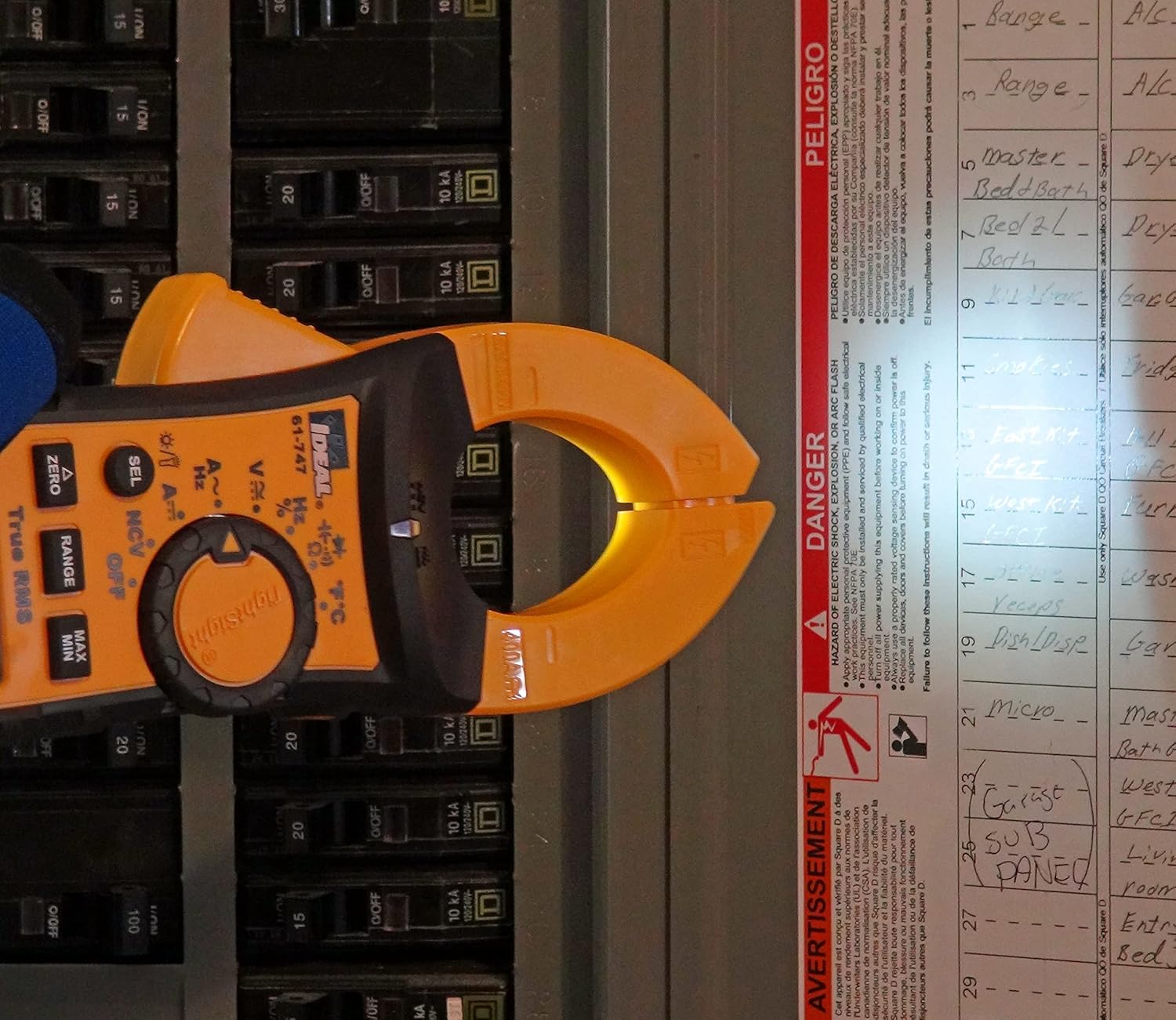
Figure 3.1: The IDEAL 61-747 Clamp Meter and its standard accessories.
4. Product Features and Components
The IDEAL 61-747 clamp meter incorporates several features designed for ease of use, accuracy, and safety:
- Clamp Head: Measures AC and DC current up to 400 Amps without breaking the circuit.
- TightSight LCD Display: A patented secondary display located at the bottom of the unit, allowing for easy reading in difficult positions.
- Main LCD Display: Primary display for all measurement readings.
- Function Dial: Rotary switch to select measurement modes.
- Non-Contact Voltage (NCV) Sensor: Integrated into the right tip of the clamp for detecting live voltage without direct contact.
- Built-in Flashlight: Illuminates the work area in low-light conditions.
- Backlit Displays: Both the main and TightSight displays can be backlit for visibility in dark environments.
- Probe Tip Holder: Located on the backside of the right clamp for convenient single-hand operation with test leads.
- Hanging Strap Mount: Compatible with IDEAL hanging straps (sold separately) for hands-free operation.
- Industrial Grade Overmolding: Enhances grip and provides drop protection.

Figure 4.1: Front view of the clamp meter highlighting key components.

Figure 4.2: Detail of the integrated probe tip holder for convenience.
5. Setup
5.1 Battery Installation
The meter operates on three 1.5V AAA batteries. To install or replace batteries:
- Ensure the meter is turned OFF.
- Locate the battery compartment on the back of the meter.
- Use a screwdriver to open the battery compartment cover.
- Insert the 3 AAA batteries, observing the correct polarity (+/-) as indicated inside the compartment.
- Replace the battery compartment cover and secure it with the screw.
5.2 Connecting Test Leads
For voltage, resistance, continuity, capacitance, and diode measurements, connect the included test leads:
- Insert the red test lead into the V/Ω/CAP/Hz/°C input jack.
- Insert the black test lead into the COM (common) input jack.
6. Operating Instructions
6.1 Powering On/Off
Rotate the function dial from the OFF position to any desired measurement function to power on the meter. To power off, rotate the dial back to the OFF position.
6.2 Measurement Functions
The 61-747 meter offers a variety of measurement capabilities:
- AC/DC Current (A~, A--): Use the clamp head to measure current up to 400 Amps. Open the clamp by pressing the lever, encircle a single conductor, and release the lever to close the clamp.
- AC/DC Voltage (V~, V--): Connect test leads to the circuit. Measures up to 600V.
- Resistance (Ω): Connect test leads across the component.
- Continuity (♫): Connect test leads across the circuit. An audible tone indicates continuity.
- Capacitance (CAP): Connect test leads across the capacitor.
- Diode Test (♫): Connect test leads across the diode.
- Frequency (Hz): Can be measured in conjunction with voltage or current.
- Temperature (°F/°C): Connect the K-Type thermocouple to the meter's input jacks.

Figure 6.1: Measuring current with the clamp meter, demonstrating the TightSight display.
6.3 Special Functions
- TightSight Display: The secondary display at the bottom of the meter mirrors the main display, providing an alternative viewing angle.
- Non-Contact Voltage (NCV): Select the NCV function. Place the right tip of the clamp near a live conductor. The red LED in the center of the meter will illuminate and an audible tone will sound if voltage is detected (40V-600V).
- Backlight: Press the backlight button (often combined with flashlight button) to illuminate the displays for better visibility in dim conditions.
- Flashlight: Press the flashlight button to activate the built-in flashlight.
- HOLD: Freezes the current reading on the display.
- MIN/MAX: Records the minimum and maximum readings over a period.
- RELATIVE (REL): Measures the difference between a stored reference value and the current reading.
- ZERO: Used to zero out the display for DC current measurements to remove residual magnetism.
- RANGE: Toggles between auto-ranging and manual ranging modes.
- Auto Power Off: The meter will automatically power off after a period of inactivity to conserve battery life. This feature can typically be disabled if needed (refer to the full user manual for specific instructions).

Figure 6.2: Using the Non-Contact Voltage (NCV) sensor.

Figure 6.3: The built-in flashlight illuminating the work area.
7. Maintenance and Care
Proper maintenance ensures the longevity and accuracy of your clamp meter:
- Cleaning: Wipe the meter with a damp cloth and mild detergent. Do not use abrasives or solvents. Ensure the meter is dry before storage or use.
- Battery Replacement: Replace batteries when the low battery indicator appears on the display. Remove batteries if the meter will not be used for an extended period.
- Storage: Store the meter in its soft storage pouch in a cool, dry place, away from direct sunlight and extreme temperatures.
- Calibration: For professional use, periodic calibration by a qualified service center is recommended to maintain accuracy.
8. Troubleshooting
If you encounter issues with your IDEAL 61-747 clamp meter, refer to the following common problems and solutions:
| Problem | Possible Cause | Solution |
|---|---|---|
| Meter does not power on. | Dead or incorrectly installed batteries. | Check battery polarity; replace with new 1.5V AAA batteries. |
| No reading or unstable reading. | Incorrect function selected; poor test lead connection; out of range. | Ensure correct function; check test lead connections; verify measurement is within meter's range. |
| NCV sensor not detecting voltage. | Voltage below detection threshold (40V); sensor not close enough to conductor. | Ensure voltage is within 40V-600V range; position sensor closer to the live conductor. |
| Display is dim or flickering. | Low battery. | Replace batteries. |
9. Specifications
Key technical specifications for the IDEAL 61-747 Clamp Meter:
| Parameter | Value |
|---|---|
| Model Number | 61-747 |
| Product Dimensions | 10 x 6 x 2 inches |
| Item Weight | 1.41 Pounds |
| Manufacturer | IDEAL |
| Power Source | Battery Powered (3 x 1.5V AAA) |
| Style | Digital |
| Color | Red |
| AC/DC Current Measurement | Up to 400 Amps |
| AC/DC Voltage Measurement | Up to 600 Volts |
| Non-Contact Voltage Detection Range | 40V to 600V |
| Temperature Measurement Range (Tester) | -40°F to 1832°F (-40°C to 1000°C) |
| Temperature Measurement Range (K-Type Thermocouple) | -40°C to 250°C (-40°F to 482°F) |
| Safety Rating | CAT III 600V |
| Display Type | Digital, 4000 Count, Dual Backlit Displays |
| Features | True RMS, TightSight Display, Flashlight, Probe Tip Holder, Hanging Strap Mount, Hold, Min/Max, Relative, Zero, Range, Auto Power Off |
10. Warranty and Support
For detailed warranty information and customer support, please refer to the official IDEAL Electrical documentation or contact IDEAL customer service.
An official User Manual in PDF format is available for download:


