
1. Introduction and Safety Information
This manual provides essential instructions for the safe assembly, operation, and maintenance of your WELCARE WC2288I Motorized Treadmill. Please read all instructions carefully before use to ensure proper function and to prevent injury.
Important Safety Warnings:
- Always consult with a physician before starting any exercise program.
- Keep children and pets away from the treadmill during operation.
- Place the treadmill on a solid, level surface with at least 2 meters of clear space behind it.
- Ensure the safety key is properly attached to your clothing before beginning your workout.
- Do not operate the treadmill if it is damaged or malfunctioning.
- Wear appropriate athletic footwear.
- Maximum user weight capacity is 100 kg. Do not exceed this limit.
2. Product Overview
Familiarize yourself with the main components of your WELCARE WC2288I Treadmill.
Console and Display
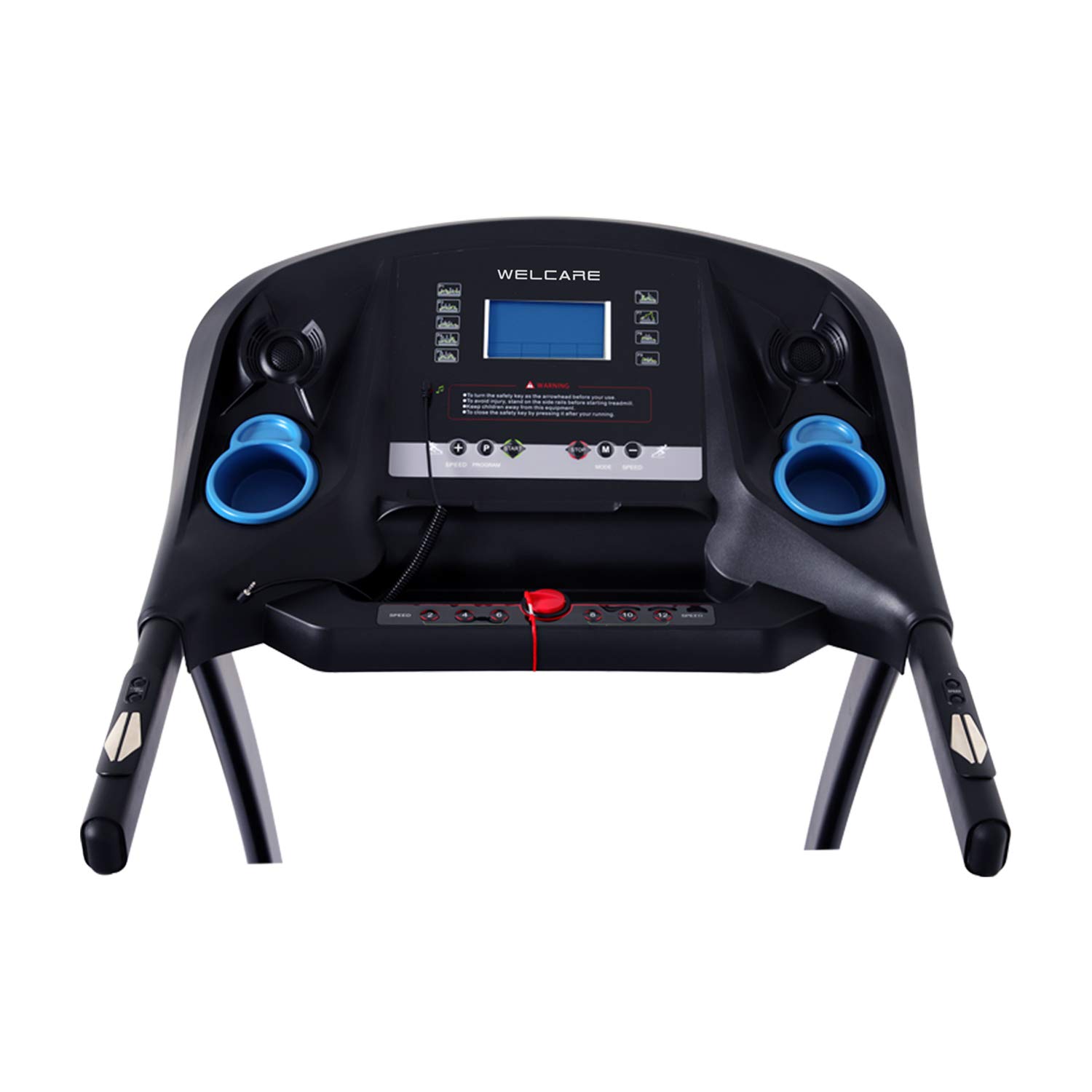
Image: The main console of the WELCARE WC2288I treadmill, featuring an LCD display, various control buttons for speed and incline, and integrated cup holders.
The central console features an LCD display that shows time, distance, speed, calories, and incline. Control buttons allow for manual adjustment of speed and incline, as well as program selection. Integrated cup holders are provided for convenience.
Handlebar Controls

Image: A close-up view of the right handlebar of the WELCARE WC2288I treadmill, showing integrated 'Start' and 'Stop' buttons, along with speed adjustment controls.
The handlebars include convenient buttons for quick start/stop and speed adjustments, allowing for easy control during your workout without reaching for the main console.
Folding Mechanism

Image: A side profile of the WELCARE WC2288I treadmill, illustrating its foldable design for space-saving storage. The model number 'WC-2288' is visible on the side frame.
The treadmill features an easy folding mechanism and a soft drop system, allowing you to safely and easily fold and unfold the running deck for storage.
3. Setup Instructions
Follow these steps to assemble and prepare your treadmill for first use.
3.1 Unpacking
- Carefully remove all components from the packaging.
- Check the included components against the packing list (TREADMILL, MANUAL, TOOLS).
- Retain packaging materials for future storage or transport.
3.2 Assembly
Assembly is required. Refer to the separate assembly guide included in your package for detailed, step-by-step instructions. Ensure all bolts and nuts are securely tightened before use.
3.3 Placement
- Place the treadmill on a firm, level surface.
- Ensure adequate clearance around the treadmill, especially at the rear (minimum 2 meters).
- Avoid placing the treadmill in direct sunlight or near heat sources.
3.4 Power Connection
- Connect the power cord to a grounded electrical outlet.
- Ensure the power switch on the treadmill is in the 'ON' position.
4. Operating Instructions
Learn how to operate your WELCARE WC2288I Treadmill for an effective workout.
4.1 Starting and Stopping
- Attach the safety key clip to your clothing and insert the safety key into its designated slot on the console.
- Press the 'START' button on the console or handlebar. The treadmill will begin at a low speed after a short countdown.
- To stop, press the 'STOP' button. For emergency stops, pull the safety key from the console.
4.2 Adjusting Speed and Incline
- Speed: Use the 'SPEED +' and 'SPEED -' buttons on the console or handlebars to adjust the running speed. The speed range is 1 to 16 Kilometers per Hour.
- Incline: Use the 'INCLINE +' and 'INCLINE -' buttons on the console to adjust the incline level. The treadmill features 15 levels of auto incline.
4.3 Using FITSHOW APP and Bluetooth Connectivity
- Download the FITSHOW APP from your device's app store.
- Enable Bluetooth on your mobile device and pair it with the treadmill (look for 'WELCARE WC2288I' or similar).
- Follow the in-app instructions to connect and control your treadmill, track workouts, and access additional features.
- The treadmill also supports wireless Bluetooth music playback.
5. Maintenance
Regular maintenance ensures the longevity and optimal performance of your treadmill.
5.1 Cleaning
- Wipe down the console and exterior surfaces with a damp cloth after each use.
- Do not use abrasive cleaners or solvents.
- Keep the area around the treadmill clean and free of dust.
5.2 Running Belt Lubrication
The running belt requires periodic lubrication to reduce friction and extend its lifespan. Refer to the separate maintenance guide or contact customer support for specific lubrication instructions and recommended lubricants.
5.3 Running Belt Adjustment
Over time, the running belt may become misaligned or loose. If the belt slips or moves to one side, refer to the separate maintenance guide for instructions on how to adjust the belt tension and alignment using the provided tools.
6. Troubleshooting
This section addresses common issues you might encounter with your treadmill.
| Problem | Possible Cause | Solution |
|---|---|---|
| Treadmill does not power on. | Power cord not connected, power switch off, circuit breaker tripped. | Check power cord connection, ensure power switch is ON, reset circuit breaker. |
| Running belt stops or slips. | Safety key dislodged, belt too loose, motor overload. | Ensure safety key is in place. Adjust belt tension (refer to maintenance section). Reduce user weight or speed. |
| Display shows an error code. | Sensor issue, motor issue, or other internal fault. | Note the error code and consult the full manual or contact customer support. |
| Unusual noise during operation. | Loose components, belt friction, motor issue. | Check for loose bolts. Lubricate running belt. If noise persists, contact support. |
7. Specifications
Technical details for the WELCARE WC2288I Motorized Treadmill.
- Model Name: WC2288I
- Brand: WELCARE
- Motor: 2 HP Continuous (4 HP Peak)
- Maximum Speed: 16 Kilometers per Hour
- Minimum Speed: 1 Kilometer per Hour
- Maximum Incline: 15 Levels Auto Incline
- Maximum Weight Recommendation: 100 Kilograms
- Display Type: LCD
- Connectivity: Bluetooth, FITSHOW APP
- Power Source: Corded Electric
- Frame Material: Alloy Steel
- Special Feature: Foldable
- Assembly Required: Yes
- Included Components: Treadmill, Manual, Tools
8. Warranty and Support
For warranty information, technical support, or service inquiries, please contact the manufacturer directly.
- Manufacturer: S AND T WELCARE EQUIPMENTS P LTD
- Contact Number: 9842993755
Please have your model number (WC2288I) and purchase date available when contacting support.