
1. Introduction
Thank you for choosing the Yaheetech Mid Mesh Back Office Chair. This manual provides essential information for the safe assembly, operation, and maintenance of your new office chair. Please read these instructions carefully before assembly and retain them for future reference.

Image 1.1: Front view of the Yaheetech Mid Mesh Back Office Chair, showcasing its mesh backrest, padded leather seat, and five-star base with casters.
2. Safety Information
- Ensure all parts are present and undamaged before assembly. Do not use if any parts are missing or broken.
- Follow assembly instructions precisely. Incorrect assembly can lead to instability and injury.
- Do not stand on the chair. Use it only for sitting.
- Do not exceed the maximum weight capacity of 265 pounds.
- Keep children away from the assembly area. Small parts can be a choking hazard.
- Periodically check all bolts and screws to ensure they are tight.
3. Package Contents
Before beginning assembly, verify that all components listed below are present in your package. Necessary tools and fittings are included.
- Backrest (1)
- Seat Cushion (1)
- Armrests (2)
- Gas Lift Cylinder (1)
- Gas Lift Cover (1)
- Five-Star Base (1)
- Casters (5)
- Mechanism Plate (1)
- Hardware Pack (Screws, Washers, Allen Wrench)
4. Setup and Assembly Instructions
Assembly typically takes about 15 minutes for an adult. Follow these steps carefully.
- Attach Casters to Base: Insert the five casters into the holes at the end of each leg of the five-star base. Push firmly until they click into place.
- Insert Gas Lift: Place the gas lift cylinder into the center hole of the five-star base. Cover it with the gas lift cover.
- Attach Mechanism Plate to Seat: Align the mechanism plate with the screw holes on the underside of the seat cushion. Ensure the front of the mechanism (with the lever) faces the front of the seat. Secure with screws using the provided Allen wrench.
- Attach Armrests to Seat: Attach the armrests to the sides of the seat cushion using the appropriate screws. Do not fully tighten yet.
- Attach Backrest to Armrests: Align the backrest with the armrests and secure with screws. Once all screws are in place for the armrests and backrest, tighten all screws firmly.
- Connect Seat Assembly to Gas Lift: Carefully place the assembled seat and backrest onto the gas lift cylinder, ensuring the center hole of the mechanism plate aligns with the top of the gas lift. Press down firmly to secure.
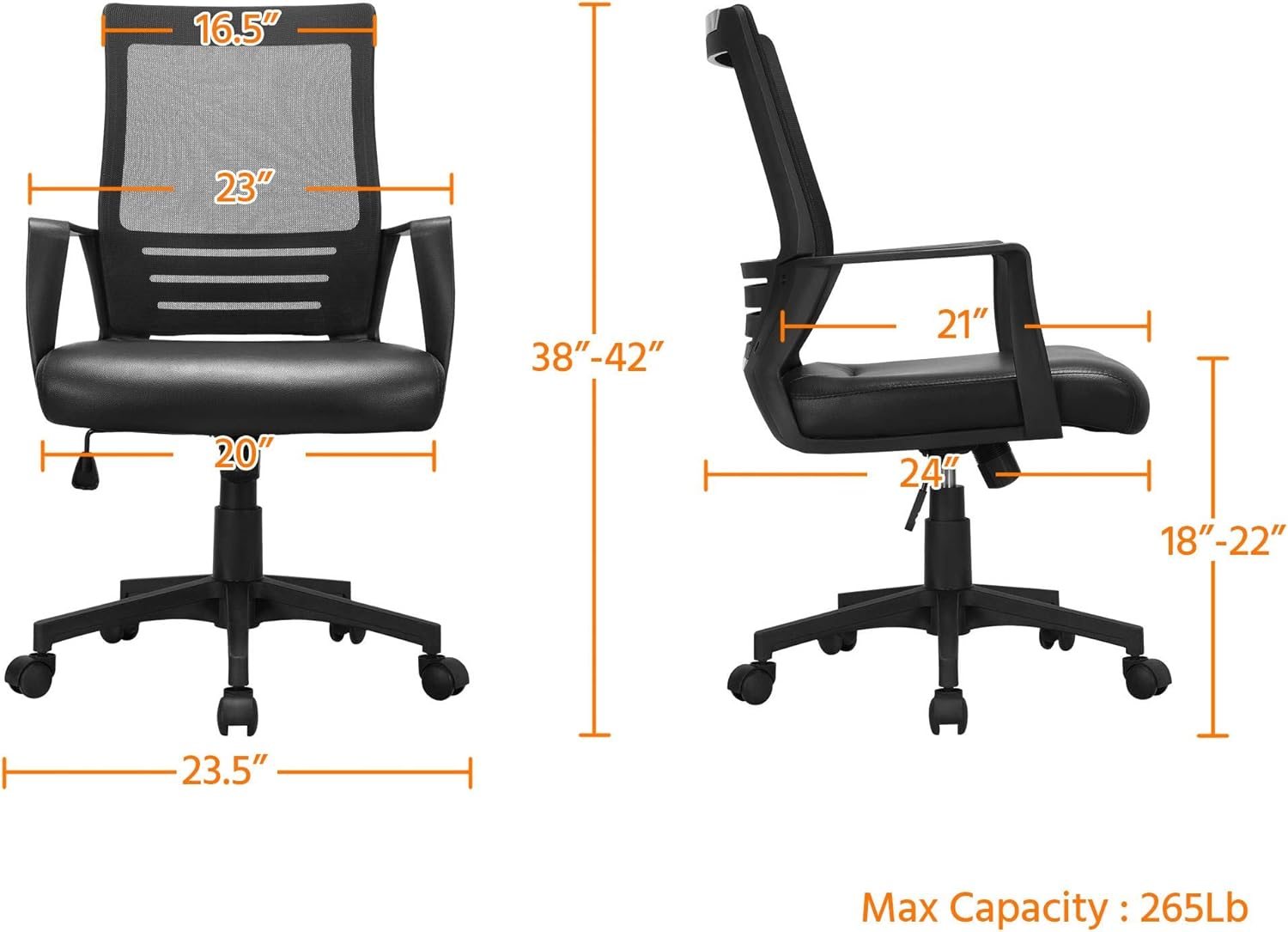
Image 4.1: Dimensional diagram of the Yaheetech office chair, illustrating height, width, and depth measurements, and maximum capacity of 265 lbs.
5. Operating Instructions
Your Yaheetech office chair features several adjustable functions for personalized comfort.
5.1. Seat Height Adjustment
To adjust the seat height (from 18 to 22 inches):
- To raise the seat: While seated, lift the lever located on the right side of the seat. The seat will rise. Release the lever at the desired height.
- To lower the seat: While seated, lift the lever. Apply slight body weight to lower the seat. Release the lever at the desired height.
5.2. Tilt Function and Tension Adjustment
The chair features a rocking function and adjustable tilt tension.
- Activate/Deactivate Tilt: Pull the same lever (used for height adjustment) outwards to allow the chair to rock. Push the lever inwards to lock the chair in an upright position.
- Adjust Tilt Tension: Turn the round knob located beneath the seat (at the front of the mechanism plate). Turn clockwise to increase tension (making it harder to recline) or counter-clockwise to decrease tension (making it easier to recline).
5.3. 360° Swivel and Mobility
The chair is designed with 5 dual-wheel nylon casters for smooth 360° mobility. This allows for effortless movement across hard floors without scratching and without the need to stand up.

Image 5.1: Visual guide to the chair's adjustable features, including the lever for activating/deactivating tilt and adjusting seat height, and the knob for tilt tension.

Image 5.2: Illustration demonstrating the ergonomic lumbar support provided by the chair's design, conforming to the natural curve of the spine.
6. Maintenance
To ensure the longevity and appearance of your Yaheetech office chair, follow these simple maintenance guidelines:
- Cleaning: Wipe clean with a damp cloth. For the PU leather seat, use a mild soap solution if necessary, then wipe dry immediately. Avoid harsh chemicals or abrasive cleaners.
- Inspection: Periodically check all screws and bolts for tightness. Re-tighten if loose to maintain stability and safety.
- Casters: Keep casters free of hair and debris to ensure smooth rolling.

Image 6.1: Close-up of the PU leather seat, showing its texture and water-resistant properties, making it easy to clean.

Image 6.2: Detail of the mesh backrest, illustrating its breathable design for enhanced comfort during prolonged use.
7. Troubleshooting
If you encounter any issues with your chair, refer to the following common problems and solutions:
| Problem | Possible Cause | Solution |
|---|---|---|
| Chair wobbles or is unstable. | Loose screws or uneven assembly. | Check and tighten all assembly screws. Ensure the chair is on a flat, even surface. |
| Seat height adjustment not working. | Gas lift cylinder issue or lever malfunction. | Ensure the lever is fully engaged. If the issue persists, the gas lift may need replacement. |
| Chair does not rock or tilt. | Tilt function locked or tension too high. | Pull the lever outwards to unlock the tilt. Turn the tension knob counter-clockwise to reduce tension. |
| Casters not rolling smoothly. | Debris caught in casters. | Turn the chair over and remove any hair, dust, or debris from the caster wheels. |
8. Specifications
| Feature | Detail |
|---|---|
| Brand | Yaheetech |
| Model Name | Mid Mesh Back Leather Padded Seat Computer Chair with Lumbar Support |
| Color | Black |
| Product Dimensions (D x W x H) | 24"D x 20"W x 42"H (Adjustable Height: 38-42") |
| Seat Height Adjustment | 18" - 22" |
| Maximum Weight Recommendation | 265 Pounds |
| Back Style | Solid Back (Mesh) |
| Special Feature | Adjustable, Ergonomic, Lumbar Support, Swivel |
| Material | PU Leather (Seat), Mesh (Back), Foam (Fill), Plastic (Base) |
| Furniture Base Movement | Swivel, Caster Wheels |
| Included Components | Casters, User Manual, Assembly Hardware |
| Product Care Instructions | Wipe Clean |
9. Warranty and Support
Yaheetech is committed to providing quality products. For any questions, concerns, or assistance with your product, please contact Yaheetech customer support. Please refer to your purchase documentation for specific warranty details.
For further assistance, please visit the Yaheetech Store on Amazon.