

1. Product Overview
The Remax RB-T25 Wireless Earbuds offer a high-fidelity sound experience with the convenience of Bluetooth 5.0 connectivity. Designed for comfort and portability, these in-ear earbuds come with a compact charging case, ensuring your music and calls are always within reach. This manual provides essential information for setting up, operating, and maintaining your RB-T25 earbuds.

Image: The Remax RB-T25 wireless earbud resting inside its portable charging case, with the lid open, showcasing the sleek black design and charging contacts.
2. Package Contents
Please verify that all items are present in your package:
- Remax RB-T25 Wireless Earbuds (Left and Right)
- Portable Charging Case
- Ear Cushions (various sizes)
- USB Charging Cable
- User Manual
3. Setup
3.1. Charging the Earbuds and Case
- Before first use, fully charge the charging case and earbuds.
- Place the earbuds into the charging case. Ensure they are correctly seated to make contact with the charging pins.
- Connect the USB charging cable to the charging port on the case and to a compatible USB power source.
- The indicator light on the case will show charging status. Once fully charged, the indicator light will change or turn off.
3.2. Pairing with Your Device
- Ensure the earbuds are charged and placed in the charging case.
- Open the charging case. The earbuds will automatically enter pairing mode, indicated by a flashing light on one or both earbuds.
- On your mobile device, go to Bluetooth settings and enable Bluetooth.
- Search for available devices and select "RB-T25" from the list.
- Once connected, a voice prompt will confirm successful pairing, and the earbud indicator lights will turn off or flash slowly.
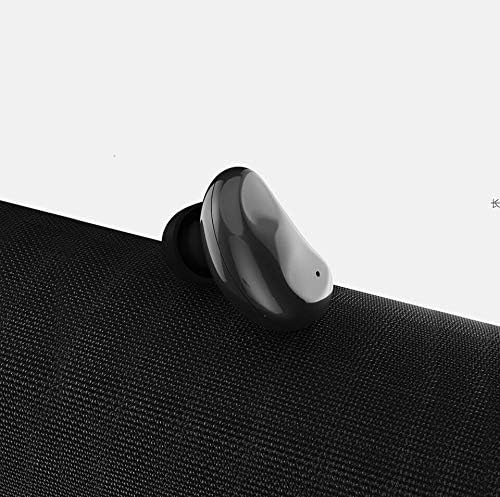
Image: A single Remax RB-T25 wireless earbud, showcasing its compact and ergonomic design, ready for pairing.
3.3. Wearing the Earbuds
- Identify the Left (L) and Right (R) earbuds.
- Gently insert each earbud into your ear canal.
- Rotate the earbud slightly until it fits snugly and comfortably. A proper fit ensures optimal sound quality and noise isolation.
- If necessary, try different sizes of ear cushions to find the best fit for your ears.

Image: A transparent view of the Remax RB-T25 earbud, highlighting its internal components and ergonomic shape designed for a secure fit.
4. Operating Instructions
4.1. Power On/Off
- Power On: The earbuds automatically power on when removed from the charging case. Alternatively, press and hold the multi-function button on each earbud for approximately 3 seconds.
- Power Off: The earbuds automatically power off when placed back into the charging case. Alternatively, press and hold the multi-function button on each earbud for approximately 5 seconds.
4.2. Music Playback
- Play/Pause: Single tap the multi-function button on either earbud.
- Next Track: Double tap the multi-function button on the right earbud.
- Previous Track: Double tap the multi-function button on the left earbud.
4.3. Call Management
- Answer/End Call: Single tap the multi-function button on either earbud.
- Reject Call: Press and hold the multi-function button on either earbud for approximately 2 seconds.
4.4. Voice Assistant
- Activate Voice Assistant: Triple tap the multi-function button on either earbud to activate your device's voice assistant (e.g., Siri, Google Assistant).
5. Maintenance
5.1. Cleaning
- Regularly clean the earbuds and charging case with a soft, dry, lint-free cloth.
- Do not use abrasive cleaners, alcohol, or chemical solvents.
- Ensure charging contacts on both earbuds and case are clean and free of debris to maintain proper charging.
5.2. Storage
- When not in use, store the earbuds in their charging case to protect them from dust and damage.
- Store the device in a cool, dry place, away from extreme temperatures and direct sunlight.
5.3. Battery Care
- To prolong battery life, avoid fully discharging the earbuds and charging case frequently.
- Charge the device regularly, even if not in frequent use, to prevent deep discharge.
6. Troubleshooting
- Earbuds not pairing: Ensure both earbuds are charged. Place them back in the case, close the lid, then open it again to re-enter pairing mode. Check your device's Bluetooth settings and try reconnecting.
- No sound from one earbud: Try placing both earbuds back in the charging case, closing the lid, and then taking them out again. Ensure both are connected to your device.
- Charging issues: Verify the charging cable is securely connected to both the case and the power source. Clean the charging contacts on the earbuds and inside the case.
- Low volume: Adjust the volume on your connected device. Ensure the earbuds are properly seated in your ears.
- Intermittent connection: Ensure there are no obstructions between the earbuds and your device. Move closer to your device. Avoid environments with strong Wi-Fi or other wireless interference.
7. Technical Specifications
| Feature | Specification |
|---|---|
| Bluetooth Version | V5.0 |
| Transmission Distance | 10 meters |
| Frequency Range | 2.38GHz - 2.45GHz |
| Frequency Response | 20Hz - 20KHz |
| Sensitivity | 90 +/- 3dB |
| Microphone Sensitivity | -42dB |
| Resistance | 600 mohm |
| Rated Power | 16mW |
| Drive Unit | 6MM |
| Play Time | About 2.5 hours |
| Standby Time | About 24 hours |
| Charging Time | About 0.5 hour |
| Earbud Battery | 30mAh |
| Charging Bin Battery | 120mAh |
| Supported Protocols | HSP / HFP / A2DP / AVRCP |
| Noise Control | Active Noise Cancellation |
| Material | Plastic |
| Color | Black |
8. Warranty and Support
8.1. Warranty Information
The Remax RB-T25 Wireless Earbuds are covered by a manufacturer's warranty against defects in materials and workmanship. Please refer to the warranty card included in your package or contact your retailer for specific warranty terms and conditions.
8.2. Customer Support
For further assistance, technical support, or inquiries regarding your Remax RB-T25 Wireless Earbuds, please contact Remax customer service or your local distributor. Contact information can typically be found on the Remax official website or on your product packaging.

