
1. Introduction
This manual provides essential information for the installation, operation, and maintenance of your WD Red Plus 4TB NAS Internal Hard Drive (Model WD40EFPX). Designed for Network Attached Storage (NAS) systems, this drive offers reliable performance for small to medium business environments and SOHO customers. It is optimized for 24x7 operation and supports workloads up to 180 TB/year.

Figure 1: Front view of the WD Red Plus 4TB NAS Internal Hard Drive.
Product Overview Video
Video 1: An overview of the WD Red Plus NAS Internal Hard Drive HDD, highlighting its features and intended use.
2. Setup
2.1 Physical Installation
The WD Red Plus drive is a 3.5-inch form factor internal hard drive designed for NAS enclosures. Ensure your NAS system or computer case has a compatible 3.5-inch drive bay and SATA power/data connectors.
- Prepare your system: Power down your NAS or computer and disconnect it from the power source.
- Open the enclosure: Access the internal drive bays of your NAS or computer case.
- Mount the drive: Secure the WD Red Plus drive into an available 3.5-inch drive bay using the provided mounting screws.
- Connect cables: Connect a SATA data cable from the drive to an available SATA port on your NAS motherboard or controller. Connect a SATA power cable from your power supply to the drive.
- Close the enclosure: Reassemble your NAS or computer case.
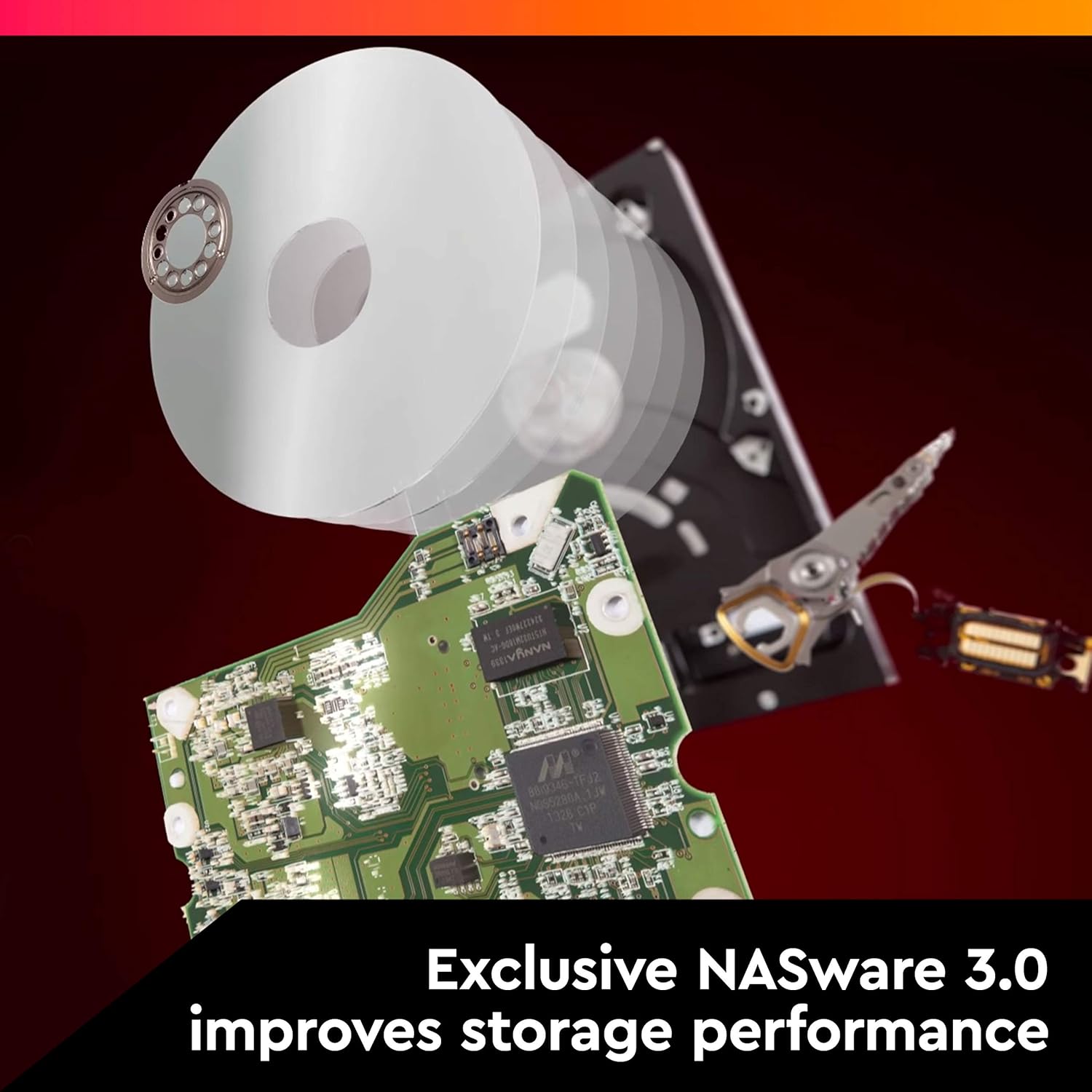
Figure 2: Bottom view of the hard drive, illustrating the SATA data and power connectors for proper installation.
2.2 Initial Configuration
After physical installation, power on your NAS system. The NAS operating system should detect the new drive. Follow your NAS system's instructions for initializing, formatting, and adding the drive to your storage pool or RAID configuration. The drive features NASware firmware for enhanced compatibility and performance within NAS environments.
Installation Video Guide
Video 2: A detailed unboxing and installation guide for the Western Digital Red+ 4TB Hard Drive, demonstrating the physical setup process.
3. Operating the WD Red Plus Drive
The WD Red Plus drive is engineered for continuous operation in NAS environments. Its design supports 24x7 usage, making it suitable for always-on systems.
3.1 Workload and Performance
This drive is rated for a workload rate of up to 180 TB/year. The workload rate is defined as the amount of user data transferred to or from the hard drive annually. This metric is crucial for understanding the drive's durability under sustained data operations typical in NAS applications.
With a SATA 6 Gb/s interface and a 5400 RPM rotational speed, the drive delivers reliable data transfer speeds, including a read speed of up to 175 MB/s. The 128 MB cache further enhances performance by optimizing data access.

Figure 3: Illustrates the typical environment for NAS systems, such as small or medium businesses, where the WD Red Plus drive excels.
3.2 NASware 3.0 Technology
The integrated NASware 3.0 firmware optimizes the drive's performance and reliability within NAS environments. This technology helps to reduce common hard drive issues in NAS systems, such as compatibility problems, data integrity concerns, and power consumption. It also includes features like error recovery controls, which are vital for RAID configurations.

Figure 4: Depicts the internal components of the hard drive, highlighting the NASware 3.0 technology that enhances storage performance and reliability.
4. Maintenance
4.1 General Care
- Environment: Ensure the NAS enclosure provides adequate ventilation to prevent overheating. Operate the drive within its specified temperature range.
- Physical Handling: Avoid dropping or subjecting the drive to physical shocks, especially when it is operating.
- Cleanliness: Keep the drive and its connectors free from dust and debris.
4.2 Firmware Updates
Periodically check the Western Digital support website for any available firmware updates for your WD Red Plus drive. Firmware updates can improve performance, stability, and compatibility. Always follow the manufacturer's instructions carefully when performing firmware updates.
4.3 Data Backup
While the WD Red Plus drives are designed for reliability in RAID configurations, it is crucial to implement a comprehensive data backup strategy. Regular backups protect against data loss due to multiple drive failures, accidental deletion, or other unforeseen events.
5. Troubleshooting
If you encounter issues with your WD Red Plus drive, consider the following troubleshooting steps:
- Drive Not Detected:
- Ensure all SATA data and power cables are securely connected to both the drive and the motherboard/controller.
- Verify that the drive bay is properly seated and secured.
- Check your NAS system's BIOS/UEFI settings or operating system's disk management utility to see if the drive is recognized.
- Test the drive in a different SATA port or with different cables if possible.
- Slow Performance:
- Check the NAS system's resource utilization (CPU, RAM, network) to ensure they are not bottlenecks.
- Verify that the drive is operating at its optimal speed (SATA 6 Gb/s).
- Ensure the drive's firmware is up to date.
- Run diagnostic tools provided by your NAS manufacturer or Western Digital to check drive health.
- Unusual Noises:
- Clicking, grinding, or repetitive noises can indicate a potential drive failure. Immediately back up any critical data and contact Western Digital support.
For advanced troubleshooting or issues not resolved by these steps, refer to your NAS system's documentation or contact Western Digital Technical Support.
6. Specifications
| Feature | Detail |
|---|---|
| Model Number | WD40EFPX |
| Digital Storage Capacity | 4 TB |
| Hard Disk Interface | Serial ATA-600 |
| Connectivity Technology | SATA |
| Brand | WD |
| Hard Disk Form Factor | 3.5 Inches |
| Hard Disk Description | Mechanical Hard Disk |
| Compatible Devices | Desktop |
| Installation Type | Internal Hard Drive |
| Hard Disk Rotational Speed | 5400 RPM |
| Read Speed | 175 Megabytes Per Second |
| Data Transfer Rate | 6 Gigabits Per Second |
| Cache Memory Installed Size | 128 MB |
| Item Weight | 600 Grams |
| Item Dimensions (L x W x Thickness) | 5.79" x 4" x 1.03" |
| UPC | 718037884394 |

Figure 5: Top view of the WD Red Plus 4TB HDD, displaying the model number WD40EFPX and serial number WCPPP1234567.
7. Warranty & Support
7.1 Limited Warranty
The WD Red Plus 4TB NAS Internal Hard Drive (Model WD40EFPX) comes with a 3-year limited warranty. This warranty covers defects in materials and workmanship under normal use. For specific terms and conditions, please refer to the warranty information included with your product or visit the official Western Digital website.

Figure 6: Illustrates the 3-year limited warranty provided with the WD Red Plus NAS HDD.
7.2 Technical Support
For technical assistance, product registration, or to access additional resources, please visit the official Western Digital support website. You can find drivers, software, and FAQs to help you with your product.
Western Digital Support Website: https://support.wdc.com


