
Introduction
Welcome and thank you for choosing the cellularline TABLE STAND. This universal holder is designed to provide a stable and adjustable viewing experience for your smartphones and tablets. Its compact and foldable design ensures portability and convenience, making it an ideal accessory for various settings.
Product Features
- Compact and foldable for easy portability.
- Two adjustable heights for vertical and horizontal viewing.
- Metal finishes combined with anti-slip and anti-scratch rubber backing.
The TABLE STAND is engineered for versatility, allowing you to position your device optimally for various activities, from video calls to media consumption.
Package Contents
- 1 x cellularline TABLE STAND Universal Holder
Please ensure all components are present upon unboxing.
Setup Instructions
- Unfold the Stand: Gently unfold the stand from its compact, folded position. The base and the device support arm will extend.

Image: The cellularline TABLE STAND shown in its folded, compact state, ready for transport or storage.

Image: The cellularline TABLE STAND fully unfolded, supporting a smartphone in a vertical orientation.
- Adjust Height and Angle: The stand features an adjustable arm. Carefully extend or retract the arm to achieve your desired viewing height. The device support can also be tilted to adjust the viewing angle.

Image: A side view of the stand illustrating the adjustable arm, which allows for various height settings.
- Place Your Device: Position your smartphone or tablet onto the support cradle. The anti-slip rubber backing will help secure your device.

Image: A smartphone is shown resting securely on the stand's cradle, highlighting the anti-slip surface that prevents movement.
The stand is designed for both vertical and horizontal device orientation.
Operating Instructions
The cellularline TABLE STAND is straightforward to operate:
- Vertical Viewing: Place your smartphone or tablet vertically on the stand for portrait mode viewing, ideal for reading or video calls.
Image: A smartphone is positioned vertically on the stand, demonstrating its use for portrait viewing.
- Horizontal Viewing: Rotate your device to a horizontal position for landscape mode viewing, suitable for watching videos or gaming.
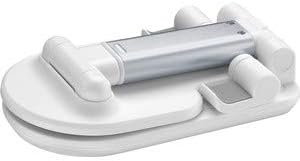
Image: A tablet is displayed horizontally on the stand, showcasing its functionality for landscape viewing.
- Adjusting for Stability: Ensure the stand is placed on a flat, stable surface. The anti-slip base provides additional grip.
The stand's design allows for easy access to charging ports and buttons on most devices.
Care and Maintenance
- Cleaning: Wipe the stand with a soft, dry cloth. For stubborn marks, a slightly damp cloth can be used, followed by immediate drying.
- Avoid Harsh Chemicals: Do not use abrasive cleaners, solvents, or strong detergents, as these may damage the finish or rubber components.
- Storage: When not in use, fold the stand into its compact form for easy storage and to protect it from dust.
Proper care will ensure the longevity and optimal performance of your TABLE STAND.
Troubleshooting
- Issue: Stand feels unstable.
- Solution: Ensure the stand is fully unfolded and placed on a flat, level surface. Check that your device is centered on the support cradle.
- Issue: Device slips on the support.
- Solution: Verify that the anti-slip rubber backing is clean and free from debris. Ensure your device is properly seated.
- Issue: Difficulty adjusting the height/angle.
- Solution: Apply gentle, firm pressure when adjusting. The joints are designed to hold position securely. Do not force adjustments.
If you encounter issues not listed here, please contact cellularline customer support.
Product Specifications
| Feature | Detail |
|---|---|
| Brand | cellularline |
| Model | TABLESTANDW |
| Product Dimensions | 9 x 17.5 x 3 cm (folded) |
| Weight | 100 g |
| Material | Satin Steel, Rubber |
| Color | White |
| Compatible Devices | Smartphones, Tablets |
| Installation Type | Tabletop |
| Additional Features | Adjustable height, Foldable, Anti-slip, Anti-scratch |
| Batteries Required | No |
Warranty Information and Customer Support
The cellularline TABLE STAND comes with a standard manufacturer's warranty. Please refer to the warranty card included in your product packaging for specific terms and conditions.
For technical support, product inquiries, or warranty claims, please visit the official cellularline website or contact their customer service department.
Note: Keep your proof of purchase for warranty purposes.