
PAGARIA SAN101
PAGARIA Portable Radio & Alarm Clock Bluetooth Speaker
Model: SAN101
User Instruction Manual
1. Product Overview
The PAGARIA Portable Radio & Alarm Clock Bluetooth Speaker (Model SAN101) is a versatile audio device designed for convenience and high-quality sound. It integrates multiple functions including a Bluetooth speaker, AM/FM radio, digital alarm clock, and media playback from USB and SD cards. Its compact design and rechargeable battery make it ideal for both indoor and outdoor use.
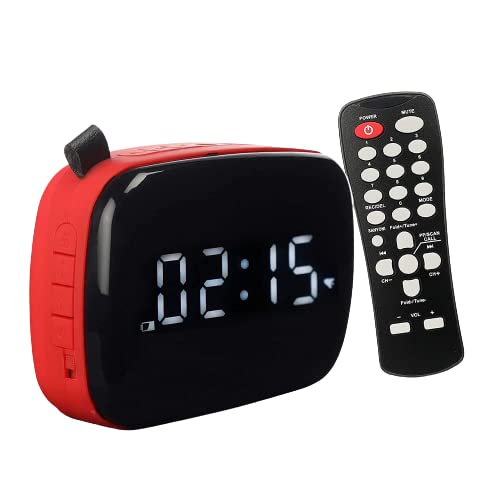
Figure 1.1: PAGARIA Portable Radio & Alarm Clock Bluetooth Speaker with included remote control.
2. What's in the Box
- PAGARIA Portable Radio & Alarm Clock Bluetooth Speaker (SAN101)
- Remote Control
- Charging Cable (Micro USB)
- AUX Cable
- User Manual (this document)
3. Product Controls and Ports
Familiarize yourself with the various buttons, ports, and indicators on your device to ensure proper operation.

Figure 3.1: Detailed diagram of the speaker's controls and ports.
- AL / M: Set Alarm / Clock Time
- Volume Down / Previous Track / Station: Decrease volume, navigate to previous track/station.
- Mode Key: Switch between Bluetooth, FM, AM, and Clock modes.
- Sleep Time: Set sleep timer.
- Play / Pause / Accept Call: Control playback or answer calls in Bluetooth mode.
- Volume Up / Next Track / Station: Increase volume, navigate to next track/station.
- FM: Play FM / Recording.
- AUX Jack: For external audio input.
- USB Slot: For USB drive playback.
- SD / TF Card Reader: For SD/TF card playback.
- Charging Port: Micro USB port for charging.
- Power On / Off: Slide switch for main power.
4. Setup Guide
4.1. Initial Charging
Before first use, fully charge the device. Connect the provided Micro USB charging cable to the speaker's charging port and the other end to a USB power adapter (not included) or a computer's USB port. The LED indicator near the charging port will illuminate red during charging and turn off when fully charged. A full charge typically takes 5 to 7 hours.
4.2. Powering On/Off
Locate the power slide switch on the side of the speaker. Slide it to the 'ON' position to power on the device. Slide it to the 'OFF' position to power off. The display will activate when the device is powered on.
4.3. Setting the Clock
In clock mode, press and hold the AL / M button. Use the Volume Up and Volume Down buttons to adjust the hours, then press AL / M again to confirm. Repeat for minutes. The display supports 12 and 24-hour formats.
5. Operating Instructions
5.1. Bluetooth Mode
- Power on the speaker.
- Press the Mode button until "BT" appears on the display, indicating Bluetooth mode.
- On your mobile device, enable Bluetooth and search for "PAGARIA SAN101" (or similar).
- Select the device to pair. A confirmation tone will sound upon successful connection.
- You can now play audio from your device through the speaker. Use the Play/Pause, Volume Up/Down, and Next/Previous Track buttons on the speaker or remote to control playback.

Figure 5.1: Connecting to the speaker via Bluetooth.
5.2. Radio (AM/FM)
- Press the Mode button to switch to FM or AM radio mode. The current frequency will be displayed.
- Auto-Scan: Press and hold the Play/Pause button to automatically scan and save available radio stations.
- Manual Tuning: Use the Next/Previous Track/Station buttons to manually tune to desired frequencies.
- For optimal reception, ensure the speaker is placed in an open area. An external antenna can be connected to the 3.5mm jack for improved AM/FM reception.

Figure 5.2: Using the AM/FM radio function.
5.3. USB/SD Card Playback
- Insert a USB drive or SD/TF card into the respective slot on the speaker.
- The speaker will automatically switch to USB or SD card mode and begin playing audio files. If not, press the Mode button to select the correct source.
- Use the Play/Pause, Volume Up/Down, and Next/Previous Track buttons on the speaker or remote to control playback.
- The remote control allows for folder switching, a convenient feature for navigating large music libraries.
5.4. Alarm Clock Functionality
- Setting Alarm: In clock mode, press the AL / M button once to enter alarm setting mode. Use Volume Up/Down to set the hour, then press AL / M to confirm. Repeat for minutes.
- Alarm Tone: You can personalize your alarm tone using music from a micro SD card.
- Disabling Alarm: Press the AL / M button again to toggle the alarm on or off.

Figure 5.3: The speaker functioning as a digital alarm clock.
5.5. Recording Function
The speaker supports recording from various sources directly to a USB drive or SD card. This includes microphone recording and Bluetooth recording.
- Ensure a USB drive or SD card is inserted.
- Select the desired input source (e.g., FM radio, Bluetooth audio).
- Press the REC button on the remote control to start recording. Press again to stop.
- Recorded files will be saved to the inserted storage device.

Figure 5.4: The recording feature allows for personalized messages.
5.6. Remote Control Usage
The included remote control provides convenient access to all major functions from a distance. Refer to Figure 3.1 for button layout and functions. Key functions include power, mute, mode selection, volume control, track/station navigation, alarm settings, and recording.
6. Maintenance
6.1. Cleaning
Wipe the speaker with a soft, dry cloth. Do not use abrasive cleaners, waxes, or solvents as they may damage the finish. Avoid exposing the device to excessive dust or moisture.
6.2. Battery Care
The device is equipped with a built-in 2400mAh Lithium battery. To prolong battery life:
- Avoid fully discharging the battery frequently.
- Charge the device regularly, even if not in use, to maintain battery health.
- Store the device in a cool, dry place when not in use for extended periods.

Figure 6.1: The speaker features a rechargeable battery lasting up to 6 hours (2400 mAh).
7. Troubleshooting
| Problem | Possible Cause | Solution |
|---|---|---|
| Device does not power on. | Battery is depleted. | Charge the device fully using the provided charging cable. |
| No sound or low volume. | Volume is too low; device is muted; incorrect mode selected. | Increase volume; check mute status; ensure correct mode (Bluetooth, USB, SD, Radio) is selected. |
| Bluetooth pairing fails. | Speaker is not in pairing mode; device is too far; interference. | Ensure speaker is in Bluetooth mode; move devices closer; restart both devices. |
| Poor radio reception. | Weak signal; environmental interference; internal antenna limitation. | Relocate the speaker to an open area; connect an external antenna to the 3.5mm jack for improved reception. |
| USB/SD card not recognized or playback issues. | Incorrect file format; corrupted files; low battery; card/drive not fully inserted. | Ensure files are in compatible format; reinsert the card/drive; charge the device; try a different card/drive. |
| Device does not switch off completely (LED remains on). | Possible software state or minor power drain. | Ensure the main power slide switch is in the 'OFF' position. If the issue persists, contact customer support. |
8. Specifications
| Feature | Detail |
|---|---|
| Brand | PAGARIA |
| Model | SAN101 |
| Colour | Red (as per current model) |
| Display Type | LED |
| Power Source | Battery Powered |
| Battery Type | Lithium Ion (2400mAh) |
| Connectivity | Bluetooth, USB, SD Card, AUX |
| Tuner Technology | AM, FM |
| Speaker Output Power | 7.5 Watts |
| Item Weight | 480 Grams |
| Product Dimensions (LxWxH) | 8 x 14 x 9 cm |
| Special Features | Alarm Clock, Recording Function (Mic/Bluetooth), Remote Control |
9. Warranty and Support
9.1. Warranty Information
This PAGARIA product comes with a 1 Year Warranty from the date of purchase. Please retain your purchase receipt as proof of warranty. The warranty covers manufacturing defects and issues arising from normal use.
9.2. Customer Support
For any queries, technical assistance, or warranty claims, please refer to the contact information provided on the product packaging or visit the official PAGARIA website. Customer support is available to clarify doubts and assist with product operation.
Related documentsSAN101


Ask a question about this manual
Ask about setup, troubleshooting, compatibility, parts, safety, or missing instructions. Manuals+ will review the question and use this page’s manual context to help answer it.