
PAGARIA SAN101
PAGARIA Portable Radio & Alarm Clock Bluetooth Speaker User Manual
Model: SAN101
Product Overview
The PAGARIA Portable Radio & Alarm Clock Bluetooth Speaker (Model SAN101) is a versatile audio device designed for various listening and recording needs. It combines a portable radio, an alarm clock, and a Bluetooth speaker into one compact unit. Key features include wireless connectivity, a digital LED display, and multiple playback options.
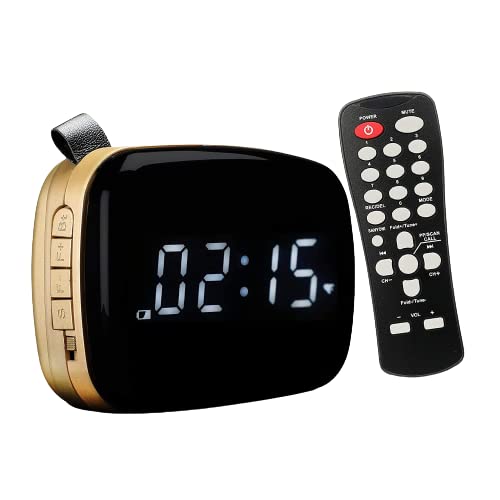
Image: The PAGARIA Portable Radio and Alarm Clock Bluetooth Speaker in golden color, shown with its accompanying remote control. The speaker features a large LED display for time and function indicators.

Image: Top view of the PAGARIA speaker, showcasing the dual speaker grilles and the Pagaria logo, indicating the audio output area.
This device offers clear sound quality with efficient bass effects, even at high volumes. It supports various media inputs including USB, SD card, and AUX. Additionally, it features a recording function for voice, FM radio, Bluetooth audio, USB, and SD content.
- Integrated Functions: Bluetooth speaker, AM/FM radio, digital alarm clock, and recording capabilities.
- Connectivity: Bluetooth, USB, SD Card, AUX.
- Display: LED display for time and mode indication.
- Power: Built-in 2400mAh rechargeable Lithium battery.
- Audio Output: 5-watt speaker with clear sound and bass.
- Accessories: Includes a charging cable, remote control, user manual, remote battery, and AUX cable.
Setup Guide
- Unboxing and Initial Inspection: Carefully remove all components from the packaging. Verify that all listed accessories are present: the speaker unit, remote control, charging cable, and AUX cable.
-
Charging the Device:
Connect the provided charging cable to the micro USB port on the speaker and the other end to a standard USB power adapter (not included) or a computer's USB port. The LED indicator near the charging port will illuminate during charging and turn off when fully charged. A full charge typically takes 5 to 7 hours from 10% to 90% battery level. Ensure the device is fully charged before first use for optimal battery life.

Image: A man is shown running outdoors with the PAGARIA speaker, emphasizing its portable design and the convenience of its rechargeable battery for on-the-go use.
- Remote Control Battery Installation: The remote control comes with batteries. If not pre-installed, open the battery compartment on the back of the remote and insert the provided batteries, observing the correct polarity (+/-).
- Powering On: Locate the power switch on the speaker unit. Slide it to the 'ON' position. The LED display will light up, indicating the device is ready for operation.
Operating Instructions
1. Bluetooth Connectivity

Image: A woman is shown happily connecting her smartphone to the PAGARIA speaker, illustrating the ease of Bluetooth pairing.
- Ensure the speaker is powered on.
- Press the 'MODE' button on the speaker or remote until "BT" appears on the LED display, indicating Bluetooth mode.
- On your smartphone or other Bluetooth-enabled device, enable Bluetooth and search for available devices.
- Select "PAGARIA" (or similar name) from the list of devices.
- Once paired, the speaker will emit a confirmation sound, and you can now play audio wirelessly.
2. Radio (AM/FM) Operation

Image: Hands holding the PAGARIA speaker, which displays "94.3" on its LED screen, indicating it is in FM radio mode and tuned to a specific frequency.
- Press the 'MODE' button to switch to FM or AM radio mode. The display will show the frequency.
- Automatic Scan: Press and hold the 'PLAY/PAUSE' button (or 'SCAN' on remote) to automatically scan and save available stations.
- Manual Tuning: Use the 'PREV/CH-' and 'NEXT/CH+' buttons to manually tune to desired frequencies or navigate through saved stations.
- For improved reception, ensure the device is not near strong electrical interference. An external antenna (not included) can be connected to the 3.5mm jack for better AM reception.
3. USB/SD Card Playback
- Insert a USB flash drive or an SD card (up to 16GB) into the respective port.
- The speaker will automatically switch to USB/SD mode and begin playing audio files (MP3 format supported).
- Use the 'PREV/CH-' and 'NEXT/CH+' buttons to skip tracks. Use the 'PLAY/PAUSE' button to pause or resume playback.
- The remote control offers folder switching options for organized music playback.
4. Digital Alarm Clock Function

Image: The PAGARIA speaker, acting as a digital alarm clock, is placed on a bedside table, showing the time 06:32. A person is sleeping peacefully in the background, highlighting the product's alarm functionality.
- Setting Time: In clock mode, press and hold the 'TIME SET' button (on remote) or a dedicated button on the unit (refer to manual for exact button) to enter time setting mode. Use the 'PREV/CH-' and 'NEXT/CH+' buttons to adjust hours and minutes. Press 'TIME SET' again to confirm.
- Setting Alarm: Press and hold the 'ALARM SET' button (on remote) to enter alarm setting mode. Adjust the alarm time using the navigation buttons. You can personalize the alarm sound using a song from your micro SD card.
- The display supports both 12 and 24-hour formats. The display goes into sleep mode after 2 minutes and reactivates with a soft touch.
5. Recording Function

Image: A woman is shown singing into a microphone, with the PAGARIA speaker positioned nearby, illustrating the device's voice recording feature.
The speaker supports recording from various sources directly to a connected USB drive or SD card.
- Voice Recording: Ensure a USB drive or SD card is inserted. Press the 'REC' button on the remote or speaker. Speak into the built-in microphone. Press 'REC' again to stop recording.
- FM/Bluetooth/USB/SD Recording: While playing audio from FM, Bluetooth, USB, or SD, press the 'REC' button to record the ongoing audio directly to the inserted storage.
6. Remote Control Usage
The included remote control provides convenient access to all functions from a distance. It allows for power on/off, mode switching, volume adjustment, track skipping, station tuning, alarm setting, and recording activation.
Image: The PAGARIA speaker is displayed alongside its remote control, highlighting the remote's role in operating the device's various features.
Maintenance
- Cleaning: Use a soft, dry cloth to clean the exterior of the speaker. Do not use abrasive cleaners, waxes, or solvents. Avoid getting moisture into any openings.
- Battery Care:
- To prolong battery life, avoid completely draining the battery frequently.
- Charge the device regularly, even if not in use, to maintain battery health.
- Do not expose the device to extreme temperatures, as this can affect battery performance.
- Storage: When storing the device for extended periods, ensure it is fully charged and store it in a cool, dry place away from direct sunlight.
Troubleshooting
| Problem | Possible Cause | Solution |
|---|---|---|
| Device does not power on. | Battery is depleted. Power switch is off. | Charge the device fully. Ensure the power switch is in the 'ON' position. |
| No sound or low volume. | Volume is too low. Device is muted. Incorrect mode selected. | Increase volume using the '+' button on the speaker or remote. Check if the device is muted. Ensure the correct input mode (Bluetooth, FM, USB, SD, AUX) is selected. |
| Bluetooth pairing fails. | Speaker is not in pairing mode. Device is too far. Interference. | Ensure speaker is in Bluetooth mode. Keep devices within 10 meters. Turn off other Bluetooth devices nearby. Try restarting both devices. |
| Poor radio reception. | Weak signal. Interference from electronics. | Relocate the speaker to an area with better signal. Move away from other electronic devices. Consider using an external antenna for AM. |
| USB/SD card not recognized or not playing. | Incorrect file format. Corrupted files. Low battery. | Ensure files are in MP3 format. Check if the USB/SD card is properly inserted. Recharge the device if the battery is low, as low battery can affect USB/SD functionality. Try re-inserting the USB/SD card. |
| Remote control not working. | Remote battery depleted. Obstruction between remote and speaker. | Replace remote batteries. Ensure no objects are blocking the signal path. |
Specifications
| Feature | Detail |
|---|---|
| Brand | PAGARIA |
| Model | SAN101 |
| Colour | Golden |
| Display Type | LED |
| Power Source | Battery Powered |
| Battery Type | Lithium Ion (2400mAh) |
| Battery Life (Average) | Up to 6 hours |
| Audio Wattage | 5 Watts |
| Speaker Configuration | 1.0_channel |
| Connectivity | Bluetooth, USB, SD Card, AUX |
| Bluetooth Range | Up to 10 meters (wireless) |
| Supported Audio Format | MP3 Audio |
| Tuner Technology | AM, FM |
| Recording Function | Voice, FM, Bluetooth, USB, SD |
| Item Weight | 480 Grams |
| Product Dimensions (LxWxH) | 8 x 14 x 9 cm |
| Included Items | Radio unit, Remote control, Charging cable, AUX cable, Remote battery, User Manual |
Warranty and Support
This PAGARIA product comes with a 1 Year Warranty from the date of purchase. This warranty covers manufacturing defects and issues arising from normal use.
For warranty claims, technical assistance, or any product-related inquiries, please refer to the contact information provided on the product packaging or visit the official PAGARIA website for customer support details.
Please retain your purchase receipt as proof of purchase for warranty purposes.
Ask a question about this manual
Ask about setup, troubleshooting, compatibility, parts, safety, or missing instructions. Manuals+ will review the question and use this page’s manual context to help answer it.