
Verizon WC10WGGL
Verizon Wireless Qi Fast Charging Pad
User Manual
Model: WC10WGGL
Introduction
The Verizon Wireless Qi Fast Charging Pad provides a convenient and efficient way to wirelessly charge your compatible devices. Designed for speed and reliability, this charging pad is optimized to deliver fast charging to a wide range of Qi-enabled smartphones, including models from Apple, Samsung, and Google. Its compact design and user-friendly features make it an ideal charging solution for home or office use.
What's in the Box
- 1 x Verizon Wireless Qi Fast Charging Pad
- 1 x USB Cable
- 1 x User Manual (this document)
Features
- Fast Charging: Optimized for rapid charging of compatible Qi-enabled devices.
- LED Charging Indicator: Provides visual confirmation of charging status.
- Silicone Grip Surface: Helps prevent devices from slipping during charging.
- Case Compatibility: Capable of charging through most phone cases.
- Safety Compliant: Halogen-free and complies with Restriction of Hazardous Substances (RoHS).
- Certified: Made for Google and Qi-certified for reliable performance.
Product Overview
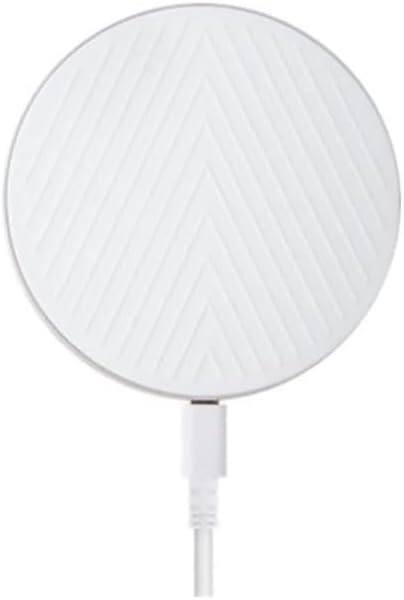
Figure 1: Top view of the Verizon Wireless Qi Fast Charging Pad. This image displays the circular white charging pad with a distinctive chevron pattern on its surface, and a white USB cable extending from its side.

Figure 2: Side view of the Verizon Wireless Qi Fast Charging Pad. This image highlights the slim, circular profile of the charging pad, revealing its minimalist design and the subtle charging port on its edge.
Specifications
| Attribute | Value |
|---|---|
| Product Dimensions | 3 x 2 x 4 inches |
| Item Weight | 7.8 ounces |
| Model Number | WC10WGGL |
| Brand | Verizon |
| Connectivity Technology | Wireless |
| Connector Type | Wireless |
| Compatible Devices | Qi-enabled Smartphones (Apple, Samsung, Google) |
| Compatible Phone Models | iPhone 8 or later, Samsung Galaxy S6 or later, Google Pixel 3/3 XL or later |
| Included Components | 1 Wireless Charging Pad |
| Special Feature | Charging Indicator, Fast Charging |
| Color | White |
| Input Voltage | 9 Volts |
| Mounting Type | Tabletop Mount |
Setup
- Unpack: Carefully remove the charging pad and its cable from the packaging.
- Connect Power: Plug the USB cable from the charging pad into a compatible USB wall adapter (not included) or a powered USB port. Ensure the power source provides sufficient output for fast charging (e.g., a Quick Charge 2.0/3.0 or Power Delivery adapter).
- Placement: Place the charging pad on a flat, stable surface, away from direct sunlight, heat sources, and liquids.
- Power On: Once connected to power, the LED indicator on the charging pad may briefly illuminate to confirm it is ready.
Operating Instructions
- Place Device: Center your Qi-enabled smartphone on the surface of the charging pad. The silicone grip surface will help keep your device in place.
- Confirm Charging: The LED indicator on the charging pad will illuminate (e.g., turn solid blue or green) to indicate that your device is charging. Your phone's screen should also show a charging icon or notification.
- Optimal Placement: If charging does not begin immediately, slightly adjust the position of your phone on the pad until the charging indicator activates.
- Charging Through Cases: The pad is designed to charge through most phone cases. However, very thick cases, cases with metal, or cases containing magnets may interfere with charging and might need to be removed.
- Charging Complete: Once your device is fully charged, the charging pad may stop charging or the LED indicator may change color (refer to your phone's display for exact charge status).
Maintenance
- Cleaning: Disconnect the charging pad from power before cleaning. Use a soft, dry, lint-free cloth to wipe the surface. Do not use abrasive cleaners, solvents, or chemical sprays.
- Storage: When not in use, store the charging pad in a cool, dry place, away from extreme temperatures and humidity.
- Handle with Care: Avoid dropping the charging pad or subjecting it to strong impacts, as this may damage internal components.
Troubleshooting
| Problem | Solution |
|---|---|
| Device not charging. |
|
| Charging is slow. |
|
| LED indicator is off or blinking. |
|
Safety Information
- Do not disassemble, modify, or repair the device.
- Keep the charging pad away from water, moisture, and extreme temperatures.
- Avoid placing metallic objects (e.g., coins, keys, credit cards) on the charging pad, as this can cause overheating or damage.
- Do not use the charging pad in environments with high humidity or near flammable materials.
- This product is halogen-free and complies with the Restriction of Hazardous Substances (RoHS).
Warranty and Support
For warranty information or technical support, please refer to the official Verizon Wireless website or contact their customer service. Keep your purchase receipt as proof of purchase for warranty claims.
Verizon Customer Support: https://www.verizon.com/support/
Related documentsWC10WGGL


Ask a question about this manual
Ask about setup, troubleshooting, compatibility, parts, safety, or missing instructions. Manuals+ will review the question and use this page’s manual context to help answer it.