
1. Introduction
Welcome to your TECCPO 3.7V Cordless Rotary Tool. This manual provides essential information for safe operation, maintenance, and troubleshooting. Please read it thoroughly before using the tool.
2. Important Safety Information
Always follow basic safety precautions to reduce the risk of fire, electric shock, and personal injury.
- Always wear appropriate eye protection (safety glasses or goggles) when operating the tool.
- Ensure adequate ventilation in your workspace to prevent inhalation of dust or fumes.
- Secure your workpiece firmly to prevent movement during operation.
- Keep hands and fingers clear of rotating accessories.
- Disconnect the tool from its power source before changing accessories or performing maintenance.
- Do not operate the tool near flammable liquids or gases.
- Store the tool and accessories in a dry, secure place out of reach of children.
3. Package Contents
Verify that all items listed below are included in your package:
- 1 x TECCPO 3.7V Cordless Rotary Tool
- 1 x Storage Box
- 1 x USB Charging Cable
- 1 x User Manual
- 50pcs Accessories:
- 1pcs Mandrel Drilling
- 2pcs Hss drill (2.3mm)
- 5pcs Grinding wheel with shank (2.3mm)
- 12pcs Sanding band
- 8pcs Sanding paper
- 1pc Sanding shank (2.3mm)
- 10pcs Cut off wheel
- Universal Keyless Chuck

4. Product Features
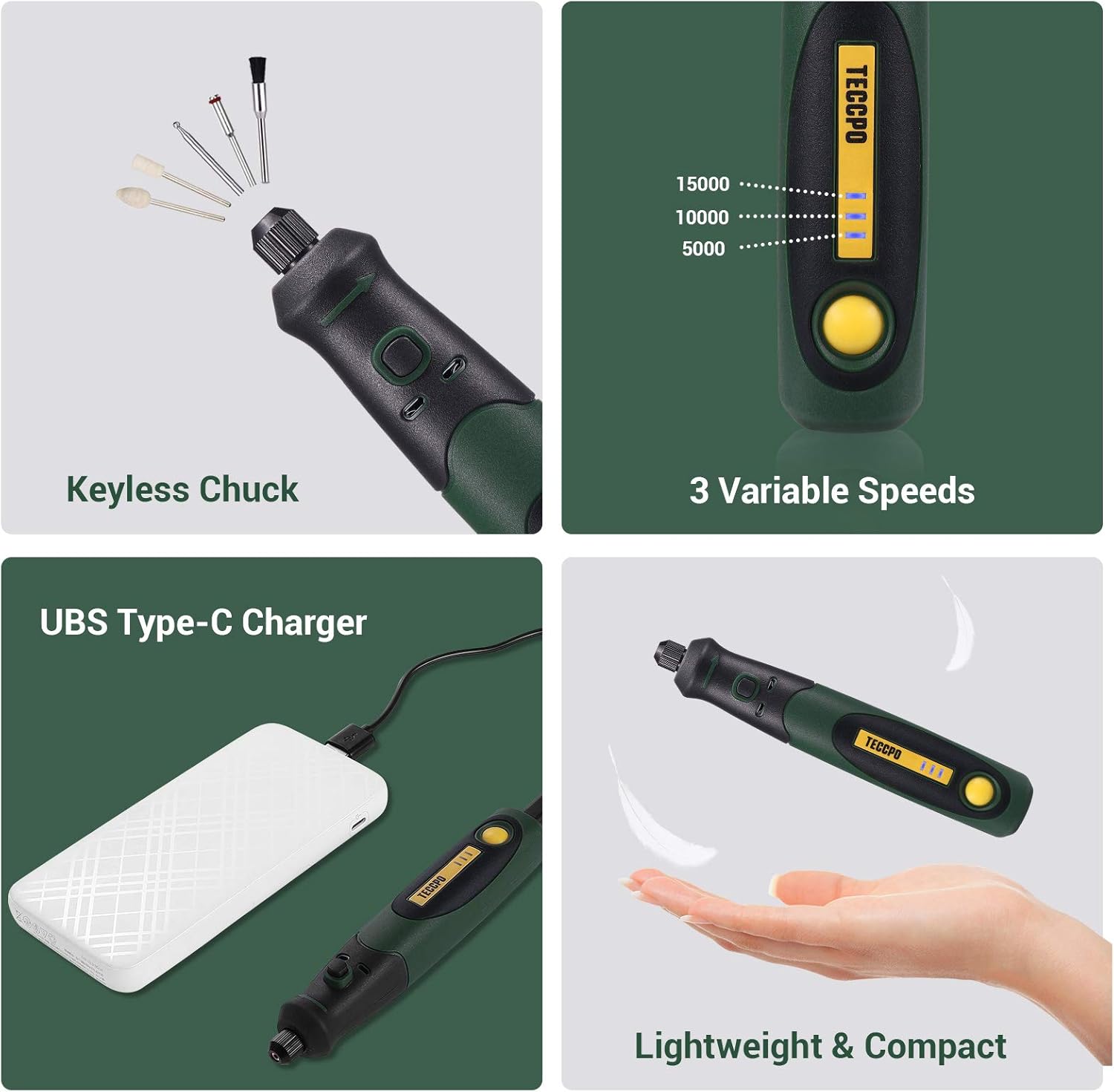
The TECCPO 3.7V Cordless Rotary Tool is designed for versatility and ease of use, featuring a compact and ergonomic design.

5. Setup
5.1 Charging the Rotary Tool
The tool is powered by a 3.7V Lithium Ion battery. Before first use, fully charge the tool using the provided USB-C charging cable.
- Connect the USB-C cable to the charging port on the tool.
- Plug the other end of the USB cable into a compatible USB power adapter (not included) or a power bank.
- The 3-speed indicator lights will show the charging status. All three lights illuminated indicate a full charge.

5.2 Installing Accessories
The TECCPO rotary tool features a universal keyless chuck for quick and easy accessory changes. Ensure the tool is powered off before changing accessories.
- Press and hold the spindle locking button.
- Unscrew the nut on the chuck counter-clockwise until the collet opens.
- Insert the desired accessory bit into the collet.
- While still holding the spindle locking button, tighten the nut clockwise until the accessory is securely held.
- Release the spindle locking button.

6. Operating the Rotary Tool
6.1 Power On/Off and Speed Adjustment
To power on the tool, press the On/Off switch. Press the speed adjustment button to cycle through the 3 variable speeds.
- Speed 1: 5000 RPM (indicated by one blue light)
- Speed 2: 10000 RPM (indicated by two blue lights)
- Speed 3: 15000 RPM (indicated by three blue lights)
- To power off, cycle through the speeds until all lights are off, or press and hold the On/Off switch.

6.2 Recommended Uses
This multi-purpose tool is suitable for various light jobs and detailed work:
- Drilling
- Grinding
- Sanding
- Cutting
- Polishing
- Carving

7. Maintenance
Regular maintenance ensures the longevity and optimal performance of your rotary tool.
- Cleaning: After each use, wipe down the tool with a clean, dry cloth to remove dust and debris. Use a small brush to clean the ventilation slots and chuck area.
- Storage: Store the tool and its accessories in the provided storage box in a cool, dry place, away from direct sunlight and moisture.
- Battery Care: For long-term storage, ensure the battery is partially charged (around 50%). Recharge the battery every 3-6 months to prevent deep discharge.
8. Troubleshooting
| Problem | Possible Cause | Solution |
|---|---|---|
| Tool does not turn on | Battery is discharged | Charge the tool fully using the USB-C cable. |
| Accessory bit is loose or falls out | Chuck nut not tightened sufficiently | Ensure the chuck nut is tightened securely while holding the spindle lock button. |
| Tool stops during operation | Overload or low battery | Reduce pressure on the tool or recharge the battery. |
| Excessive vibration | Bent accessory shaft or improperly installed bit | Check the accessory for damage and ensure it is installed correctly and securely. |
9. Specifications
| Feature | Detail |
|---|---|
| Brand | TECCPO |
| Model Number | US-TPRT01D |
| Voltage | 3.7 Volts |
| Power Source | Cordless-Electric |
| Maximum Rotational Speed | 15000 RPM |
| Minimum Rotational Speed | 5000 RPM |
| Item Weight | 0.22 Kilograms (7.7 ounces) |
| Number of Batteries | 1 Lithium Ion (included) |
| Special Feature | Cordless |
| Included Components | Rotary Tool, Storage Box, USB Charging Cable, User Manual, 50pcs Accessories (Mandrel Drilling, Hss drill, Grinding wheel with shank, Sanding band, Sanding paper, Sanding shank, Cut off wheel, Universal Keyless Chuck) |
10. Warranty and Support
Your TECCPO rotary tool comes with a 12-month warranty. For support, please refer to the contact information provided in your warranty card or user manual. You can also visit the official TECCPO website for further assistance.
