
1. Important Safety Instructions
Please read all instructions carefully before using the appliance and retain them for future reference. Incorrect use may lead to electric shock, fire, or serious injury.
- Always ensure the voltage on the rating label corresponds to your mains voltage.
- Do not immerse the iron, power cord, or plug in water or other liquids.
- Keep the iron out of reach of children and individuals with reduced physical, sensory, or mental capabilities.
- Unplug the iron from the power outlet when filling with water, emptying, or when not in use.
- Never leave the iron unattended while it is switched on or connected to the power supply.
- Allow the iron to cool completely before storing.
- Do not operate the iron with a damaged cord or plug. Contact customer service for repair.
- Use the iron only for its intended household purpose.
2. Product Overview
Familiarize yourself with the components of your BLACK+DECKER BXIR3000E Steam Iron.

Image: The BLACK+DECKER BXIR3000E Steam Iron, highlighting its 3000W power and ceramic soleplate for efficient ironing.
The iron features a durable ceramic soleplate for smooth gliding and a powerful 3000W heating element for quick heat-up.
- Water Tank: For holding water for steam generation.
- Spray Nozzle: For moistening stubborn creases.
- Steam Control Dial: To adjust steam output.
- Temperature Control Dial: To select the appropriate temperature for different fabrics.
- Steam Shot Button: For an extra burst of steam.
- Spray Button: To activate the spray function.
- Self-Clean Button: For activating the self-cleaning function.
- Ceramic Soleplate: Provides even heat distribution and smooth gliding.
- Precision Tip: Designed for reaching difficult areas like collars and button plackets.
3. Setup
3.1 Unpacking
Carefully remove the iron from its packaging. Remove any protective films or stickers from the soleplate before first use. Keep packaging materials away from children.
3.2 Filling the Water Tank

Image: A person demonstrating how to fill the 420ml water tank of the steam iron, which heats up in 30 seconds.
- Ensure the iron is unplugged from the power outlet.
- Set the steam control to the 'Dry Ironing' position (no steam).
- Open the water tank filler cap.
- Using a measuring cup, carefully pour tap water into the water tank up to the 'MAX' fill line. The tank capacity is 420ml.
- Close the filler cap securely.
Note: For areas with hard water, it is recommended to use a mixture of 50% tap water and 50% distilled water to prolong the life of your iron.
3.3 First Use
Before ironing clothes for the first time, iron an old piece of fabric to remove any manufacturing residues from the soleplate. Some vapor or odor may be emitted during the first use; this is normal and will disappear quickly.
4. Operating Instructions
4.1 Temperature Control
Sort your laundry according to fabric type and recommended ironing temperature. Always start with fabrics requiring lower temperatures.
- Plug the iron into a suitable power outlet.
- Turn the temperature control dial to the desired setting. The indicator light will illuminate.
- Wait for the indicator light to turn off, indicating the iron has reached the selected temperature. The iron is ready in approximately 30 seconds.
4.2 Steam Ironing
Steam ironing is suitable for most fabrics except those marked with the 'do not steam iron' symbol.

Image: The steam iron in operation, showing a continuous steam flow of 45g/min for effective wrinkle removal.
- Fill the water tank as described in Section 3.2.
- Set the temperature control to the steam ironing range (usually between '••' and '•••' settings).
- Once the indicator light turns off, adjust the steam control dial to the desired steam level. The iron provides a continuous steam flow of 45g/min.
- Begin ironing.
4.3 Steam Shot Function

Image: A hand pressing the steam blast button on the iron, indicating a powerful 200g/min steam burst for tough wrinkles.
For stubborn creases, press the steam shot button. This delivers an extra burst of steam up to 200g/min. Wait a few seconds between shots to allow the iron to reheat and produce optimal steam.
4.4 Vertical Steaming

Image: A person performing vertical ironing on a hanging garment using the steam iron, ideal for delicate fabrics or quick touch-ups.
The iron can be used for vertical steaming to remove creases from hanging garments, curtains, or delicate fabrics. Hold the iron vertically a few centimeters away from the fabric and press the steam shot button. The powerful steam also disinfects effectively.
4.5 Dry Ironing
For dry ironing, ensure the water tank is empty or the steam control is set to the 'Dry Ironing' position. Select the desired temperature and wait for the indicator light to turn off before ironing.
4.6 Spray Function
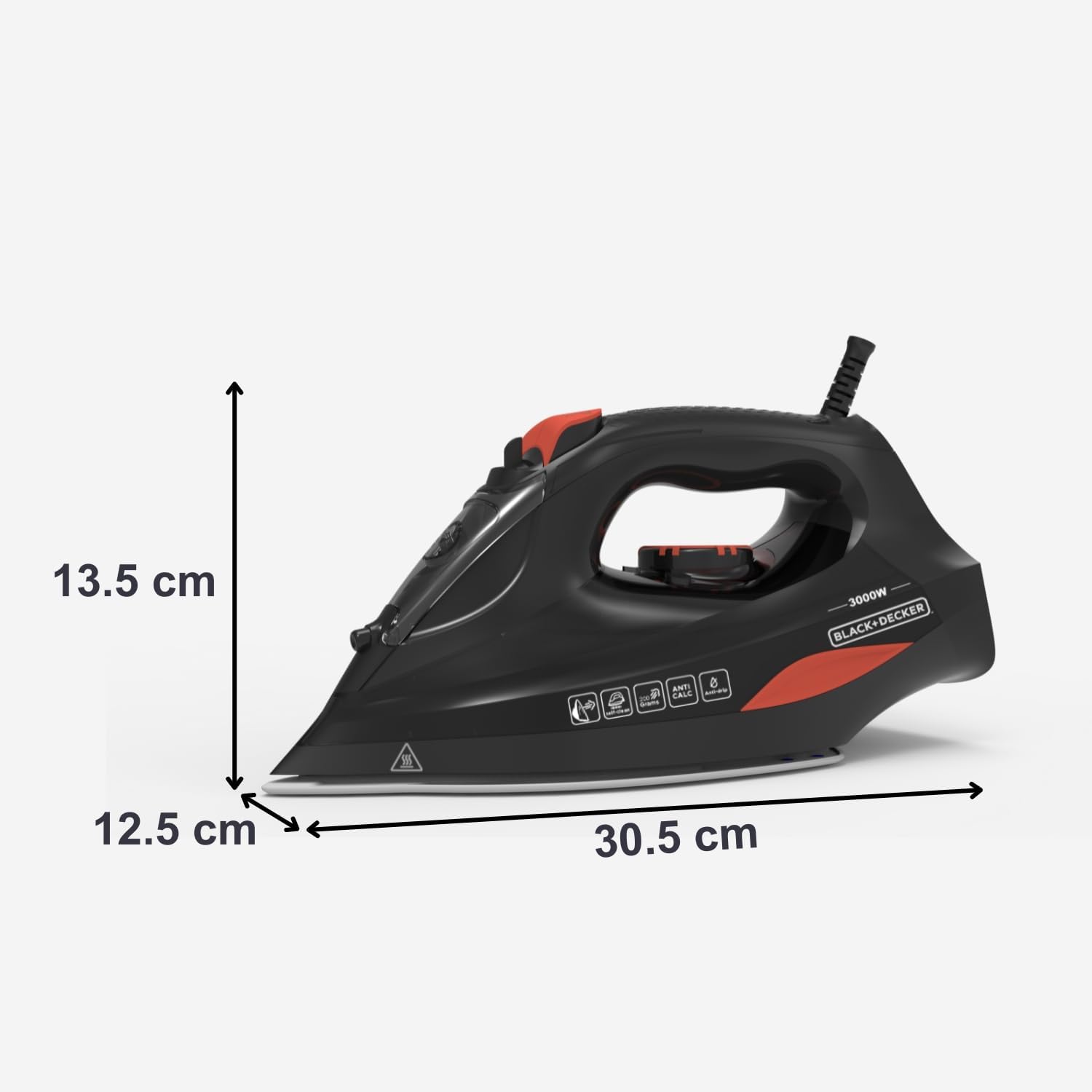
Image: A detailed view of the iron's precision tip and the spray system, useful for targeting specific wrinkles.
Press the spray button to lightly moisten the fabric, which helps in smoothing out stubborn wrinkles. Ensure the water tank has sufficient water.
5. Maintenance
5.1 Cleaning the Soleplate
To clean the soleplate, ensure the iron is unplugged and completely cool. Wipe the soleplate with a damp cloth and a non-abrasive cleaner if necessary. Do not use metallic or abrasive scouring pads.
5.2 Anti-Calc System (Save Clean)

Image: The steam iron showcasing its double anti-scale system and auto-cleaning function for enhanced durability and performance.
The iron is equipped with a double anti-calc system to reduce limescale build-up and prolong its lifespan. This system works automatically during operation.
5.3 Self-Cleaning Function
Regularly use the self-cleaning function to flush out mineral deposits and impurities from the steam vents.
- Fill the water tank to the 'MAX' line.
- Set the steam control to 'Dry Ironing' and the temperature to maximum.
- Plug in the iron and wait for the indicator light to turn off.
- Unplug the iron.
- Hold the iron horizontally over a sink.
- Press and hold the self-clean button. Hot water and steam will be expelled from the soleplate, carrying impurities with them.
- Gently shake the iron back and forth until the water tank is empty.
- Release the self-clean button.
- Plug in the iron again, heat it up, and iron an old cloth to dry the soleplate.
5.4 Storage
After use, unplug the iron, empty any remaining water from the tank, and allow it to cool completely. Store the iron upright on its heel rest in a safe, dry place.
6. Troubleshooting
| Problem | Possible Cause | Solution |
|---|---|---|
| Iron does not heat up. | Not plugged in; power outlet fault; temperature dial set to 'OFF'. | Check plug and power outlet; turn temperature dial to a heat setting. |
| No steam or insufficient steam. | Water tank empty; temperature too low; steam control set to 'Dry Ironing'. | Fill water tank; set temperature to steam range; adjust steam control. |
| Water drips from soleplate. | Temperature too low for steam; overfilling water tank. | Increase temperature to steam range; do not overfill water tank. |
| White flakes or brown stains on fabric. | Mineral deposits (limescale) in the iron. | Perform the self-cleaning function. Use distilled water if tap water is very hard. |
7. Specifications

Image: Side view of the BLACK+DECKER BXIR3000E Steam Iron, illustrating its physical dimensions for reference.
| Feature | Detail |
|---|---|
| Model Number | BXIR3000E |
| Power | 3000 W |
| Voltage | 240 V |
| Soleplate Material | Ceramic |
| Continuous Steam | 45 g/min |
| Steam Shot | 200 g/min |
| Water Tank Capacity | 420 ml |
| Cable Length | 2 meters |
| Dimensions (L x W x H) | 33 x 16 x 0.1 cm (Product); 30.5 x 12.5 x 13.5 cm (Approximate Iron Body) |
| Weight | 1.38 kg |
| Special Features | Steam shot function, Double Anti-Calc System, Self-cleaning, Precision Tip, Vertical Steam |
8. Warranty and Support
This BLACK+DECKER product is manufactured to high-quality standards. For warranty information, please refer to the warranty card included with your purchase or contact your local BLACK+DECKER service center. For technical support or spare parts, please visit the official BLACK+DECKER website or contact their customer service department.


