
1. Introduction
This manual provides essential information for the safe and effective operation, setup, and maintenance of your JAMARA 404980 JCB Loader. Please read these instructions carefully before using the product to ensure proper function and longevity.

Image 1.1: The JAMARA 404980 JCB Loader and its remote control.
2. Safety Information
- Warning: To be used under the direct supervision of an adult.
- Warning: Not suitable for children under 36 months. Contains small parts that can be swallowed. Choking hazard. Keep away from small children.
- Always operate the vehicle in a safe environment, away from obstacles, people, and pets.
- Do not operate near water or in wet conditions to prevent electrical damage.
- Ensure batteries are inserted with correct polarity.
- Do not mix old and new batteries, or different types of batteries.
- Remove batteries from the vehicle and remote control when not in use for extended periods.
3. What's in the Box
- Model (JCB Loader)
- Remote control 2.4 GHz
- Instruction Manual
4. Setup
4.1 Battery Installation
- Vehicle: Locate the battery compartment on the underside of the JCB Loader. Open the cover, insert the required batteries (not included) ensuring correct polarity (+/-), and close the cover securely.
- Remote Control: Locate the battery compartment on the back of the remote control. Open the cover, insert the required batteries (not included) ensuring correct polarity (+/-), and close the cover securely.
4.2 Pairing the Remote Control
The 2.4 GHz remote control typically pairs automatically with the vehicle upon power-up. Ensure both the vehicle and the remote control have fresh batteries installed and are switched ON. If pairing does not occur, switch both devices OFF, then ON again, keeping them close to each other.

Image 4.1: The 2.4 GHz Remote Control.
5. Operating Instructions
The JAMARA 404980 JCB Loader offers realistic functions controlled via the 2.4 GHz remote control.
5.1 Driving Controls
- Use the left joystick to control forward/backward movement.
- Use the right joystick to control left/right steering.
- The vehicle features 2-wheel drive for maneuverability.
5.2 Loader and Excavator Functions
- Front Shovel: Use designated buttons on the remote control to lift, lower, and tilt the front shovel.
- Rear Shovel: The rear shovel can be manually lifted, lowered, and tilted.
- Rear Excavator: The rear excavator arm can be manually moved left and right.
- Retractable Boom: The boom of the excavator is manually retractable.
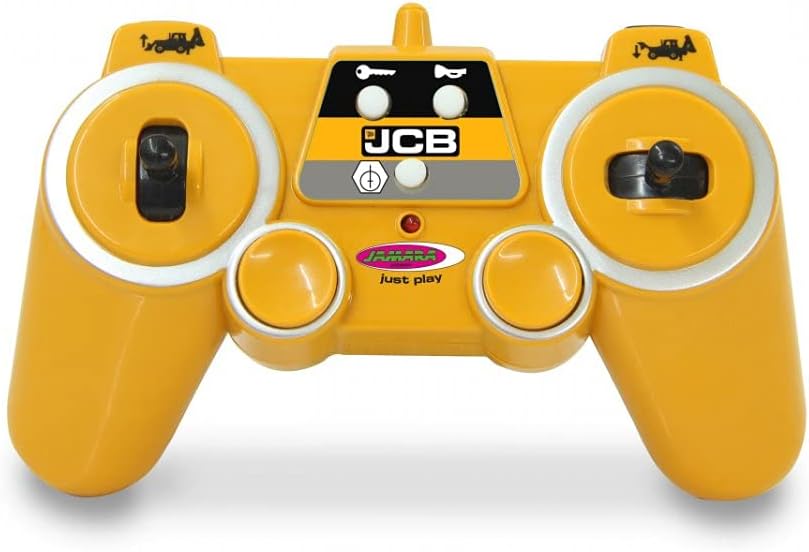
Image 5.1: JCB Loader with front shovel raised.

Image 5.2: JCB Loader with rear excavator extended.
5.3 Sound and Light Features
- Engine Sound: The model features a realistic engine sound, which can be switched off via the remote control.
- Horn: Activate the horn sound using the designated button.
- Reversing Warning Sound: A warning sound will activate when the vehicle is driven in reverse.
- Indicator: The vehicle is equipped with an indicator light.
5.4 Advanced Features
- Programmable Functions: The remote control allows for programmable functions with a repeat function. Refer to the remote control diagram for specific button assignments.
- Auto Standby Mode: The vehicle may enter an auto standby mode after a period of inactivity to conserve battery life.
- Demo Mode: A demo mode may be available to showcase the vehicle's functions.
6. Maintenance
- Cleaning: Wipe the vehicle and remote control with a soft, dry cloth. Do not use water or chemical cleaners.
- Storage: Store the product in a cool, dry place away from direct sunlight when not in use.
- Battery Care: Remove batteries if the product will not be used for an extended period to prevent leakage.
- Regularly check for loose screws or damaged parts.
7. Troubleshooting
| Problem | Possible Cause | Solution |
|---|---|---|
| Vehicle does not respond | Low batteries in vehicle or remote; Not paired; Power switch OFF | Replace batteries; Re-pair vehicle and remote; Ensure power switches are ON |
| Short control range | Low batteries; Interference | Replace batteries; Move to an area with less electronic interference |
| Functions (shovel/excavator) not working | Low batteries; Mechanical obstruction | Replace batteries; Check for any physical obstructions and clear them carefully |
| Engine sound not working | Sound function switched off; Low batteries | Activate sound via remote; Replace batteries |
8. Specifications
- Model Number: 404980
- Brand: Jamara
- Scale: 1:20
- Control Frequency: 2.4 GHz
- Product Dimensions: 24.02 x 5.51 x 6.5 inches
- Item Weight: 2.95 pounds
- Recommended Age: 6 years and up
- Drive: 2 Wheel Drive
- Features: Lift/Lower/Tilt Shovel, Manual Rear Shovel/Excavator, Realistic Engine Sound (switchable), Horn, Reversing Warning Sound, Indicator, Programmable Functions, Auto Standby Mode, Demo Mode.
9. Warranty and Support
For warranty information and customer support, please refer to the official Jamara website or contact your retailer. Keep your purchase receipt as proof of purchase.
For more information, visit the official product page: JAMARA 404980 Product Page
