
Soundsation MH-75BT
Soundsation MH-75BT Adjustable Stereo Headphones
User Manual
Model: MH-75BT | Brand: Soundsation
1. Product Overview
The Soundsation MH-75BT headphones offer a versatile and comfortable audio experience with both wireless Bluetooth and wired connectivity. They feature 40mm transducers with a 32 Ohm impedance, delivering a frequency response of 50Hz-20kHz and a sensitivity of 108dB. A distinctive feature is the integrated player for micro SD cards (up to 32GB), supporting various audio formats including MP3, WAV, WMA, AIF, M4A, and FLAC.
The soft earcups and adjustable headband ensure optimal comfort during extended listening. An integrated microphone and four control buttons allow for easy management of calls and music playback. The elegant black design and quality construction make them suitable for various uses, from home listening to daily commuting.
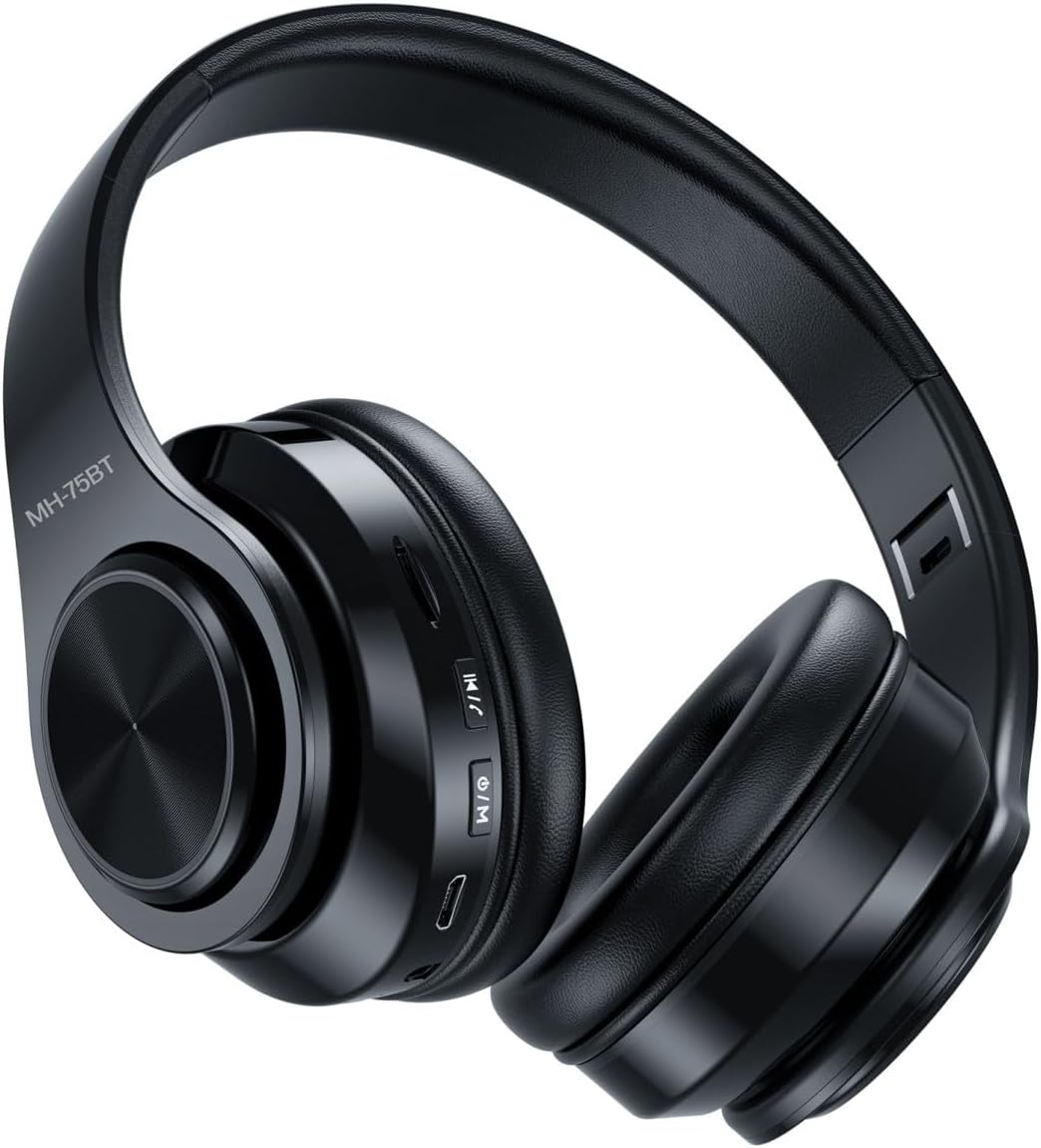
Image 1.1: Soundsation MH-75BT headphones. These over-ear headphones feature a sleek black design with visible control buttons on the right earcup and an adjustable headband for comfortable wear.
2. What's in the Box
Upon opening the package, please verify that all the following components are included:
- Soundsation MH-75BT Headphones
- Robust Carrying Case
- 150cm Audio Cable (3.5mm jack)
- 6.35mm Jack Adapter

Image 2.1: Contents of the package. The image displays the MH-75BT headphones alongside the detachable 3.5mm audio cable and the 6.35mm jack adapter, highlighting the wired connectivity options.

Image 2.2: Headphones stored in the carrying case. The headphones are shown folded compactly within their durable, zippered carrying case, demonstrating their portability and protection.
3. Product Features
- Versatile Connectivity: Operates wirelessly via Bluetooth or with the included 150 cm cable, featuring a 3.5mm jack and a 6.35mm adapter.
- Advanced Audio: 40mm drivers with 32 Ohm impedance and a 50Hz-20kHz frequency response for high-quality sound reproduction.
- Smart Functionality: Integrated player for micro SD cards up to 32GB, supporting MP3, WAV, WMA, AIF, M4A, and FLAC formats.
- Integrated Controls: Built-in microphone and 4 buttons to manage calls, volume, and music playback from both remote devices and the SD card.
- Comfort and Portability: Adjustable design with soft earcups for maximum comfort, and a robust carrying case included for secure transport.
4. Setup Guide
4.1 Charging the Headphones
Before first use, fully charge the headphones. Connect the supplied USB charging cable to the micro USB port on the headphones and the other end to a USB power source (e.g., computer USB port, USB wall adapter). The LED indicator will show charging status (e.g., red for charging, blue/off for fully charged).
4.2 Wired Connection
For a wired connection, insert the 3.5mm audio cable into the audio input jack on the headphones and the other end into your audio device's 3.5mm output. If your audio device requires a 6.35mm jack, use the included adapter.
4.3 Bluetooth Pairing
- Ensure the headphones are charged.
- Press and hold the Power/Mode button until the LED indicator flashes blue and red, indicating pairing mode.
- On your device (smartphone, tablet, computer), enable Bluetooth and search for available devices.
- Select "MH-75BT" from the list of found devices.
- Once paired, the LED indicator will typically show a solid blue light or flash slowly.
Note: If a password is required, enter "0000".
4.4 Micro SD Card Usage
The MH-75BT headphones support micro SD cards up to 32GB. Insert the micro SD card into the designated slot on the headphones with the gold contacts facing down. The headphones will automatically switch to SD card playback mode if a card with supported audio files is detected. Use the Mode button to switch between Bluetooth and SD card playback modes.
5. Operating Instructions
The MH-75BT headphones feature four control buttons for easy operation:
- Power/Mode Button:
- Press and hold to power on/off.
- Short press to switch between Bluetooth and Micro SD card modes.
- Play/Pause Button:
- Short press to play or pause music.
- Short press to answer or end a phone call.
- Press and hold to reject an incoming call.
- Volume Up / Next Track Button:
- Short press to increase volume.
- Press and hold to skip to the next track.
- Volume Down / Previous Track Button:
- Short press to decrease volume.
- Press and hold to go to the previous track.
6. Maintenance
- Cleaning: Use a soft, dry cloth to clean the headphones. Do not use abrasive cleaners or solvents.
- Storage: When not in use, store the headphones in the provided carrying case to protect them from dust, scratches, and impacts. Store in a cool, dry place.
- Battery Care: To prolong battery life, avoid fully discharging the headphones frequently. Charge them regularly, even if not in constant use.
- Avoid Moisture: The headphones are not water-resistant. Avoid exposure to water, rain, or excessive humidity.
7. Troubleshooting
| Problem | Possible Cause | Solution |
|---|---|---|
| Headphones do not power on. | Low battery. | Charge the headphones fully. |
| No sound from headphones. | Volume too low; incorrect mode; device not connected. | Increase volume; ensure correct mode (Bluetooth/SD card); re-pair Bluetooth or check wired connection. |
| Cannot pair via Bluetooth. | Headphones not in pairing mode; device Bluetooth off; interference. | Ensure headphones are in pairing mode (flashing blue/red LED); enable Bluetooth on device; move closer to device; clear previous pairings. |
| Micro SD card not recognized. | Card inserted incorrectly; unsupported format; card corrupted. | Re-insert card correctly; ensure files are supported formats (MP3, WAV, WMA, AIF, M4A, FLAC); try a different card. |
8. Specifications
| Feature | Detail |
|---|---|
| Model | MH-75BT |
| Connectivity Technology | Wired, Wireless (Bluetooth) |
| Wireless Communication Technology | Bluetooth |
| Driver Size | 40mm |
| Impedance | 32 Ohm |
| Frequency Response | 50Hz-20kHz |
| Sensitivity | 108dB |
| Micro SD Card Support | Up to 32GB |
| Supported Audio Formats | MP3, WAV, WMA, AIF, M4A, FLAC |
| Microphone | Integrated |
| Control Type | Button Control |
| Cable Length | 150 cm (Tangle-resistant) |
| Headphone Jack | 3.5mm |
| Weight | 350 grams |
| Material | Plastic, Faux Leather |
| Color | Black |
| Water Resistance Level | Not water resistant |
9. Warranty and Support
Soundsation products are designed for reliability and performance. This product is covered by a standard manufacturer's warranty against defects in materials and workmanship. The specific terms and duration of the warranty may vary by region and local regulations.
For warranty claims, technical support, or any questions regarding your MH-75BT headphones, please contact your retailer or visit the official Soundsation website for customer service information. Please retain your proof of purchase for warranty validation.
You can find more information and contact details on the Soundsation brand store page: Soundsation Store
Ask a question about this manual
Ask about setup, troubleshooting, compatibility, parts, safety, or missing instructions. Manuals+ will review the question and use this page’s manual context to help answer it.