
Introduction
This manual provides detailed instructions for the setup, operation, and maintenance of your PlayBetter Garmin Descent Mk2 Dive Computer Watch Bundle. The Garmin Descent Mk2 is a versatile watch-style dive computer that also functions as an everyday fitness tracker and multisport smartwatch.
Key features include:
- Advanced features for recreational, technical, and free diving, including on-device dive planning.
- Customizable dive modes and dive log review data.
- Surface multi-GNSS and inReach compatibility.
- All-day heart rate and multisport activity tracking for various sports like trail running, swimming, biking, hiking, rowing, skiing, and golfing.
- Music storage and streaming, Garmin Pay for cashless payments, and safety features such as incident detection and assistance.
- Long battery life: up to 80 hours in dive mode, 16 days in smartwatch mode, and 15 hours in GPS mode with music.
What's in the Box
Your PlayBetter Garmin Descent Mk2 Dive Computer Watch Bundle includes:
- Garmin Descent Mk2 (Stainless Steel with Black Band) Dive Computer Watch
- PlayBetter Waterproof Dry Bag with Window
- PlayBetter Waterproof Extra-Long Adjustment Strap
- Charging Cable

Image: The Garmin Descent Mk2 watch, waterproof dry bag, and phone pouch, along with other accessories included in the bundle.
Setup
1. Charging the Device
Before initial use, fully charge your Garmin Descent Mk2. Connect the charging cable to the charging port on the back of the watch and plug the other end into a USB power source. A full charge typically takes a few hours.

Image: The back of the Garmin Descent Mk2 watch, showing the optical heart rate sensor and charging contacts.
2. Initial Power-On and Basic Settings
Press and hold the power button (usually located on the side) to turn on the device. Follow the on-screen prompts to select your language, time zone, and basic user profile information.
3. Pairing with a Smartphone
To access all smartwatch features, pair your Descent Mk2 with the Garmin Connect app on your smartphone via Bluetooth. Download the Garmin Connect app, create an account, and follow the app's instructions to add your device.
Operating the Garmin Descent Mk2
Dive Modes
The Descent Mk2 supports multiple dive modes, including single-gas, multi-gas (nitrox and trimix), gauge, apnea, and apnea hunt. You can configure settings for each mode directly on the device.
- Planning Dives: The device allows for dive planning directly on the watch.
- Dive Log: Review detailed data from your past dives, including depth, time, and temperature.
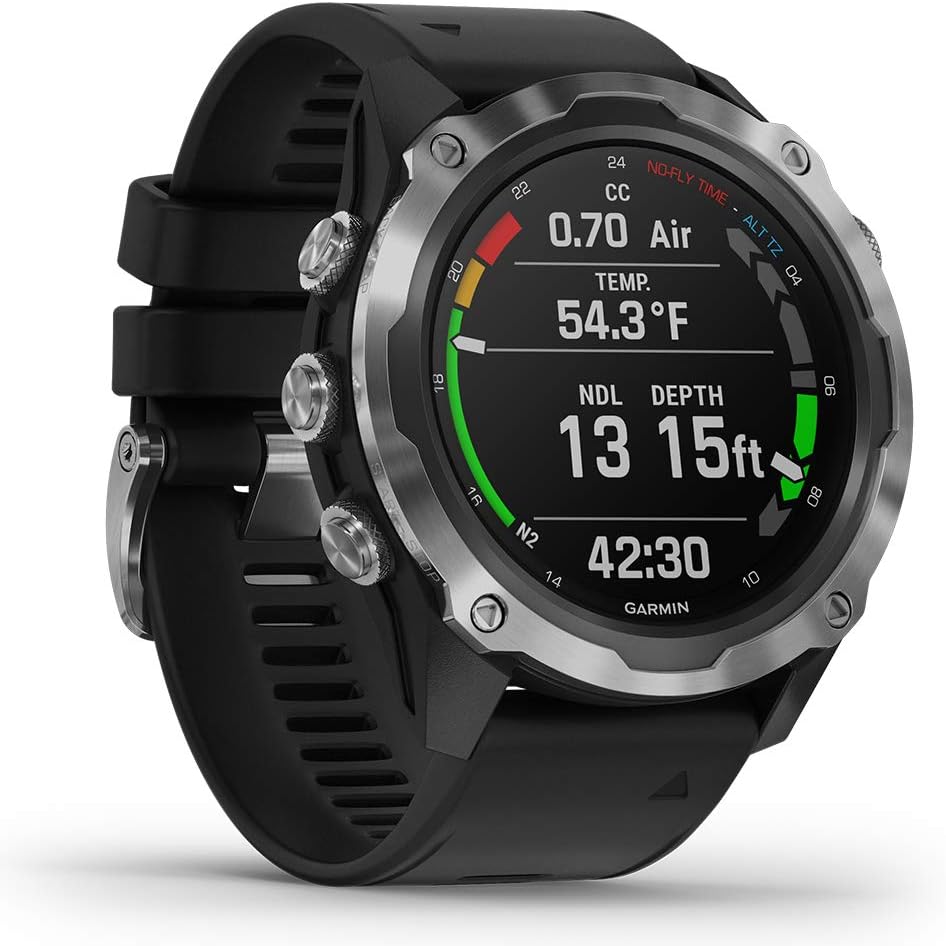
Image: The Garmin Descent Mk2 watch face showing current dive data, including temperature, no-decompression limit (NDL), and depth.
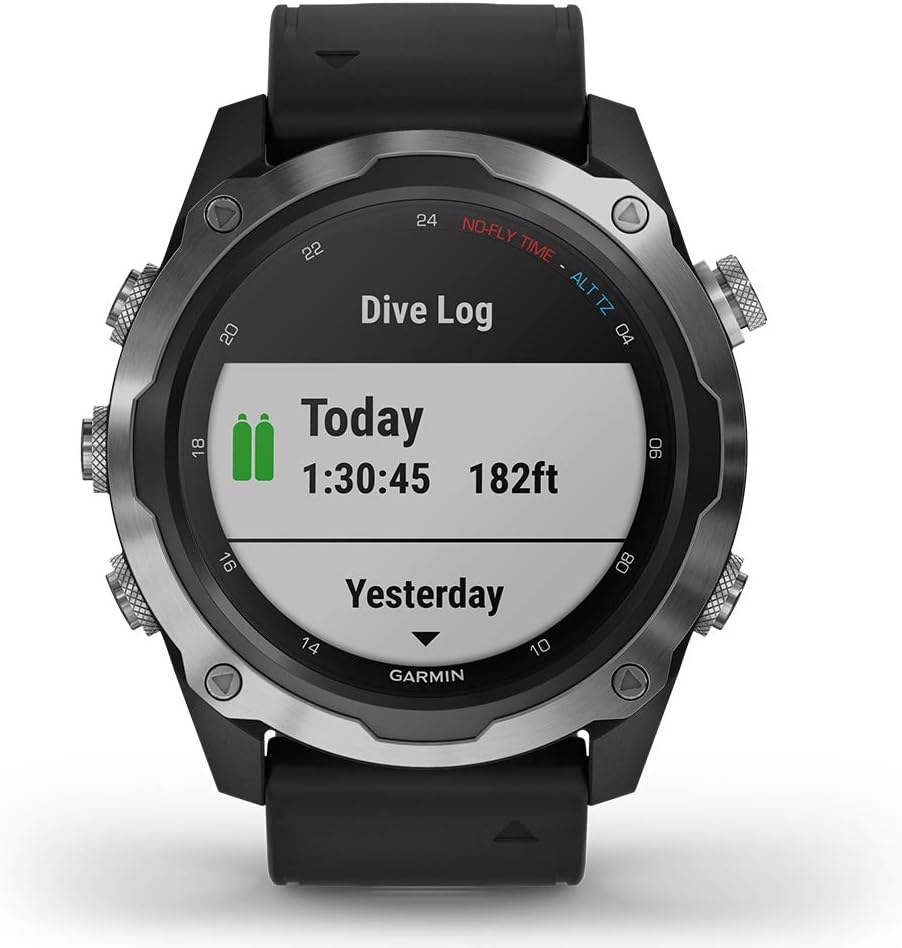
Image: The Garmin Descent Mk2 watch face displaying a dive log summary, showing total dive time and maximum depth for recent dives.
Multisport Activity Tracking
The Descent Mk2 offers comprehensive tracking for a wide range of sports and activities. Select your desired activity from the activity list to begin tracking. The watch provides metrics relevant to each sport.
- GPS Tracking: Utilizes multi-GNSS for accurate location tracking during outdoor activities.
- Heart Rate Monitoring: Continuous heart rate tracking directly from your wrist.
- Animated Workouts: Follow on-screen animated workouts for strength, cardio, yoga, and Pilates.
Smart Features
- Music: Store up to 2000 songs directly on the watch and stream them to Bluetooth headphones.
- Garmin Pay: Make contactless payments directly from your wrist.
- Notifications: Receive smart notifications for calls, texts, and app alerts when paired with your smartphone.
- Safety and Tracking: Features like incident detection and assistance can send your location to emergency contacts.
Maintenance
Cleaning the Device
Regularly clean your Descent Mk2 to maintain its performance and appearance. After each dive or exposure to saltwater, rinse the watch thoroughly with fresh water. Use a soft, lint-free cloth to wipe the device dry. Avoid using harsh chemicals or abrasive materials.
Strap Care
Inspect the watch strap regularly for signs of wear or damage. Clean the strap with mild soap and water. Ensure the strap is dry before wearing the watch again.
Troubleshooting
If you encounter issues with your Garmin Descent Mk2, consider the following common solutions:
- Device Not Responding: Try a soft reset by holding down the power button for 15 seconds until the device turns off, then restart it.
- Charging Issues: Ensure the charging cable is securely connected to both the watch and the power source. Clean the charging contacts on the watch if necessary.
- GPS Inaccuracy: Ensure you have a clear view of the sky when acquiring a GPS signal. Sync your device with Garmin Connect regularly to update satellite data.
- Bluetooth Connectivity: Ensure Bluetooth is enabled on both your watch and smartphone. Try unpairing and re-pairing the devices in the Garmin Connect app.
- Dive Data Not Recording: Ensure you have selected the correct dive mode before starting a dive. Check that the sensors are clean and unobstructed.
For more detailed troubleshooting or persistent issues, refer to the official Garmin support resources or contact customer service.
Specifications
| Feature | Specification |
|---|---|
| Product Dimensions | 2.05 x 2.05 x 0.7 inches |
| Item Weight | 3.66 ounces (103.8 Grams) |
| ASIN | B08V118H9W |
| Item Model Number | 010-02132-00 |
| Batteries | 1 Lithium Ion battery required (included) |
| Manufacturer | Garmin Fitness |
| Standing Screen Display Size | 1.4 Inches |
| Memory Storage Capacity | 32 GB |
| Operating System | Proprietary Garmin OS |
| Special Feature | Bluetooth, Waterproof |
| Battery Capacity | 5 Milliamp Hours |
| Connectivity Technology | Bluetooth |
| Wireless Communication Standard | Bluetooth |
| Battery Cell Composition | Lithium Ion |
| GPS | True |
| Shape | Round |
| Screen Size | 1.4 Inches |
Warranty and Support
For warranty information and customer support, please refer to the documentation provided with your product or visit the official Garmin website. You can also contact PlayBetter customer service for assistance with your bundle components.