
1. Introduction
Thank you for choosing the maguja Arm Blood Pressure Monitor RN-032A. This device is designed for accurate and convenient measurement of blood pressure and pulse rate on the upper arm. Please read this manual thoroughly before use to ensure correct operation and to obtain the most accurate results. This monitor is intended for home use and should not replace professional medical advice.
2. Safety Information
- Consult your physician before using this device if you have any medical conditions.
- Do not use this device for self-diagnosis or self-treatment. Always consult a healthcare professional for interpretation of blood pressure readings.
- Keep the device out of reach of children.
- Do not use the device in a moving vehicle.
- Avoid eating, drinking alcohol, smoking, exercising, and bathing for 30 minutes before measurement.
- Rest for at least 5 minutes before taking a measurement.
3. Package Contents
Verify that the following items are included in your package:
- maguja Arm Blood Pressure Monitor (Model RN-032A)
- Upper Arm Cuff (20-42 cm)
- User Manual
4. Device Overview
The maguja Arm Blood Pressure Monitor features a large backlit LCD display for clear readings, along with intuitive buttons for operation.

Image 4.1: Front view of the maguja Arm Blood Pressure Monitor with its cuff.
Components:
- Main Unit: Houses the display, control buttons (SET, Power, MEM), and air pump.
- LCD Display: Shows systolic pressure (SYS), diastolic pressure (DIA), pulse rate (PUL), time, and memory indicators.
- Arm Cuff: Adjustable cuff for upper arm measurements (20-42 cm).
- Air Tube Port: Connection point for the arm cuff's air tube.
5. Setup
5.1 Battery Installation
The monitor requires 4 AAA batteries (not included). To install:
- Open the battery compartment cover on the back of the main unit.
- Insert four AAA batteries, ensuring correct polarity (+ and -).
- Close the battery compartment cover securely.
5.2 Cuff Connection
Connect the air tube from the arm cuff to the air tube port on the side of the main unit. Ensure a snug fit.
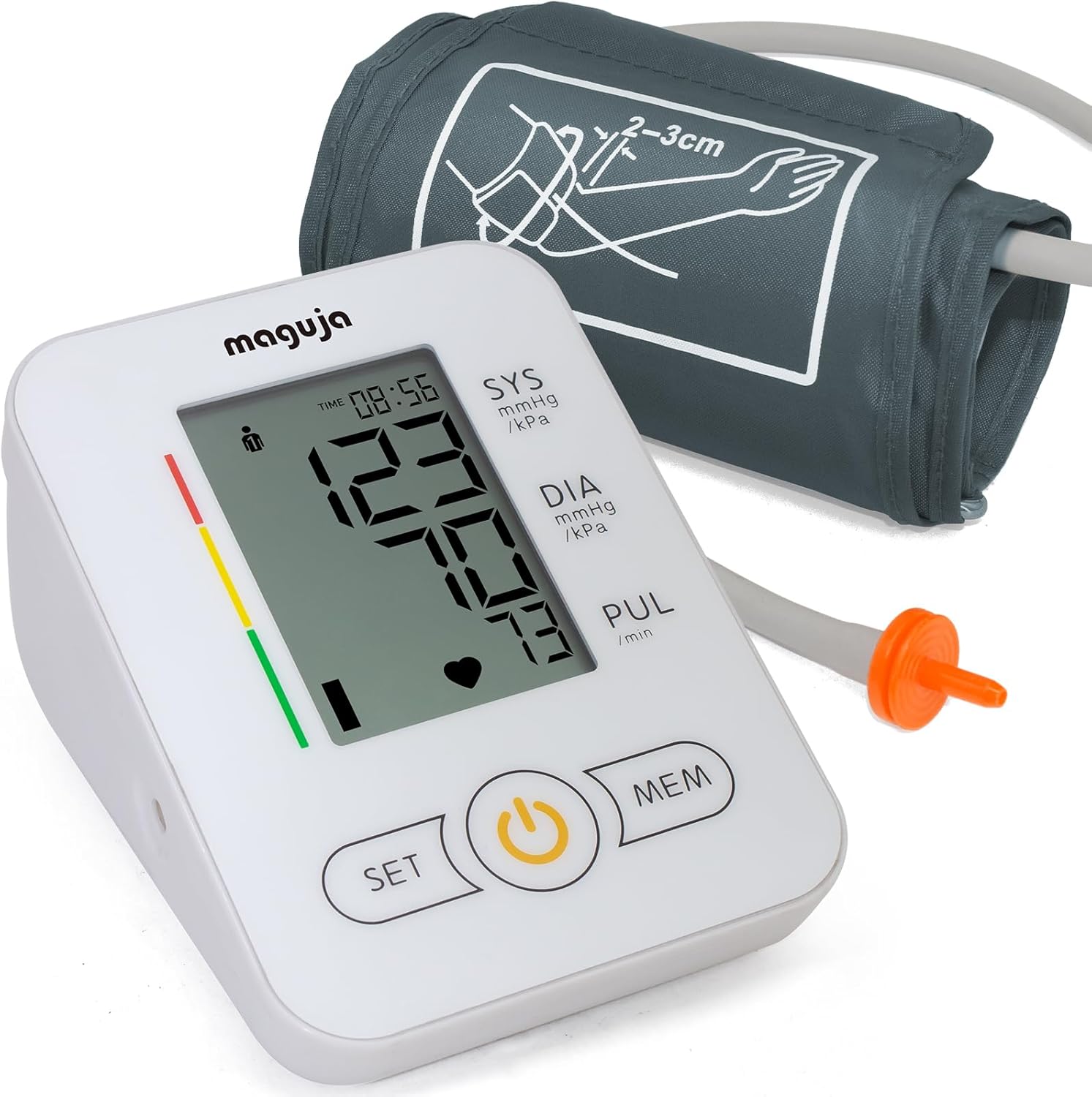
Image 5.2: The arm cuff's air tube connected to the monitor.
6. Operation
6.1 Before Measurement
- Sit comfortably with your back supported.
- Place your feet flat on the floor.
- Rest your arm on a flat surface so the cuff is at heart level.
- Avoid talking or moving during the measurement.
6.2 Applying the Cuff
- Ensure the cuff is placed directly on your bare upper arm, approximately 2-3 cm above the elbow joint.
- Wrap the cuff snugly around your arm, making sure the air tube runs down the center of your arm in line with your middle finger.
- Secure the cuff with the Velcro closure.

Image 6.2: Correct cuff placement on the upper arm.
6.3 Taking a Measurement
- Press the Power button to start the measurement. The cuff will automatically inflate.
- Remain still and silent during inflation and deflation.
- Once the measurement is complete, the systolic pressure (SYS), diastolic pressure (DIA), and pulse rate (PUL) will be displayed on the screen. The device may also announce the readings audibly.
6.4 Understanding Readings
- SYS (Systolic Pressure): The top number, indicating the pressure in your arteries when your heart beats.
- DIA (Diastolic Pressure): The bottom number, indicating the pressure in your arteries between beats.
- PUL (Pulse Rate): Your heart rate, measured in beats per minute.
- The monitor also features Irregular Heartbeat Detection, which alerts you to irregular heartbeats during measurement.

Image 6.4: Display features including Irregular Heartbeat Detection.
6.5 Memory Function
The monitor supports 60 groups of memory storage for two users. To switch between users or view past readings:
- Press the MEM button to cycle through stored measurements.
- Refer to the on-screen user indicator to ensure you are viewing the correct user's data.
7. Maintenance and Care
- Clean the monitor and cuff with a soft, dry cloth. Do not use abrasive cleaners or immerse the device in water.
- The cuff is made of high-quality, anti-dust material and is easy to clean. Wipe gently with a damp cloth if necessary.
- Store the device in a cool, dry place, away from direct sunlight and extreme temperatures.
- Remove batteries if the device will not be used for an extended period.
8. Troubleshooting
- No Power/Display Blank: Check battery installation and ensure batteries are not depleted. Replace if necessary.
- "Err" Message on Display: This indicates a measurement error. Ensure the cuff is correctly applied, you are sitting still, and the air tube is not kinked. Retake the measurement after a few minutes of rest.
- Inaccurate Readings: Ensure proper cuff placement and size. The cuff fits arm circumferences from 20 to 42 cm. Follow all pre-measurement guidelines (rest, no talking).
- Audible Voice Feature: The device features an audible voice to announce readings. If you wish to disable or adjust this feature, please refer to the device's settings, though some models may not offer this option.
9. Specifications
| Feature | Specification |
|---|---|
| Model | RN-032A |
| Brand | maguja |
| Power Source | 6Vdc (4x AAA Battery) |
| Display Type | Digital, Backlit LCD |
| Cuff Size | 20-42 cm (Wide Range) |
| Memory Storage | 60 groups for 2 users |
| Product Dimensions | 5.12"L x 3.94"W x 2.68"Th |
| Item Weight | 430 Grams |
| Manufacturer | Ningbo Ranor Medical Science & Technology Co., Ltd. |
10. Warranty and Support
Specific warranty information for the maguja Arm Blood Pressure Monitor RN-032A is typically provided with the product packaging or can be obtained from the retailer or manufacturer's official website. Please retain your proof of purchase for warranty claims.
For technical support or further inquiries, please contact the retailer where you purchased the device or refer to the contact information provided by maguja in your product documentation.