Introduction
This manual provides detailed instructions for the Mackie Onyx16 16-Channel Premium Analog Mixer with Multi-Track USB. The Onyx16 is designed for live audio, home recording, and content creation, offering 24-Bit / 96kHz multitrack recording, high-gain Onyx mic preamps, and an ultra-low-noise design. It includes powerful DSP effects, British-style Perkins EQ, a full-color display, and integrated recording and playback from an SD card. Please read this manual thoroughly to ensure proper setup and operation of your device.
Important Safety Information
- Power Source: Connect the mixer only to the specified power source as indicated on the unit.
- Ventilation: Ensure adequate ventilation around the unit. Do not block ventilation openings.
- Water and Moisture: Do not expose the unit to rain or moisture. Do not place objects filled with liquids on the unit.
- Heat: Keep the unit away from heat sources such as radiators, heat registers, stoves, or other apparatus that produce heat.
- Servicing: Do not attempt to service this product yourself. Refer all servicing to qualified service personnel.
- Cables: Protect the power cord from being walked on or pinched, particularly at plugs, convenience receptacles, and the point where they exit from the apparatus.
What's in the Box
Upon unpacking your Mackie Onyx16 mixer, verify that all the following items are included:
- Mackie Onyx16 16-Channel Premium Analog Mixer
- Power Cord
- USB Cable
- Quick Start Guide
- DAW Software & Plug-Ins (download information typically provided)
Setup Guide
1. Unpacking and Placement
Carefully remove the mixer from its packaging. Place the mixer on a stable, flat surface, ensuring there is adequate space for ventilation and cable connections.
2. Physical Connections
Before connecting any audio devices, ensure the mixer and all connected equipment are powered off.
- Power: Connect the supplied power cord to the mixer's power inlet and then to a suitable AC power outlet.
- Audio Inputs: Connect microphones to the XLR inputs (channels 1-16) and line-level instruments or devices to the 1/4" TRS/TS inputs. Channels 1 and 2 feature Hi-Z inputs for direct instrument connection.
- Main Outputs: Connect your main speakers or power amplifier to the MAIN OUT (XLR or 1/4" TRS) connectors.
- Monitor Outputs: Connect studio monitors to the CONTROL ROOM OUT (1/4" TRS) for monitoring.
- Headphones: Plug your headphones into the PHONES jack.
- USB Connection: For multi-track recording and playback with a computer, connect the mixer to your Mac or PC using the supplied USB cable.

Figure 1: Front panel view of the Mackie Onyx16 mixer, showing all controls and input channels.
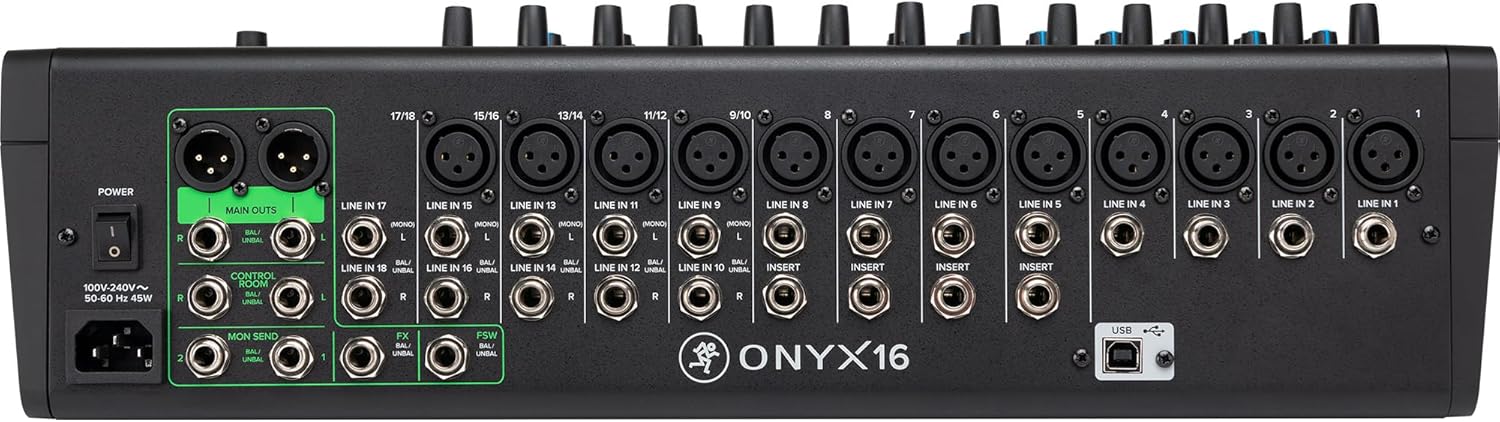
Figure 2: Rear panel view of the Mackie Onyx16 mixer, detailing the various input and output connectors including XLR, 1/4" TRS, and USB.
3. Driver Installation (for USB)
For Windows users, it may be necessary to install specific drivers for multi-track USB functionality. Visit the official Mackie website for the latest drivers compatible with your operating system. Mac users typically do not require additional drivers.
4. Initial Power-Up
Once all connections are secure, power on your audio sources first, then the Mackie Onyx16 mixer, and finally your powered speakers or amplifier. Reverse this order when powering down.
Operating Instructions
1. Channel Strip Overview
Each input channel on the Onyx16 features a dedicated set of controls for signal processing.
- Gain Control: Adjusts the input sensitivity for microphones or line-level signals. Use the PFL/Solo button to monitor the input level and prevent clipping.
- Low Cut Filter: Engages a high-pass filter to remove unwanted low-frequency rumble.
- Perkins EQ: A 3-band "British-style" equalizer with sweepable midrange for precise tone shaping.
- Aux Sends: Controls the amount of signal sent to external effects processors or monitor mixes.
- Pan Control: Positions the channel's signal within the stereo field (left to right).
- Mute Button: Silences the channel's output to the main mix and aux sends.
- Solo Button: Isolates the channel's signal for monitoring through headphones or control room outputs without affecting the main mix.
- Channel Fader: Adjusts the overall volume of the channel in the main mix.
2. Master Section Controls
The master section manages the overall output and monitoring of the mixer.
- Main Mix Faders: Controls the overall volume of the stereo main output.
- Control Room/Phones Level: Adjusts the volume for the control room outputs and headphone jack.
- Main Meters: Displays the output level of the main stereo mix.
- Phantom Power (+48V): Activates phantom power for condenser microphones connected to XLR inputs. This is a global switch.

Figure 3: Angled view of the Mackie Onyx16, highlighting the layout of channel strips and master section controls.
3. USB Multi-Track Recording and Playback
The Onyx16 offers high-resolution 96kHz / 24-bit multi-track recording to a connected Mac or PC.
- Connecting to DAW: After connecting via USB, select the Onyx16 as your audio interface in your Digital Audio Workstation (DAW) software.
- Routing: Individual channels can be routed to separate tracks in your DAW for multi-track recording. The mixer also allows for playback from your DAW back through the mixer.
4. SD Card Stereo Recording and Playback
Record your stereo mix directly to an SD card without a computer.
- Insert SD Card: Insert a formatted SD card into the SD card slot.
- Recording: Use the dedicated transport controls (Record, Play, Pause) in the Studio Command section to manage SD card operations. The mixer records the main stereo mix.
- Playback: Play back audio files directly from the SD card through the mixer.
5. Bluetooth Streaming
Stream audio wirelessly to the mixer via Bluetooth.
- Pairing: Press and hold the "PAIR" button in the Bluetooth section until the indicator flashes. On your device, select "Onyx16" from the Bluetooth device list to pair.
- Playback: Once paired, audio streamed from your device will play through a dedicated stereo channel on the mixer.

Figure 4: Close-up of the Studio Command section, showing Bluetooth pairing controls and SD card recording/playback buttons.
6. Digital Effects Engine
The Onyx16 includes a robust digital effects engine with customizable reverbs, delays, and more.
- Selecting Effects: Use the display and rotary encoder in the FX section to browse and select desired effects.
- Applying Effects: Use the dedicated FX send controls on each channel strip to send signal to the effects processor. The FX Return fader controls the overall level of the effects in the main mix.
Maintenance
- Cleaning: Use a soft, dry cloth to clean the exterior of the mixer. Avoid abrasive cleaners or solvents.
- Dust Protection: When not in use, cover the mixer to protect it from dust and debris.
- Storage: Store the mixer in a cool, dry environment away from direct sunlight and extreme temperatures.
- Firmware Updates: Periodically check the Mackie website for any available firmware updates for your Onyx16 mixer. Follow the instructions provided with the update carefully.
Troubleshooting
If you encounter issues with your Mackie Onyx16, refer to the following common troubleshooting steps. For more detailed information, consult the full user manual available on the Mackie website.
- No Sound Output:
- Check all cable connections (inputs, outputs, power).
- Ensure main mix faders and channel faders are up.
- Verify that Mute buttons are not engaged on channels or master.
- Check gain settings on input channels.
- Confirm speakers/amplifiers are powered on and connected correctly.
- Hum or Noise:
- Ensure all cables are in good condition and properly shielded.
- Check for ground loops; try connecting all equipment to the same power strip.
- Reduce gain settings if input signal is too hot.
- USB Recording Issues:
- Verify USB cable connection.
- Ensure correct drivers are installed (Windows).
- Confirm the Onyx16 is selected as the audio interface in your DAW settings.
- Effects Not Working:
- Check FX send levels on individual channels.
- Ensure the FX Return fader is up.
- Verify an effect is selected and active in the digital effects engine.
Specifications
| Feature | Detail |
|---|---|
| Model Number | Onyx16 |
| Number of Channels | 16 |
| Item Weight | 20.6 pounds |
| Product Dimensions | 14.02 x 18.7 x 5.39 inches |
| Hardware Interface | Bluetooth, Secure Digital Card, USB 2.0 |
| Power Source | Corded Electric |
| Connectivity Technology | USB |
| Multi-Track Recording | 24-Bit / 96kHz via USB |
| Mic Preamps | Onyx, up to 60dB gain |
| Equalization | Perkins "British style" EQ with sweepable midrange |
| Effects | Robust digital effect engine (reverbs, delays, etc.) |
Warranty and Support
Mackie products are designed for reliability and performance. For specific warranty details, please refer to the warranty card included with your product or visit the official Mackie website.
For technical support, product registration, or to download the full user manual (PDF), please visit the official Mackie support page:Mackie Onyx16 Full User Manual (PDF)
You can also find additional resources and contact information on the Mackie Store on Amazon.


