
Blukar K9702
Blukar 4-in-1 Extendable Bluetooth Selfie Stick Tripod User Manual
Model: K9702
Brand: Blukar
Introduction
Thank you for choosing the Blukar 4-in-1 Extendable Bluetooth Selfie Stick Tripod. This versatile device combines a selfie stick and a stable tripod, designed for capturing photos and videos with ease. It features a detachable wireless remote for convenient operation and is compatible with a wide range of smartphones and small cameras.
Product Features
- 4-in-1 Design: Functions as both a selfie stick and a tripod, offering portability and ease of use.
- Wide Compatibility: Supports iOS (5.1 and above) and Android (4.3 and above) phones, as well as small cameras. Compatible with smartphones from 4.7 to 6.7 inches.
- Detachable Bluetooth Remote: Provides a stable wireless connection up to 10 meters (33 feet) for remote photo and video capture.
- Multi-Angle Rotation: Features a 240° neck rotation and 360° clamp rotation for flexible shooting angles.
- Extendable & Portable: Extends from 7.48 inches (19 cm) to 29.2 inches (74 cm) and is lightweight at 125g for easy transport.
- Durable Construction: Made with an aluminum alloy stick and non-slip silicone pads for stability and protection.
Package Contents
- Blukar 4-in-1 Selfie Stick Tripod
- Detachable Bluetooth Remote Shutter
- Lithium Metal Batteries (2 included, one pre-installed, one spare)
- User Manual
Setup Guide
1. Remote Control Battery Installation
The Bluetooth remote comes with a pre-installed battery. If replacement is needed, gently slide open the battery compartment on the side of the remote and insert a new CR1632 Lithium Metal battery with the positive (+) side facing up. Close the compartment securely.
2. Bluetooth Pairing
- Turn on the remote control by pressing and holding the button until the indicator light flashes blue.
- On your smartphone, go to Settings > Bluetooth.
- Search for available devices and select "Blukar Selfie" from the list.
- Once paired, the indicator light on the remote will stop flashing and remain solid blue.
- For Android users, ensure your camera app's volume button function is set to "Shutter" for optimal remote control use. This setting is typically found in your camera app's settings under "Volume button function" or similar.

Image: Bluetooth remote and phone displaying "Blukar Selfie" in Bluetooth settings, illustrating the pairing process.

Image: Visual guide showing five steps: placing the phone, connecting Bluetooth, extending the pole, opening the tripod, and taking a photo.
3. Phone/Camera Mounting
Gently pull open the phone clamp and securely place your smartphone (4.7-6.7 inches) or small camera into the holder. Ensure the device is centered and stable. The clamp features silicone protective mats to prevent scratches.
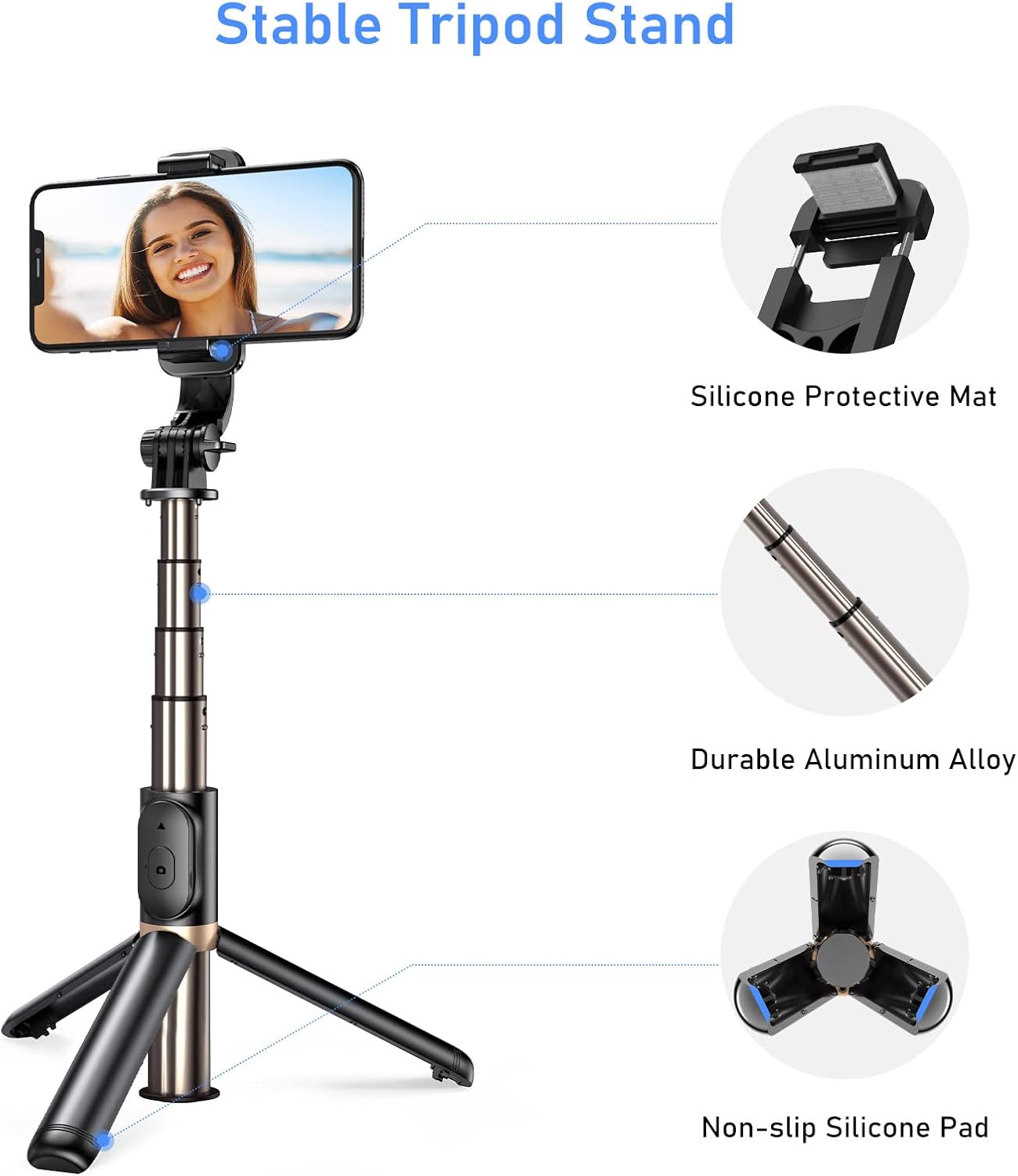
Image: The selfie stick with a smartphone mounted, illustrating its compatibility with different phone sizes (4.7-6.7 inches) and showing how a small camera can be attached.
Operating Instructions
1. Extending and Retracting the Selfie Stick
Hold the base of the stick and gently pull the top section upwards to extend the telescopic pole. It can extend up to 29.2 inches (74 cm). To retract, push the pole back down until it is fully collapsed.

Image: The selfie stick fully extended, with markings indicating its adjustable length from 7.48 inches (19 cm) to 29.2 inches (74 cm).
2. Using as a Tripod
At the bottom of the selfie stick handle, gently unfold the three legs outwards until they lock into place, forming a stable tripod base. Ensure the legs are fully extended and the tripod is placed on a flat, stable surface before mounting your device.
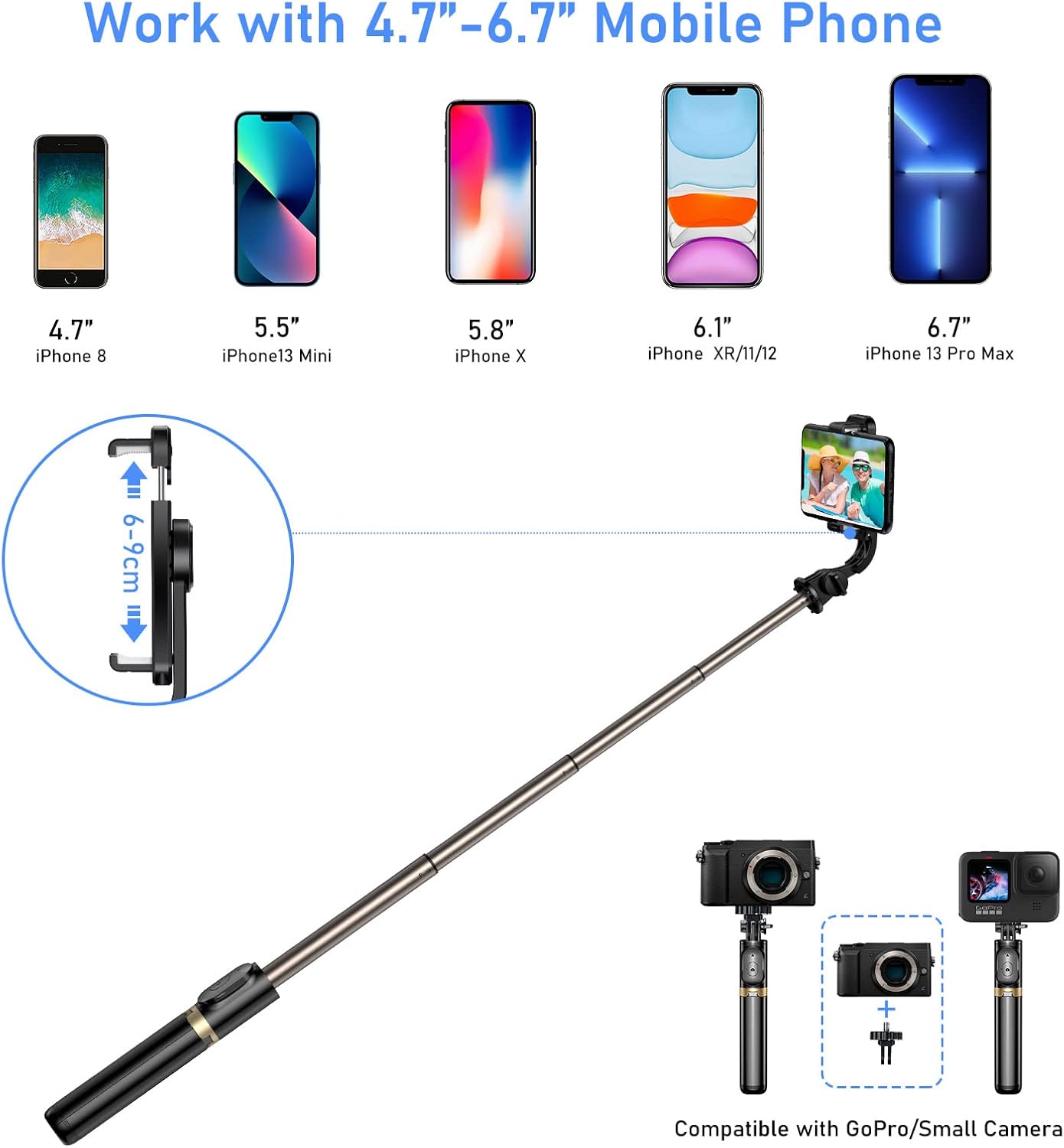
Image: The selfie stick configured as a tripod, with callouts pointing to the silicone protective mat on the phone clamp, the durable aluminum alloy pole, and the non-slip silicone pads on the tripod feet.
3. Adjusting Shooting Angles
The phone clamp allows for a full 360° rotation, enabling you to switch between horizontal and vertical orientations. The neck of the selfie stick also offers a 240° rotation, providing flexibility to find the optimal shooting angle for any situation.

Image: A diagram illustrating the multi-angle shooting capabilities, showing the 360° rotation of the phone clamp and the 240° rotation of the stick's neck.
4. Using the Remote Shutter
Once paired, simply press the button on the detachable Bluetooth remote to capture photos or start/stop video recording. Ensure your phone's camera app is open and ready to capture.
Maintenance
- Clean the device with a soft, dry cloth. Avoid using abrasive cleaners or solvents.
- Store the selfie stick in a cool, dry place away from direct sunlight and extreme temperatures.
- Ensure the remote control is turned off when not in use to conserve battery life.
- Periodically check all moving parts for smooth operation and ensure the tripod legs lock securely.
Troubleshooting
| Problem | Possible Solution |
|---|---|
| Remote control does not pair. |
|
| Remote control takes photos but not videos. |
|
| Tripod is unstable. |
|
| Phone does not fit in the clamp. |
|
Specifications
| Feature | Detail |
|---|---|
| Model Number | K9702 |
| Material | Aluminum Alloy |
| Color | Gold |
| Product Dimensions (Folded) | 19.5 x 4.5 x 3.3 cm (7.68 x 1.77 x 1.3 inches) |
| Weight | 125 g (0.27 lbs) |
| Minimum Height | 19 cm (7.48 inches) |
| Maximum Height | 74 cm (29.2 inches) |
| Weight Limit | 2 Kilograms |
| Compatible Phone Size | 4.7 - 6.7 inches |
| Bluetooth Range | Up to 10 meters (33 feet) |
| Remote Battery Type | CR1632 Lithium Metal (2 included) |
| Operating System Compatibility | iOS 5.1 and above, Android 4.3 and above |
Warranty and Support
For warranty information or technical support, please refer to the contact details provided with your purchase or visit the official Blukar website. Keep your purchase receipt for warranty claims.
Manufacturer: Blukar
Place of Business: 1-800-360-5881
Related documentsK9702

Ask a question about this manual
Ask about setup, troubleshooting, compatibility, parts, safety, or missing instructions. Manuals+ will review the question and use this page’s manual context to help answer it.