
Introduction
Thank you for choosing the MeLE Fanless Mini PC Stick PCG02 N100. This ultra-compact and silent mini PC is designed for a wide range of applications, from daily tasks and multimedia to light office work and industrial IoT solutions. Featuring a 12th generation Intel N100 processor, Windows 11 Pro compatibility, 4K dual display support, and high-speed wireless connectivity, this device offers versatility and efficiency. This manual provides essential information for setting up, operating, maintaining, and troubleshooting your device.
Package Contents
Before proceeding with the setup, please ensure all items are present in the package:
- 1 x MeLE PCG02 Mini PC Stick
- 1 x User Manual
- 1 x 5V 3A Power Adapter
- 1 x HDMI Extender Cable (25cm)
- 1 x VESA Mount Kit

Setup
1. Connecting to a Display
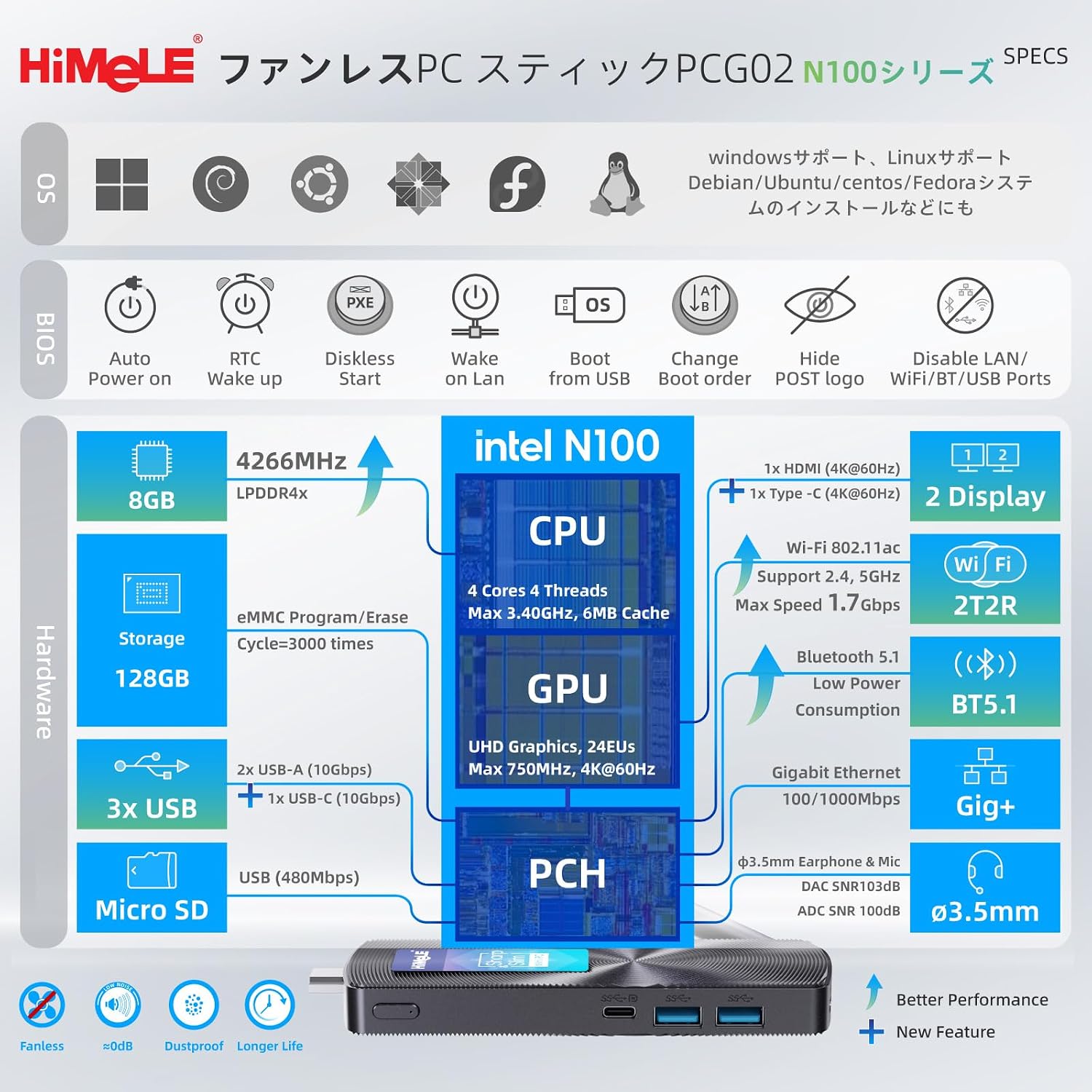
The MeLE PCG02 N100 supports dual display output at 4K UHD (60Hz) resolution. You can connect to a display using either the HDMI 2.0 port or the full-function USB-C port (which supports DisplayPort 1.4 Alt Mode).
- HDMI Connection: Connect one end of an HDMI cable to the HDMI port on the PC stick and the other end to your monitor or TV.
- USB-C Connection: For a second display or primary display via USB-C, connect a compatible USB-C to DisplayPort/HDMI cable to the full-function USB-C port on the PC stick and your display.
2. Connecting Peripherals
Connect your keyboard, mouse, and other USB devices to the available USB 3.2 Gen 2 ports. The device also features a 3.5mm audio jack for headphones or speakers.

3. Powering On
Connect the provided 5V 3A power adapter to the power input port on the PC stick. The device will automatically power on or can be powered on by pressing the power button. The system comes pre-installed with Windows 11 Pro.
Operating Instructions
1. Initial Boot and Windows Setup
Upon first power-on, follow the on-screen instructions to complete the Windows 11 Pro setup. This typically involves selecting your region, language, creating a user account, and connecting to a network.
2. Network Connectivity
The PCG02 N100 supports multiple network connection methods:
- Wi-Fi 5: Connect to a wireless network (2.4G/5G) for high-speed internet access (802.11ac / max 1.7Gbps).
- Gigabit Ethernet: For a stable wired connection, plug an Ethernet cable into the RJ45 Gigabit Ethernet port.
- Bluetooth 5.1: Connect wireless peripherals such as keyboards, mice, and headphones.

3. Dual Display Configuration
To configure dual displays, connect both monitors as described in the Setup section. Windows will automatically detect the displays. You can then adjust display settings (e.g., extend, duplicate) via the Display Settings in Windows.

4. BIOS Settings and Advanced Features
The PCG02 N100 supports advanced BIOS features essential for business and industrial applications:
- Wake on LAN (WoL): Allows the device to be woken up remotely over a network.
- PXE Boot: Enables booting from a network server.
- Auto Power On: Configures the device to automatically power on after a power outage.
- RTC Wake: Allows scheduling the device to wake up at a specific time.
- Kensington Security Slot: For physical anti-theft protection.
To access BIOS settings, press the designated key (usually Del or F2) during startup. Refer to the on-screen prompts for specific key presses.

Maintenance
1. Fanless Design and Heat Management
The PCG02 N100 features a fanless design for silent operation and reduced power consumption. The casing temperature typically ranges from 55℃ to 70℃ during continuous operation. To ensure optimal performance and longevity:
- Ensure adequate airflow around the device. Avoid placing it in enclosed spaces.
- Do not block the ventilation grooves on the device.
- Avoid touching the hot surface for prolonged periods to prevent burns.

2. Storage Expansion
The device includes 128GB of eMMC internal storage. For additional storage, you can use:
- MicroSD Card: Insert a microSD card into the dedicated slot (supports up to 1TB).
- External HDD/SSD: Connect external hard drives or SSDs via the USB 3.2 ports (supports up to 5TB HDD / 4TB SSD).

3. General Care
To maintain your device:
- Keep the device clean and free from dust. Use a soft, dry cloth for cleaning.
- Avoid exposing the device to extreme temperatures, humidity, or direct sunlight.
- Handle with care to prevent physical damage.
Troubleshooting
- No Power: Ensure the power adapter is securely connected to both the device and a working power outlet. Verify the power adapter is the correct 5V 3A model.
- No Display: Check HDMI/USB-C cable connections to both the PC stick and the monitor. Ensure the monitor is powered on and set to the correct input source. Try a different cable or monitor if possible.
- No Internet Connection: For Wi-Fi, ensure the Wi-Fi antenna is properly attached and the device is within range of a Wi-Fi network. For Ethernet, check the cable connection and router status.
- Slow Performance: Close unnecessary applications. Check for background processes consuming resources. Ensure sufficient free storage space.
- Overheating: Ensure the device has adequate ventilation and is not covered. Avoid placing it in direct sunlight or near heat sources.
Specifications
| Brand | MeLE |
| Model | PCG02 |
| Operating System | Windows 11 Pro (Pre-installed), supports Linux, other OS |
| CPU | Intel Celeron N100 Processor (12th Gen Alder Lake) |
| CPU Speed | Up to 3.4 GHz (Burst Frequency) |
| Cores/Threads | 4 Cores / 4 Threads |
| Smart Cache | 6MB |
| Graphics | Intel UHD Graphics (Integrated) |
| RAM | 8GB LPDDR4x (4266MHz) |
| Internal Storage | 128GB eMMC 5.1 |
| Expandable Storage | MicroSD card slot (up to 1TB), External HDD (up to 5TB) / SSD (up to 4TB) via USB 3.2 |
| Video Output | 1 x HDMI 2.0 (4K@60Hz), 1 x Full-Function USB-C (DisplayPort 1.4 Alt Mode, 4K@60Hz) |
| USB Ports | 2 x USB 3.2 Gen 2 (10Gbps), 1 x Full-Function USB-C (10Gbps data, DisplayPort, PD3.0) |
| Audio | 3.5mm Audio Jack |
| Network | Wi-Fi 5 (802.11ac, 2.4G/5G), Bluetooth 5.1, Gigabit Ethernet (RJ45) |
| Dimensions | Approx. 130 x 51 x 13 mm |
| Weight | Approx. 118g |
| Power Input | 5V 3A DC |
| Special Features | Fanless Design, VESA Mount Support, Kensington Lock Slot, Wake on LAN, PXE Boot, Auto Power On, RTC Wake |
Warranty and Support
MeLE is committed to providing high-quality products and excellent customer service. Your MeLE PCG02 N100 comes with the following:
- 3-Month Free Replacement: For any manufacturing defects within the first three months.
- 12-Month Warranty: Covers hardware defects for one year from the date of purchase.
- Lifetime Service: Ongoing support for the lifespan of the product.
- 24-Hour Customer Service: Dedicated support available within 24 hours for inquiries and assistance.
All MeLE products are manufactured in compliance with international standards including FCC, UL, UKCA, CE, GS, CCC, PSE, Giteki, and RCM.
For support inquiries, please contact: service@mele.cn


