
1. Introduction
The BORSSO Ultima Curve Ultra is an advanced 4K Ultra HD projector designed for a superior home theater and professional presentation experience. Featuring Android 15, 4GB RAM, 128GB ROM, 4K HDR10+ support, MEMC technology, and 3500 ANSI lumens brightness, this projector delivers vivid and smooth visuals. This manual provides essential information for setting up, operating, and maintaining your projector.

Image: The BORSSO Ultima Curve Ultra projector is versatile for home theater, meetings, fitness, and social gatherings.
2. What's in the Box
Carefully unpack your BORSSO Ultima Curve Ultra projector and ensure all items are present:
- ULTIMA CURVE ULTRA Projector
- Remote Control
- Power Cord
- Warranty Registration Card

Image: Front view of the BORSSO Ultima Curve Ultra projector, showcasing its sleek design.
3. Product Features
The Ultima Curve Ultra projector is equipped with advanced features for an immersive viewing experience:
- Operating System: Android 15 with 4GB LPDDR4X RAM and 128GB ROM for smooth performance.
- Display Technology: Native 1080P resolution with 4K HDR10+ HDMI signal support and LTPS+ Highly Transparent FHD Wide Screen LCD (16:9) display.
- Brightness: 3500 ANSI Peak Lamp Brightness with adjustable levels (High: 3500 ANSI, Standard: 3000 ANSI, Low Noise: 2000 ANSI).
- Contrast Ratio: 60000:1 High Dynamic Contrast Ratio.
- Motion Enhancement: MEMC (Motion Estimation, Motion Compensation) for smoother fast-action scenes.
- Automatic Adjustments: AI-based Smart Algorithm 3.0 for Full Auto Projection (Focus, Keystone, Obstacle Avoidance, Tilt).
- Audio: Powerful 10W×3 stereo DSP speakers with 3D surround sound and Bass Diaphragm.
- Cooling: Closed Optomechanics Engine with GeoThermal Cooling technology for reduced dust and efficient cooling.

Image: An infographic detailing the key features of the Ultima Curve Ultra, including 4K decode, 3500 ANSI brightness, auto keystone, wireless mirroring, Android 15, MEMC, Dolby sound, and large memory.
4. Setup
4.1 Placement
Choose a stable, flat surface for the projector. Ensure adequate ventilation around the unit. For optimal viewing, position the projector directly in front of your projection surface (wall or screen). The throw ratio of 1.27:1 allows for a 100-inch display from approximately 11 feet distance, up to a maximum of 300 inches.

Image: Diagram showing the 1.27:1 throw ratio, indicating distances for various screen sizes from 55 to 300 inches.
4.2 Power Connection
- Connect the power cord to the projector's power input.
- Plug the other end of the power cord into a suitable electrical outlet.
5. Operation
5.1 Power On/Off
- Power On: Press the power button on the projector or the remote control. The indicator light will illuminate.
- Power Off: Press the power button again. Confirm shutdown if prompted.
5.2 Initial Setup (Android 15)
Upon first power-on, follow the on-screen instructions to complete the initial Android 15 setup, including language selection, Wi-Fi connection, and Google account login.
5.3 Navigation
Use the provided remote control to navigate the Android 15 interface. The directional buttons, OK button, back button, and home button allow for easy interaction with apps and settings.
6. Connectivity
The Ultima Curve Ultra offers a wide range of connectivity options:
- HDMI: Connect devices like laptops, gaming consoles, Blu-ray players, and media players via HDMI 2.1 ports. HDMI ARC is supported for enhanced audio return.
- USB: Two USB ports are available for connecting USB drives (U Disk), hard disks, or mobile phones for charging.
- Wi-Fi: Supports latest 6th Gen Wi-Fi (2.4G/5G) for internet access and wireless mirroring.
- Bluetooth: Bluetooth 5.2 for connecting external audio devices.
- Wireless Mirroring: Supports AirPin and Miracast for screen mirroring from Android and iOS devices.
- RJ45: Ethernet port for wired network connection.
- AUX: Audio output for external speakers or headphones.

Image: A visual representation of the various input and output ports available on the projector, including HDMI, USB, RJ45, and AUX.

Image: Demonstrates the 'One Button Second To Big Screen' feature, showing wireless mirroring from a smartphone to a large projected display.
7. Projection & Display
7.1 Automatic Adjustments
The projector features an AI-based Smart Algorithm 3.0 for full automatic projection adjustments:
- Auto Focus: Automatically adjusts the image clarity.
- Auto Keystone: Corrects trapezoidal distortion for a perfectly rectangular image.
- Obstacle Avoidance: Scans the projection surface and automatically adjusts to avoid obstacles.
- Auto Tilt: Adjusts the projection angle for optimal viewing.
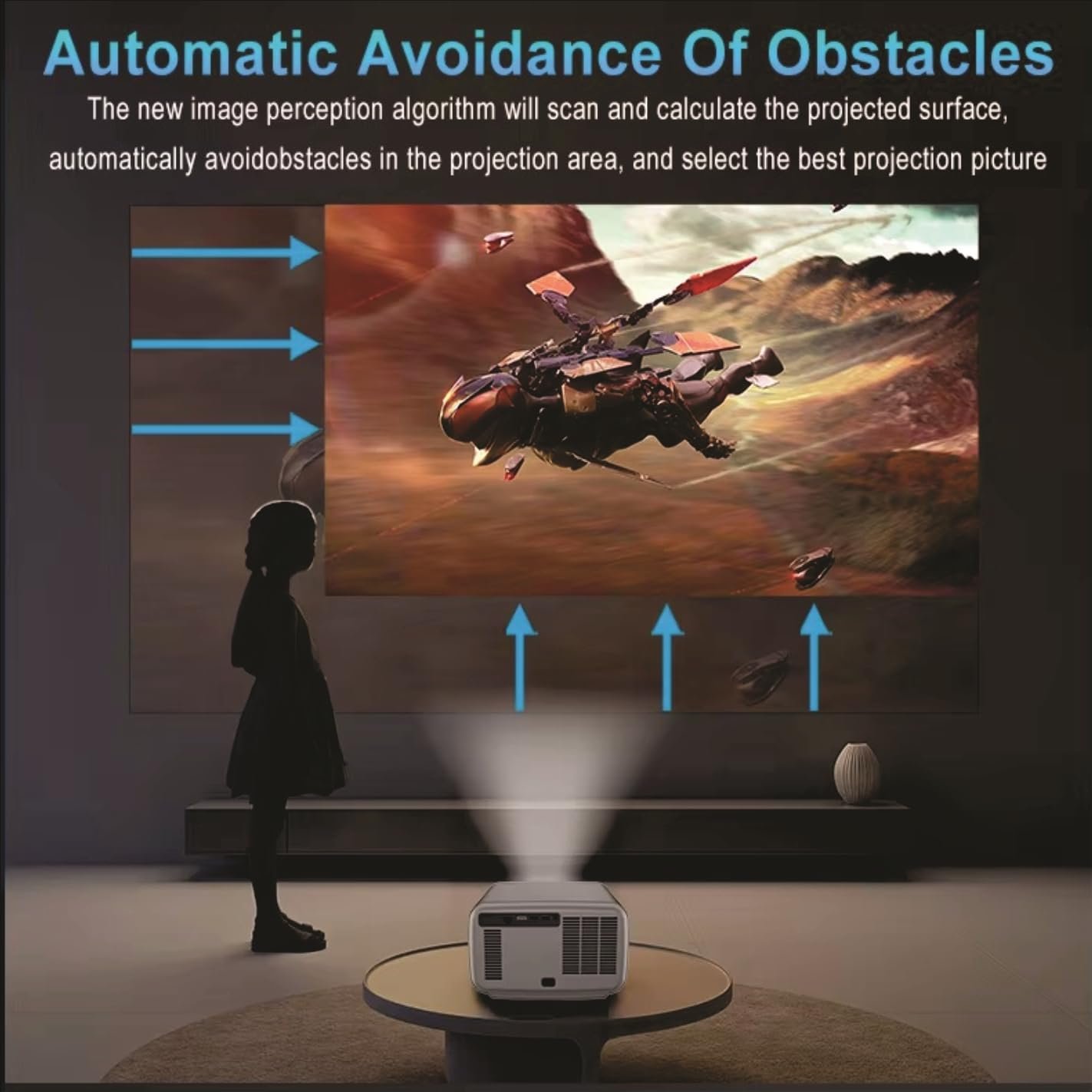
Image: Illustration of the automatic obstacle avoidance system, where the projector intelligently adjusts its output to bypass objects in the projection path.
7.2 HDR10+ and MEMC
- HDR10+: Provides enhanced contrast and color depth. You can toggle HDR effects On or Off in the settings.
- MEMC: Improves motion smoothness in fast-action scenes by inserting intermediate frames, reducing blur and judder.
7.3 AI Color Engine
The advanced Vivid Cinema Engine with AI Super Color chipset enhances contrast, deep color, and clarity, creating ultra-realistic and vivid images.

Image: Visual representation of the AI Color Engine's capabilities, including realistic colors, ultra denoise, anti-shaking, and full color restoration.
8. Audio
The BORSSO Ultima Curve Ultra is equipped with a powerful audio system:
- Integrated Speakers: Three 10W stereo DSP speakers with 3D surround sound and Bass Diaphragm provide an immersive audio experience.
- HDMI ARC: Supports HDMI 2.1 ARC for fast and stable connections with external soundbars or AV receivers, allowing audio to be sent back from the projector to the audio system.
- Bluetooth 5.2: Connect wireless headphones or Bluetooth speakers for personalized audio.

Image: An exploded diagram showcasing the internal structure of the 10W*3 DSP stereo speakers, highlighting the Bass Diaphragm for rich audio.
9. Maintenance
9.1 Cleaning the Lens
Use a soft, lint-free cloth specifically designed for optical lenses. Gently wipe the lens to remove dust or smudges. Avoid using abrasive cleaners or excessive force.
9.2 Cleaning the Projector Body
Wipe the exterior of the projector with a soft, dry cloth. For stubborn marks, a slightly damp cloth can be used, followed by a dry wipe. Do not use harsh chemicals.
9.3 Ventilation
Ensure the projector's ventilation ports are clear of obstructions to prevent overheating. The Closed Optomechanics Engine with GeoThermal Cooling technology significantly reduces dust accumulation, but regular checks are still recommended.
10. Troubleshooting
| Problem | Possible Cause | Solution |
|---|---|---|
| No image displayed | Power cable disconnected, input source incorrect, lens cap on. | Check power connection, select correct input source, remove lens cap. |
| Image is blurry | Focus not adjusted, projector too close/far. | Allow auto-focus to adjust or manually adjust if needed. Ensure proper throw distance. |
| Image is distorted (trapezoid) | Keystone not corrected. | Allow auto-keystone correction or manually adjust in settings. |
| No sound | Volume too low, external audio device not connected, incorrect audio output selected. | Increase volume, check external audio connections, select correct audio output in settings. |
| Remote control not working | Batteries low/dead, obstruction between remote and projector. | Replace batteries, ensure clear line of sight to the projector's IR receiver. |
11. Specifications
Detailed technical specifications for the BORSSO Ultima Curve Ultra projector:
| Feature | Specification |
|---|---|
| Brand | BORSSO |
| Model Name | ULTIMA CURVE ULTRA |
| Operating System | Android 15 |
| RAM / ROM | 4GB LPDDR4X / 128GB |
| CPU / GPU | Hi3751 V660, A55*8 / C52 MC1 600M |
| Native Resolution | 1920 x 1080 (Full HD) |
| Maximum Display Resolution | 3840 x 2160 Pixels (4K Support) |
| Brightness | 3500 ANSI Lumens (Peak) |
| Contrast Ratio | 60000:1 Dyne-cm |
| Display Type | LTPS+ New Generation Highly Transparent FHD Wide Screen LCD (16:9) |
| Light Source Life | 50000 Hours |
| Throw Ratio | 1.27:1 |
| Image Size | 60 - 300 Inches |
| Connectivity | Bluetooth 5.2, Wi-Fi (6th Gen, 2.4G/5G), HDMI (ARC), USB, RJ45, AUX |
| Audio | 10W×3 Stereo DSP Speakers with 3D Surround Sound (Bass Diaphragm) |
| Special Features | 4K Ultra HD, HDR10+, MEMC, Closed Engine, Full Auto Projection (Focus+Keystone+Obstacle Avoidance+Tilt) |
| Item Dimensions (L x W x H) | 26L x 15W x 26H Centimeters |
| Item Weight | 4 Kilograms |

Image: Details of the projector's powerful chip configuration, including 4GB RAM, 128GB ROM, Native 1080P, 4K HDR Support, and the Hi3751 V660 chipset.
12. Warranty & Support
The BORSSO Ultima Curve Ultra projector comes with a comprehensive warranty:
- Projector Warranty: 1 year comprehensive off-site warranty from the date of purchase.
- Lamp Warranty: 2 years warranty on the lamp from the date of purchase.
It is mandatory to register your product's warranty within 10 days from the date of delivery to avail warranty benefits. For more details and support, please visit the BORSSO brand website or contact customer service:
- Contact Number: 8955589977
- Email: myrakhmshop@gmail.com