
1. Introduction
Thank you for choosing the ABKO CWS120 True Wireless Earbuds. This manual provides essential information for the proper setup, operation, and maintenance of your device. Please read it thoroughly before use to ensure optimal performance and longevity.
The ABKO CWS120 earbuds feature a compact, lightweight design with a fabric-textured charging cradle. They deliver high-quality stereo sound through 6mm dynamic drivers and offer a stable connection via Bluetooth 5.0. With IPX4 waterproofing, they are suitable for various activities.
2. Package Contents
Please verify that all items listed below are included in your package:
- 1 X CWS120 Earbud Set (Left and Right)
- 1 X Charging Cradle
- 1 X USB-C type Charging Cable
- 3 X Ear Tip Sets (Small, Medium, Large)
- 1 X User Manual
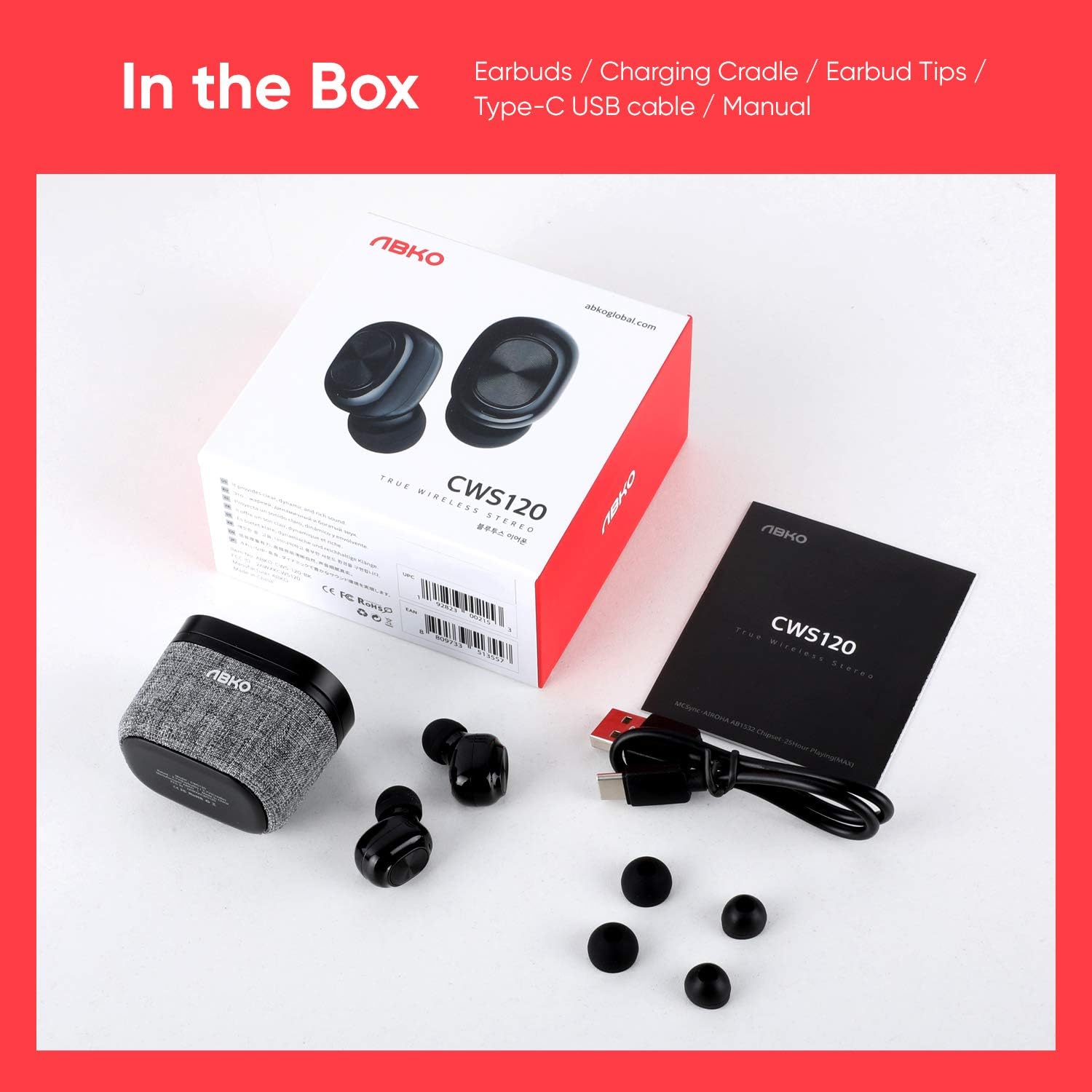
3. Product Overview
The ABKO CWS120 earbuds are designed for comfort and high-quality audio. The charging cradle features a unique fabric texture.

Each earbud is equipped with a 6mm dynamic driver to deliver clear and rich stereo sound, enhancing your listening experience.

The earbuds are ultra-lightweight, with each earbud weighing approximately 4.5g and the cradle weighing 36g, making them comfortable for extended wear and easy to carry.

4. Setup
4.1. Charging the Earbuds and Cradle
- Initial Charge: Before first use, fully charge both the earbuds and the charging cradle.
- Charging Earbuds: Place the earbuds into the charging cradle. Ensure they are correctly seated; the indicator lights on the earbuds will illuminate to show charging status.
- Charging Cradle: Connect the provided USB-C cable to the charging port on the cradle and the other end to a USB power source (e.g., wall adapter, computer USB port). The cradle's indicator light will show charging status.
- Charging Time: The cradle takes approximately 2 hours to fully charge, and the earbuds take about 1 hour.
4.2. Pairing with a Device
The ABKO CWS120 earbuds feature one-step auto-pairing for convenience.
- Power On: Open the charging cradle lid. The earbuds will automatically power on and enter pairing mode.
- Activate Bluetooth: On your smartphone or other Bluetooth-enabled device, go to the Bluetooth settings and ensure Bluetooth is turned on.
- Select Device: Look for "CWS120" in the list of available devices and select it to connect.
- Confirmation: Once connected, you will hear an audio prompt from the earbuds, and the device's Bluetooth settings will show "CWS120" as connected.
- Reconnection: After the initial pairing, the earbuds will automatically connect to the last paired device when removed from the cradle and Bluetooth is active on the device.

5. Operating Instructions
5.1. Multi-Function Button (MFB) Controls
Each earbud features a Multi-Function Button (MFB) for controlling various functions:
- Power On: Open the charging cradle lid (automatic).
- Power Off: Place earbuds back into the charging cradle and close the lid (automatic).
- Play/Pause: Single tap on either earbud.
- Answer/End Call: Single tap on either earbud during an incoming call.
- Reject Call: Press and hold either earbud for 2 seconds during an incoming call.
- Next Track: Double tap the right earbud.
- Previous Track: Double tap the left earbud.
- Activate Voice Assistant (Siri/Google): Triple tap on either earbud.

5.2. Wearing the Earbuds
The earbuds are designed with a 120-degree angle for an ergonomic fit. Insert each earbud gently into your ear canal and rotate slightly to ensure a secure and comfortable seal. Choose the ear tips that best fit your ears for optimal sound quality and comfort.
6. Maintenance
6.1. Cleaning
- Regularly clean the earbuds and charging contacts with a soft, dry, lint-free cloth.
- Remove ear tips and clean them with mild soap and water if necessary. Ensure they are completely dry before reattaching.
- Do not use harsh chemicals or abrasive materials for cleaning.
6.2. Storage
When not in use, always store the earbuds in their charging cradle to protect them and keep them charged.
6.3. Water Resistance (IPX4)
The ABKO CWS120 earbuds are IPX4 waterproof, meaning they are resistant to splashing water from any direction. This makes them suitable for workouts and light rain. However, they are not designed for submersion in water or exposure to strong jets of water.

7. Troubleshooting
If you encounter issues with your ABKO CWS120 earbuds, please refer to the following common solutions:
| Problem | Possible Solution |
|---|---|
| Earbuds not pairing/connecting |
|
| Only one earbud working |
|
| No sound or low volume |
|
| Charging issues |
|
8. Specifications
Key technical specifications for the ABKO CWS120 True Wireless Earbuds:
- Frequency Response: 20Hz – 20KHz
- Bluetooth Version: BT 5.0
- Bluetooth Profile: HFP / HSP / A2DP / AVRCP
- Audio Codec: AAC / SBC
- Charging Time (Cradle): Approximately 2 hours
- Charging Time (Earbuds): Approximately 1 hour
- Playtime (Earbuds): Up to 5 hours
- Total Playtime (with Charging Case): Up to 25 hours
- Cradle Battery Spec.: 3.7V / 500mAh
- Earbud Battery Spec.: 3.7V / 50mAh
- Operation Distance: 10 meters (33 feet)
- Waterproof Rate: IPX4
- Charging Port: USB-C type
- Earbud Weight: 4.5g (approx.)
- Cradle Weight: 36g (approx.)
- Control Method: Touch
9. Safety Information
- Do not disassemble, repair, or modify the product.
- Keep the product away from extreme temperatures, direct sunlight, and open flames.
- Avoid exposing the product to strong magnetic fields.
- Do not use the product at high volume for extended periods to prevent hearing damage.
- Keep out of reach of children and pets.
- Dispose of the product and its battery responsibly according to local regulations.
10. Warranty and Support
ABKO products are designed and manufactured to the highest quality standards. For warranty information, technical support, or customer service inquiries, please refer to the warranty card included in your package or visit the official ABKO website. Please retain your proof of purchase for warranty claims.


