
Introduction
The ORSDA 2-in-1 Interactive Cat Toy (Model T60W) is designed to provide engaging play for indoor cats by simulating hunting and tracking experiences. This device combines an ambush feather toy with a track ball feature, offering varied entertainment to keep your cat physically and mentally active.
Safety Information
- This product is intended for pet use only. Keep out of reach of children.
- Always supervise your pet during play to prevent ingestion of parts.
- Inspect the toy regularly for damage. Discontinue use if any part becomes loose or detached.
- Do not expose the device to water or excessive moisture.
- Use only the specified power source (4*AA batteries or 5V/1A adapter).
Package Contents
Please ensure all items are present in the package:
- ORSDA 2-in-1 Interactive Cat Toy Unit
- 6 x Replaceable Feathers (including multicolored, purple, fluffy tail, and pearl pheasant feathers)
- 2 x Track Balls (one with bell)
- User Manual
Product Features

Image: The ORSDA 2-in-1 Interactive Cat Toy demonstrating its dual functionality with an ambush feather emerging from one side and a track ball spinning within the circular track.
- 2-in-1 Play Modes: Features both an unpredictable ambush feather that pops out randomly and a track with spinning balls to engage your cat's natural hunting instincts.
- Rich & Replaceable Attachments: Comes with 6 varied feathers to maintain your cat's interest and allow for customization.
- Auto On-Off & Speed Modes: Offers 3 customized speed modes and includes a built-in 10-minute automatic shut-off feature (activates every 3 hours) to conserve power.
- Smart Mode: Automatically enters standby mode at night to ensure undisturbed sleep for both you and your cat.
- Dual Power Supplies: Can be powered by 4 AA batteries (not included) or a 5V/1A adapter (not included).
- Paws-Friendly Design: Constructed with smooth and thick tracking edges to ensure the safety of your cat's paws during play.
Setup
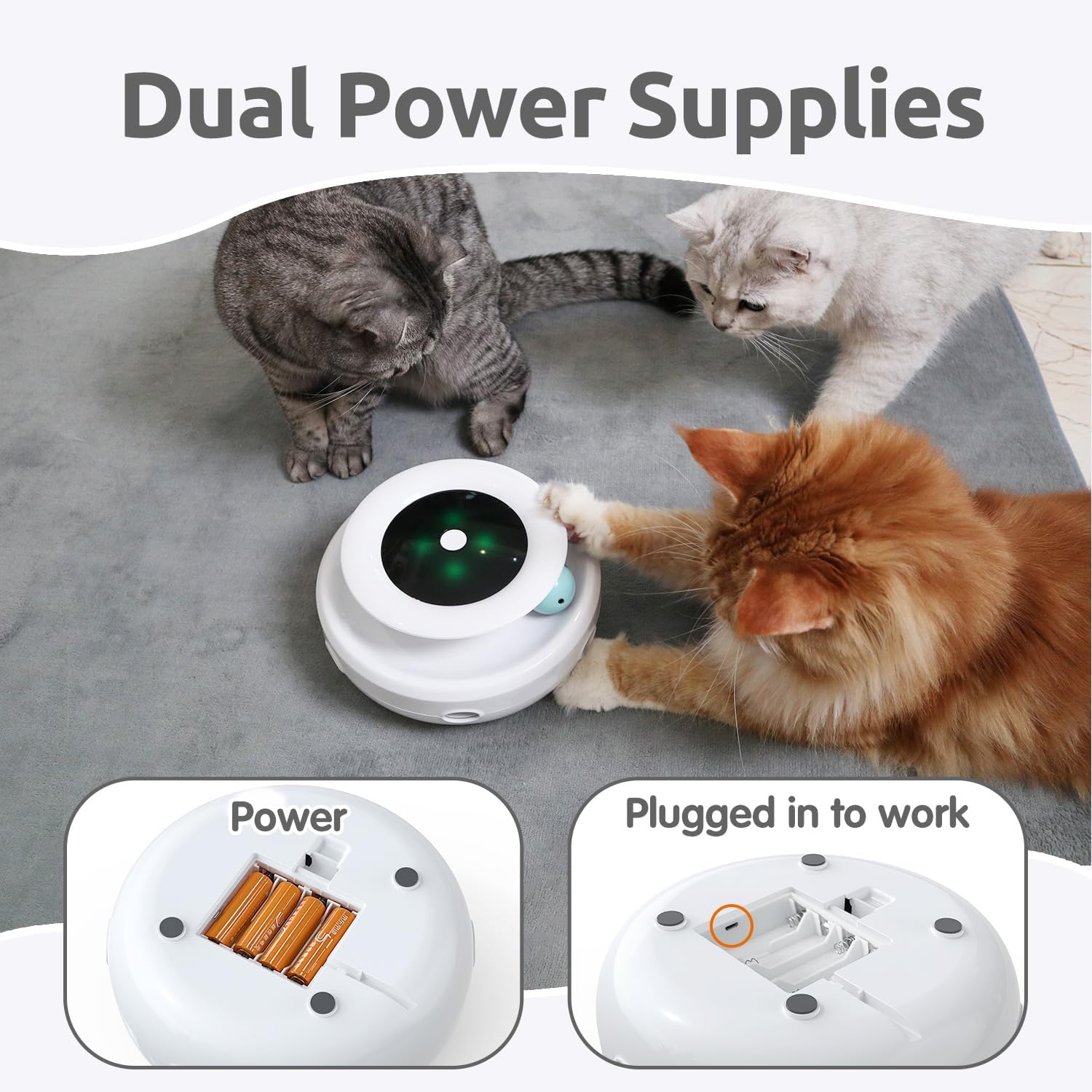
Image: The underside of the ORSDA 2-in-1 Interactive Cat Toy, illustrating the battery compartment for 4 AA batteries and the port for a 5V/1A power adapter.
- Power Supply Installation:
- Batteries: Open the battery compartment on the underside of the toy. Insert 4 AA batteries (not included), ensuring correct polarity. Close the compartment securely.
- Adapter: Alternatively, connect a 5V/1A power adapter (not included) to the DC input port on the underside of the toy and plug it into a wall outlet.
- Attach Feathers: Select a feather attachment and securely insert its base into the designated slot on the toy's rotating mechanism.
- Place Track Balls: Place the two track balls into the circular track around the base of the toy.
- Position the Toy: Place the toy on a flat, stable surface in an area accessible to your cat.
Operating Instructions

Image: The top view of the ORSDA 2-in-1 Interactive Cat Toy, highlighting the central button and LED indicator lights for Smart Mode, showing activation during daylight and automatic turn-off at night.
- Power On/Off: Press the central button on the top of the toy to turn it on. Press it again to cycle through modes or turn it off.
- Mode Selection: Each press of the central button will cycle through the available speed modes for the ambush feather and track ball functions. There are 3 customized speed modes.
- Automatic Shut-off: The toy is designed to operate for 10 minutes and then automatically shut off. It will reactivate every 3 hours to provide intermittent play sessions.
- Smart Mode: The toy features a Smart Mode that detects ambient light. During daylight hours, it will activate for 10 minutes every 4 hours. At night, it will automatically turn off to avoid disturbing sleep.
Maintenance
- Cleaning: Wipe the toy's surface with a soft, dry cloth. Do not use harsh chemicals or immerse the toy in water.
- Feather Replacement: If feathers become worn or damaged, gently pull them out and insert new ones. Ensure they are securely fastened.
- Battery Replacement: When the toy's performance diminishes, replace the 4 AA batteries with new ones, ensuring correct polarity.
- Storage: When not in use for extended periods, remove batteries and store the toy in a dry, cool place.
Troubleshooting
| Problem | Possible Cause | Solution |
|---|---|---|
| Toy does not turn on. | No power (dead batteries or adapter not connected). | Replace batteries or ensure adapter is properly connected and functional. |
| Feather does not move. | Feather mechanism jammed or damaged. | Check for obstructions. If damaged, discontinue use. |
| Cat is not interested in the toy. | Cat prefers different play styles or needs new stimulation. | Try different feather attachments. Introduce the toy during active play times. Ensure the toy is clean and functioning correctly. |
| Toy turns off too quickly. | Automatic shut-off feature activated. | This is normal operation (10 minutes on, then off). It will reactivate after 3 hours in regular mode, or according to Smart Mode schedule. |
Specifications

Image: The ORSDA 2-in-1 Interactive Cat Toy with measurements indicating its dimensions (7.68 inches wide, 3.55 inches high) and highlighting its ABS material construction and natural, non-toxic colored feathers.
- Manufacturer: ORSDA
- Model Number: T60W
- Product Dimensions: 19.51 x 19.51 x 9.02 cm
- Product Weight: 600 g
- Material: Acrylonitrile Butadiene Styrene (ABS)
- Color: Ivory White
- Power Supply: 4 x AA batteries (not included) or 5V/1A adapter (not included)
- Recommended Use: Indoor play for cats of all breed sizes
Warranty and Support
ORSDA provides an 18-month after-sales service for this product. If you have any questions, concerns, or require assistance with your ORSDA 2-in-1 Interactive Cat Toy, please contact ORSDA customer support through the retailer's platform or the official ORSDA website.


