
Introduction
This manual provides essential information for the safe and effective use of your Nerf AccuStrike Ultra 20-Dart Refill Pack. These darts are designed for accuracy and are compatible only with Nerf Ultra blasters. Stock up with this refill pack to ensure you always have plenty of darts for continuous play.
Safety Information
WARNING: Do not aim at eyes or face. Use of eyewear recommended for players and people within range. Use only official Nerf darts. Other darts may not meet safety standards. Do not modify darts or blaster. WARNING: CHOKING HAZARD - Small parts may be generated. Not for children under 3 years.
Product Overview
The Nerf AccuStrike Ultra 20-Dart Refill Pack contains 20 official Nerf AccuStrike Ultra darts. These darts are engineered for enhanced accuracy and are specifically designed to work with Nerf Ultra blasters and Nerf Ultra clips (sold separately).

Image: Twenty Nerf AccuStrike Ultra darts, featuring grey foam bodies and distinctive red tips, designed for accuracy.

Image: The Nerf AccuStrike Ultra 20-Dart Refill Pack, showing the packaging box and the darts themselves.
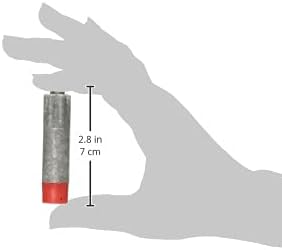
Image: A single Nerf AccuStrike Ultra dart, demonstrating its approximate length of 2.8 inches (7 cm).
Setup
To prepare your Nerf Ultra blaster for use, ensure you have a compatible Nerf Ultra blaster (sold separately). Open the blaster's dart loading mechanism or magazine well. Carefully insert the Nerf AccuStrike Ultra darts into the designated slots or magazine, ensuring they are fully seated. Do not force darts into the blaster, as this can cause damage to the darts or the blaster.
Operating Instructions
Once the darts are loaded, follow the specific operating instructions for your Nerf Ultra blaster model to prime and fire. Always ensure the area is clear of obstacles and other people before firing. Aim responsibly and never at eyes or face. Eyewear is recommended for all participants and bystanders.
Maintenance
To ensure the longevity and performance of your Nerf AccuStrike Ultra darts, follow these maintenance guidelines:
- Storage: Store darts in a cool, dry place away from direct sunlight and extreme temperatures.
- Cleaning: If darts become dirty, gently wipe them with a damp cloth. Do not submerge in water or use harsh chemicals.
- Inspection: Regularly inspect darts for damage such as tears, bends, or deformed tips. Damaged darts may affect blaster performance and accuracy, and should be replaced.
- Avoid Modification: Do not modify the darts in any way, as this can compromise their safety and performance.
Troubleshooting
If you encounter issues with your Nerf AccuStrike Ultra darts, consider the following:
- Darts not firing correctly: Ensure darts are fully inserted into the blaster's magazine or loading port. Check for any obstructions in the blaster's barrel or firing mechanism.
- Reduced accuracy: Inspect darts for any damage or deformation. Even minor damage can affect flight path. Ensure your blaster is clean and functioning correctly.
- Darts getting stuck: This can often be caused by damaged darts or an issue with the blaster itself. Remove any stuck darts carefully to avoid damaging the blaster.
If problems persist, refer to your specific Nerf Ultra blaster's manual or contact Nerf customer support.
Specifications
| Feature | Detail |
|---|---|
| Product Dimensions | 1.31 x 8 x 5.75 inches |
| Item Weight | 2.39 ounces |
| ASIN | B08TRMF37G |
| Item Model Number | F2311 |
| Manufacturer Recommended Age | 8 years and up |
| Release Date | August 1, 2021 |
| Manufacturer | Hasbro |
| What's in the Box | Toy Blaster Refill (20 Darts) |