
PULUOMIS Video Gaming Chair
PULUOMIS Video Gaming Chair User Manual
Model: Video Gaming Chair
1. Introduction
Thank you for choosing the PULUOMIS Video Gaming Chair. This manual provides essential information for the safe assembly, operation, and maintenance of your new chair. Please read it thoroughly before use to ensure optimal performance and longevity of the product.

Image: Front view of the PULUOMIS Video Gaming Chair, showcasing its ergonomic design and black PU leather finish.
2. Safety Information
Please observe the following safety guidelines to prevent injury or damage to the chair:
- This chair has a maximum weight capacity of 150 kg. Exceeding this weight may result in damage to the chair or injury to the user.
- When operating the adjustable reclining mechanisms, ensure the chair is on a stable, level surface to prevent tipping or instability.
- Improper use of the chair may result in injury or damage to the chair. Always follow the assembly and operation instructions provided.
- Keep small parts away from children during assembly to avoid choking hazards.
- Do not stand on the chair or use it as a step stool.
3. Product Features
The PULUOMIS Video Gaming Chair is designed with several features to enhance your comfort and experience:
- Retractable Footrest: Provides leg support for extended relaxation.
- Adjustable Headrest Pillow: Offers neck and head support.
- Massage Lumbar Pillow: Features built-in USB massage devices for active support and relaxation.
- Ergonomic Design: Thicken and widen seat, streamlined adjustable armrests for comfort.
- Adjustable Backrest: Reclines from 90 to 150 degrees for various activities like working, gaming, reading, or resting.
- Height Adjustable: Easily adjust the seat height for multi-tasking convenience.
- 360° Swivel: Allows for full rotation and easy movement.
- Sturdy 5-Star Base: BIFMA certified for stability and durability.
- Smooth-Rolling Caster Wheels: Quiet, non-slip, anti-scratch, and protect your floor.
- High-Quality Materials: Constructed with a sturdy metal frame, high-density foam, and premium PU leather.
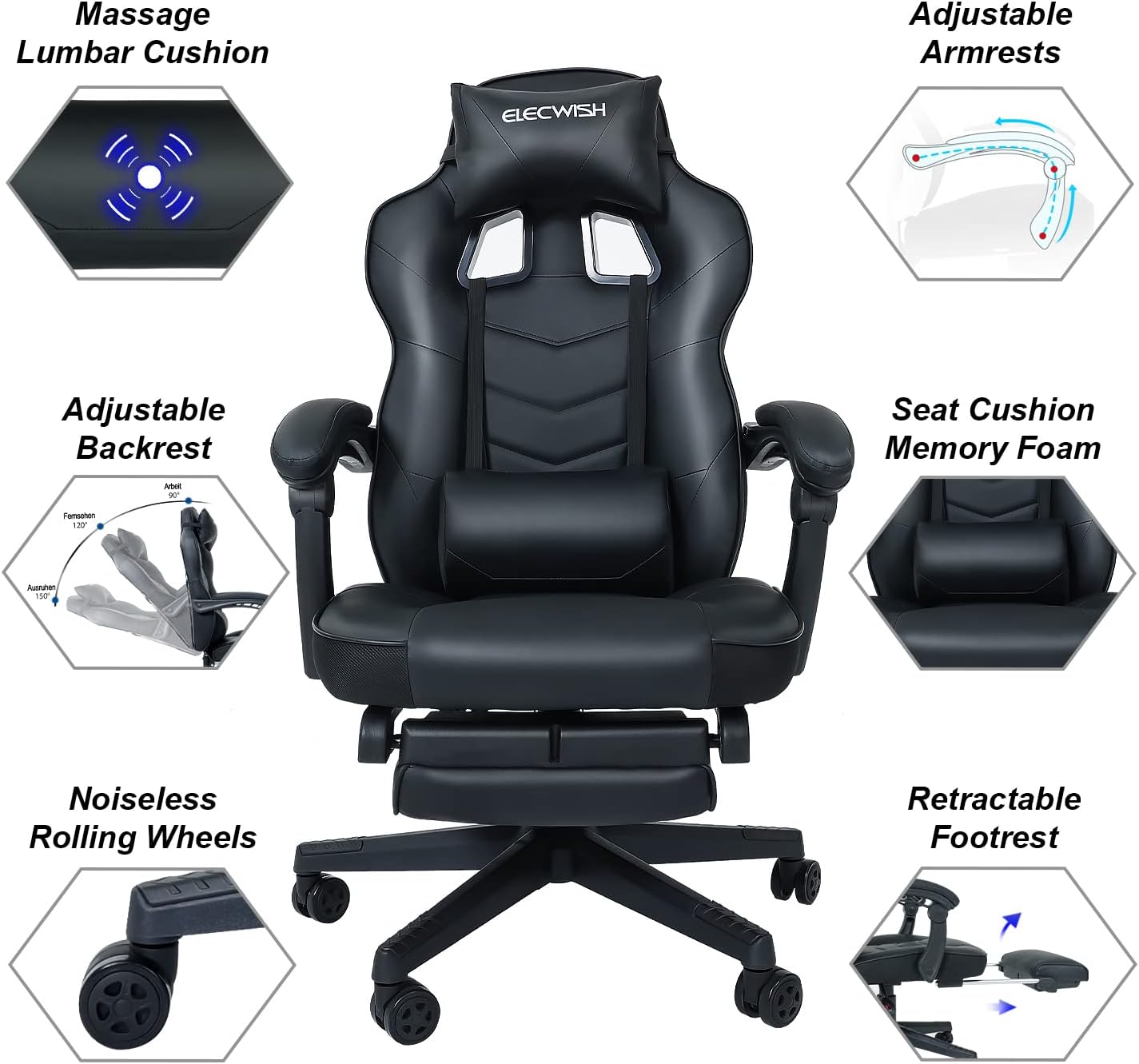
Image: Detailed diagram highlighting the key features of the PULUOMIS Gaming Chair, including its massage lumbar cushion, adjustable armrests, and retractable footrest.

Image: Close-up view illustrating the massage lumbar cushion, the retractable footrest in its extended position, and the comfortable memory foam seat cushion.
4. Assembly Instructions
The PULUOMIS Gaming Chair is designed for easy assembly. A clear installation guide is provided with your product. Please follow the steps below and refer to the included manual for detailed diagrams and instructions:
- Unpack Components: Carefully remove all parts from the packaging and lay them out on a clean, soft surface to prevent scratches. Verify all components are present according to the parts list in your manual.
- Assemble the Base: Attach the caster wheels to the 5-star base. Insert the gas lift cylinder into the center hole of the base.
- Attach Armrests to Seat: Secure the armrests to the seat cushion using the provided screws.
- Connect Backrest to Seat: Attach the backrest to the seat assembly. This step may be easier with two people.
- Mount Seat Assembly to Gas Lift: Carefully place the assembled seat and backrest onto the gas lift cylinder.
- Attach Cushions: Position the headrest pillow and massage lumbar pillow as desired. The lumbar pillow connects via USB for its massage function.
Ensure all screws are tightened securely before using the chair. Do not overtighten.
5. Operating Instructions
Familiarize yourself with the chair's adjustable functions for optimal comfort:
5.1. Seat Height Adjustment
To adjust the seat height, locate the lever on the right side, beneath the seat. Pull the lever upwards while seated to lower the chair, or pull the lever upwards while standing to raise the chair. Release the lever to lock the height in place.
5.2. Backrest Recline
To recline the backrest, locate the lever on the left side, beneath the seat. Pull the lever upwards and lean back to your desired angle (between 90 and 150 degrees). Release the lever to lock the backrest position. To return to an upright position, pull the lever and lean forward.

Image: Visual representation of the chair's recline capabilities, illustrating different angles suitable for various activities from working to resting.
5.3. Retractable Footrest
To extend the footrest, pull it out from beneath the seat. To retract it, push it back in until it is fully stored. Ensure the footrest is fully extended or retracted before applying weight.
5.4. Massage Function (Lumbar Pillow)
The lumbar pillow features a built-in massage device. Connect the USB cable from the lumbar pillow to a compatible USB power source (e.g., computer, power bank, USB wall adapter). The massage function can be controlled via a switch on the cable.
6. Maintenance
Proper maintenance will extend the life of your PULUOMIS Gaming Chair:
- Cleaning: Wipe clean the PU leather surfaces with a soft, damp cloth. For tougher stains, use a mild soap solution and wipe dry immediately. Avoid harsh chemicals or abrasive cleaners.
- Caster Wheels: Periodically check and clean the caster wheels to remove any hair, dust, or debris that may hinder smooth rolling.
- Hardware: Regularly check all screws and bolts to ensure they are tight. Retighten if necessary to maintain stability.
- Avoid Direct Sunlight: Prolonged exposure to direct sunlight can cause the PU leather to fade or crack.
- Lubrication: If any moving parts (e.g., recline mechanism, swivel) begin to squeak, a small amount of silicone-based lubricant can be applied.
7. Troubleshooting
If you encounter any issues with your chair, please refer to the following common troubleshooting tips:
- Chair Sinks or Does Not Stay Up: Ensure the height adjustment lever is fully engaged. If the issue persists, the gas lift cylinder may need replacement.
- Chair Squeaks: Check all bolted connections and tighten them if loose. Apply a small amount of silicone lubricant to moving parts, such as the recline mechanism or the base where the gas lift connects.
- Wheels Not Rolling Smoothly: Inspect the caster wheels for tangled hair, dust, or debris. Clean them thoroughly.
- Backrest Does Not Recline/Lock: Check the recline lever and its mechanism for any obstructions or damage. Ensure it is fully engaged.
- Massage Function Not Working: Verify the USB cable is securely connected to a working USB power source. Check the switch on the cable to ensure it is in the 'on' position.
If these steps do not resolve the issue, please contact PULUOMIS customer support for further assistance.
8. Specifications
| Feature | Detail |
|---|---|
| Brand | PULUOMIS |
| Model Name | Video Gaming Chair |
| Colour | Black |
| Material Type | Faux Leather, High-Density Foam, Metal Frame |
| Product Dimensions (D x W x H) | 49D x 53W x 121H centimetres |
| Item Weight | 20.5 kg |
| Maximum Weight Recommendation | 150 kg |
| Reclining Position Count | 90-150 degrees (2 or more positions) |
| Special Features | Head support, Ergonomic, Wheels, Swivel, Height adjustable, Retractable Footrest, Massage Lumbar Pillow |
| Recommended Uses | Office, Relaxing, Gaming |

Image: Dimensional drawing of the PULUOMIS Gaming Chair, providing key measurements for height, width, and depth.
9. Warranty and Support
PULUOMIS is committed to providing high-quality products. For any warranty inquiries, technical support, or assistance with parts, please contact PULUOMIS customer service. Please have your purchase details and model information ready when contacting support.
While no specific video tutorials are available in this manual, please check the official PULUOMIS website or product page for any available instructional videos or additional support resources.
Ask a question about this manual
Ask about setup, troubleshooting, compatibility, parts, safety, or missing instructions. Manuals+ will review the question and use this page’s manual context to help answer it.