
Amazon Basics LSMICRO128GU3
Amazon Basics Micro SDXC Memory Card User Manual
Model: LSMICRO128GU3 | Brand: Amazon Basics
Product Overview
The Amazon Basics Micro SDXC Memory Card with Full Size Adapter offers reliable and high-speed storage for a wide range of devices. Designed for optimal performance, it supports high-resolution photos, Full HD/4K video recording, and efficient app usage. Its robust construction ensures lasting reliability against various environmental factors.

Image: Amazon Basics 128GB Micro SDXC Memory Card with its full-size adapter.
Key Features
- Wide Compatibility: Compatible with smartphones, tablets, cameras, GoPro/action cameras, laptops, desktop computers, DSLRs, drones, Nintendo Switch/other portable consoles, and more. Includes a full-size SD adapter for versatile use.
- High Quality Storage: Ideal for high-resolution photos, and for recording and storing Full HD/4K videos and any other data type.
- Ultra Fast Performance: Features read speeds up to 100MB/s and write speeds up to 60MB/s (varies by memory size). UHS, U3, Class 10, and A2 speed classes ensure an optimal smartphone experience.
- Lasting Reliability: Designed to be shockproof, IPX6 waterproof, temperature-proof (-10° to 80°C), X-Ray-proof, and magnetic-proof, ensuring data safety in various conditions.

Image: Overview of the memory card's key features including compatibility, speed, and durability.
Setup & Installation
The Amazon Basics Micro SDXC Memory Card is designed for easy installation in compatible devices. It comes with a full-size SD adapter for broader compatibility.
Inserting the Micro SD Card:
- Identify Slot: Locate the Micro SD card slot on your device (e.g., smartphone, tablet, camera, laptop).
- Orient Card: Ensure the metal contacts on the Micro SD card are facing the correct direction, typically aligning with the contacts inside the device's slot.
- Insert Gently: Gently push the Micro SD card into the slot until it clicks into place. Do not force the card.
Using the Full-Size SD Adapter:
- Insert Micro SD: Slide the Micro SD card into the designated slot on the full-size SD adapter until it locks securely.
- Insert Adapter: Insert the adapter with the Micro SD card into a device that uses a standard SD card slot (e.g., DSLR camera, laptop with an SD card reader).
- Lock Switch (Optional): Some SD adapters have a lock switch on the side. Ensure it is in the "unlocked" position to allow writing to the card.

Image: Demonstrates inserting the Micro SD card into the adapter and then into a DSLR camera.

Image: Illustrates inserting the Micro SD card with its adapter into a laptop's SD card slot.
Operating Instructions
Once installed, your Amazon Basics Micro SDXC Memory Card is ready for use. Its high-speed capabilities make it suitable for demanding tasks.
Data Storage and Transfer:
- Photos & Videos: Use the card to store high-resolution photos and record Full HD or 4K videos directly from your camera or smartphone.
- App Performance: The A2 rating ensures faster app loading and performance when running applications directly from the card on compatible smartphones and tablets.
- File Transfer: Transfer files between your device and a computer quickly, thanks to read speeds up to 100MB/s.
Device Compatibility:
This Micro SD card is widely compatible with various electronic devices, expanding your storage options.

Image: Visual representation of various devices compatible with the Micro SD card.
Capacity Guidelines:
Refer to the table below for estimated storage capacities for photos and video recordings based on card size.
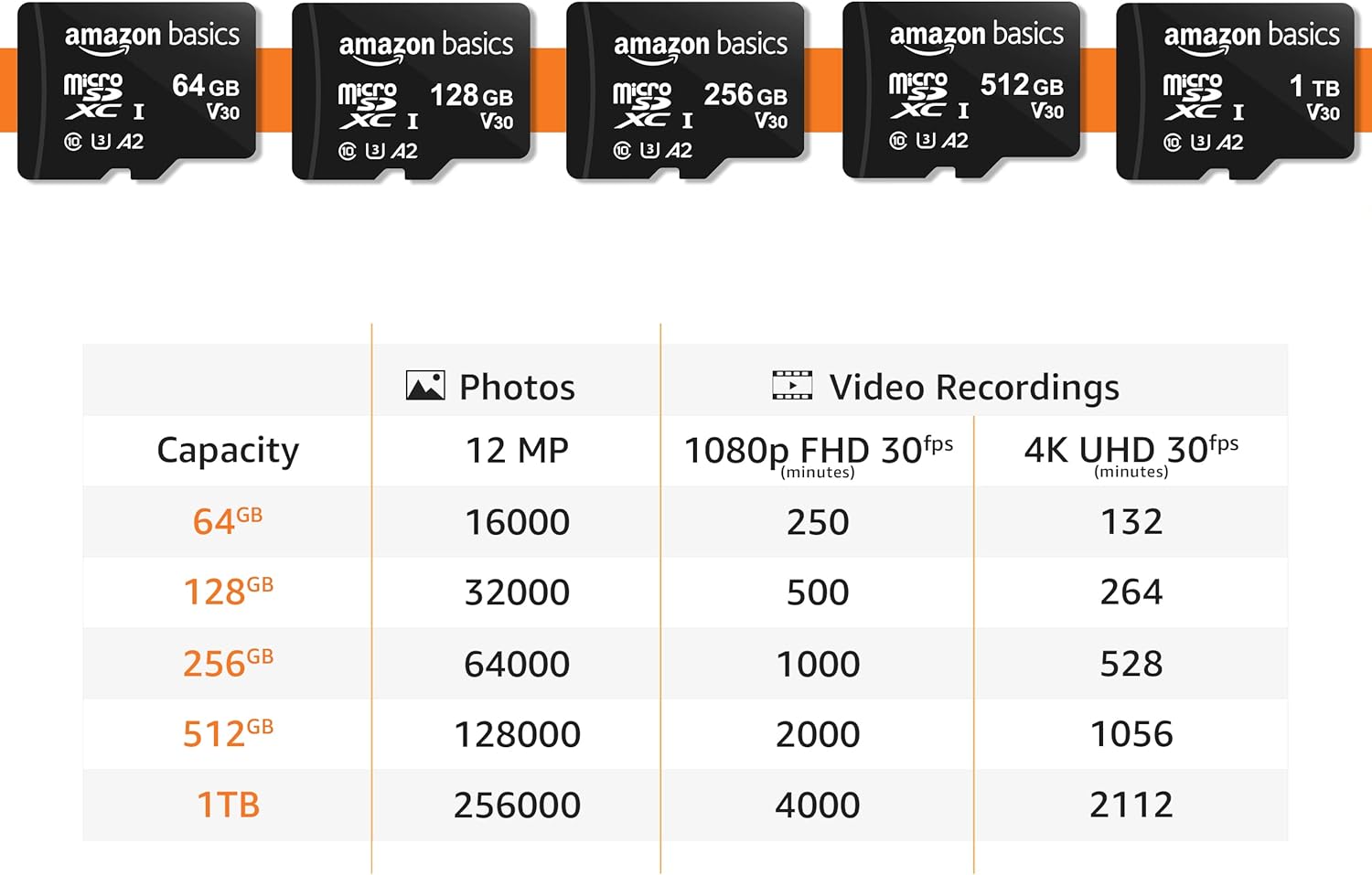
Image: Table detailing estimated storage capacities for photos and videos across different card sizes.
Maintenance & Care
The Amazon Basics Micro SDXC Memory Card is built for durability. Follow these guidelines to ensure its longevity and data integrity:
- Physical Protection: Avoid bending, dropping, or applying excessive force to the card.
- Environmental Resistance: The card is shockproof, IPX6 waterproof, temperature-proof (-10° to 80°C), X-Ray-proof, and magnetic-proof. While robust, avoid unnecessary exposure to extreme conditions.
- Cleanliness: Keep the metal contacts clean and free from dust or debris. Use a soft, dry cloth if cleaning is necessary.
- Safe Removal: Always safely eject the card from your device or computer before physically removing it to prevent data corruption.

Image: Visuals demonstrating the card's resistance features against various elements.
Troubleshooting
If you encounter issues with your Micro SDXC Memory Card, try the following common troubleshooting steps:
- Card Not Recognized:
- Ensure the card is fully inserted into the device or adapter.
- Check if your device supports the Micro SDXC format and the specific capacity (e.g., if a device only supports 64GB, it may not recognize 128GB cards).
- Try the card in another compatible device to rule out a device-specific issue.
- If using the adapter, ensure the lock switch is in the unlocked position.
- Slow Performance:
- Ensure your device's card reader supports UHS-I speeds.
- Free up space on the card; performance can decrease when storage is nearly full.
- Format the card (back up data first!) to resolve potential file system fragmentation.
- Data Corruption:
- Always safely eject the card before removal.
- Avoid interrupting data transfers.
- If data is corrupted, data recovery software may be an option, but success is not guaranteed.
Specifications
| Specification | Detail |
|---|---|
| Brand | Amazon Basics |
| Flash Memory Type | Micro SDXC |
| Memory Storage Capacity | 128 GB |
| Read Speed | Up to 100 MB/s |
| Write Speed | Up to 60 MB/s |
| Hardware Interface | microSDXC |
| Secure Digital Association Speed Class | Class 10, U3, A2 |
| Compatible Devices | Laptop, Gaming Console, Personal Computer, Tablet, Drone, Camera, Smartphone |
| Color | Black |
| Item Model Number | LSMICRO128GU3 |
| Item Weight | 0.283 ounces (8.02 Grams) |
| Product Dimensions | 0.59 x 0.43 x 0.1 inches (1.69"L x 0.3"W) |
| Country of Origin | Taiwan |
| First Available Date | August 10, 2021 |
Warranty & Support
For detailed safety information and warranty details, please refer to the official documents:
For further assistance, please visit the Amazon Basics Store.
Related documentsLSMICRO128GU3


Ask a question about this manual
Ask about setup, troubleshooting, compatibility, parts, safety, or missing instructions. Manuals+ will review the question and use this page’s manual context to help answer it.