
Einhell 4511526
Einhell Power X-Change 5.2 Ah Battery Twinpack User Manual
Model: 4511526
1. Product Overview
The Einhell Power X-Change 5.2 Ah Battery Twinpack consists of two 18V 5.2 Ah Power X-Change PLUS batteries. These batteries are integral components of the versatile and fully interchangeable Einhell Power X-Change rechargeable battery system. Designed for universal use across all PXC devices, they offer significant cost savings and environmental benefits by allowing a single battery and charger to power multiple tools.
The 18V 5.2 Ah PXC PLUS battery is a high-end model within the Power X-Change family, suitable for TWIN-PACK applications requiring 36V. Its robust housing is engineered to resist dust, corrosion, and mechanical impacts. A protective rubber coating enhances impact resistance and provides a secure grip. A convenient trough handle facilitates easy removal from any tool.
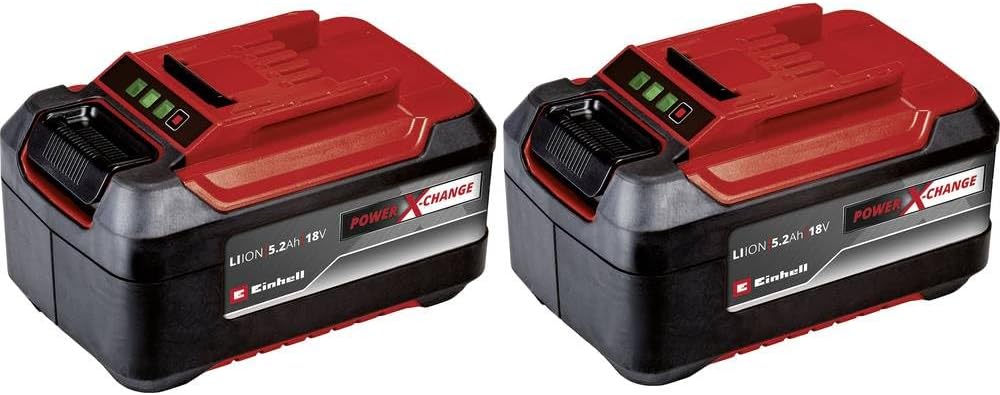
Figure 1: Einhell Power X-Change 5.2 Ah Battery Twinpack. Each battery features a charge indicator with four green LEDs and a robust, ergonomic design.
2. Safety Instructions
Always observe the following safety precautions when handling and using your Einhell Power X-Change batteries:
- Do not expose batteries to heat, direct sunlight, or fire.
- Do not short-circuit the battery terminals.
- Do not immerse batteries in water or other liquids.
- Store batteries in a cool, dry place, away from flammable materials.
- Only use original Einhell chargers for charging.
- Do not attempt to open, modify, or repair the battery pack.
- Keep batteries out of reach of children.
- In case of battery leakage, avoid contact with skin and eyes. Rinse affected areas with water and seek medical attention.
- Dispose of depleted batteries responsibly according to local regulations.
3. Setup and Initial Use
3.1 Unpacking
Carefully remove the batteries from their packaging. Inspect them for any signs of damage. If any damage is observed, do not use the batteries and contact customer support.
3.2 Charging the Batteries
Before first use, fully charge both batteries. Use only an Einhell Power X-Change charger (sold separately). The charging process is as follows:
- Connect the charger to a suitable power outlet.
- Slide the battery onto the charger until it clicks into place.
- The charger's indicator light will show the charging status. Refer to your charger's manual for specific light patterns.
- Once fully charged, the indicator light will change (e.g., solid green). Remove the battery from the charger.
The batteries feature a proactive battery management system and adapted charging cycles to optimize lifespan and performance.
4. Operating the Batteries
4.1 Inserting the Battery into a Tool
Ensure the tool is switched off before inserting or removing the battery.
- Align the battery with the battery slot on your Einhell Power X-Change tool.
- Slide the battery firmly into the slot until it clicks securely into place.
- To remove, press the release button(s) on the battery (or tool, depending on design) and slide the battery out.
4.2 Battery Charge Indicator
Each battery is equipped with an LED charge indicator. Press the button next to the LEDs to check the current charge level:
- 4 LEDs lit: 75-100% charge
- 3 LEDs lit: 50-75% charge
- 2 LEDs lit: 25-50% charge
- 1 LED lit: 0-25% charge (recharge soon)
5. Maintenance and Storage
5.1 Cleaning
Wipe the battery surface with a clean, dry cloth. Do not use abrasive cleaners or solvents. Ensure the battery terminals are clean and free of debris.
5.2 Storage
For optimal battery life, store batteries in a cool, dry place (ideally between 5°C and 20°C / 41°F and 68°F) and away from direct sunlight or extreme temperatures. If storing for extended periods, charge the batteries to approximately 50-75% capacity. Avoid storing fully discharged batteries.
6. Troubleshooting
| Problem | Possible Cause | Solution |
|---|---|---|
| Battery not charging. | Charger not plugged in; faulty charger; battery too hot/cold; faulty battery. | Check power connection; try another charger; allow battery to reach room temperature; contact customer support if battery is faulty. |
| Tool not operating with battery. | Battery not fully inserted; battery discharged; faulty tool; faulty battery. | Ensure battery is clicked into place; charge battery; test with another battery/tool; contact customer support. |
| Battery charge indicator not working. | Button malfunction; internal fault. | Ensure button is pressed firmly; if issue persists, contact customer support. |
7. Specifications
- Model Number: 4511526
- Battery Type: Lithium Ion (Li-Ion)
- Voltage: 18 V
- Capacity: 5.2 Ah (Ampere-hours)
- Product Dimensions: 4.84 x 3.03 x 2.87 inches (12.3 x 7.7 x 7.3 cm)
- Item Weight: 1.96 pounds (0.89 kg) per battery
- Number of Batteries: 2 (included in twinpack)
- Recommended Use: Power Tools within the Einhell Power X-Change system
8. Warranty and Support
Einhell products are manufactured with high-quality materials and undergo strict quality control. For information regarding warranty terms and conditions, please refer to the warranty card included with your purchase or visit the official Einhell website. For technical support, spare parts, or service inquiries, please contact Einhell customer service through their official channels.
Official Einhell Website: www.einhell.com
Related documents4511526


Ask a question about this manual
Ask about setup, troubleshooting, compatibility, parts, safety, or missing instructions. Manuals+ will review the question and use this page’s manual context to help answer it.