Introduction
This instruction manual provides essential information for the safe and effective use of your RYOBI OEM 537239001 Router Port Dust Vacuum. This accessory is designed to enhance dust collection when operating compatible RYOBI routers, contributing to a cleaner workspace and improved visibility during routing tasks. Please read this manual thoroughly before installation and operation.
Safety Information
Always observe general power tool safety guidelines when using this accessory. Ensure the router is unplugged or its battery removed before attaching or detaching the dust port. Wear appropriate personal protective equipment, including eye protection and a dust mask, especially when routing. Keep the work area clean and well-lit.
- Disconnect power to the router before installation.
- Ensure the dust port is securely attached before operation.
- Use with a compatible shop vacuum for effective dust collection.
- Do not modify the dust port or router.
Setup and Installation
- Prepare the Router: Ensure your RYOBI router (e.g., P601, R860443) is powered off and disconnected from its power source or battery.
- Access the Base: Depending on your router model, you may need to loosen or remove the screws securing the router's base plate to access the attachment points for the dust port. Some models require the removal of four screws from the flat plastic face.
- Position the Dust Port: Align the RYOBI OEM 537239001 dust port with the designated attachment area on your router. The dust port features specific notches designed to fit securely into the router's base.
- Secure the Dust Port: Carefully reattach or tighten the router's base screws, ensuring the dust port is firmly held in place. Verify that the dust port does not interfere with the router's operation or bit changes. The fit should be snug to prevent it from popping out during use.
- Connect Vacuum Hose: Attach a compatible shop vacuum hose to the dust port. The port is designed to accept a 1 1/4 inch inner diameter vacuum hose end.
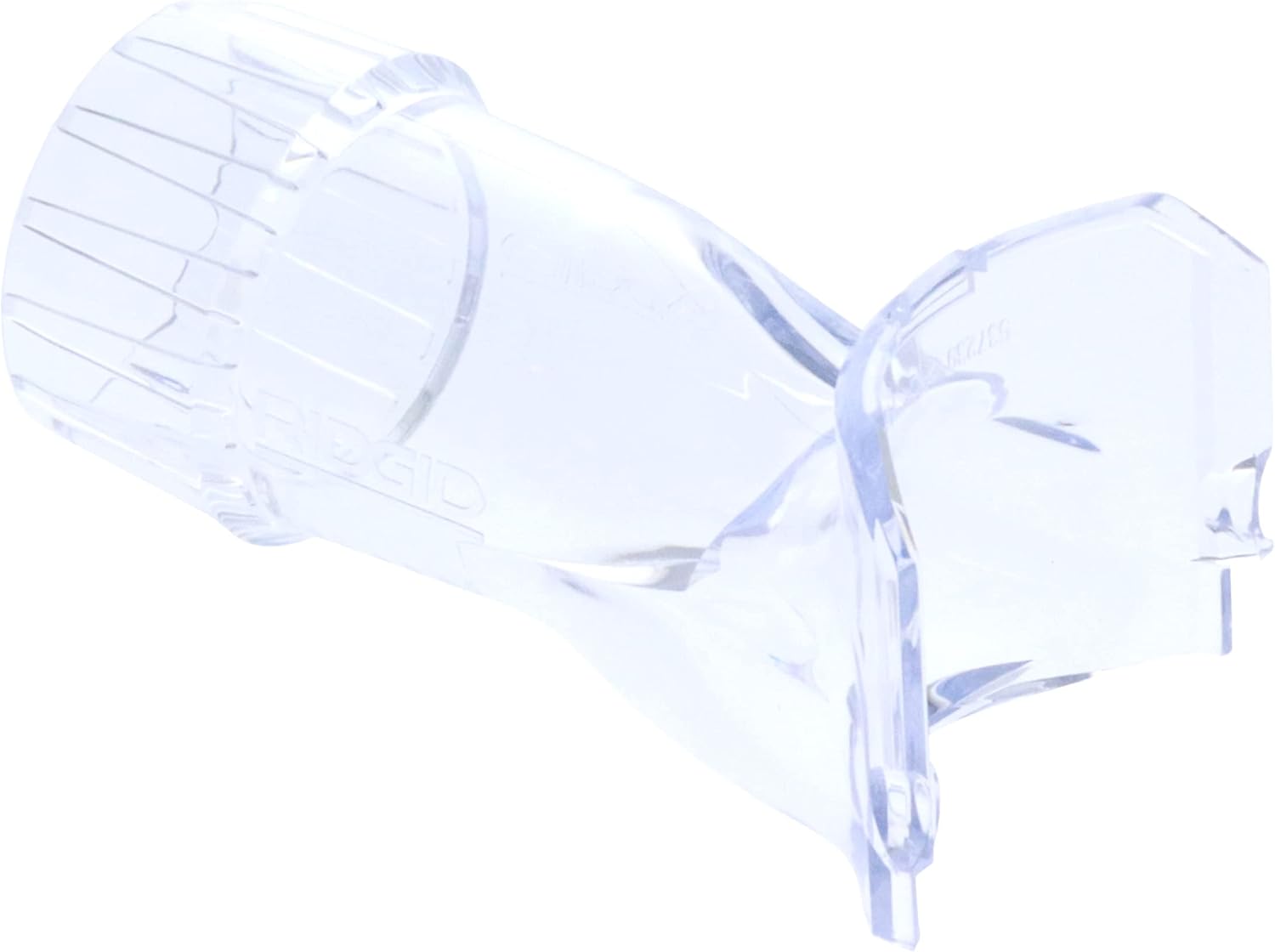
Image 1: The RYOBI OEM 537239001 Router Port Dust Vacuum. This clear plastic accessory is designed to attach to compatible RYOBI routers to facilitate dust extraction during operation. It features a wider opening for router attachment and a narrower port for vacuum hose connection.
Operating Instructions
- Verify Connection: Before starting, ensure the dust port is securely attached to the router and the vacuum hose is firmly connected to the dust port.
- Activate Vacuum: Turn on your shop vacuum before starting the router. This ensures immediate dust collection as soon as routing begins.
- Perform Routing Task: Operate your router as usual, maintaining proper technique and safety precautions. The dust port will direct wood chips and dust into the connected vacuum.
- Monitor Dust Collection: Periodically check the effectiveness of dust collection. If dust accumulation is excessive, ensure the vacuum hose is not clogged and the dust port is properly seated.
- Deactivate Tools: After completing your routing task, turn off the router first, then the shop vacuum.
Maintenance
- Cleaning: After each use, disconnect the dust port from the router and clean any accumulated dust or debris from its interior and exterior surfaces. A brush or compressed air can be used.
- Inspection: Regularly inspect the dust port for cracks, damage, or wear. Replace the part if it shows signs of significant damage that could affect its performance or safety.
- Storage: Store the dust port in a clean, dry place away from direct sunlight and extreme temperatures to prevent material degradation.
Troubleshooting
| Problem | Possible Cause | Solution |
|---|---|---|
| Poor dust collection | Vacuum hose not securely attached; vacuum filter clogged; dust port not properly seated on router; vacuum not powerful enough. | Ensure hose is tight; clean or replace vacuum filter; re-seat dust port; use a more powerful shop vacuum. |
| Dust port detaches during use | Not securely fastened to router base; screws loose. | Re-tighten router base screws, ensuring the dust port's notches are correctly engaged. |
| Dust port does not fit router | Incompatible router model; incorrect installation procedure. | Verify router model compatibility (e.g., RYOBI P601, R860443). Ensure router base screws are loosened/removed as needed for proper seating. |
Specifications
- Brand: RYOBI
- Model Number: 537239001
- Item Weight: 1.41 ounces
- Product Dimensions: 0.39 x 0.39 x 0.39 inches (Note: These dimensions appear to be placeholder or incorrect for the actual product, refer to physical product for accurate measurements.)
- Filter Type: Foam (Note: This specification might refer to a compatible vacuum filter, not the dust port itself.)
- Recommended Uses: Workshop, Woodworking
- Hose Connection: Designed for 1 1/4 inch inner diameter vacuum hose.
Warranty and Support
For warranty information and customer support regarding your RYOBI OEM 537239001 Router Port Dust Vacuum, please refer to the documentation provided with your original RYOBI router or contact RYOBI customer service directly. Warranty terms may vary based on purchase location and retailer.