
BLUETTI AC50S
BLUETTI AC50S Portable Power Station User Manual
Model: AC50S | Brand: BLUETTI
1. Safety Instructions
Please read all safety instructions carefully before operating the BLUETTI AC50S Portable Power Station.
- Do not disassemble, repair, or modify the unit. Incorrect reassembly may cause fire or electric shock.
- Do not place the unit near fire or expose it to heat. Keep out of direct sunlight.
- Do not charge, use, or store the unit in a bathroom or in an area exposed to water or moisture.
- Use only the provided charger and cables. Using unauthorized accessories may cause fire, explosion, or injury.
- Do not use the unit if it is damaged or has been dropped.
- Keep out of reach of children and pets.
- Ensure proper ventilation during use and charging to prevent overheating.
2. Product Overview
The BLUETTI AC50S is a versatile 500Wh/300W portable power station designed to provide reliable power for various devices, whether indoors or outdoors. It features multiple output ports and supports various charging methods, including solar.
Key Features:
- 500Wh Capacity: Provides ample power for extended use.
- 300W Pure Sine Wave AC Output: Two 120V AC outlets for sensitive electronics.
- Multiple DC Outputs: Includes 12V/3A DC ports and a 12V/10A car port.
- USB Connectivity: Features 4 USB-A ports (5V/3A) and 1 PD45W USB-C port.
- 10W Wireless Charging: Convenient charging for compatible smartphones.
- Integrated MPPT Controller: Optimizes solar charging efficiency.
- Built-in LED Light: Offers strong, weak, and SOS modes for illumination.
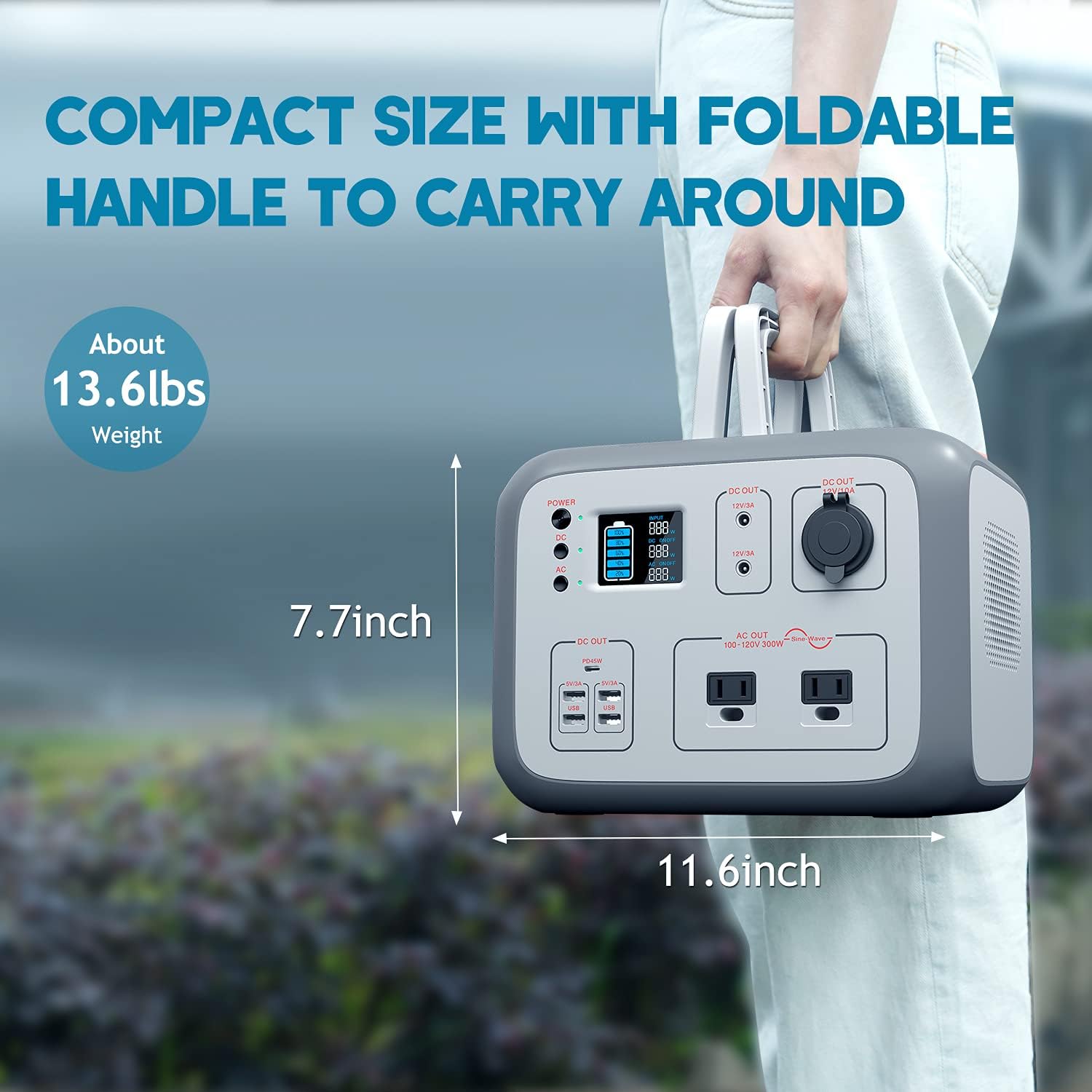
- Portable Design: Compact size (11.6"L x 7.5"W x 7.7"H) and lightweight (13.6 lbs) with a foldable handle.
Product Diagram:
The image above illustrates the various input and output ports available on the AC50S, including the power button, DC and AC output buttons, LCD display, USB ports, AC outlets, DC ports, and the 12V car port. The top surface also features a wireless charging pad.

This image displays the complete bundle, including the AC50S unit and the 120W foldable solar panel, demonstrating the comprehensive portable power solution.
3. Setup
Initial Charging:
Before first use, it is recommended to fully charge the BLUETTI AC50S. The unit can be charged via AC wall outlet, car charger, or solar panel.

The diagram above illustrates the various charging methods and their approximate charging times:
- Solar Panel (BLUETTI SP120): 5-6 hours
- Wall Outlet: 6 hours
- Car Outlet (12V/24V): 5-5.5 hours
- Generator: 6 hours
Connecting the Solar Panel:
- Unfold the 120W solar panel and position it in direct sunlight.
- Connect the solar panel's output cable to the DC input port on the BLUETTI AC50S.
- Ensure the connection is secure. The LCD display will show the input wattage from the solar panel.
The 120W solar panel is designed for high efficiency (up to 23% cell efficiency) and features a durable ETFE lamination. It is foldable and includes kickstands for easy angle adjustment to maximize solar absorption.
4. Operating Instructions
Powering On/Off:
- Press the POWER button to turn the unit on or off.
- Press the DC button to enable/disable DC outputs.
- Press the AC button to enable/disable AC outputs.
Using Output Ports:
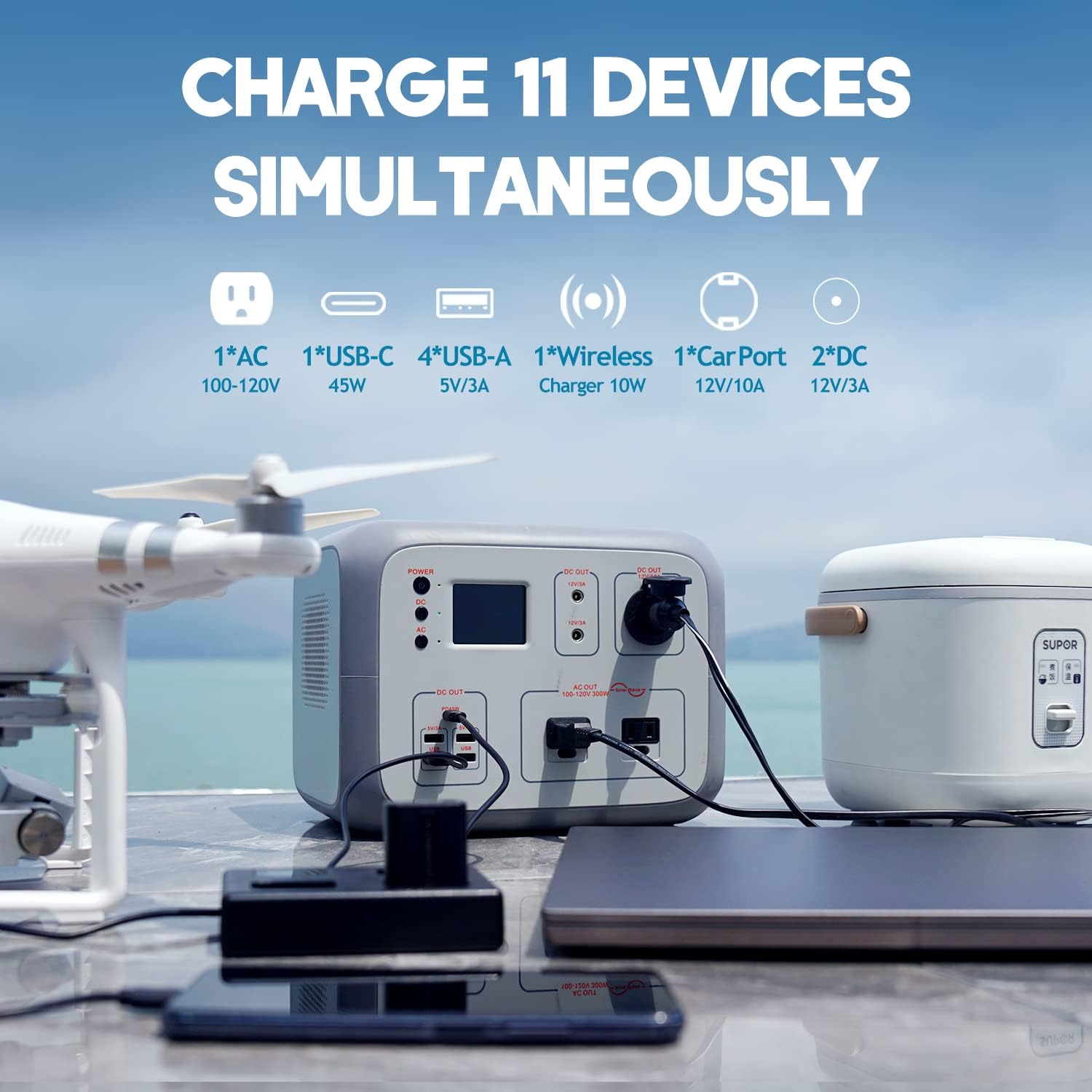
The BLUETTI AC50S can charge up to 11 devices simultaneously.
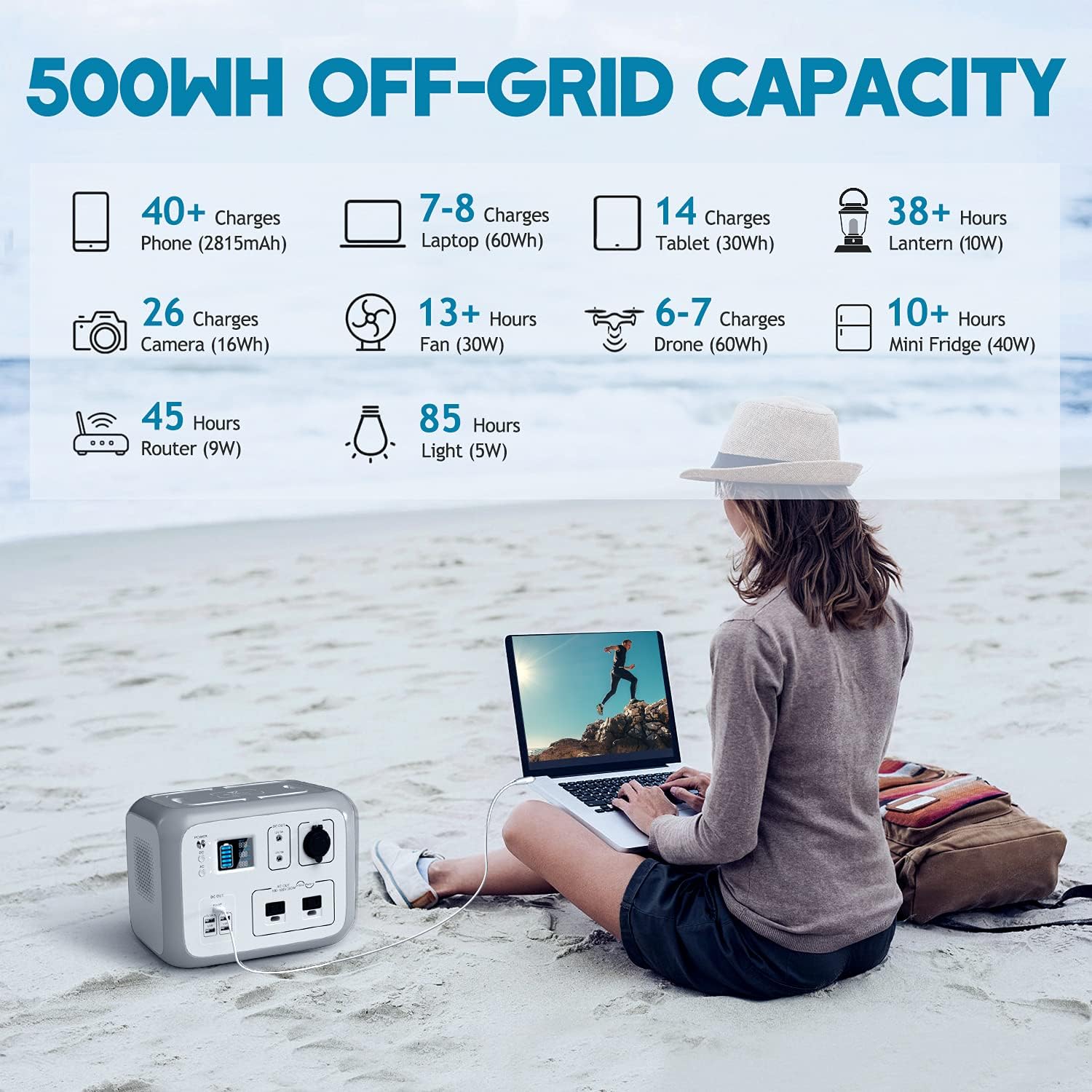
The infographic above provides an estimate of how many times or for how long the AC50S can power common devices:
- Phones (2815mAh): 40+ Charges
- Laptops (60Wh): 7-8 Charges
- Tablets (30Wh): 14 Charges
- Lantern (10W): 38+ Hours
- Camera (16Wh): 26 Charges
- Fan (30W): 13+ Hours
- Drone (60Wh): 6-7 Charges
- Mini Fridge (40W): 10+ Hours
- Router (9W): 45 Hours
- Light (5W): 85 Hours
LED Lighting:
The unit features an integrated LED light with multiple modes:
- Press the LIGHT button once for Strong mode.
- Press again for Weak mode.
- Press a third time for SOS mode (flashing).
- Press a fourth time to turn off the light.
Official Product Video:
Watch this official video from BLUETTI for a visual guide on the AC50S features and usage:
Official BLUETTI video showcasing the AC50S 500Wh portable power station, demonstrating its features and portability.
5. Maintenance
Cleaning:
- Wipe the unit with a dry, soft cloth.
- Do not use abrasive cleaners or solvents.
Storage:
- Store the unit in a cool, dry place, away from direct sunlight and heat sources.
- For long-term storage, charge the unit to 50-80% every 3-6 months to preserve battery life.
Battery Care:
The BLUETTI AC50S uses high-quality EV-grade 3C battery cells for longevity and stability. The Battery Management System (BMS) ensures safe operation. Avoid completely draining the battery frequently to prolong its lifespan.
6. Troubleshooting
Common Issues and Solutions:
- Unit does not power on: Ensure the power button is pressed firmly. Check if the battery is completely depleted and try charging it.
- No output from AC/DC ports: Ensure the respective AC or DC output button is pressed and its indicator light is on. Check if the connected device's power consumption exceeds the unit's maximum output (300W for AC).
- Slow charging via solar: Ensure the solar panel is in direct sunlight and free from obstructions. Adjust the panel's angle for optimal sun exposure. Verify cable connections. Charging efficiency can be affected by weather conditions and panel orientation.
- Wireless charging not working: Ensure the DC output is enabled. Reposition the device on the wireless charging pad to ensure proper alignment. Remove any thick phone cases that might interfere with charging.
If issues persist, please refer to the official BLUETTI support resources or contact customer service.
7. Specifications
| Feature | Specification |
|---|---|
| Model Name | AC50S |
| Battery Capacity | 500Wh |
| AC Output | 2 x 120V AC, 300W (Pure Sine Wave) |
| DC Output | 2 x 12V/3A, 1 x 12V/10A (Car Port) |
| USB Output | 4 x USB-A (5V/3A), 1 x USB-C (PD45W) |
| Wireless Charging | 10W |
| Solar Input | 14V-40V (Max 120W, 10A Max) |
| Dimensions (L x W x H) | 11.6" x 7.5" x 7.7" |
| Weight | 13.6 lbs |
| Operating Temperature | 0-40 ℃ |
Physical Dimensions:

The image above visually represents the compact size and weight of the AC50S, emphasizing its portability with a foldable handle.
Solar Panel Specifications:

The accompanying 120W solar panel features monocrystalline silicon cells with 23% efficiency and ETFE lamination for durability. Its closed dimensions are approximately 16.3" x 16.1" and it weighs 9.48 lbs, making it highly portable.
8. Warranty & Support
Warranty Information:
The BLUETTI AC50S Portable Power Station typically comes with a standard manufacturer's warranty. Please refer to your purchase documentation or the official BLUETTI website for specific warranty terms and conditions, including duration and coverage details.
Customer Support:
For technical assistance, troubleshooting, or any product-related inquiries, please contact BLUETTI customer support. You can often find contact information on the official BLUETTI website or through the retailer where you purchased the product.
Visit the official BLUETTI Store on Amazon for more products and support resources.
Related documentsAC50S


Ask a question about this manual
Ask about setup, troubleshooting, compatibility, parts, safety, or missing instructions. Manuals+ will review the question and use this page’s manual context to help answer it.