
1. Introduction and Overview
The JASHEN P10 Robot Vacuum Cleaner is designed to provide efficient and convenient floor cleaning. This manual provides essential information for the safe and effective use of your device.
Key Features:
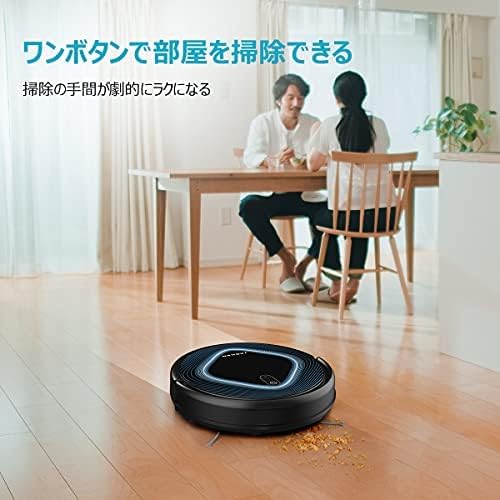
- Easy Operation & Maintenance: Features one-touch operation for user-friendliness. The large-capacity dust box allows for easy disposal of collected debris. Both the net filter and the dust box are fully washable. The V-shaped main brush is also easily removable for cleaning.
- Powerful Suction: The advanced JASHEN P10 delivers efficient suction, capturing even microscopic dust particles. Its strong suction power effectively cleans pet hair and dust from various surfaces.
- Remote Control: The included remote control allows for convenient starting, stopping, and mode selection. Choose from Auto, Edge, and Spot cleaning modes to suit different cleaning needs and ensure thorough cleaning of all room corners.
- Multiple Sensors: Equipped with multiple sensors to navigate the indoor environment efficiently. It detects drops and automatically avoids falls. The automatic charging function ensures the robot returns to its charging dock when the battery is low, eliminating battery concerns.
- High Dust Collection: Two side brushes and a V-shaped main brush work together to gather debris to the center for thorough suction. It effectively cleans pet hair and food spills from hardwood floors to carpets. With a slim height of 81mm, it can clean under furniture like beds and sofas.
2. Setup
2.1 Unpacking
Carefully remove all components from the packaging. Ensure all accessories are present: robot vacuum, charging dock, power adapter, remote control, side brushes, cleaning tool, and user manual.
2.2 Charging Dock Placement
Place the charging dock against a wall in an open area, ensuring there are no obstacles within 1 meter (3 feet) to the front and 0.5 meters (1.5 feet) to the sides. Connect the power adapter to the charging dock and plug it into a power outlet.
2.3 Initial Charge
Place the robot vacuum onto the charging dock. Ensure the charging contacts on the robot align with those on the dock. The indicator light will show charging status. For first-time use, fully charge the robot for approximately 4-5 hours.

2.4 Installing Side Brushes
Attach the side brushes by pressing them onto the square posts on the bottom of the robot until they click into place.
3. Operating Instructions
3.1 Power On/Off
To power on, press and hold the power button on the robot or the remote control. To power off, press and hold the power button again.
3.2 Starting Cleaning
Press the 'Clean' button on the robot or the remote control to start cleaning in Auto mode.
3.3 Cleaning Modes
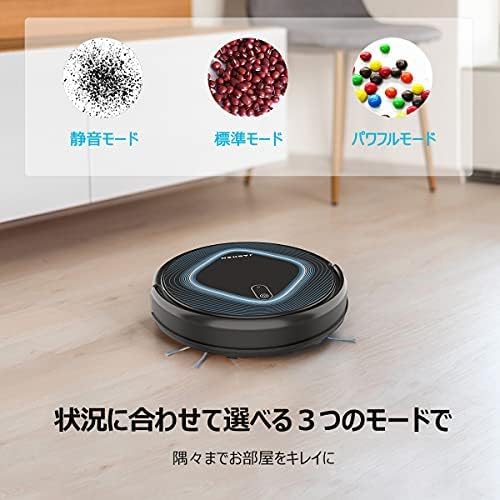
The JASHEN P10 offers three cleaning modes:
- Auto Mode: The robot cleans automatically, adjusting its path based on the environment.
- Edge Mode: The robot cleans along walls and furniture edges.
- Spot Mode: The robot cleans a specific area in a spiral pattern, ideal for concentrated dirt.
Select the desired mode using the remote control.
3.4 Remote Control Functions
The remote control allows for:
- Starting and stopping cleaning.
- Selecting cleaning modes.
- Manual direction control.
- Scheduling cleaning times.

3.5 Scheduling Cleaning
Use the remote control to set a scheduled cleaning time. The robot will automatically start cleaning at the programmed time.
3.6 Obstacle Avoidance and Drop Detection
The robot is equipped with multiple sensors to detect obstacles and avoid collisions with walls and furniture. It also features drop detection sensors to prevent falls from stairs or ledges.

4. Maintenance
Regular maintenance ensures optimal performance of your JASHEN P10 robot vacuum.
4.1 Cleaning the Dust Box and Filter
After each cleaning cycle, empty the dust box. The dust box and net filter can be rinsed with water. Ensure they are completely dry before re-installing.

4.2 Cleaning the Main Brush
The V-shaped main brush can be easily removed for cleaning. Use the provided cleaning tool to cut and remove tangled hair or debris.

4.3 Cleaning Side Brushes and Sensors
Periodically check the side brushes for tangled hair or debris and clean them. Wipe the charging contacts and all sensors with a dry cloth to ensure proper function.
4.4 Battery Replacement
If the battery performance degrades, it may need replacement. Follow these steps:
- Remove the cover on the bottom of the robot.
- Disconnect the old battery's connector.
- Insert the new battery and connect its connector.
- Replace the cover.

5. Troubleshooting
If you encounter issues with your JASHEN P10, refer to the following common problems and solutions:
| Problem | Possible Cause | Solution |
|---|---|---|
| Robot does not start or respond. | Low battery; main power switch off; remote control battery depleted. | Charge the robot; ensure the main power switch (often on the side) is ON; replace remote control batteries. |
| Robot gets stuck frequently. | Obstacles like cables, rugs with long fringes, or tight spaces. | Clear the cleaning area of loose cables and small objects. Ensure rugs are secured. |
| Robot does not return to charging dock. | Charging dock is obstructed or not powered; robot is too far from the dock. | Ensure the charging dock is powered and clear of obstacles. Manually place the robot on the dock if it's too far. |
| Poor cleaning performance. | Full dust box; clogged filter; tangled brushes. | Empty the dust box and clean the filter. Clean the main brush and side brushes. |
| Unusual noise during operation. | Debris caught in brushes or wheels. | Inspect and clean all brushes and wheels for any trapped debris. |
6. Specifications
| Feature | Detail |
|---|---|
| Brand | JASHEN |
| Model | P10 |
| Product Dimensions (L x W x H) | 31 cm x 31 cm x 8 cm |
| Control Method | Remote Control |
| Special Features | Scheduled Timer, Collision Prevention |
| Recommended Surface | Hardwood, Carpet (low pile) |
7. Warranty Information
Your JASHEN P10 Robot Vacuum Cleaner comes with a standard manufacturer's warranty. Please refer to the warranty card included in your product packaging for specific terms, conditions, and duration. Keep your purchase receipt as proof of purchase for warranty claims.
8. Support
For further assistance, technical support, or to purchase replacement parts, please contact JASHEN customer service. Contact information can typically be found on the official JASHEN website or on the product packaging.
When contacting support, please have your product model (P10) and purchase date available.