1. Introduction
This manual provides essential information for the safe and effective operation, setup, and maintenance of your Parkside PTSS 1200 Plunge Saw with Guide Rail. Please read these instructions thoroughly before using the tool to ensure proper function and user safety. Keep this manual for future reference.
2. Safety Instructions
WARNING: Read all safety warnings, instructions, illustrations, and specifications provided with this power tool. Failure to follow all instructions listed below may result in electric shock, fire, and/or serious injury.
- Always wear appropriate personal protective equipment, including safety glasses, hearing protection, and a dust mask.
- Ensure the workpiece is securely clamped before cutting.
- Keep hands away from the cutting area and the saw blade.
- Disconnect the power plug from the power source before making any adjustments, changing accessories, or storing the tool.
- Do not operate the saw in damp or wet conditions.
- Maintain a firm grip on the tool with both hands during operation.
- Regularly inspect the power cord for damage. If damaged, have it replaced by a qualified professional.
- Ensure the saw blade is sharp and suitable for the material being cut.
- Never bypass safety features or modify the tool.
3. Package Contents
Carefully unpack all items and ensure all components are present and undamaged. If any parts are missing or damaged, contact your retailer.
- Parkside PTSS 1200 Plunge Saw (with pre-mounted universal saw blade)
- Universal Saw Blade (Ø 165 mm, 24 teeth, pre-mounted)
- 2-Part Saw Guide Rail with Connector
- 2 Mounting Wrenches
- 1 Chip Ejection Adapter (Dust Adapter)
- Spacer Disc (Splitter Wedge)

This image displays the main components included with the Parkside PTSS 1200 Plunge Saw. It shows the saw unit itself, the two sections of the guide rail, the connector for the rail, and the small accessories like the wrenches and the dust extraction adapter.
4. Technical Specifications
| Feature | Specification |
|---|---|
| Nominal Power Consumption | 1200 W |
| No-Load Speed | 5200 rpm |
| Saw Blade Diameter | 165 mm |
| Max. Cutting Depth at 90° | 56 mm |
| Max. Cutting Depth at 45° | 42 mm |
| Bevel Angle Adjustment | 0-45° (continuously adjustable) |
| Cable Length | 4 m |
| Saw Dimensions (L x W x D) | Approx. 337 x 241 x 227 mm |
| Saw Weight | Approx. 4590 g |
| Guide Rail Dimensions (each part) | Approx. 700 x 182 x 14.6 mm |
| Guide Rail Weight (2 parts with connector) | Approx. 2102 g |
| Power Source | Corded Electric |
| Recommended Materials | Wood, Plastic, Light Materials (e.g., Plasterboard), Aluminum |
5. Setup
5.1 Assembling the Guide Rail
- Place the two guide rail sections on a flat, stable surface.
- Align the ends of the two rail sections.
- Insert the guide rail connector into the channels on both rail sections.
- Ensure the connector is fully seated and the rails are securely joined. The guide rail can be assembled to a length of 70 cm or 140 cm.

This image shows the two aluminum guide rail sections, the small cylindrical connector used to join them, and the two L-shaped mounting wrenches. These components are essential for setting up the extended guide rail for longer cuts.
5.2 Installing/Changing the Saw Blade
The saw comes with a universal saw blade pre-mounted. If you need to change the blade:
- Disconnect the power plug from the mains supply.
- Locate the spindle lock button. Press and hold it to lock the saw spindle.
- Using the provided mounting wrench, loosen the saw blade retaining screw.
- Carefully remove the old saw blade.
- Install the new saw blade, ensuring the rotation direction arrows on the blade match the direction indicated on the saw.
- Tighten the retaining screw firmly while holding the spindle lock button.
- Release the spindle lock button.
The Spindle Lock feature facilitates easy and secure blade changes.
5.3 Connecting Dust Extraction
For a cleaner work environment and improved visibility, connect a dust extraction system:
- Attach the chip ejection adapter (dust adapter) to the designated port on the saw.
- Connect a suitable vacuum cleaner hose to the dust adapter.
6. Operating Instructions
6.1 Adjusting Cutting Depth
The cutting depth can be continuously adjusted from 0 to 56 mm:
- Loosen the depth adjustment lever/knob.
- Move the saw base up or down to set the desired cutting depth using the scale.
- Tighten the depth adjustment lever/knob securely before operation.
6.2 Adjusting Bevel Angle (Miter Cuts)
The saw blade can be tilted continuously for miter cuts from 0° to 45°:
- Loosen the bevel angle adjustment lever/knob.
- Tilt the saw base to the desired angle, indicated on the angle scale.
- Tighten the bevel angle adjustment lever/knob firmly.

This image illustrates the plunge saw's capability to adjust its cutting angle. The saw body is shown tilted relative to its base, indicating the mechanism for setting bevel cuts up to 45 degrees.
6.3 Using the Guide Rail
The guide rail ensures precise, straight cuts and is ideal for long workpieces or repetitive cuts:
- Assemble the guide rail to the desired length (70 cm or 140 cm).
- Place the guide rail on the workpiece, aligning it with your desired cut line.
- Secure the guide rail to the workpiece using clamps (not included) to prevent movement during cutting.
- Place the plunge saw onto the guide rail. The saw base is designed to fit snugly into the rail's channels.
- Ensure the saw slides smoothly along the rail before starting the cut.

This image shows a user wearing protective gloves, guiding the Parkside PTSS 1200 Plunge Saw along the guide rail. This setup ensures accurate and straight cuts on the workpiece.

This image provides an alternative perspective of a user operating the plunge saw on the guide rail. It highlights the ergonomic grip and the controlled movement required for precise cutting tasks.

This image captures the plunge saw actively cutting through a wooden board. The saw is positioned on the guide rail, demonstrating its function in achieving clean, straight cuts on larger materials.
6.4 Making a Plunge Cut
The plunge saw allows for cuts to begin in the middle of a workpiece:
- Position the saw on the workpiece or guide rail at the desired starting point.
- Ensure the saw blade is not touching the workpiece.
- Switch on the saw using the ergonomic Softgrip handle with safety switch.
- Slowly plunge the saw blade into the material until the desired cutting depth is reached.
- Once plunged, push the saw forward along the cut line or guide rail.
- After completing the cut, release the safety switch and allow the blade to stop before lifting the saw.
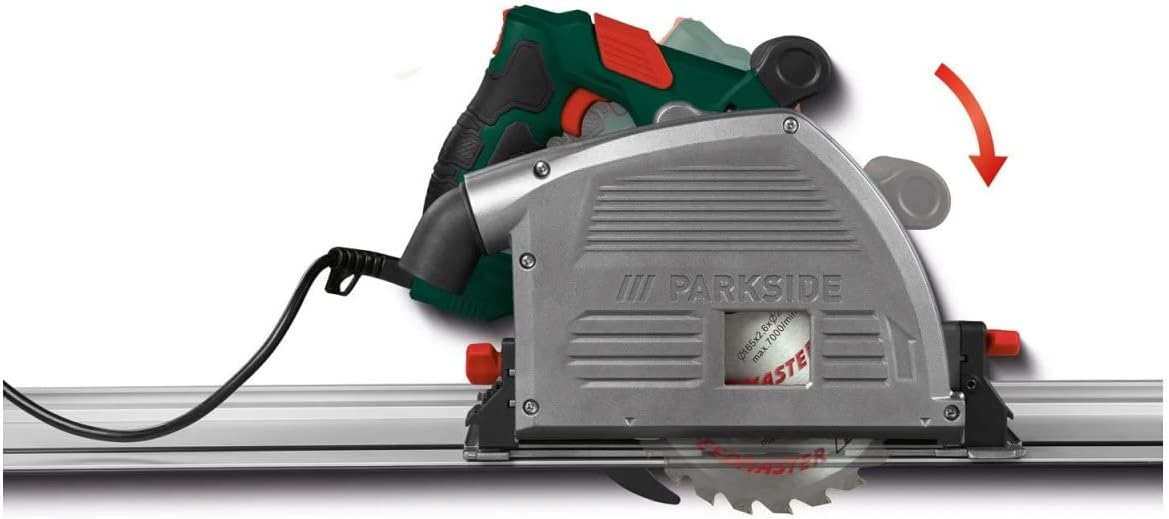
This close-up image focuses on the saw blade and its protective guard, illustrating how the blade emerges from the housing during a plunge action. The image also shows the saw positioned on the guide rail, ready for operation.
6.5 General Cutting Guidelines
- Always use the splitter wedge (spacer disc) to prevent the saw blade from pinching in the cut, especially in wood.
- Maintain a steady, even feed rate. Do not force the saw.
- For optimal results, ensure the workpiece is stable and properly supported.
- When cutting near a wall, the saw allows working up to 15 mm from the wall, which is suitable for shadow and expansion joints.
7. Maintenance
7.1 Cleaning
- Always disconnect the power tool from the power supply before cleaning.
- Regularly clean the ventilation slots to prevent overheating.
- Remove dust and debris from the saw blade guard and base plate using a brush or compressed air.
- Wipe the tool housing with a soft, damp cloth. Do not use harsh chemicals or abrasive cleaners.
7.2 Blade Care
- Ensure the saw blade is always sharp. A dull blade can cause kickback and strain the motor.
- Replace damaged or bent saw blades immediately.
- Clean resin and pitch buildup from the saw blade using a suitable blade cleaner.
7.3 Storage
- Store the plunge saw and its accessories in a dry, secure location, out of reach of children.
- Protect the saw blade from damage during storage.
8. Troubleshooting
| Problem | Possible Cause | Solution |
|---|---|---|
| Saw does not start | No power supply; Safety switch not engaged; Damaged power cord | Check power connection; Ensure safety switch is pressed; Inspect power cord for damage and replace if necessary by a qualified technician. |
| Blade binds or smokes | Dull blade; Incorrect blade for material; Improper feed rate; Workpiece pinching blade | Replace or sharpen blade; Use correct blade type; Reduce feed rate; Ensure workpiece is supported and splitter wedge is used. |
| Inaccurate cuts | Guide rail not secured; Blade wobble; Incorrect depth/angle setting | Secure guide rail and workpiece; Check blade for damage/proper installation; Re-adjust depth/angle settings. |
| Excessive vibration | Loose blade; Damaged blade; Motor issue | Check blade tightness; Replace damaged blade; If motor issue suspected, contact service. |
9. Warranty and Support
This Parkside PTSS 1200 Plunge Saw is covered by a limited warranty. Please refer to the warranty card included with your purchase for specific terms and conditions, including warranty period and coverage details.
For technical support, spare parts, or warranty claims, please contact the manufacturer, HKM Akku Technik, or your authorized retailer. Keep your proof of purchase for warranty validation.
Information regarding spare parts availability is currently unavailable. Please contact customer support for assistance.


