
Introduction
This manual provides essential information for the proper use and care of your Gowin Power Badminton Shoe and the accompanying Verified Walking Set. The set includes high-performance badminton shoes designed for indoor play, adjustable ankle/wrist weights, a digital pedometer, and a water bottle with a holder. Please read these instructions carefully before using the products to ensure optimal performance and longevity.
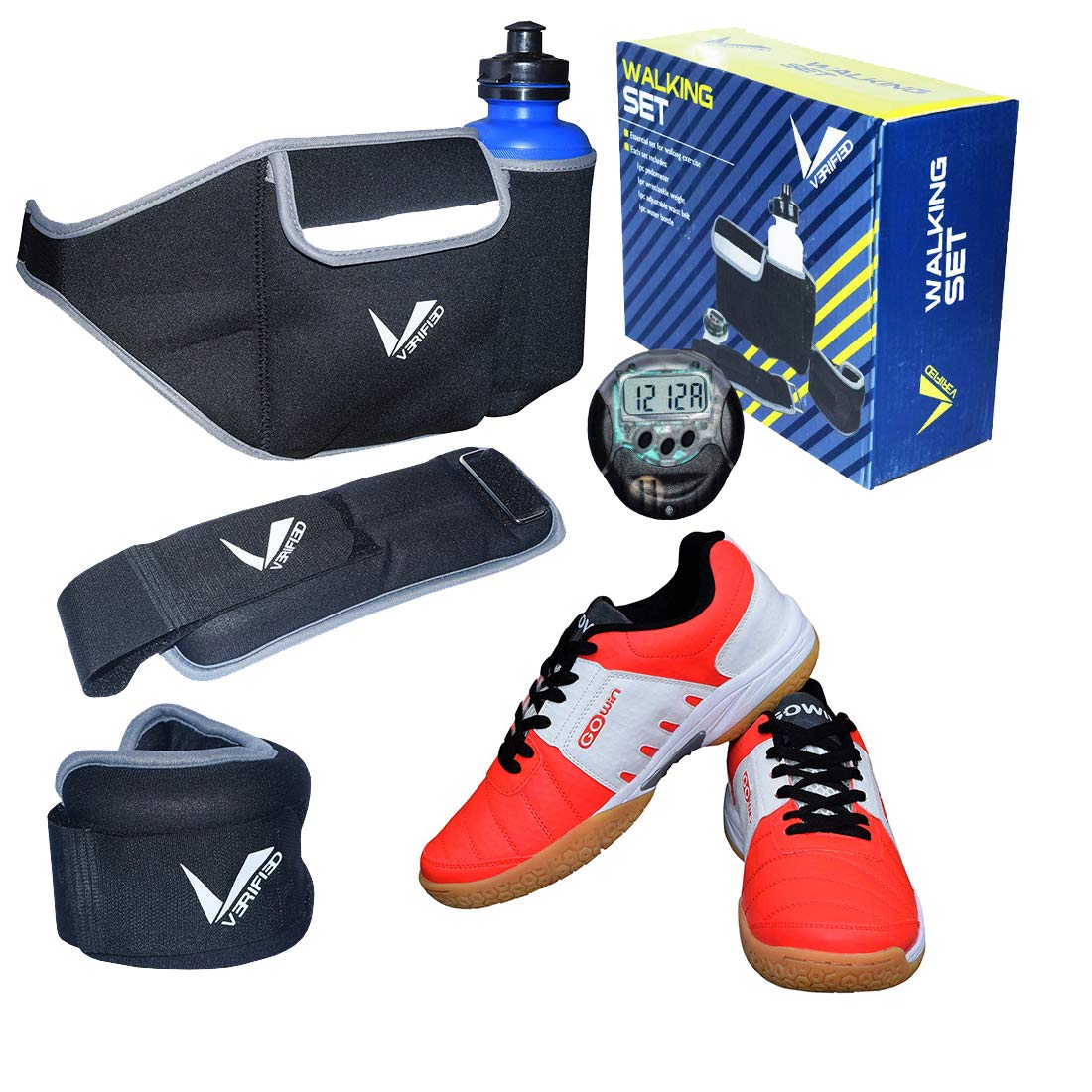
This image displays the Gowin Power Badminton Shoe, featuring a red and white design, alongside the components of the Verified Walking Set. The set includes adjustable ankle/wrist weights, a digital pedometer, and a water bottle with an elastic holder.
Product Components
Gowin Power Badminton Shoe
- Upper: High resistant PVC construction with synthetic leather materials and comfortable lining.
- Sockliner: EVA for enhanced comfort.
- Outsole: 100% natural crape rubber, non-marking.
- Midsole: High-grade EVA for cushioning.
- Shank: TPU for balancing.
- Closure Type: Lace-Up.
Verified Walking Set
- Adjustable Ankle/Wrist Weights: Set of two, each weighing 0.5 kg. Filled with iron ore in individual pouches, waterproof and durable.
- Pedometer: Records daily steps (walking & running), distance (KM & Miles), calories, fat burned, and exercise time.
- Water Bottle Holder: Adjustable and elastic waistband design with an included bottle.
Setup
Badminton Shoes
- Unpack the shoes from their packaging.
- Loosen the laces and insert your foot.
- Tighten the laces evenly for a secure and comfortable fit, then tie them.
Adjustable Ankle/Wrist Weights
- Remove the weights from their packaging.
- Wrap the weights around your ankles or wrists.
- Secure the weights using the adjustable straps, ensuring a snug but comfortable fit that does not restrict circulation.
Pedometer
- Ensure the pedometer has a working battery.
- Attach the pedometer securely to your waistband or clothing, typically near your hip, for accurate step tracking.
- Refer to the pedometer's specific instructions for initial setup, including setting personal data (if applicable) and resetting the count.
Water Bottle Holder
- Place the provided water bottle into the holder.
- Adjust the elastic rope to securely hold the bottle in place, preventing it from bouncing or falling during activity.
- Wear the waistband around your waist, adjusting for comfort.
Operating
Badminton Shoes
These shoes are designed for indoor badminton and other indoor court sports. The non-marking outsole ensures grip without damaging court surfaces. Always ensure laces are securely tied to prevent injury.
Adjustable Ankle/Wrist Weights
Use the weights to add resistance to various exercises, including walking, jogging, physical therapy, home workouts, and cross-training. Start with short durations and gradually increase as your strength improves. Consult a fitness professional for guidance on incorporating weights into your routine.
Pedometer
The pedometer automatically tracks your steps, distance, calories burned, fat burned, and exercise time. Check the display periodically to monitor your activity levels. Most pedometers have a reset function to clear daily data; refer to its specific manual for details.
Water Bottle Holder
Use the water bottle holder to carry hydration during your workouts or walks. The elastic design keeps the bottle stable, allowing for easy access to water without interrupting your activity.
Maintenance
Badminton Shoes
- Cleaning: Wipe the PVC and synthetic leather upper with a damp cloth to remove dirt. For tougher stains, use a mild soap solution.
- Drying: Air dry shoes at room temperature, away from direct sunlight or heat sources, to prevent material damage.
- Storage: Store in a cool, dry place.
Adjustable Ankle/Wrist Weights
- Cleaning: Wipe the exterior with a damp cloth. Do not submerge in water.
- Storage: Store in a dry place to prevent moisture accumulation.
Pedometer
- Cleaning: Wipe with a soft, dry cloth. Avoid harsh chemicals.
- Battery: Replace batteries as needed. Dispose of old batteries responsibly.
- Water Exposure: Keep the pedometer dry. It is not designed to be waterproof unless specified by its individual manual.
Water Bottle Holder
- Cleaning: The fabric holder can be hand-washed with mild soap and air-dried.
- Bottle: Wash the water bottle thoroughly with soap and water after each use.
Troubleshooting
Badminton Shoes
- Poor Fit: Ensure you have selected the correct size. Adjust laces for a snug fit.
- Slipping: Clean the outsole regularly to maintain grip. Ensure the playing surface is dry and clean.
Pedometer
- Not Tracking Steps: Check battery level. Ensure the pedometer is securely attached and positioned correctly (e.g., vertically on the hip).
- Inaccurate Readings: Ensure the pedometer is not swinging freely. Some movements may not register as steps if they are not consistent walking motions.
Specifications
| Feature | Detail |
|---|---|
| Product Dimensions | 28 x 20.3 x 7.6 cm |
| Item Weight | 1 kg 950 g (total package) |
| Material Type (Shoes) | Faux Leather (Outer), Ethylene Vinyl Acetate, Rubber, Polyvinyl Chloride (Sole) |
| Closure Type (Shoes) | Lace-Up |
| Heel Type (Shoes) | No Heel |
| Included Components | Badminton Shoes, 2 Ankle/Wrist Weights (0.5 kg each), Pedometer, Water Bottle with Holder |
| Country of Origin | India |
| Manufacturer | SHOE VENTURES INDIA |
Warranty and Support
For any warranty claims, product support, or inquiries, please contact the manufacturer, SHOE VENTURES INDIA, directly. Retain your proof of purchase for warranty purposes.
Manufacturer Contact Information:
SHOE VENTURES INDIA
D-77 Sports and Surgical Complex Kapurthala road Jalandhar - 144021
Phone: 9815988400, 8054321041


