
1. Introduction and Overview
The Pro'skit MT-1820 is a 3 5/6 digit, 5999 count multifunction digital multimeter designed for precise electrical measurements. It features a dual display with an analog bargraph, automatic and manual ranging capabilities, and a USB interface for computer connectivity. This manual provides essential information for the safe and effective operation, maintenance, and troubleshooting of your MT-1820 multimeter.
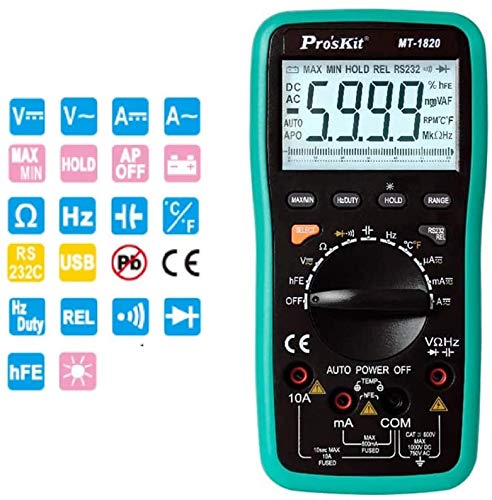
Figure 1: Front view of the Pro'skit MT-1820 Digital Multimeter, showing the display, rotary switch, and input jacks.
2. Safety Information
Always adhere to safety precautions when using any electrical testing equipment. Failure to do so may result in injury or damage to the device. This multimeter complies with EN61010-1 security specifications CAT II and CAT III, with CAT II rated for 1000V.
- Do not exceed the maximum input limits for any function.
- Ensure the test leads are properly connected and the function switch is set to the correct range before making measurements.
- Never use the multimeter if it appears damaged or if the battery cover is not securely closed.
- Exercise extreme caution when working with voltages above 60V DC or 30V AC RMS.
- Replace batteries promptly when the low battery indicator appears.
- Disconnect test leads from the circuit before changing functions.
3. Product Features
The Pro'skit MT-1820 multimeter offers a range of features for versatile electrical testing:
- Display: 3 5/6 digits, 5999 counts with LCD backlight and 61-segment analog bargraph.
- Accuracy: 0.5% best accuracy.
- Ranging: Automatic and manual range selection.
- Measurement Functions: DC/AC Voltage, DC/AC Current, Resistance, Frequency, Capacitance, Temperature, Diode Test, Continuity Test, Transistor (hFE) Test.
- Special Functions: Data Hold, Maximum/Minimum measurement, Relative value measurement, Duty Cycle measurement.
- Connectivity: USB PC Link for data transfer and monitoring.
- Safety: Anti-burning protection, input warning, automatic shutdown, low battery indication.
4. Package Contents
Verify that all items are present in your package:
- Pro'skit MT-1820 Digital Multimeter Unit
- Test Leads (Red and Black)
- USB Cable
- Software CD
- User Manual
- Temperature Probe
- Alligator Clips
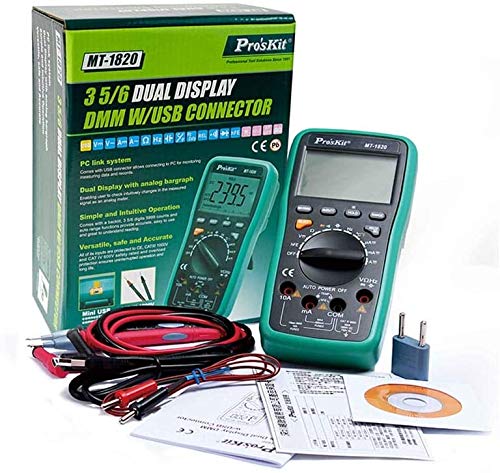
Figure 2: The MT-1820 multimeter shown with its standard accessories, including test leads, USB cable, and software CD.
5. Setup
5.1 Battery Installation
- Ensure the multimeter is powered off and test leads are disconnected.
- Locate the battery compartment on the rear of the unit.
- Unscrew the retaining screw(s) and remove the battery cover.
- Insert two 1.5V AAA batteries, observing correct polarity.
- Replace the battery cover and secure it with the screw(s).
5.2 Connecting Test Leads
For most measurements, connect the black test lead to the 'COM' jack and the red test lead to the 'VΩHz' jack. For current measurements, refer to the specific instructions in the operating section.
5.3 USB PC Link
To connect the multimeter to a computer for data logging or real-time monitoring, use the provided USB cable. Install the software from the included CD onto your computer before connecting the device.
6. Operating Instructions
Turn the rotary switch to the desired measurement function. The multimeter will automatically select the appropriate range unless manual ranging is activated.

Figure 3: Visual guide demonstrating common measurement types such as DC Voltage, AC Voltage, Continuity, Temperature, and Capacitance.
6.1 DC Voltage Measurement (V---)
- Connect the black lead to 'COM' and the red lead to 'VΩHz'.
- Set the rotary switch to the 'V---' position.
- Connect the test leads in parallel to the DC voltage source.
6.2 AC Voltage Measurement (V~)
- Connect the black lead to 'COM' and the red lead to 'VΩHz'.
- Set the rotary switch to the 'V~' position.
- Connect the test leads in parallel to the AC voltage source.
6.3 Current Measurement (A--- / A~)
- For mA/µA: Connect the black lead to 'COM' and the red lead to 'mA'.
- For 10A: Connect the black lead to 'COM' and the red lead to '10A'.
- Set the rotary switch to the desired 'A---' (DC) or 'A~' (AC) range.
- Connect the multimeter in series with the circuit.
- Caution: Do not exceed the maximum current rating for the selected input jack.
6.4 Resistance Measurement (Ω)
- Connect the black lead to 'COM' and the red lead to 'VΩHz'.
- Set the rotary switch to the 'Ω' position.
- Ensure the circuit is de-energized before measuring resistance.
- Connect the test leads across the component to be measured.
6.5 Continuity Test
- Connect the black lead to 'COM' and the red lead to 'VΩHz'.
- Set the rotary switch to the continuity symbol (often shared with diode test).
- Touch the test leads across the circuit or component. A continuous beep indicates a low resistance path.
6.6 Diode Test
- Connect the black lead to 'COM' and the red lead to 'VΩHz'.
- Set the rotary switch to the diode symbol (often shared with continuity test).
- Connect the red lead to the anode and the black lead to the cathode of the diode. The display will show the forward voltage drop. Reverse the leads; the display should show 'OL' (Open Loop) for a good diode.
6.7 Capacitance Measurement (F)
- Connect the black lead to 'COM' and the red lead to 'VΩHz'.
- Set the rotary switch to the 'F' position.
- Ensure the capacitor is fully discharged before measurement.
- Connect the test leads across the capacitor terminals.
6.8 Temperature Measurement (°C/°F)
- Connect the temperature probe to the appropriate input jacks (refer to the multimeter's markings, typically 'VΩHz' and 'COM' or dedicated temperature jacks).
- Set the rotary switch to the 'TEMP' position.
- Place the probe on or near the object whose temperature is to be measured.
6.9 Other Functions
- HOLD: Press the 'HOLD' button to freeze the current display reading. Press again to release.
- MAX/MIN: Press the 'MAX/MIN' button to record the maximum and minimum readings. Press again to cycle through MAX, MIN, and current readings.
- REL (Relative Measurement): Press 'REL' to store the current reading as a reference. Subsequent readings will be displayed as a deviation from this reference.
- Duty Cycle: Available in certain frequency modes, press the 'Hz/DUTY' button to display the duty cycle percentage.
7. Maintenance
7.1 Cleaning
Wipe the multimeter casing with a damp cloth and mild detergent. Do not use abrasives or solvents. Ensure the device is dry before use.
7.2 Battery Replacement
Replace batteries as described in Section 5.1 when the low battery indicator appears on the display.
7.3 Fuse Replacement
If the current measurement function fails, the fuse may need replacement. Refer to the device markings for fuse specifications (e.g., 10A FUSED). Fuse replacement should only be performed by qualified personnel.
8. Troubleshooting
- No Display: Check battery installation and charge. Replace batteries if necessary.
- Incorrect Readings: Ensure test leads are properly connected, the function switch is set correctly, and the circuit is within the multimeter's measurement range.
- Current Measurement Failure: Check the fuse. Replace if blown (refer to Section 7.3).
- 'OL' on Display: Indicates an open circuit or a reading exceeding the selected range.
9. Specifications
| Parameter | Specification |
|---|---|
| Maximum Read Value | 5999 |
| Display Bit | 3 5/6 digits |
| LCD Size | 70 x 50mm, word height 33mm |
| LCD Backlight | Yes |
| Analog Bargraph | 61 segment |
| Ranging | Automatic / Manual |
| DC Voltage (V) | 600mV/6V/60V/600V (0.5%+4d), 1000V (1.0%+6d) |
| AC Voltage (V) | 6/60/600V (0.8%+10d), 750V (1.0%+10d) |
| DC Current (A) | 600µA/6000µA (1.0%+10d), 60/600mA (1.0%+10d), 6A/10A (1.2%+10d) |
| AC Current (A) | 600µA/6000µA (1.5%+10d), 60/600mA (1.5%+10d), 6A/10A (2.0%+15d) |
| Resistance (Ω) | 600Ω (0.8%+5d), 6/60/600KΩ/6MΩ (0.8%+4d), 60MΩ (1.2%+10d) |
| Frequency (Hz) | 100/1000Hz (0.5%+4d), 10K/100KHz (0.5%+4d), 1M/30MHz (0.5%+4d) |
| Capacitance (F) | 40nF (5%+30d), 400nF/4µF/40µF (3.5%+8d), 200µF (5.0%+10d) |
| Temperature (°C) | -20°C~400°C (1.0%+50d), 400°C~1000°C (1.5%+15d) |
| Temperature (°F) | 0°F~750°F (1.0%+5d), 750°F~1832°F (1.5%+5d) |
| Diode Test | Yes |
| Transistor Test (hFE) | Yes |
| Data Retention | Yes |
| Max / Min Measurement | Yes |
| Relative Value Measurement | Yes |
| Duty Cycle Measurement | 0.1%~99.9% |
| PC Link | USB |
| Automatic Shutdown | Yes |
| Battery Low Voltage Indication | Yes |
| Input Warning | Yes |
| Security Specification | EN61010-1 CAT II / CAT III, CAT II 1000V |
| Battery Type | 1.5V AAA x 2 |
| Dimensions (D x W x H) | 192 x 95 x 48 mm |
| Weight | 390g |
| UPC | 765083464186 |
10. Warranty and Support
For warranty information and technical support, please contact the retailer or the manufacturer, StarNY. Keep your purchase receipt as proof of purchase. Specific warranty terms may vary by region and retailer.


