
Introduction
This manual provides detailed instructions for the installation, operation, and maintenance of your Wet Sounds WS-G2-CTR Wired Transom Remote. This remote is designed to provide full-color display control for your WS-MC-20 marine source unit.
Please read this manual thoroughly before installation and operation to ensure proper use and to prevent damage to the unit or connected equipment.
Safety Information
- Always disconnect power before performing any installation or maintenance.
- Ensure all wiring connections are secure and properly insulated to prevent short circuits.
- Do not expose the unit to extreme temperatures or direct sunlight for prolonged periods.
- Consult a qualified marine electronics technician if you are unsure about any installation steps.
Package Contents
Verify that all items are present in the package:
- WS-G2-CTR Wired Transom Remote
- Mounting Hardware
- Connection Cable
- Instruction Manual (this document)
Setup and Installation
Mounting Location
Select a mounting location on the transom that is easily accessible and visible, but protected from direct impact. Ensure there is sufficient space behind the mounting surface for wiring connections.
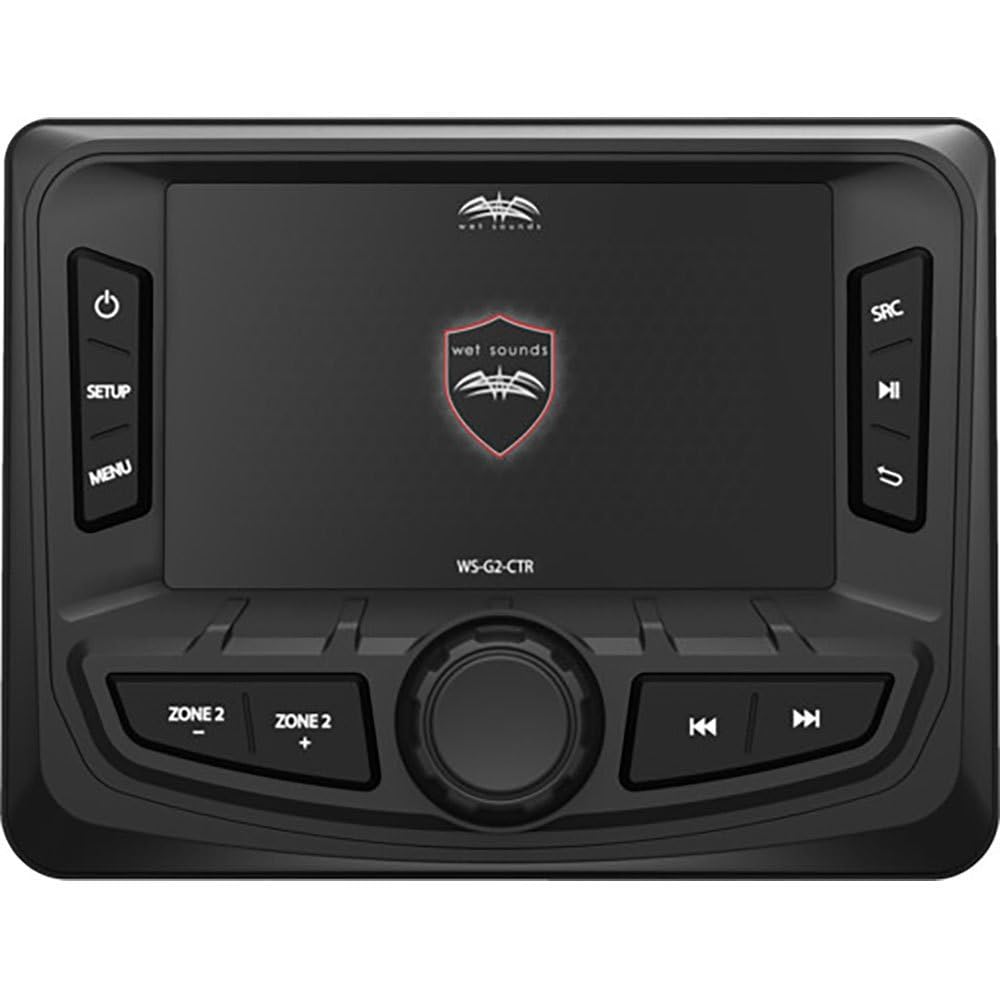
Image: The Wet Sounds WS-G2-CTR remote installed on a boat's transom, showing its compact design and full-color display.
Wiring Connections
- Power Connection: Connect the remote's power wire to a switched 12V DC power source.
- Ground Connection: Connect the remote's ground wire to a reliable boat ground.
- Data Connection: Connect the data cable from the WS-G2-CTR to the dedicated remote input on your WS-MC-20 source unit. Refer to the WS-MC-20 manual for the exact port location.
- Testing: After all connections are made, power on your WS-MC-20 unit and verify that the WS-G2-CTR remote powers on and displays information correctly.
Operating Instructions
The WS-G2-CTR remote provides intuitive control over your WS-MC-20 source unit. The full-color display shows source information, track details, and menu options.
Button Functions
| Button | Function |
|---|---|
| Power/Source | Press to turn the unit on/off. Press and hold to cycle through available audio sources. |
| Volume Up (+) | Increases audio volume. |
| Volume Down (-) | Decreases audio volume. |
| Track Up (>>) | Skips to the next track/station. |
| Track Down (<<) | Skips to the previous track/station. |
| Play/Pause | Plays or pauses current audio playback. |
Menu Navigation
Use the directional buttons (if present, or specific buttons for navigation) to move through menu options displayed on the full-color screen. Press the Enter or Select button (if present) to confirm a selection.
Maintenance
- Cleaning: Clean the display and buttons with a soft, damp cloth. Do not use abrasive cleaners or solvents.
- Inspection: Periodically inspect all wiring connections for corrosion or damage. Ensure the mounting hardware remains secure.
- Software Updates: Check the Wet Sounds official website for any available firmware updates for the WS-MC-20 source unit, which may also affect the remote's functionality.
Troubleshooting
| Problem | Possible Cause | Solution |
|---|---|---|
| Remote does not power on. | No power supply; faulty wiring; blown fuse. | Check 12V power connection. Verify ground connection. Inspect inline fuse (if applicable). |
| Remote powers on but no display. | Display settings; internal fault. | Ensure the WS-MC-20 is powered on. Check for any display brightness settings. If problem persists, contact support. |
| Remote buttons are unresponsive. | Loose data cable; software glitch. | Check the data cable connection to the WS-MC-20. Power cycle both the remote and the source unit. |
| Incorrect information displayed. | Synchronization issue. | Power cycle the WS-MC-20 and the remote. Ensure both units have the latest firmware. |
Specifications
- Model: WS-G2-CTR
- Compatibility: Wet Sounds WS-MC-20 Marine Source Unit
- Display: Full Color
- Connectivity: Wired
- Controller Type: Button Control
- Button Quantity: 5
- ASIN: B08T6889XZ
- GTIN/UPC: 810042171220
Warranty and Support
For warranty information, please refer to the documentation included with your WS-MC-20 source unit or visit the official Wet Sounds website. For technical support, please contact Wet Sounds customer service directly.
Note: Recambios Marinos is a distributor of marine parts and accessories. For product-specific support, always refer to the original manufacturer, Wet Sounds.


