
comiso C32
comiso Portable Bluetooth Speaker User Manual
Model: C32
1. Product Overview
The comiso Portable Bluetooth Speaker (Model C32) is designed for versatile audio playback in various environments. It features powerful sound, robust bass, and a durable, waterproof design, making it suitable for both indoor and outdoor use. Key functionalities include Bluetooth 5.0 connectivity, dual stereo pairing capability, a built-in LED flashlight, and hands-free calling.

Image: The comiso C32 Portable Bluetooth Speaker, showcasing its pink color and sleek design, surrounded by water splashes to highlight its waterproof feature.
2. Package Contents
Please verify that all items are present in the package upon unboxing:
- comiso C32 Speaker x1
- Type C Charging Cable x1
- User Manual x1
- Detachable Lanyard x1

Image: An illustration detailing the items included in the product package: the speaker, charging cable, user manual, and detachable lanyard.
3. Safety Information
To ensure safe operation and prolong the lifespan of your comiso speaker, please adhere to the following guidelines:
- Do not expose the speaker to extreme temperatures (hot or cold).
- Avoid dropping or subjecting the speaker to severe impacts.
- Keep the speaker away from direct sunlight for extended periods.
- Ensure the charging port cover is securely closed when near water to maintain IPX7 waterproof rating.
- Use only the provided charging cable or a certified Type-C cable for charging.
- Do not attempt to disassemble, repair, or modify the speaker yourself. Contact customer support for assistance.
- Dispose of the battery according to local regulations. Do not dispose of in fire.
4. Setup Guide
4.1 Initial Charge
Before first use, fully charge the speaker. Connect the provided Type-C charging cable to the speaker's charging port and the other end to a USB power adapter (not included) or a computer's USB port. The charging indicator light will show charging status and turn off when fully charged. A full charge provides up to 24 hours of playtime.
4.2 Powering On/Off
- Power On: Press and hold the Power button (⏻) for 2-3 seconds until you hear an audible prompt and the LED indicator lights up.
- Power Off: Press and hold the Power button (⏻) for 2-3 seconds until you hear an audible prompt and the LED indicator turns off.
5. Operating Instructions
5.1 Bluetooth Pairing
- Ensure the speaker is powered on and in pairing mode (LED indicator will flash).
- On your device (smartphone, tablet, laptop), enable Bluetooth.
- Search for "COMISO C32" in the list of available Bluetooth devices.
- Select "COMISO C32" to connect. Once connected, you will hear a confirmation sound, and the LED indicator will turn solid.
- The speaker will automatically reconnect to the last paired device when powered on, if the device's Bluetooth is active and within range.
The speaker offers a wireless range of up to 100 feet (30.48 meters).
5.2 Audio Playback Controls
- Play/Pause: Press the Play/Pause button (⏸).
- Volume Up: Press and hold the Volume Up button (+).
- Volume Down: Press and hold the Volume Down button (-).
- Next Track: Short press the Next Track button (≫).
- Previous Track: Short press the Previous Track button (≪).
5.3 Hands-Free Calling
When connected via Bluetooth, the speaker can be used for hands-free phone calls.
- Answer Call: Press the Play/Pause button (⏸) once.
- End Call: Press the Play/Pause button (⏸) once during a call.
- Reject Call: Press and hold the Play/Pause button (⏸) for 2 seconds.
5.4 True Wireless Stereo (TWS) Pairing
You can pair two comiso C32 speakers together for a true stereo sound experience.
- Ensure both speakers are powered off.
- Power on both speakers. Do not connect them to any Bluetooth device yet.
- On one speaker (this will be the primary speaker), double-press the Power button (⏻). The speakers will attempt to pair with each other.
- Once successfully paired, you will hear a confirmation sound. The LED indicator on the primary speaker will flash, while the secondary speaker's LED will be solid.
- Now, connect your device to the primary speaker via Bluetooth as described in Section 5.1. Both speakers will play audio in stereo.

Image: Two comiso C32 speakers demonstrating the True Wireless Stereo pairing feature, with sound waves indicating their synchronized audio output.
5.5 Built-in LED Flashlight
The speaker includes an integrated LED flashlight for convenience in low-light conditions.
- Turn On/Off Flashlight: Press the Flashlight button (often indicated by a lightbulb icon or integrated with another button).

Image: The comiso C32 speaker with its built-in LED flashlight activated, providing illumination.
6. Maintenance
Proper maintenance ensures the longevity and optimal performance of your speaker.
- Cleaning: Wipe the speaker with a soft, damp cloth. Do not use abrasive cleaners, alcohol, or chemical solvents.
- Water Exposure: While IPX7 waterproof, always ensure the charging port cover is sealed when exposed to water. After exposure to saltwater or chlorinated water, rinse the speaker with fresh water and dry thoroughly before charging.
- Storage: Store the speaker in a cool, dry place away from direct sunlight and extreme temperatures when not in use for extended periods.
- Battery Care: To preserve battery life, avoid fully discharging the battery frequently. Charge the speaker regularly, even if not in frequent use.
7. Troubleshooting
If you encounter issues with your comiso speaker, refer to the following common problems and solutions:
| Problem | Possible Cause | Solution |
|---|---|---|
| Speaker does not power on. | Low battery; Power button not held long enough. | Charge the speaker for at least 30 minutes. Press and hold the Power button for 2-3 seconds. |
| Cannot pair via Bluetooth. | Speaker not in pairing mode; Device Bluetooth off; Speaker too far from device; Interference. | Ensure speaker LED is flashing. Turn device Bluetooth off/on. Move speaker closer to device. Avoid strong Wi-Fi signals. |
| No sound or low volume. | Volume too low on speaker or device; Speaker not connected. | Increase volume on both speaker and connected device. Re-establish Bluetooth connection. |
| Sound distortion. | Volume too high; Low battery; Source audio quality. | Reduce volume. Charge the speaker. Try a different audio source. |
| TWS pairing fails. | Speakers already connected to a device; Incorrect pairing steps. | Ensure both speakers are disconnected from other devices. Follow TWS pairing steps precisely (Section 5.4). |
8. Specifications
| Feature | Detail |
|---|---|
| Model Name | C32 |
| Connectivity Technology | Bluetooth 5.0 |
| Wireless Range | Up to 100 feet (30.48 meters) |
| Speaker Output Power | 30 Watts |
| Battery Life | Up to 24 Hours |
| Water Resistance | IPX7 (Immersion up to 1m for 30 minutes) |
| Material | Silicone, Iron Mesh |
| Product Dimensions (LxWxH) | 7.4" x 2.8" x 2.5" (18.8 cm x 7.1 cm x 6.35 cm) |
| Item Weight | 1 Pound (0.45 kg) |
| Audio Output Mode | Stereo |
| Signal-to-Noise Ratio | 90 dB |
| Woofer Diameter | 50 Millimeters |
| Power Source | Battery Powered |
| Included Components | Speaker, Charging cable, User Manual, Lanyard |
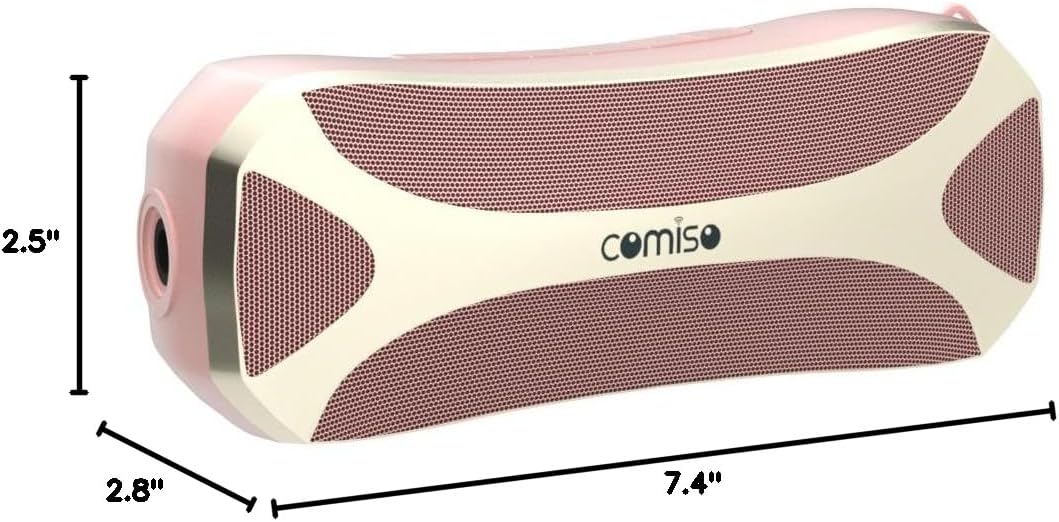
Image: A visual representation of the comiso C32 speaker's dimensions, indicating its length, width, and height.
9. Warranty Information
The comiso C32 Portable Bluetooth Speaker comes with a One Year Warranty from the date of purchase. This warranty covers manufacturing defects and workmanship under normal use. It does not cover damage caused by misuse, accidents, unauthorized modifications, or natural disasters.
Please retain your proof of purchase for warranty claims.
10. Customer Support
For any questions, technical assistance, or warranty claims, please contact comiso customer service. Refer to the contact information provided on the product packaging or the official comiso website.
We are committed to providing a worry-free experience and friendly customer service.
Related documentsC32


Ask a question about this manual
Ask about setup, troubleshooting, compatibility, parts, safety, or missing instructions. Manuals+ will review the question and use this page’s manual context to help answer it.