
TEMOLA DT-68A
TEMOLA DT-68A Digital Instant Read Meat Thermometer
User Manual
Introduction
Thank you for choosing the TEMOLA DT-68A Digital Instant Read Meat Thermometer. This device is designed to provide quick and accurate temperature readings for various food items, ensuring perfectly cooked meals every time. It features a durable stainless steel probe, a clear LCD backlight display, and additional functions like an oven-safe wired probe and temperature alarm. Please read this manual thoroughly before use to ensure proper operation and maintenance.

The TEMOLA DT-68A Digital Instant Read Meat Thermometer, ready for use.
Package Contents
Upon opening your TEMOLA DT-68A package, please ensure all the following items are present:
- 1 x TEMOLA DT-68A Digital Instant Read Meat Thermometer
- 1 x Extra Wired Oven-Safe Probe
- 2 x CR2032 Batteries (one pre-installed, one spare)
- 1 x Drawstring Storage Bag
- 1 x Meat Temperature Guide
- 1 x Detailed Instruction Manual (this document)
- 4 x Hooks/Rings for hanging the temperature guide

All components included in the TEMOLA DT-68A package.
Product Features
- Fast & Accurate Readings: Equipped with a 4.6-inch food-grade stainless steel probe and a precise sensor, providing temperature readings within 2-3 seconds with an accuracy of ±1°C (±1.8°F).
- Wide Temperature Range: Measures temperatures from -50°C to 300°C (-58°F to 572°F).
- Dual Probe Functionality: Includes an additional heat-resistant wired probe for continuous monitoring in ovens or smokers.
- Temperature Alarm: Set a target temperature, and the thermometer will alert you when the food reaches it.
- Calibration Function: Allows for user calibration to ensure long-term accuracy.
- Hold Function: Locks the current temperature reading on the display for easy viewing away from heat.
- Large LCD Backlight Display: Bright backlight ensures clear readability in all lighting conditions.
- Energy Efficient: Powered by a CR2032 battery with over 10,000 hours of battery life.
- Convenient Storage: Features a built-in magnet for attaching to metal surfaces and a hang hole for easy storage.
Setup
Battery Installation
- Locate the battery compartment on the back of the thermometer.
- Use a coin or small screwdriver to twist the battery cover counter-clockwise to open.
- Insert one CR2032 battery with the positive (+) side facing up.
- Replace the battery cover and twist clockwise to secure.
- The thermometer should power on automatically or by pressing the power button.
Initial Power On
Once the battery is installed, unfold the main probe to power on the device. The LCD display will illuminate.
Switching Temperature Units (°F/°C)
Press the °F/°C button located on the device to switch between Fahrenheit and Celsius temperature units.
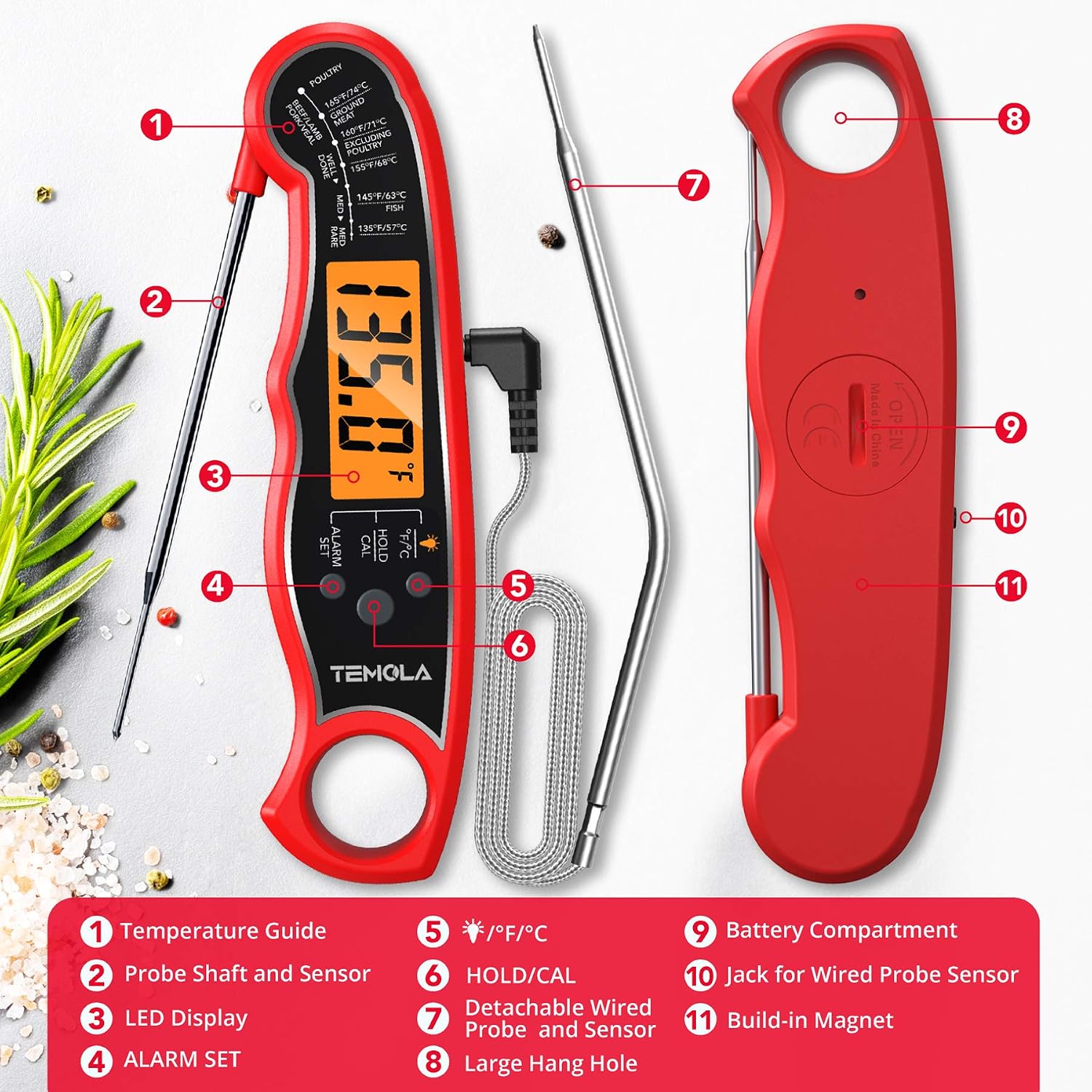
Component diagram highlighting the battery compartment and wired probe jack.
Operation
Using the Instant Read Probe
- Unfold the main stainless steel probe. The device will power on.
- Insert the tip of the probe into the thickest part of the food, avoiding bone or gristle.
- Hold the probe in place for 2-3 seconds until the temperature stabilizes on the LCD display.
- Read the temperature.
- Fold the probe back into the device to power off.

The instant-read probe quickly displays the internal temperature of food.
Using the Wired Oven-Safe Probe
- Plug the wired probe into the designated jack on the side of the thermometer.
- Insert the tip of the wired probe into the thickest part of the food you are cooking in the oven or smoker.
- Close the oven/smoker door, ensuring the wire is not pinched.
- The thermometer will display the continuous temperature reading from the wired probe.
- You can use the alarm function with the wired probe for continuous monitoring.

The instant-read probe (4.6 inches) and the wired oven-safe probe (6.5 inches).
Calibration
Your TEMOLA DT-68A thermometer is individually pre-calibrated at the factory for high accuracy. However, if you suspect a calibration issue, you can perform a user calibration using an ice water bath.
Ice Water Calibration Method
- Fill a glass with crushed ice and top it off with cold water. Stir well and let it sit for 3 minutes.
- Insert the thermometer probe into the ice water, ensuring the tip is submerged but not touching the bottom or sides of the glass.
- Wait for the temperature reading to stabilize (approximately 30 seconds). The reading should be 0°C (32°F).
- If the reading is not 0°C (32°F), press and hold the HOLD/CAL button for 3 seconds until "CAL" appears on the display.
- The display will then show "0.0°C" or "32.0°F", indicating successful calibration.

Calibrating the thermometer using an ice water bath.
Alarm Function
The alarm function is particularly useful when using the wired oven-safe probe to monitor food temperature without constantly opening the oven.
- With the wired probe connected and inserted into the food, press the ALARM SET button.
- The target temperature will flash. Use the °F/°C button to increase the target temperature and the HOLD/CAL button to decrease it.
- Press ALARM SET again to confirm the target temperature.
- Once the measured temperature reaches or exceeds the set target temperature, the alarm will sound.
- The alarm will continue for up to 10 minutes unless any button is pressed to stop it.
Hold Function
The hold function allows you to lock the current temperature reading on the display, making it easier to read the temperature away from the heat source.
- While taking a temperature reading, press the HOLD/CAL button briefly.
- The current temperature reading will be locked on the display.
- Press the HOLD/CAL button again to release the hold and resume live temperature readings.
Care and Maintenance
- Cleaning: The probe can be wiped clean with a damp cloth or washed by hand. Do not immerse the entire thermometer unit in water, as it is not fully waterproof.
- Storage: Fold the probe back into the unit when not in use. Store the thermometer in the provided drawstring bag in a dry place. The built-in magnet allows for convenient storage on metallic surfaces like refrigerators.
- Battery Replacement: Replace the CR2032 battery when the display becomes dim or the device fails to power on. Follow the battery installation steps in the "Setup" section.

Storage options: built-in magnet and hang hole.
Troubleshooting
| Problem | Possible Cause | Solution |
|---|---|---|
| Display is blank or dim. | Low battery or incorrect battery installation. | Replace the CR2032 battery, ensuring correct polarity. |
| Inaccurate temperature readings. | Needs calibration or probe not inserted correctly. | Perform an ice water calibration. Ensure the probe tip is in the thickest part of the food, away from bone. |
| Wired probe not working. | Probe not fully plugged in or damaged. | Ensure the wired probe is securely plugged into its jack. Inspect the wire for any visible damage. |
| Alarm not sounding. | Alarm not set or volume too low (if applicable). | Verify the alarm target temperature is set correctly. |
Specifications
- Model Number: DT-68A (Part Number: TM27-RD)
- Brand: TEMOLA
- Temperature Range: -50°C to 300°C (-58°F to 572°F)
- Accuracy: ±1°C (±1.8°F)
- Response Time: 2-3 seconds
- Probe Material: Food-grade Stainless Steel
- Instant Read Probe Length: 4.6 inches
- Wired Probe Length: 6.5 inches
- Display Type: Digital LCD with Backlight
- Power Source: 1 x CR2032 Battery (included)
- Battery Life: Over 10,000 hours
- Special Features: Quick Read System, Temperature Alarm, Hold Function, Calibration Function, Built-in Magnet, Hang Hole
- Care Instructions: Hand Wash Only (probe), Do Not Immerse Main Unit
- Color: Red
- UPC: 718225624818
Safety Information
- Keep the thermometer out of reach of children.
- The probe tip is sharp; handle with care to avoid injury.
- Do not expose the main unit to direct flame or extreme heat. The wired probe is oven-safe, but the main unit is not.
- Do not immerse the main unit in water or other liquids. It is not waterproof.
- Clean the probe thoroughly after each use to prevent cross-contamination.
- Dispose of batteries according to local regulations.
Warranty and Support
TEMOLA products are designed for quality and reliability. If you encounter any issues or have questions regarding your TEMOLA DT-68A Digital Instant Read Meat Thermometer, please contact the seller or TEMOLA customer support for assistance. Please refer to your purchase documentation for specific warranty details.
For further assistance, you may visit the TEMOLA brand page on Amazon: TEMOLA Brand Store
Ask a question about this manual
Ask about setup, troubleshooting, compatibility, parts, safety, or missing instructions. Manuals+ will review the question and use this page’s manual context to help answer it.